
Vibe Cam - Moments Never Fade
Vibe Cam - Moments Never Fade generates an estimated $500–$3k/month in revenue from 100–800 downloads/month on the App Store, according to AppCurrents estimates (updated 2026-08-02).
| Est. revenue / month | $500–$3k |
|---|---|
| Est. downloads / month | 100–800 |
| Estimate confidence | low |
| Pricing | Free + IAP |
| Rating | 4.81 ★ (289 ratings) |
| Category | Photo & Video |
| Released | 13.11.2023 |
| App last updated | 29.07.2026 |
| Platform | iOS |
Modeled monthly estimate · rating velocity · low confidence


About
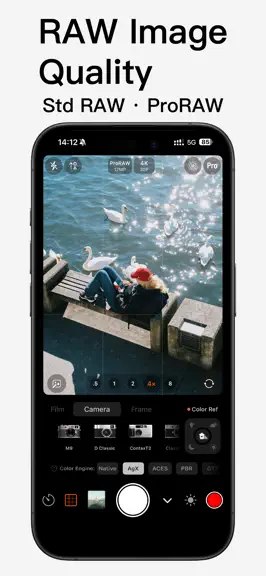
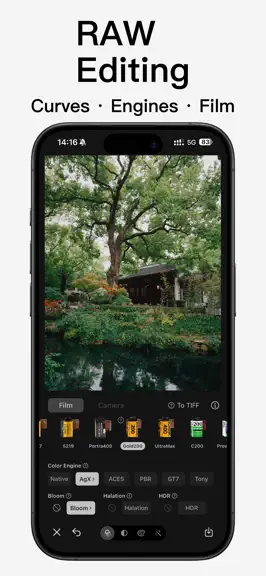
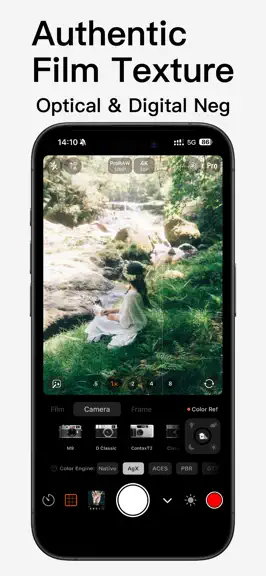
Vibe Cam is a professional imaging workstation built for creators who truly love photography. We went deep into the foundation of Apple silicon, reconstructing the entire image, audio, and video processing pipeline to push the boundaries of mobile photography to new heights. Here, unprecedented pure image quality, industrial-grade color science, and an ultra-smooth control experience will become t…
Trends & analysis
Chart rank trend
US · overallWhy it's surfacing
Scout 9Ratings & velocity
★ +0.02 in windowRating distribution
96% positive · 268 ratingsGeographic reach
best rank · 0 storefrontsRevenue & downloads trend
ARPU $3In-app purchases
2 tiersUpdate history
5 updates tracked- v5.12.06d ago
This update adds a lens chromatic aberration effect, rewrites the film grain generation algorithm, and adjusts the layout of the capture screen. [New] Chromatic Aberration Simulates the lateral chromatic aberration of real lenses: at light–dark edges, one side shifts toward red-orange and the other toward blue-cyan, becoming more pronounced toward the corners of the frame. This is one of the most recognizable optical signatures of vintage lenses, toy cameras, and disposable film cameras. A phone's main-camera ISP usually corrects it away, so here we add it back algorithmically. The implementation uses a radial polynomial displacement model for lateral chromatic aberration, combined with spectrally weighted multi-tap sampling, producing a continuous transition from orange through white to cyan rather than a crude three-color split. Six parameters are provided — Strength, Corner Concentration, Sharpness Retention, Color Purity, Sample Count, and Color Direction — along with two built-in calibrations, "Fringe" and "Lens." Displacement is measured in 12 MP-equivalent pixels, so the editor preview matches full-resolution exports. Chromatic aberration is off by default and can be enabled on the capture screen and in the RAW editor. [Improved] Film Grain Grain noise has changed from white noise to lattice value noise, restoring the clumping of silver-halide grains instead of a uniform, per-pixel fine sand. We also fixed grain size drifting with output resolution: the editor preview and the exported photo now show the same grain scale. Grain amounts for all film presets have been recalibrated, so finished images look the same as before. The grain slider in the RAW editor now spans 0–100 instead of 0–50; the maximum available grain is unchanged, only the scale is finer. [Changed] Capture Screen · The self-timer has moved to the top toolbar, alongside the flash; · The sharpening toggle has been removed; capture now always uses the no-extra-sharpening output path; · Two buttons remain on each side of the shutter at the bottom, in a symmetric, evenly divided layout. [Other] · After switching cameras, photo and video now retain the previous resolution, format, and frame rate wherever possible; · Fixed an issue where changing the image resolution could affect the capture mode and Live Photos; · Rebuilt the settings storage layer for improved stability.
- v5.11.025d ago
This update introduces professional-grade "Depth of Field Blur" and "Portrait Skin Retouching", alongside comprehensive improvements to the interactive and multilingual experience. 【Depth of Field Blur】 Based on monocular depth estimation, it restores spatial depth from a single photo, simulating the shallow depth of field of large-aperture lenses: · Tap or drag to change the focus position in real-time, WYSIWYG. · Provides pro parameters like aperture (blur strength), max blur radius, depth layers, and highlight bokeh. Night point lights can be blurred into bright bokeh spots. · Combines subject segmentation for edge protection, ensuring cleaner transitions for hair and contours. · Optional "Edge-Aware Upsampling" to make blur boundaries fit the subject perfectly. 【Portrait Skin Retouching】 Works exclusively on detected face areas: it first precisely removes blemishes like acne marks and spots, then performs per-pixel adaptive skin evening. It improves skin quality while retaining pores and authentic textures for a natural, non-plastic look. Supports smoothing strength adjustment (set to 0 for blemish removal only), processes multiple faces independently, and does not alter facial features or face shape. 【Experience Optimization】 · Blur and Skin Retouching are now integrated into tabbed panels for clearer operation, with detailed explanations for each parameter. · Toggle states are automatically remembered and applied the next time you enter the editor.
- v5.9.51mo ago
[RAW9 Decoding Engine] Following the integration of RAW9 into the RAW editor in the previous version, this update brings the new generation Apple RAW Decoder to the camera. After enabling "Shoot with RAW9" in "Pro → Other Settings", the film mode will image directly using RAW9. Based on a tiled CoreML model, it jointly solves demosaicing and denoising on the Apple Neural Engine (ANE). Compared to RAW8—used since 2018, which separates demosaicing and denoising into two independent processes—RAW9 delivers significantly superior rendering quality in edges, textures, and low-light scenes. Note: RAW9 is only supported on iOS 27 and above, which is currently in the system beta phase. For stable output, we still recommend prioritizing RAW8 until the official iOS 27 release matures before fully switching. [Standard RAW Chromatic Aberration Correction] We have rewritten the axial chromatic aberration (LoCA / color fringing) correction algorithm for Standard RAW. The correction is now performed in the scene-referred linear space of the development pipeline, prior to the view transform (benchmarking the defringe position in Lightroom / RawTherapee / darktable). The detection utilizes a scale-independent adaptive ratio: normalized by "local chroma protrusion of high-contrast edges / neighborhood chroma energy". Only those exceeding the threshold are identified as color fringes. Then, local desaturation is applied exclusively to the targeted hues using a narrow-band gate in the OKLab hue space, leaving flat solid colors and normal areas unaffected. While maintaining the original purple and green fringing removal, this version adds two new correction channels: orange and blue. The orange band actively avoids skin reds and pure yellows, while the blue band avoids blue skies and water surfaces. These are specifically designed to clean up residual orange and blue fringing on high-contrast edges caused by backlighting and large apertures, resulting in cleaner and more transparent colors. The entire process is non-destructive and can be freely combined with other editing features like decoder versions, color engines, and film simulations.
- v5.9.01mo ago
[RAW9 Decoding Engine] Following the integration of RAW9 into the RAW editor in the previous version, this update brings the new generation Apple RAW Decoder to the camera. After enabling "Shoot with RAW9" in "Pro → Other Settings", the film mode will image directly using RAW9. Based on a tiled CoreML model, it jointly solves demosaicing and denoising on the Apple Neural Engine (ANE). Compared to RAW8—used since 2018, which separates demosaicing and denoising into two independent processes—RAW9 delivers significantly superior rendering quality in edges, textures, and low-light scenes. Note: RAW9 is only supported on iOS 27 and above, which is currently in the system beta phase. For stable output, we still recommend prioritizing RAW8 until the official iOS 27 release matures before fully switching. [Standard RAW Chromatic Aberration Correction] We have rewritten the axial chromatic aberration (LoCA / color fringing) correction algorithm for Standard RAW. The correction is now performed in the scene-referred linear space of the development pipeline, prior to the view transform (benchmarking the defringe position in Lightroom / RawTherapee / darktable). The detection utilizes a scale-independent adaptive ratio: normalized by "local chroma protrusion of high-contrast edges / neighborhood chroma energy". Only those exceeding the threshold are identified as color fringes. Then, local desaturation is applied exclusively to the targeted hues using a narrow-band gate in the OKLab hue space, leaving flat solid colors and normal areas unaffected. While maintaining the original purple and green fringing removal, this version adds two new correction channels: orange and blue. The orange band actively avoids skin reds and pure yellows, while the blue band avoids blue skies and water surfaces. These are specifically designed to clean up residual orange and blue fringing on high-contrast edges caused by backlighting and large apertures, resulting in cleaner and more transparent colors. The entire process is non-destructive and can be freely combined with other editing features like decoder versions, color engines, and film simulations.
- v5.8.51mo ago
Lock Screen Camera Control, One-Tap Access Fully supports iOS 18 "Camera Control." After setting Vibe Cam as the default camera for Camera Control, you can quickly launch it by pressing the Camera Control button on the lock screen, or via the Control Center and lock screen shortcuts. After Face ID or passcode verification, you will directly enter the full shooting interface, significantly shortening the path from launching to framing, ensuring you never miss a moment worth capturing. Fuji100 Simulation Remake Recalibrated the Fuji100 film simulation, based on the Fujifilm FP-100C peel-apart instant film. It restores its iconic low-saturation color rendering, clear cyan shadows, and soft highlight roll-off, offering a more refined and enduring texture. We have also refined the color curves for Pro400H, Superia 400, C200, Gold 200, and other films, making the overall simulations more stable and closer to the look of real film. Bloom and Halation Upgraded to Curve Control The adjustment for Bloom and Halation has been upgraded from a single slider to a graphical curve panel. You can intuitively grasp the relationship between threshold, intensity, diffusion, and hue on the curve for more precise tuning. The curve and sliders are linked bi-directionally, making the adjustment results clear at a glance. Whether creating a soft highlight glow or restoring the red halation unique to film, you can control it with ease. We continue to optimize stability and usage details. Thank you for choosing Vibe Cam.
Vibe Cam - Moments Never Fade — FAQ
How much money does Vibe Cam - Moments Never Fade make?
According to AppCurrents estimates, Vibe Cam - Moments Never Fade generates approximately $500–$3k per month (low confidence), modeled from its the App Store chart performance, rating velocity, and monetization signals.
How many downloads does Vibe Cam - Moments Never Fade get?
Vibe Cam - Moments Never Fade sees an estimated 100–800 downloads per month on the App Store, per AppCurrents modeling.
Is Vibe Cam - Moments Never Fade free?
Vibe Cam - Moments Never Fade is free to download on the App Store, monetizing through in-app purchases.
What is Vibe Cam - Moments Never Fade's rating?
Vibe Cam - Moments Never Fade holds a 4.81-star average from 289 ratings on the App Store.
When was Vibe Cam - Moments Never Fade released?
Vibe Cam - Moments Never Fade launched on the App Store on 13.11.2023. Its latest version shipped 29.07.2026.


