
Suila — Video Editor
Suila — Video Editor generates an estimated $0/month in revenue from 0 downloads/month on the App Store, according to AppCurrents estimates (updated 2026-08-02).
| Est. revenue / month | $0 |
|---|---|
| Est. downloads / month | 0 |
| Estimate confidence | low |
| Pricing | Free |
| Rating | 0.00 ★ (0 ratings) |
| Category | Photo & Video |
| Released | 23.06.2026 |
| App last updated | 24.07.2026 |
| Platform | iOS |
Modeled monthly estimate · rating velocity · low confidence

About
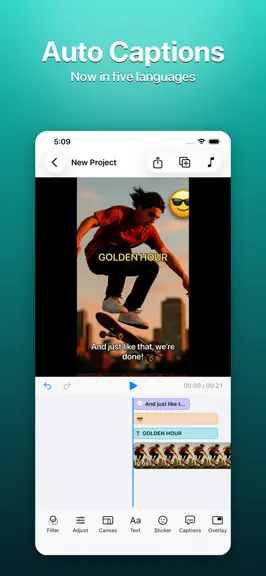
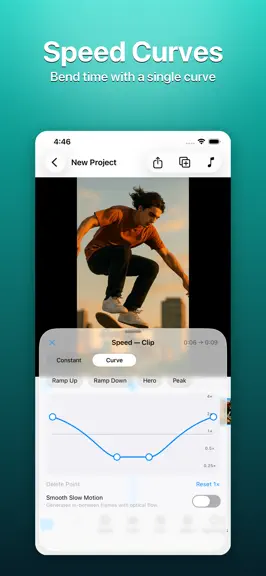
Suila is a completely free video editor for iPhone and iPad. No accounts, no ads, no tracking, no personal data collected. Suila doesn't upload your videos, audio, or projects anywhere on its own — everything stays on your device. Its signature is multi-point speed curves — bend time with a single curve for slow motion and dynamic speed changes. Cut, caption, and score your video in minutes. Wh…
Trends & analysis
Chart rank trend
US · overallWhy it's surfacing
Scout 29Ratings & velocity
★ 0 in windowGeographic reach
best rank · 1 storefrontRevenue & downloads trend
monthly estimateUpdate history
12+ updates tracked- v1.6.0today
• New "Effects": the toolbar's Animation button is now Effects — 14 looping styles in four categories, Mood, Retro, Motion, and Texture (Vignette, Light Leak, Dreamy, Film Grain, VHS, Old Film, Shake, Pulse, Strobe, Glitch, Speed Lines, Pixelate, Chromatic, Scanlines), each with strength and speed. Every thumbnail previews on your own frame, so you see it before you pick it; the old fade in/out moved into the panel's "In & Out" tab. • New "Voiceover": tap Voiceover in the toolbar and, after a 3-second countdown, record narration while the preview plays. Takes land on their own track — trim, volume, and fades work like any audio clip. • Built-in teleprompter: paste your script and it shows over the top of the preview while you record, with three text sizes and manual scrolling. Botched a take? Tap "Delete Last Segment" — the playhead jumps back to the start of the take so you can retry right away. • New "Mute track": every lane now has a speaker button at its head. One tap silences the whole track (exports match), and clip volume settings are kept. • Duplicate a project: long-press a project in the library to make a copy — a safety net before big edits. Your footage isn't duplicated, so the copy takes almost no space. • Auto-caption line breaks, rebuilt: lines break only at word boundaries and follow punctuation, numbers stay with their units, and connectives like "so" and "then" lead the next line instead of dangling at the end of the last one. Long sentences read far better, especially in Chinese. • Caption "Polish" no longer just disappears: when it's off or the model is still downloading, the panel says why and where to turn it on. • Smarter storage for caption language models: languages you haven't installed or used are given up first, so the ones you rely on aren't dropped. • Fixed: the cover no longer goes missing after undoing a cover change; adding music no longer stacks on top of existing music — it snaps in right after it. • Polished: a clearer import icon, empty-project hints no longer run to the screen edge, and export failure messages say more about what went wrong.
- v1.5.411d ago
• New "Cover": tap the Cover card at the start of the timeline and pick a video frame (filters and captions included) or a photo from your library as the video's cover — platforms that grab the first frame for the thumbnail will use it. • Fixed an export that could hang indefinitely on iOS 27. • When a clip lives in iCloud and you're offline, Suila now says so and shows download progress instead of a blank preview. • Fixed text, stickers, and picture-in-picture disappearing when media was missing. • The export frame is easier to see: content outside the canvas is marked with a border and dimming. • On older devices that can't run auto-captions, Suila now says it isn't supported on this device instead of a misleading error.
- v1.5.316d ago
• Clip audio can now fade in and out too — not just the music track. • Import a video right where you want it: move the playhead and the imported clip drops in at the nearest cut, pushing everything after it along. • Select a caption and drag it straight on the preview — no need to open the caption panel first, and all captions move together. • Redesigned watermark panel: pick the position on a mini-canvas, with a tidier layout. • The "Remove" buttons across panels moved out of spots that were easy to tap by accident. • The preview no longer goes black during an export — it shows the current frame.
- v1.5.218d ago
• Fixed slow-motion and speed-change clips that could make an export freeze or stop partway (most noticeable with 4K video). Slow motion and speed changes work as before. • A new project now takes its canvas orientation — portrait or landscape — from the first video you add (or the first photo if there's no video).
- v1.5.118d ago
• Fixed exports that could freeze at a certain percentage: preview resources are released before exporting and the screen stays awake throughout; if an export still stops making progress, it now stops itself with a message so you can retry right away. • New "Report a Problem" when an export fails: send us the error details by email with a tap, helping us find the cause faster. • Much better hardware keyboard input: Enter commits, Shift+Enter adds a line break; character picking in Zhuyin and other input methods is no longer interrupted. • Smoother caption editing: selecting and switching caption rows no longer interrupts editing or drops the keyboard; adding a row on iPhone no longer bounces the panel. • Fixed a black screen and failing project saves in certain situations.
Suila — Video Editor — FAQ
How many downloads does Suila — Video Editor get?
Suila — Video Editor sees an estimated 0 downloads per month on the App Store, per AppCurrents modeling.
Is Suila — Video Editor free?
Suila — Video Editor is free to download on the App Store, with no in-app purchases detected.
When was Suila — Video Editor released?
Suila — Video Editor launched on the App Store on 23.06.2026. Its latest version shipped 24.07.2026.


