
PhotoMark: Image Frame
PhotoMark: Image Frame generates an estimated $20–$200/month in revenue from 10–40 downloads/month on the App Store, according to AppCurrents estimates (updated 2026-08-02).
| Est. revenue / month | $20–$200 |
|---|---|
| Est. downloads / month | 10–40 |
| Estimate confidence | low |
| Pricing | Free + IAP |
| Rating | 4.00 ★ (10 ratings) |
| Category | Photo & Video |
| Released | 10.05.2024 |
| App last updated | 04.07.2026 |
| Platform | iOS |
Modeled monthly estimate · rating velocity · low confidence
About
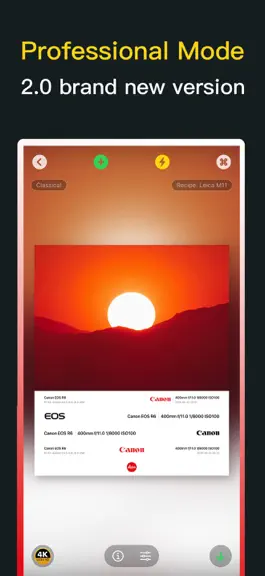
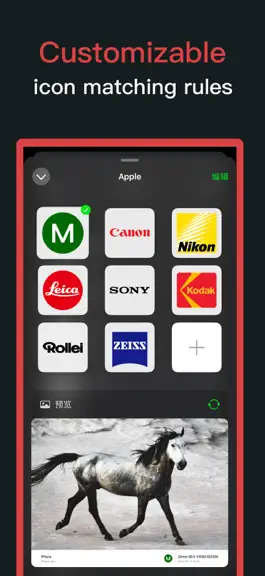
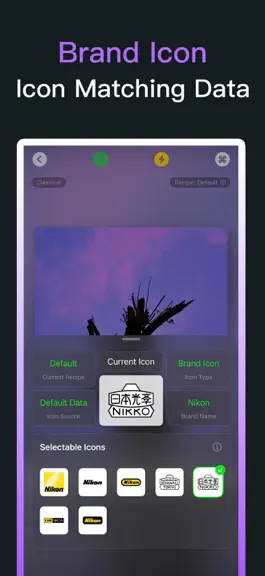
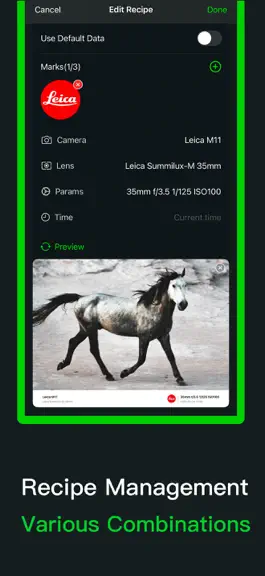
PhotoMark - Your Default Photo Frame Watermark, a Professional Camera Brand Watermark Tool, Easily Giving Every Picture a Unique Mark. PhotoMark, crafted for photography enthusiasts and professionals, is a brand watermark tool that lets every photo carry your exclusive mark. We go beyond simple watermarking; our powerful "Recipe System" allows your brand display to be both smart and personalized.…
Trends & analysis
Chart rank trend
US · overallWhy it's surfacing
Scout 6Ratings & velocity
★ 0 in windowRating distribution
70% positive · 10 ratingsGeographic reach
best rank · 0 storefrontsRevenue & downloads trend
ARPU $3In-app purchases
3 tiersUpdate history
2 updates tracked- v2.9.01mo ago
This version is a preview version prior to the official 3.0 release and has been fully migrated to iOS 26, supporting only iOS 26 and above. - New: Supports multi-image retouching — Import multiple images at once, switch between left and right editing, and quickly locate images using thumbnails. - New: Supports batch export; multiple finished products can be saved at once for a more efficient workflow. - New: The homepage has been upgraded to a template library, with clearer separation between templates and "My Borders". - New: "My Borders" supports waterfall and tiled layouts, with customizable display modes. - New: "My Borders" supports switching between rounded and right-angle styles. - New: Supports custom image backgrounds, allowing for more freedom in watermark and border effects. - New: First-time user guidance added to the image processing page, making key operations easier to learn. - Optimized: Adapted to iOS 26; navigation, toolbars, and interface hierarchy are more aligned with the new system experience. - Optimized: iCloud sync architecture reduces duplicate data, resulting in more stable and clear sync status. - Optimized: Rendering and editing underlying layers have been restructured, reducing memory usage and improving stability for handling large and multiple images. - Optimized: Templates remember last edited configurations for easier reuse. - Optimized: Download and batch export interfaces are now simpler, with clearer button status and usage indicators. - Optimized: Membership and download usage rules are now unified, and benefits descriptions are more intuitive. - Optimized: iPad template library layout for a more comfortable browsing and template selection experience. - Fixed: Fixed an issue where the aspect ratio was forced into vertical rendering; display is now more accurate when switching aspect ratios. - Fixed: Fixed a white border issue at the bottom of template thumbnails. - Fixed: Fixed an issue where "My Borders" might not have a preview on first access. - Fixed: Fixed issues with abnormal display of light-colored logo backgrounds and duplicate logo data. - Fixed: Fixed an issue where some platforms could not correctly recognize links when sharing the app. - Note: This is an important preview update towards the official 3.0 version. If you encounter any problems while using it, please feel free to contact me and I will fix it as soon as possible. Thank you for your support.
- v2.8.02mo ago
The PhotoMark app is currently undergoing rapid updates. - New: Embedded Watermark Card—allows you to directly overlay a brand logo, camera metadata, and custom text onto your photos. Supports a 3x3 grid for positioning, adjustable sizing presets, font weights, a selection of 7 curated colors, and single/double-line layouts. - New: The Classic, Blur, and Artistic border styles now support custom slot layouts. You can independently select what is displayed in each slot—choosing from "Camera," "Lens," "Metadata," or "Timestamp"—and toggle the visibility of the brand logo and separator lines. - Optimization: The editing experience has reverted from a "pop-up page" interface to in-place editing. The Classic, Blur, Artistic, and Embedded cards now each feature their own independent editors; switching between cards no longer causes settings to bleed over into one another, and your configurations are automatically preserved. - Optimization: Image switching now features smooth fade-in/fade-out transitions throughout the process. The tool panel transitions smoothly using spring-based animations. Adjusting parameters and switching between recipes or borders no longer causes visual flickering, and switching between tools no longer causes the image position to shift unexpectedly. - Optimization: Toolbar icons across all cards have been unified under a consistent "geometric + filled" design style. Foreground/background configuration options now utilize fixed-width columns for better alignment. The "Custom Layout" button has been moved above the border selection row and right-aligned, resulting in a cleaner and more organized overall aesthetic. - Optimization: When the border style is set to "None," the brand logo panel is automatically grayed out and disabled, accompanied by an explanatory note. The "Cancel" action now truly discards all changes, preventing accidental persistence of unwanted edits. - Optimization: Preview rendering for the Blur Border and Artistic Border styles has been optimized for a speed increase of over 3x. - Optimization: Fixed various issues, including gray pixel artifacts appearing at image edges upon export, momentary visual ghosting when switching between cards, and inconsistencies in how camera metadata is displayed within the Classic border style (specifically, differences between the active editing state and the static viewing state). - Note: If you encounter any issues while using the app, please feel free to reach out to me directly. Thank you for your support!
PhotoMark: Image Frame — FAQ
How much money does PhotoMark: Image Frame make?
According to AppCurrents estimates, PhotoMark: Image Frame generates approximately $20–$200 per month (low confidence), modeled from its the App Store chart performance, rating velocity, and monetization signals.
How many downloads does PhotoMark: Image Frame get?
PhotoMark: Image Frame sees an estimated 10–40 downloads per month on the App Store, per AppCurrents modeling.
Is PhotoMark: Image Frame free?
PhotoMark: Image Frame is free to download on the App Store, monetizing through in-app purchases.
What is PhotoMark: Image Frame's rating?
PhotoMark: Image Frame holds a 4.00-star average from 10 ratings on the App Store.
When was PhotoMark: Image Frame released?
PhotoMark: Image Frame launched on the App Store on 10.05.2024. Its latest version shipped 04.07.2026.


