
pCAM Pro - Camera Tools
pCAM Pro - Camera Tools generates an estimated $1k–$24k/month in revenue from 100–500 downloads/month on the App Store, according to AppCurrents estimates (updated 2026-08-02).
| Est. revenue / month | $1k–$24k |
|---|---|
| Est. downloads / month | 100–500 |
| Estimate confidence | medium |
| Pricing | Paid $34.99 |
| Rating | 4.94 ★ (222 ratings) |
| Category | Photo & Video |
| Best chart rank | #88 Photo & Video Paid |
| Released | 20.12.2018 |
| App last updated | 31.07.2026 |
| Platform | iOS |
Modeled monthly estimate · rating velocity · medium confidence

About
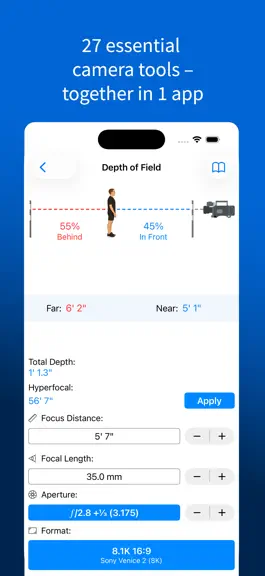
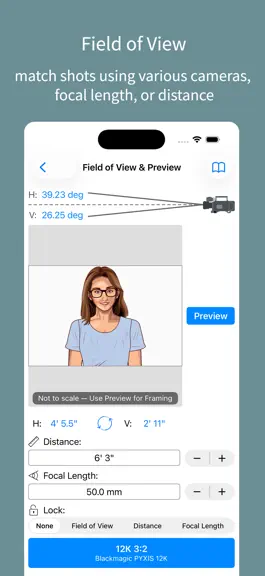
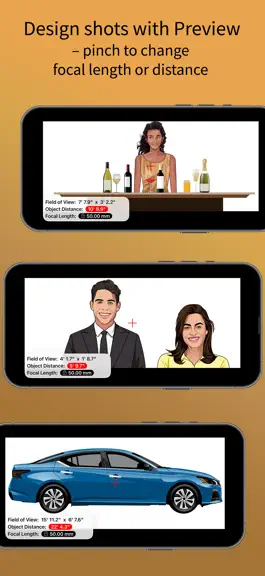
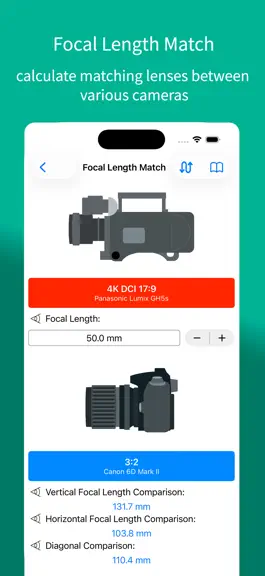
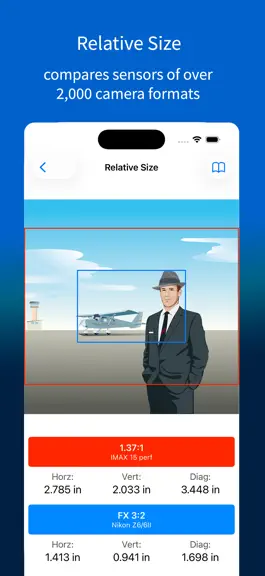
Plan shots, choose lenses, calculate exposure, and pre-visualize the frame in seconds. 27 pro tools. 2,000+ camera formats. Every result illustrated. I've deliberately kept pCAM Pro a one-time purchase, with none of the subscriptions that have crept into so many apps. • Universal app for iPhone, iPad, Apple Silicon Mac, and Apple Vision Pro • Depth of Field (hyperfocal, total depth, near and fa…
Trends & analysis
Chart rank trend
US · categoryWhy it's surfacing
Scout 15Ratings & velocity
★ 0 in windowRating distribution
99% positive · 218 ratingsGeographic reach
best rank · 10 storefrontsRevenue & downloads trend
ARPU $25Update history
8 updates tracked- v2.3.44d ago
IMPROVEMENTS • Reference: redesigned. Added KODAK VERITA, and spec sheets for all. Retired Fuji Cinema Film. Header and footer now disappear on a landscape scroll. • Crew Wheel: fixed flapper animation bug. GUI and sound improvements. • Settings/Review App: allows reviews, and editing previous reviews. • Performance improvements throughout. FROM THE DEVELOPER • Tip Jar in Settings—optional, unlocks nothing, and the only thing I'll ever ask. I've deliberately kept pCAM Pro a one-time purchase, with none of the subscriptions that have crept into so many apps. If it's earned a place in your kit, a tip genuinely helps keep a one-person project going. • Prefer to help for free? A quick rating or review ('Review App' in Settings) boosts visibility so more crews can find it. • Questions or issues: 'Contact Support' in Settings (opens in your default mail app), or tool guides via the book icon (top left).
- v2.3.310d ago
IMPROVEMENTS • Stability improvements throughout. • Crew Wheel: fixed the stutter on a day's first spin, better sound, and improved Bluetooth audio support. Added Stunts to Crew list. FROM THE DEVELOPER • Tip Jar in Settings—optional, unlocks nothing, and the only thing I'll ever ask. I've deliberately kept pCAM Pro a one-time purchase, with none of the subscriptions that have crept into so many apps. If it's earned a place in your kit, a tip genuinely helps keep a one-person project going. • Prefer to help for free? A quick rating or review ('Review App' in Settings) boosts visibility so more crews can find it. • Questions or issues: 'Contact Support' in Settings (opens in your default mail app), or tool guides via the book icon (top left).
- v2.3.217d ago
IMPROVEMENTS • Crew Wheel: instant response from the first flick, smoother spin with sound on. Issue was on older iPhones. • Circle of Confusion refinements on just a few camera formats. • Macro: Object Distance now measures from the film plane (⌀), instead of front principal point. • Splits: now shows the lens-marked stop when a Speed Booster is attached. • Speed Booster: now remembers your aperture between visits. • Exposure: now displayed as EI (retired ASA). Filter selections (including custom filters) are remembered as √. • Time Lapse: alert now explains when an exposure is too long for the requested time-lapse, and how to adjust. • Screen Time: refreshed artwork. • Angles throughout the app now display with the ° symbol. • Calculation safeguards and refinements throughout. FROM THE DEVELOPER • Tip Jar in Settings—optional, unlocks nothing, and the only thing I'll ever ask. I've deliberately kept pCAM Pro a one-time purchase, with none of the subscriptions that have crept into so many apps. If it's earned a place in your kit, a tip genuinely helps keep a one-person project going. • Prefer to help for free? A quick rating or review ('Review App' in Settings) boosts visibility so more crews can find it. • Questions or issues: 'Contact Support' in Settings (opens in your default mail app), or tool guides via the book icon (top left).
- v2.3.124d ago
IMPROVEMENTS • Refinements to the Crew Wheel—a bit of fun for when you hurry up and wait and get stuck in Standby limbo. Find it at the bottom of the Camera menu. • Added an optional Tip Jar. • Stability improvements throughout. FROM THE DEVELOPER • Yes, there's now a Tip Jar in Settings—optional, unlocks nothing, and the only thing I'll ever ask. I've deliberately kept pCAM Pro a one-time purchase, with none of the subscriptions that have crept into so many apps. If it's earned a place in your kit, a tip genuinely helps keep a one-person project going. • Prefer to help for free? A quick rating or review ('Review App' in Settings) boosts visibility so more crews can find it. • Questions or issues: 'Contact Support' in Settings (opens in your default mail app), or tool guides via the book icon (top left).
- v2.3.026d ago
IMPROVEMENTS • New Crew Wheel—a bit of fun for when you hurry up and wait and get stuck in Standby limbo. Find it at the bottom of the Camera menu. • Refined Siri and Shortcuts to app and its tools. • Added an optional Tip Jar. FROM THE DEVELOPER • Yes, there's now a Tip Jar in Settings—optional, unlocks nothing, and the only thing I'll ever ask. I've deliberately kept pCAM Pro a one-time purchase, with none of the subscriptions that have crept into so many apps. If it's earned a place in your kit, a tip genuinely helps keep a one-person project going. • Prefer to help for free? A quick rating or review ('Review App' in Settings) boosts visibility so more crews can find it. • Questions or issues: 'Contact Support' in Settings (opens in your default mail app), or tool guides via the book icon (top left).
pCAM Pro - Camera Tools — FAQ
How much money does pCAM Pro - Camera Tools make?
According to AppCurrents estimates, pCAM Pro - Camera Tools generates approximately $1k–$24k per month (medium confidence), modeled from its the App Store chart performance, rating velocity, and monetization signals.
How many downloads does pCAM Pro - Camera Tools get?
pCAM Pro - Camera Tools sees an estimated 100–500 downloads per month on the App Store, per AppCurrents modeling.
Is pCAM Pro - Camera Tools free?
pCAM Pro - Camera Tools is a paid app priced at $34.99 on the App Store.
What is pCAM Pro - Camera Tools's rating?
pCAM Pro - Camera Tools holds a 4.94-star average from 222 ratings on the App Store. It currently ranks #88 on the Photo & Video paid chart.
When was pCAM Pro - Camera Tools released?
pCAM Pro - Camera Tools launched on the App Store on 20.12.2018. Its latest version shipped 31.07.2026.


