
Overlay: AI Photo Design
Overlay: AI Photo Design generates an estimated $2k–$12k/month in revenue from 700–3k downloads/month on the App Store, according to AppCurrents estimates (updated 2026-08-02).
| Est. revenue / month | $2k–$12k |
|---|---|
| Est. downloads / month | 700–3k |
| Estimate confidence | low |
| Pricing | Free + IAP |
| Rating | 4.68 ★ (1,219 ratings) |
| Category | Photo & Video |
| Released | 19.03.2014 |
| App last updated | 30.07.2026 |
| Platform | iOS |
Modeled monthly estimate · rating velocity · low confidence



About
Overlay is the ultimate creative canvas for making stunning layered designs, custom stickers, and social content in seconds. Whether you’re a pro designer or just playing around, Overlay makes complex editing feel like magic. DESIGN IN LAYERS. CREATE WITH AI. Stop settling for basic filters. With Overlay, you have the power of a professional studio in your pocket. Use our advanced AI background r…
Trends & analysis
Chart rank trend
US · overallWhy it's surfacing
Scout 10Ratings & velocity
★ -0.01 in windowRating distribution
93% positive · 1k ratingsGeographic reach
best rank · 0 storefrontsRevenue & downloads trend
ARPU $3In-app purchases
4 tiersUpdate history
8 updates tracked- v2.14.05d ago
Introducing Filters! Give any layer a whole new mood with over 80 one-tap looks — previewed live on your own photo, so you can see exactly how each one feels before you choose. • Browse 82 filters with live thumbnails of your image • Fine-tune the intensity with a strength slider • Apply a different filter to every layer, and stack them with your manual adjustments • Filters are saved with your drafts and stickers, and carry through to every export • Try premium filters on your photo before you unlock them Also in this update: • One-tap reset button in the Adjust panel clears every slider back to zero • The layer toolbar now stays where you left it when you open and close panels • Bug fixes and polish We'd love to hear what you think — leave a review, and if you have feedback or suggestions, email us at [email protected].
- v2.13.012d ago
See your adjustments at a glance! The Adjust panel now shows exactly what you’ve changed — as you fine-tune a layer, the value appears right on the control, with a ring that fills to show how far you’ve pushed it. • Instantly see which adjustments are active on any layer • Live values as you drag, across brightness, exposure, contrast, warmth and more Also in this update: • Zoom in 10x further when erasing a cutout — perfect for cleaning up fine details like hair and edges We’d love to hear what you think — leave a review, and if you have feedback or suggestions, email us at [email protected].
- v2.12.024d ago
This update includes small improvements and bug fixes: • Start from Photo now takes you straight to the editor • Fixed an issue where a cutout's background could not be restored • Home screen polish and updated translations Having problems or have a suggestion? Contact us at [email protected]
- v2.11.21mo ago
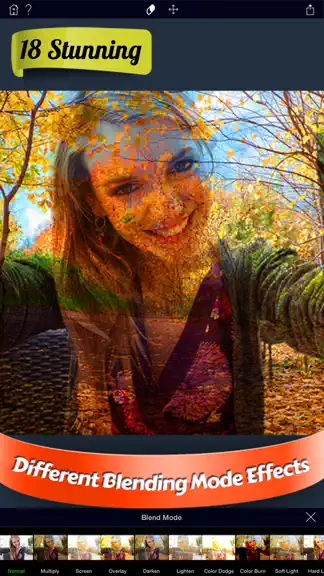
Turn two photos into one striking image. Drop a city skyline, a forest or the sky inside a portrait — then make it yours with 42 built-in styles, from bold city silhouettes to soft, dreamy blends. • 42 double-exposure styles • Precise subject cutout for crisp, clean edges • Fine-tune the blend until it looks just right • Save and share watermark-free As always, thanks for using Overlay. Tap in and give it a try! If you have any issues or feedback, please contact us at [email protected].
- v2.11.11mo ago
Turn two photos into one striking image. Drop a city skyline, a forest or the sky inside a portrait — then make it yours with 42 built-in styles, from bold city silhouettes to soft, dreamy blends. • 42 double-exposure styles • Precise subject cutout for crisp, clean edges • Fine-tune the blend until it looks just right • Save and share watermark-free As always, thanks for using Overlay. Tap in and give it a try! If you have any issues or feedback, please contact us at [email protected].
Overlay: AI Photo Design — FAQ
How much money does Overlay: AI Photo Design make?
According to AppCurrents estimates, Overlay: AI Photo Design generates approximately $2k–$12k per month (low confidence), modeled from its the App Store chart performance, rating velocity, and monetization signals.
How many downloads does Overlay: AI Photo Design get?
Overlay: AI Photo Design sees an estimated 700–3k downloads per month on the App Store, per AppCurrents modeling.
Is Overlay: AI Photo Design free?
Overlay: AI Photo Design is free to download on the App Store, monetizing through in-app purchases.
What is Overlay: AI Photo Design's rating?
Overlay: AI Photo Design holds a 4.68-star average from 1,219 ratings on the App Store.
When was Overlay: AI Photo Design released?
Overlay: AI Photo Design launched on the App Store on 19.03.2014. Its latest version shipped 30.07.2026.


