
Nebulis
Nebulis generates an estimated $0/month in revenue from 0 downloads/month on the App Store, according to AppCurrents estimates (updated 2026-08-02).
| Est. revenue / month | $0 |
|---|---|
| Est. downloads / month | 0 |
| Estimate confidence | low |
| Pricing | Paid $4.99 |
| Rating | 0.00 ★ (0 ratings) |
| Category | Photo & Video |
| Best chart rank | #79 Photo & Video Paid |
| Released | 27.05.2026 |
| App last updated | 03.08.2026 |
| Platform | iOS |
Modeled monthly estimate · rating velocity · low confidence

About
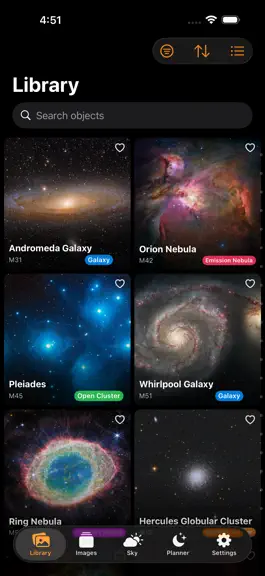
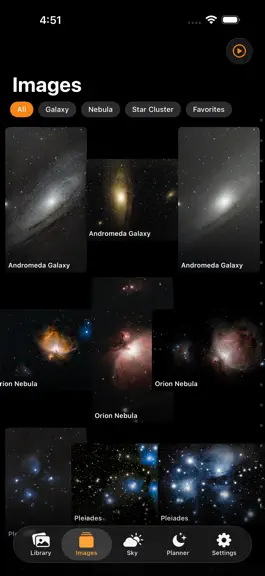
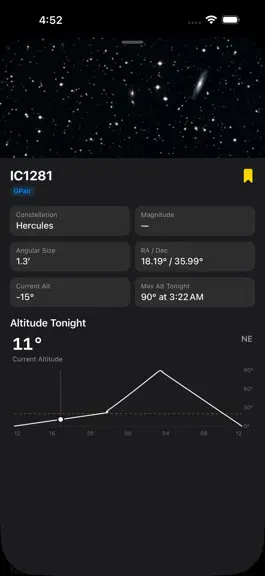
Nebulis is the companion app for your Nebulis astrophotography server. Browse your entire deep-sky image library from your iPhone or iPad, plan your next observation session, and dive deep into the objects you've captured. Your Library, Your Way Browse hundreds of images organized by object, date, and type. Filter by galaxies, nebulae, or star clusters. Mark favorites, swipe through full-screen pr…
Trends & analysis
Chart rank trend
US · categoryWhy it's surfacing
Scout 36Ratings & velocity
★ 0 in windowGeographic reach
best rank · 4 storefrontsRevenue & downloads trend
monthly estimateUpdate history
6 updates tracked- v1.4.01d ago
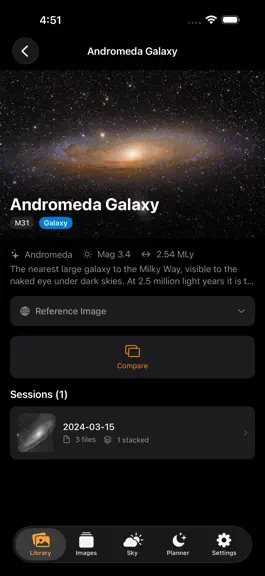
New - Observing Sites on iOS: create and manage multiple named locations (each with its own coordinates), switch between them from the Planner, and manage them under Settings → - Observing Sites, bringing iOS to parity with the web app's site-switching feature. - Session detail view now shows real thumbnails for images and FITS sub-frames instead of placeholder icons. Updated - Server discovery now shows the port alongside the server name (e.g. Nebulis:8090) when it isn't the default, it makes it possible to tell two servers apart during setup if you've customized the port. - Cleaned up catalog item page. Larger hero image, removed redundant title. - Forecast tab now follows whichever Observing Site is active (switchable from the Planner tab), instead of only using GPS or a manually-entered location, it matches how the web app and Planner already behave. - Object detail page redesigned: the reference image now runs full-bleed behind the status bar instead of sitting under a separate nav title bar. - Planner: the date/site header was reorganized into a clearer "conditions card", night window and moon phase now group together under the site picker, which is now a proper tappable chip instead of plain caption text. - Planner: new schedule blocks now default to 90 minutes instead of 60. - Planner: timeline half-hour tick marks are unlabeled now (hour-only labels), matching the convention of Apple/Google Calendar day views instead of doubling up on numbers. Fixed Planner: the resize handles on a scheduled block now sit exactly centered on the block's edge
- v1.3.015d ago
New - Added a new Nebulis Share Extension for iOS, making it possible to send images to Nebulis directly from Seestar, Dward, Photos, Files, Safari, and other apps. - The Share Extension supports adding images to existing observations or creating new manual observations. - The share flow includes object/session selection, image type selection, telescope selection, titles, notes, and observation dates. - The Share Extension supports common astrophotography image formats, including HEIC/HEIF, TIFF, JPEG, and PNG. Bug Fixes & Improvements - Fixed planner schedule date and time handling across observatory/server time zones. - Improved planner timeline rendering for twilight sessions and short summer nights. - Planner schedules now refresh when returning to the app, so changes made on another device appear automatically. - Improved Gallery favorite behavior by moving favorite actions into context menus to reduce accidental taps. - Updated server connection setup for HTTP-only Nebulis servers. - General reliability, signing, and build configuration improvements.
- v1.2.01mo ago
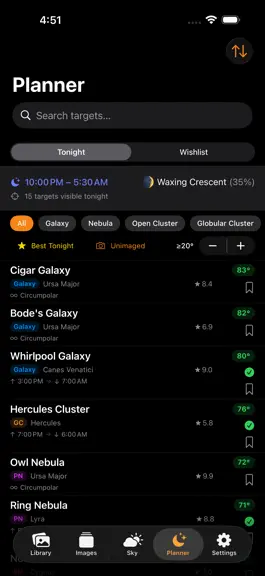
Planner: New Schedule View The planner now has a full timeline-based schedule you can drag objects onto, resize, and reorder. A sky-arc editor lets you define your visible horizon segment for accurate visibility checks. Objects light up based on whether they're up, partially visible, or blocked during your scheduled slot. Planner: Share Your Plan Tap the share button to export tonight's plan as a branded image card — includes the session list, timeline bar, moon phase, and an elevation chart for each object. Or copy a plain-text summary to paste anywhere. QR Code Device Pairing Connect a new phone or iPad by scanning a QR code generated from the server's Settings page. No more typing IP addresses or manually entering server URLs. FITS Color Rendering Color .fit files now display in full color. Previously they rendered as monochrome regardless of the capture filter. Image Editor Crop, rotate, and adjust brightness/contrast with an overhauled editor. The crop overlay now supports pan gesture to reposition the crop area, and the watermark panel has been redesigned with compact sliders. Session Detail Minor layout and action improvements on the session detail view.
- v1.1.11mo ago
Bugfixes: - Fixed regression on Planner page where certain Timezones would trigger a "No Nighttime Window" error on the Planner page. - Fixed "jump" that occurred when an object is moved on the Planner view.
- v1.1.01mo ago
What's New in Version 1.1 Night Planner Plan your entire imaging session before heading out. Add objects to a visual timeline, drag blocks to rearrange them, resize sessions, and get instant warnings for low altitude, moon interference, and sky obstructions. Share Your Plan Export your night's plan as a shareable image, includes your object list, timing, and an elevation graph so you can send it to your club or save it for reference. FITS Viewer Improvements .FIT files now render in full color instead of monochrome. Bug Fixes & Polish • Gallery content no longer hides behind the tab bar on some devices • Various layout and usability improvements throughout the app
Nebulis — FAQ
How many downloads does Nebulis get?
Nebulis sees an estimated 0 downloads per month on the App Store, per AppCurrents modeling.
Is Nebulis free?
Nebulis is a paid app priced at $4.99 on the App Store.
When was Nebulis released?
Nebulis launched on the App Store on 27.05.2026. Its latest version shipped 03.08.2026.


