
Motion Track: Video Stabilizer
Motion Track: Video Stabilizer generates an estimated $200–$2k/month in revenue from 90–400 downloads/month on the App Store, according to AppCurrents estimates (updated 2026-08-02).
| Est. revenue / month | $200–$2k |
|---|---|
| Est. downloads / month | 90–400 |
| Estimate confidence | low |
| Pricing | Free + IAP |
| Rating | 4.39 ★ (36 ratings) |
| Category | Photo & Video |
| Released | 09.04.2023 |
| App last updated | 31.07.2026 |
| Platform | iOS |
Modeled monthly estimate · rating velocity · low confidence




About
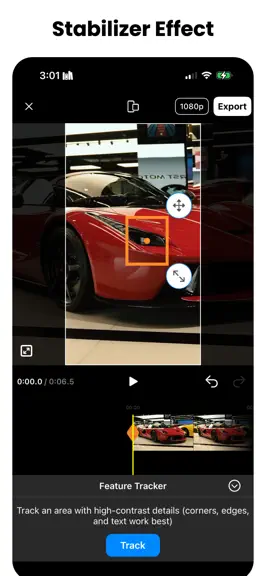
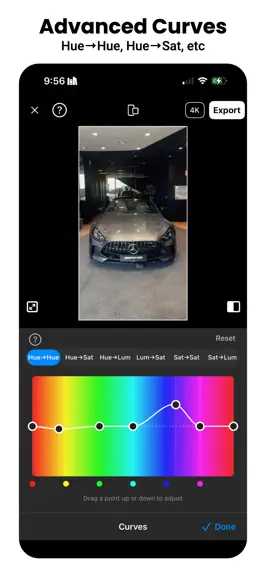
Lock a moving car, bike or board dead still in frame for a buttery-smooth stabilized shot. Then ramp the speed on a curve, boost it to 240FPS for real slow motion, and finish it with true optical-flow motion blur. Motion Track is a full motion editor for iPhone: stabilization, tracking, speed ramps, frame interpolation, motion blur, effects and color grading. Everything runs on-device — your vide…
Trends & analysis
Chart rank trend
US · overallWhy it's surfacing
Scout 8Ratings & velocity
★ -0.11 in windowRating distribution
83% positive · 24 ratingsGeographic reach
best rank · 1 storefrontRevenue & downloads trend
ARPU $3In-app purchases
2 tiersUpdate history
8 updates tracked- v6.204d ago
Improved Motion Stabilizer, Speed Ramps with more controls, Frame Interpolation for any clips! 1. Pro Speed Ramps - Every beat on the ramp now has Bezier handles, like a value graph in After Effects - Drag the direction to set how steep the ramp is, drag the length to set how long it carries its momentum - Break a handle to slam in fast and ease out slow — or the reverse 2. Motion Blur, rebuilt - A true long-exposure look: we reconstruct the frames between your frames with optical flow and integrate them, the way desktop tools do — so a turning car smears along its arc instead of one straight streak - Strength slider from a light blur to a long, cinematic exposure. Before/after compare on the result screen - Runs on far more iPhones than the old engine, and handles portrait 4K directly 3. Boost FPS with AI - Frame interpolation moved into the clip toolbar: rebuild a clip at 60, 120 or 240FPS and get genuinely fluid slow motion instead of stuttered frames - It interpolates the source, so your trim, speed ramp, tracking and overlays are all preserved — your ramp simply re-samples footage that now has real in-between frames - Offered automatically when a speed ramp drops a clip below 20 effective FPS - Before/after preview, played slowed down so you can actually see the new frames 4. New Video Effects - Eight effects: Shake, Hard Shake, Wobble, Zoom Pulse, RGB Glitch, Strobe, Ripple and Dreamy - They live on their own timeline lane — drag the ends to set exactly when an effect starts and stops, and stack several at the same moment - Tap an effect and it previews on the spot; Cancel removes it in one tap 5. Music Beats - New panel: scrub the waveform, listen, and drop a beat mark exactly where you hear it - Or auto-detect, with a Light-to-Intense density slider for how many beats you want - Your hand-placed marks survive re-detection and switching auto off - Playback keeps running while the panel is open, and beat marks are now clear orange dots ALREADY IN MOTION TRACK - Track Feature — tap any point on a moving car, bike or board and pin it dead still in frame - Track 2 Points for rotation and scale, Track Surface for flat surfaces, plus manual keyframes when you want full control - Background music with beat sync and Auto Sync, 4K AI upscaling, and full color grading with LUTs, curves and film emulation Everything runs on-device. Your videos never leave your phone.
- v6.195d ago
Improved Motion Stabilizer, Speed Ramps with more controls, Frame Interpolation for any clips! 1. Pro Speed Ramps - Every beat on the ramp now has Bezier handles, like a value graph in After Effects - Drag the direction to set how steep the ramp is, drag the length to set how long it carries its momentum - Break a handle to slam in fast and ease out slow — or the reverse 2. Motion Blur, rebuilt - A true long-exposure look: we reconstruct the frames between your frames with optical flow and integrate them, the way desktop tools do — so a turning car smears along its arc instead of one straight streak - Strength slider from a light blur to a long, cinematic exposure. Before/after compare on the result screen - Runs on far more iPhones than the old engine, and handles portrait 4K directly 3. Boost FPS with AI - Frame interpolation moved into the clip toolbar: rebuild a clip at 60, 120 or 240FPS and get genuinely fluid slow motion instead of stuttered frames - It interpolates the source, so your trim, speed ramp, tracking and overlays are all preserved — your ramp simply re-samples footage that now has real in-between frames - Offered automatically when a speed ramp drops a clip below 20 effective FPS - Before/after preview, played slowed down so you can actually see the new frames 4. New Video Effects - Eight effects: Shake, Hard Shake, Wobble, Zoom Pulse, RGB Glitch, Strobe, Ripple and Dreamy - They live on their own timeline lane — drag the ends to set exactly when an effect starts and stops, and stack several at the same moment - Tap an effect and it previews on the spot; Cancel removes it in one tap 5. Music Beats - New panel: scrub the waveform, listen, and drop a beat mark exactly where you hear it - Or auto-detect, with a Light-to-Intense density slider for how many beats you want - Your hand-placed marks survive re-detection and switching auto off - Playback keeps running while the panel is open, and beat marks are now clear orange dots ALREADY IN MOTION TRACK - Track Feature — tap any point on a moving car, bike or board and pin it dead still in frame - Track 2 Points for rotation and scale, Track Surface for flat surfaces, plus manual keyframes when you want full control - Background music with beat sync and Auto Sync, 4K AI upscaling, and full color grading with LUTs, curves and film emulation Everything runs on-device. Your videos never leave your phone.
- v6.1713d ago
DANCE MODE IS HERE Tap one dancer in a group video and get a clean, centered solo cut — automatically. - Auto-Track a Person — the frame follows your subject on its own, no keyframing - Blur Others — keep your dancer sharp and blur everyone else, so bystanders stay unrecognizable. Pick a person-shaped or rectangular sharp area, and dial in blur strength, margin, and edge softness - Cover My Face — hide your own face behind a blur or an emoji that tracks your head as you move. ~100 emoji to choose from, or bring your own - Match Person Size — the frame zooms in as you move away, so you stay the same size on screen the whole clip - Follow Smoothness — choose how tightly the camera hugs your movement ALSO IN THIS UPDATE - Person tracking is dramatically faster and no longer runs out of memory on long videos - Fixed a jump at the end of a pan when Position Smoothing was on - Delete a bad stretch of tracking without redoing the whole clip - Duplicate a clip in one tap - Background music: per-segment volume and fades, trim handles, and a mute toggle - Auto Sync Music — line your clip up to the song it was filmed to - Show Beats — see the beat markers on the timeline and cut to them - New text styles, fonts, and presets ALREADY IN MOTION TRACK - Lock-on stabilization for cars, bikes, and boards - AI slow motion up to 240FPS with frames synthesized on-device - 4K AI upscaling - Full color grading with LUTs, curves, wheels, and film emulation Everything runs on-device. Your videos never leave your phone.
- v6.1620d ago
Smoother stabilization, sharper AI Enhance, and rock-solid exports. - Stabilize: One tap to make shaky footage look smooth and steady. - AI Enhance: Better detail and clarity when upscaling your footage. - Exports: Major reliability improvements so your videos save every time. Thanks for using Motion Track. Update now for the best version yet.
- v6.1527d ago
1. Keyframe Your Stabilization Guide exactly how your shot reframes and moves through the clip. Cinematic motion that used to need desktop software, right on your phone. 2. Improved AI Video Enhancer A new Fast / High / Max picker puts you in charge of AI upscaling. 3. Auto Detect Music Beats Show Beats drops beat markers right on your timeline, so your cuts and effects hit in perfect rhythm. 4. Pro-Grade Color Shooting Log? Convert to natural, true-to-life color in a tap — Apple Log, Sony, Canon, DJI, and custom LUTs supported.
Motion Track: Video Stabilizer — FAQ
How much money does Motion Track: Video Stabilizer make?
According to AppCurrents estimates, Motion Track: Video Stabilizer generates approximately $200–$2k per month (low confidence), modeled from its the App Store chart performance, rating velocity, and monetization signals.
How many downloads does Motion Track: Video Stabilizer get?
Motion Track: Video Stabilizer sees an estimated 90–400 downloads per month on the App Store, per AppCurrents modeling.
Is Motion Track: Video Stabilizer free?
Motion Track: Video Stabilizer is free to download on the App Store, monetizing through in-app purchases.
What is Motion Track: Video Stabilizer's rating?
Motion Track: Video Stabilizer holds a 4.39-star average from 36 ratings on the App Store.
When was Motion Track: Video Stabilizer released?
Motion Track: Video Stabilizer launched on the App Store on 09.04.2023. Its latest version shipped 31.07.2026.


