Moments generates an estimated $0/month in revenue from 0 downloads/month on the App Store, according to AppCurrents estimates (updated 2026-08-02).
| Est. revenue / month | $0 |
|---|---|
| Est. downloads / month | 0 |
| Estimate confidence | low |
| Pricing | Free + IAP |
| Rating | 0.00 ★ (0 ratings) |
| Category | Photo & Video |
| Released | 09.04.2017 |
| App last updated | 12.01.2026 |
| Platform | iOS |
Modeled monthly estimate · rating velocity · low confidence


About
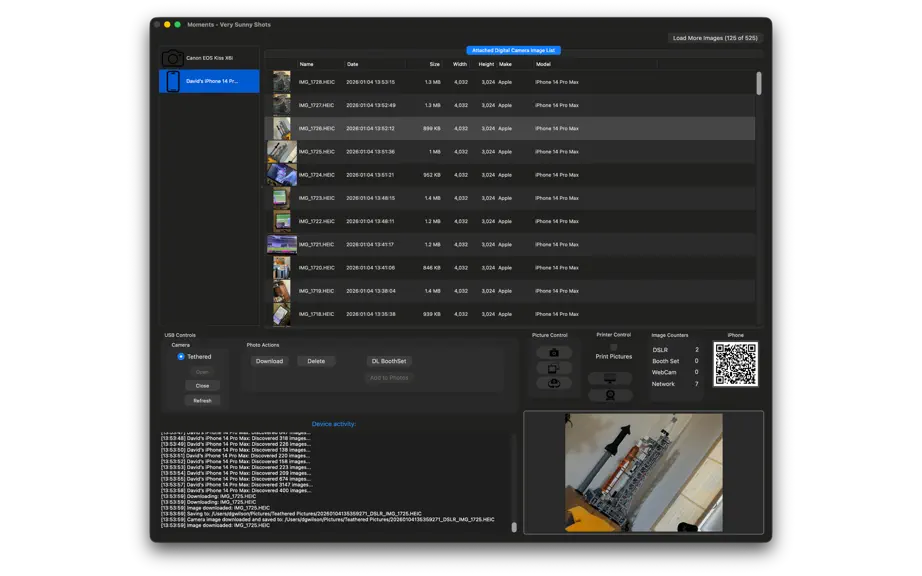
Transform Any Event Into an Unforgettable Experience Moments brings professional photo booth magic to your Mac, creating instant memories for weddings, parties, corporate events, and special occasions. Capture spontaneous moments and display them in real-time on the big screen. Why Moments? Instant Gratification Photos appear seconds after capture on stunning displays via AirPlay or ded…
Trends & analysis
Chart rank trend
US · overallWhy it's surfacing
Scout 4Ratings & velocity
★ 0 in windowGeographic reach
best rank · 0 storefrontsRevenue & downloads trend
monthly estimateIn-app purchases
1 tiersUpdate history
1 update tracked- v2.0.16mo ago
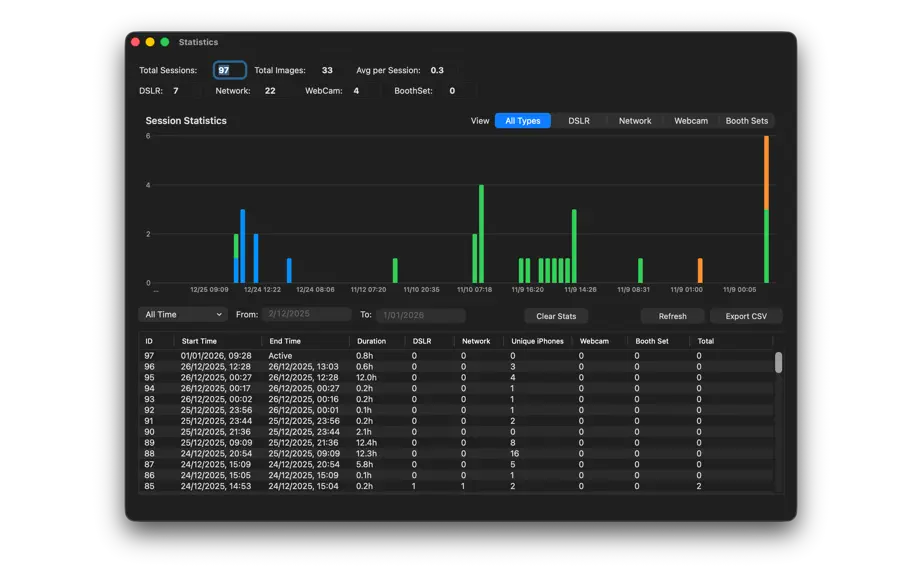
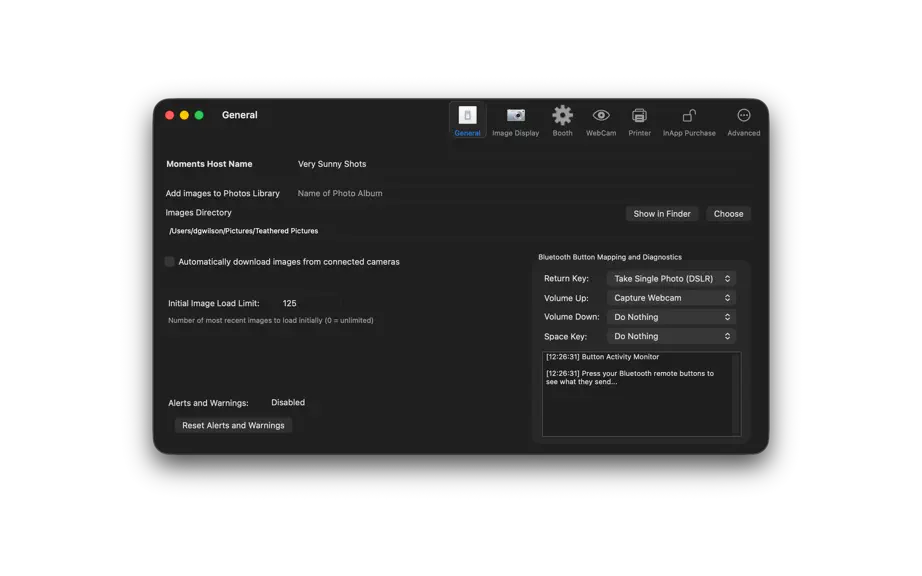
In this version (2.0.1) • Internal changes to support a plugin system for camera, separate plugins by Manufacturer and Device • Improved multi-camera support for Nikon D5600 and Canon 650D when used together • iPhone and iPad photos now keep their original filenames (like IMG_0123.HEIC) when received from Moments Camera app • Requires Moments Camera version 1.5.1 (build 51) or later for iPhone/iPad photo capture • Live Photos from iPhone now correctly save both the photo and video with matching filenames • Webcam captures now save with cleaner filenames and avoid duplicate files • Added manual refresh button for Canon M50 to work around camera firmware limitation In this version (2.0.0) System Requirements • Minimum macOS 13 or later Camera & Device Support • Compatible with select Canon DSLR cameras (see compatibility help page) • Full support for iOS devices running Moments Camera • Standard USB webcam support - capture images without DSLR or iPhone • Webcam resolution control in preferences Major New Features Statistics Dashboard (⇧⌘S) • Track session times, photo counts by source (DSLR, Network, Webcam, Booth Set) • Monitor unique iPhone devices contributing photos • Interactive charts with date filtering • Export to CSV for analysis • All data stored locally, accessible remotely via Moments Print Moments Print Integration • Full support for Moments Print companion app • Remote statistics access from any iOS/Mac device on your network • Browse and print photos from your Moments host wirelessly Professional Printer Support • New printer preferences for precise output control • Direct printing to desktop, photo, and AirPrint devices • Configure automatic printing or batch processing Multi-Host Support • Name your Moments host for easy identification • Run multiple Moments systems on the same network • Moments Camera users can select which host to connect to • Perfect for large venues with multiple photo booth stations Bluetooth Button Actions • Configure custom actions for Bluetooth remote buttons • Map Return Key, Volume Up, Volume Down, and Space • Per-button action control for multi-button setups • Action options: - Booth Set: Automatic photo sequences - Trigger iOS Devices: Control all iPhones simultaneously - Capture Webcam: Direct webcam capture - Do Nothing: Prevent accidental triggers Enhanced Networking • Migrated from MultipeerConnectivity to Network.framework • Improved reliability and stability • Better performance for Moments Camera and Moments Print communication • Fixed stream corruption issues Important: Network Setup Recommendation For best results at events, bring your own WiFi router or mobile hotspot. Do not rely on venue WiFi, especially networks with captive portals (login pages) - these typically prevent device communication and will block Moments Camera connections. A portable router or iPhone personal hotspot ensures reliable connectivity between Moments, Moments Camera, and Bluetooth triggers. Recommended Camera Setup • Primary: iPhone wired in fixed position running Moments Camera • Additional: Multiple iPhones with Moments Camera roaming the event • Connect via your own wireless network for automatic image upload Bug Fixes • Fixed Settings screen display issues for some preference panes • Fixed new images not appearing in Moments Print on refresh • Improved overall stability and performance Breaking Changes Network framework migration requires updated versions of Moments Camera and Moments Print for compatibility.
Moments — FAQ
How many downloads does Moments get?
Moments sees an estimated 0 downloads per month on the App Store, per AppCurrents modeling.
Is Moments free?
Moments is free to download on the App Store, monetizing through in-app purchases.
When was Moments released?
Moments launched on the App Store on 09.04.2017. Its latest version shipped 12.01.2026.


