
LumaBooth Event Photo Booth
LumaBooth Event Photo Booth generates an estimated $3k–$18k/month in revenue from 1k–5k downloads/month on the App Store, according to AppCurrents estimates (updated 2026-08-02).
| Est. revenue / month | $3k–$18k |
|---|---|
| Est. downloads / month | 1k–5k |
| Estimate confidence | low |
| Pricing | Free + IAP |
| Rating | 4.57 ★ (1,490 ratings) |
| Category | Photo & Video |
| Released | 28.10.2016 |
| App last updated | 25.06.2026 |
| Platform | iOS |
Modeled monthly estimate · rating velocity · low confidence
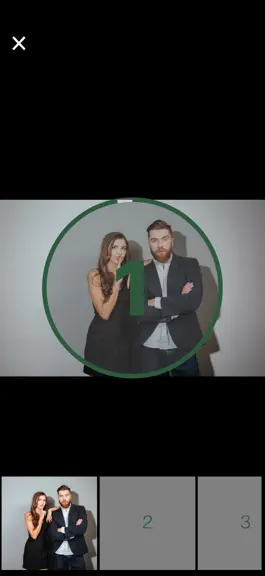

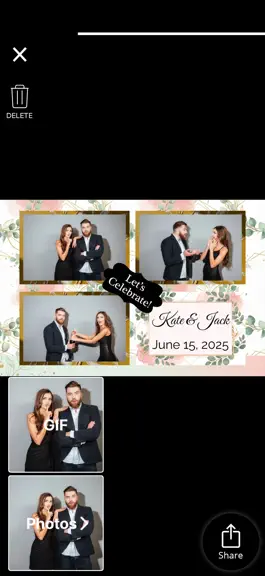

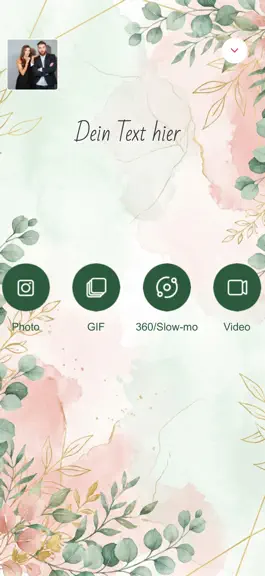
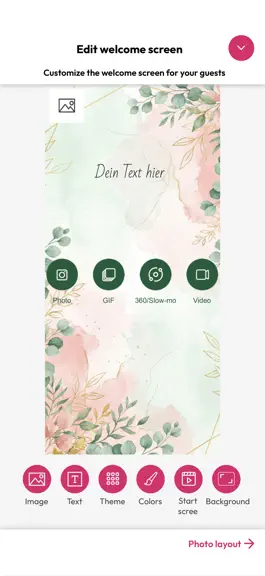
About
The life of every party. The easiest way to run a professional photo booth at your next wedding, birthday, or event. Just download, set up in minutes, and let your guests have the time of their lives. LumaBooth runs on iPhone, iPad, Mac, and Windows, perfect whether you're a first-timer or a seasoned pro. LUMABOOTH DASHBOARD Configure your entire event from any browser before you even arrive. T…
Trends & analysis
Chart rank trend
US · overallWhy it's surfacing
Scout 11Ratings & velocity
★ +0.01 in windowRating distribution
89% positive · 1k ratingsGeographic reach
best rank · 4 storefrontsRevenue & downloads trend
ARPU $3In-app purchases
2 tiersUpdate history
4 updates tracked- v5.2.21mo ago
LumaBooth 5.0, our biggest release yet. AI Portraits are here. Watch your guests transform into superheroes, vintage oil paintings, and 3D characters right at your booth. Over 170 styles, one tap to enable, no green screen, no setup. Just pure wow. 820+ professional templates now in the LumaBooth Dashboard. Browse, favorite, and launch the perfect look for every event, no design skills needed. The LumaBooth Dashboard changes everything. Imagine walking into any event knowing your booth is already configured and waiting. Set up your templates, overlays, and settings once from any browser, then show up. Launch instantly on iPhone, iPad, Mac, or Windows with dslrBooth. No other photo booth platform brings iOS and Windows together like this. Your booth is ready before you walk in the door. One platform. Every device. -- LumaBooth 5.0.7 brings smarter guidance for AI Portraits — on-screen warnings now alert you when too many people are in the frame or subjects are standing too far from the camera, so you get better results every time. This update fixes email validation so addresses with international domains like .com.mx or .co.uk are accepted correctly, and resolves a rare crash when switching cameras with previously saved zoom settings. Several stability and reliability improvements are included, along with a fix for a stretched toggle button on the Event Link screen on iPhone. -- LumaBooth 5.1 introduces Custom AI Portraits. Write your own prompt to create exactly the look you want, and add per-style guest questions so a single prompt can personalize every portrait using answers like a guest's name, jersey number, or chosen theme. AI Portraits now process all photos together after capture for a smoother guest experience. This update also redesigns the guest browse and sharing screens with a new scrollable session gallery, improves USB webcam support on iPad, refreshes the app's look with a new font, and adds reliable hex color entry. Text messaging issues are fixed, per-event print settings now sync from the dashboard, and we resolved a range of crashes and stability issues — including better recovery after Wi-Fi interruptions so your overlays and settings are never lost. -- LumaBooth 5.1.1 fixes a crash that could occur when duplicating an event, so reusing your favorite event setups is reliable again. -- LumaBooth 5.2 sharpens the booth from start to share. The Layout Editor on iPad now responds exactly to your touch, so items move where you place them, and small items get easier-to-grab resize handles on iPhone. The Welcome screen reflects live view changes and lets you hide the start buttons for a clean single-tap booth. Duplicating events is more reliable too. AI Portrait reference images and print layout text carry over cleanly when you open the copy on another device. GIFs gain 3:2 and 2:3 aspect ratio options, USB webcam video on Mac stays bright (no more dim recordings on cameras like the Logitech BRIO), print limit labels are clearer, and we resolved a long-standing crash when saving print layouts.
- v5.2.11mo ago
LumaBooth 5.0, our biggest release yet. AI Portraits are here. Watch your guests transform into superheroes, vintage oil paintings, and 3D characters right at your booth. Over 170 styles, one tap to enable, no green screen, no setup. Just pure wow. 820+ professional templates now in the LumaBooth Dashboard. Browse, favorite, and launch the perfect look for every event, no design skills needed. The LumaBooth Dashboard changes everything. Imagine walking into any event knowing your booth is already configured and waiting. Set up your templates, overlays, and settings once from any browser, then show up. Launch instantly on iPhone, iPad, Mac, or Windows with dslrBooth. No other photo booth platform brings iOS and Windows together like this. Your booth is ready before you walk in the door. One platform. Every device. -- LumaBooth 5.0.7 brings smarter guidance for AI Portraits — on-screen warnings now alert you when too many people are in the frame or subjects are standing too far from the camera, so you get better results every time. This update fixes email validation so addresses with international domains like .com.mx or .co.uk are accepted correctly, and resolves a rare crash when switching cameras with previously saved zoom settings. Several stability and reliability improvements are included, along with a fix for a stretched toggle button on the Event Link screen on iPhone. -- LumaBooth 5.1 introduces Custom AI Portraits. Write your own prompt to create exactly the look you want, and add per-style guest questions so a single prompt can personalize every portrait using answers like a guest's name, jersey number, or chosen theme. AI Portraits now process all photos together after capture for a smoother guest experience. This update also redesigns the guest browse and sharing screens with a new scrollable session gallery, improves USB webcam support on iPad, refreshes the app's look with a new font, and adds reliable hex color entry. Text messaging issues are fixed, per-event print settings now sync from the dashboard, and we resolved a range of crashes and stability issues — including better recovery after Wi-Fi interruptions so your overlays and settings are never lost. -- LumaBooth 5.1.1 fixes a crash that could occur when duplicating an event, so reusing your favorite event setups is reliable again. -- LumaBooth 5.2 sharpens the booth from start to share. The Layout Editor on iPad now responds exactly to your touch, so items move where you place them, and small items get easier-to-grab resize handles on iPhone. The Welcome screen reflects live view changes and lets you hide the start buttons for a clean single-tap booth. Duplicating events is more reliable too. AI Portrait reference images and print layout text carry over cleanly when you open the copy on another device. GIFs gain 3:2 and 2:3 aspect ratio options, USB webcam video on Mac stays bright (no more dim recordings on cameras like the Logitech BRIO), print limit labels are clearer, and we resolved a long-standing crash when saving print layouts.
- v5.21mo ago
LumaBooth 5.0, our biggest release yet. AI Portraits are here. Watch your guests transform into superheroes, vintage oil paintings, and 3D characters right at your booth. Over 170 styles, one tap to enable, no green screen, no setup. Just pure wow. 820+ professional templates now in the LumaBooth Dashboard. Browse, favorite, and launch the perfect look for every event, no design skills needed. The LumaBooth Dashboard changes everything. Imagine walking into any event knowing your booth is already configured and waiting. Set up your templates, overlays, and settings once from any browser, then show up. Launch instantly on iPhone, iPad, Mac, or Windows with dslrBooth. No other photo booth platform brings iOS and Windows together like this. Your booth is ready before you walk in the door. One platform. Every device. -- LumaBooth 5.0.7 brings smarter guidance for AI Portraits — on-screen warnings now alert you when too many people are in the frame or subjects are standing too far from the camera, so you get better results every time. This update fixes email validation so addresses with international domains like .com.mx or .co.uk are accepted correctly, and resolves a rare crash when switching cameras with previously saved zoom settings. Several stability and reliability improvements are included, along with a fix for a stretched toggle button on the Event Link screen on iPhone. -- LumaBooth 5.1 introduces Custom AI Portraits. Write your own prompt to create exactly the look you want, and add per-style guest questions so a single prompt can personalize every portrait using answers like a guest's name, jersey number, or chosen theme. AI Portraits now process all photos together after capture for a smoother guest experience. This update also redesigns the guest browse and sharing screens with a new scrollable session gallery, improves USB webcam support on iPad, refreshes the app's look with a new font, and adds reliable hex color entry. Text messaging issues are fixed, per-event print settings now sync from the dashboard, and we resolved a range of crashes and stability issues — including better recovery after Wi-Fi interruptions so your overlays and settings are never lost. -- LumaBooth 5.1.1 fixes a crash that could occur when duplicating an event, so reusing your favorite event setups is reliable again. -- LumaBooth 5.2 sharpens the booth from start to share. The Layout Editor on iPad now responds exactly to your touch, so items move where you place them, and small items get easier-to-grab resize handles on iPhone. The Welcome screen reflects live view changes and lets you hide the start buttons for a clean single-tap booth. Duplicating events is more reliable too. AI Portrait reference images and print layout text carry over cleanly when you open the copy on another device. GIFs gain 3:2 and 2:3 aspect ratio options, USB webcam video on Mac stays bright (no more dim recordings on cameras like the Logitech BRIO), print limit labels are clearer, and we resolved a long-standing crash when saving print layouts.
- v5.1.12mo ago
LumaBooth 5.0, our biggest release yet. AI Portraits are here. Watch your guests transform into superheroes, vintage oil paintings, and 3D characters right at your booth. Over 170 styles, one tap to enable, no green screen, no setup. Just pure wow. 820+ professional templates now in the LumaBooth Dashboard. Browse, favorite, and launch the perfect look for every event, no design skills needed. The LumaBooth Dashboard changes everything. Imagine walking into any event knowing your booth is already configured and waiting. Set up your templates, overlays, and settings once from any browser, then show up. Launch instantly on iPhone, iPad, Mac, or Windows with dslrBooth. No other photo booth platform brings iOS and Windows together like this. Your booth is ready before you walk in the door. One platform. Every device. -- LumaBooth 5.0.7 brings smarter guidance for AI Portraits — on-screen warnings now alert you when too many people are in the frame or subjects are standing too far from the camera, so you get better results every time. This update fixes email validation so addresses with international domains like .com.mx or .co.uk are accepted correctly, and resolves a rare crash when switching cameras with previously saved zoom settings. Several stability and reliability improvements are included, along with a fix for a stretched toggle button on the Event Link screen on iPhone. -- LumaBooth 5.1 introduces Custom AI Portraits. Write your own prompt to create exactly the look you want, and add per-style guest questions so a single prompt can personalize every portrait using answers like a guest's name, jersey number, or chosen theme. AI Portraits now process all photos together after capture for a smoother guest experience. This update also redesigns the guest browse and sharing screens with a new scrollable session gallery, improves USB webcam support on iPad, refreshes the app's look with a new font, and adds reliable hex color entry. Text messaging issues are fixed, per-event print settings now sync from the dashboard, and we resolved a range of crashes and stability issues — including better recovery after Wi-Fi interruptions so your overlays and settings are never lost.
LumaBooth Event Photo Booth — FAQ
How much money does LumaBooth Event Photo Booth make?
According to AppCurrents estimates, LumaBooth Event Photo Booth generates approximately $3k–$18k per month (low confidence), modeled from its the App Store chart performance, rating velocity, and monetization signals.
How many downloads does LumaBooth Event Photo Booth get?
LumaBooth Event Photo Booth sees an estimated 1k–5k downloads per month on the App Store, per AppCurrents modeling.
Is LumaBooth Event Photo Booth free?
LumaBooth Event Photo Booth is free to download on the App Store, monetizing through in-app purchases.
What is LumaBooth Event Photo Booth's rating?
LumaBooth Event Photo Booth holds a 4.57-star average from 1,490 ratings on the App Store.
When was LumaBooth Event Photo Booth released?
LumaBooth Event Photo Booth launched on the App Store on 28.10.2016. Its latest version shipped 25.06.2026.


