
ZPTH generates an estimated $40–$300/month in revenue from 10–60 downloads/month on the App Store, according to AppCurrents estimates (updated 2026-10-02).
| Est. revenue / month | $40–$300 |
|---|---|
| Est. downloads / month | 10–60 |
| Estimate confidence | low |
| Pricing | Free + IAP |
| Rating | 3.50 ★ (2 ratings) |
| Category | Photo & Video |
| Released | 16.06.2026 |
| App last updated | 06.08.2026 |
| Platform | iOS |
Modeled monthly estimate · rating velocity · low confidence



About
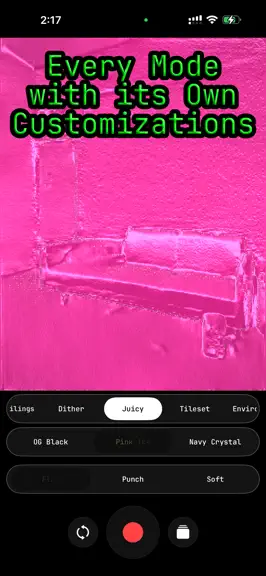
ZPTH reads the depth in front of you and paints it in real time. Point it at a face, a room, or your hand and watch it become light, contour lines, plasma, chrome, cut paper, or a drifting cloud of dust. Capture a photo or record video straight to Photos — or stream the live preview to your computer over NDI. Fifteen of the modes need no depth sensor at all: a Core ML model running on your device…
Trends & analysis
Chart rank trend
US · overallWhy it's surfacing
Scout 23Ratings & velocity
★ 0 in windowRating distribution
50% positive · 2 ratingsGeographic reach
best rank · 0 storefrontsRevenue & downloads trend
ARPU $3In-app purchases
1 tiersUpdate history
4 updates tracked- v3.31mo ago
ZPTH 3.3 adds fifteen new modes — and they don't need a depth sensor at all. FIFTEEN MONOCULAR MODES • Depth is now inferred from a single camera by a Core ML model running on your device. That means these fifteen modes work on the front AND rear camera of any iPhone ZPTH runs on, with no LiDAR scanner required. • Parallax orbits the scene from one still viewpoint. Anaglyph gives you real red/cyan 3D, plus a glasses-free wiggle. Aperture is a cinema lens with shaped bokeh and a focus puller. Vertigo is Hitchcock's dolly zoom, live. • Nebula, Motes, Godlight and Aerial put real atmosphere in the air between you and the scene — cloud, dust, sun shafts and haze that wrap behind people instead of sitting on top of them. • Woodblock, Stipple, Papercut and Riso rebuild the frame as print: engraved hatching, ink stipple, torn paper plates and misregistered spot colour. • Lattice, Hologram and Datamosh handle the science-fiction end: a scanning wireframe mesh, a projected hologram, and codec smear where depth decides what tears. HOME SCREEN WIDGETS • A small tile that opens ZPTH, a medium carousel for stepping through modes, and a large grid that puts every mode one tap from the Home Screen. ALSO IN THIS RELEASE • Papercut now stacks up to 20 paper plates, with a new Depth Reach control that sets how far back into the scene the plates are cut. • Stipple's dot field no longer skews out of the top-left corner — the perspective now converges where the lens does. • On iPhones without a rear LiDAR scanner, the camera flip button now appears in the monocular modes, so you can use the rear camera there too. Everything still runs on your device. No account, no internet, no tracking; the microphone (Pulsar, Cymatic) and local-network (NDI) features remain opt-in and off by default.
- v3.2.02mo ago
ZPTH 3.2 adds a live camera-view toggle and a second NDI stream. CAMERA VIEW TOGGLE • A new button next to the shutter switches instantly between your depth effect and the plain RGB camera — even while you're recording. Switch back and forth as many times as you like; it's one continuous recording, one continuous cut. SECOND NDI STREAM • NDI users can now turn on a second stream, "ZPTHRGB," that broadcasts the raw camera alongside your usual "ZPTH" effect stream — mix them live on your desktop. Everything still runs entirely on your device. No account, no internet, no tracking; the microphone (Pulsar, Cymatic) and local-network (NDI) features remain opt-in and off by default.
- v3.1.02mo ago
ZPTH 3.1 adds ten new depth modes and a recordings rescue. TEN NEW DEPTH MODES The live camera colour now drives a whole new family of looks: • Aerochrome — false-colour infrared: living things bloom hot magenta, far surfaces wash cyan. • Heat Ghost — a colour-schlieren wind-tunnel image; surfaces flare along their slope. • Solarise — a darkroom Sabattier fold into metallic colour with bright edge lines. • Cymatic — a vibrating Chladni sand plate; can optionally ring to live sound (mic, opt-in). • Aquarelle — the scene as wet watercolour, pigment pooling and granulating on the paper. • Tessera — reality re-laid as a Roman stone mosaic that hugs every contour. • Chemigram — a darkroom developer tide that eats dull areas while vivid colour resists. • Ripplefield — the room becomes a pool with spreading wakes that refract over the depth. • Ferrofluid — a glossy black magnetic-bead lattice that pushes toward you with depth. • Lichtenberg — glowing lightning branches forking down the depth gradient. SAVE OLD IN-APP RECORDINGS • A new button in Settings finds any videos an older version kept inside the app, saves them to your Photos library, and clears them from app storage. It reads "No saves found" when there's nothing to move. Everything still runs entirely on your device. No account, no internet, no tracking; the microphone (Pulsar, Cymatic) and local-network (NDI) features remain opt-in and off by default.
- v3.03mo ago
The Pulsar mode is rebuilt as a Rutt-Etra-style line synth driven by depth, colour and — if you turn it on — live sound from the microphone, so the lines pulse in time with music or your voice. Audio is optional and off by default; when on, it's analysed live on your device only and is never recorded, saved, or sent anywhere. Broadcast your live preview to NDI receivers — OBS, TouchDesigner, vMix and more — on your local network, so your iPhone becomes a depth-camera source for your desktop setup. Off by default; a Wired mode over USB-C gives lower-latency streaming. The rear LiDAR camera now captures and records at up to 60 fps (on supported LiDAR cameras) for smoother motion; the front TrueDepth camera runs at 30 fps. It switches automatically with the camera — nothing to set. A round of performance and memory cleanup for smoother, lighter long sessions. Everything else still runs entirely on your device. The microphone (Pulsar) and local-network (NDI) features are opt-in; no account, no internet, no tracking.
ZPTH — FAQ
How much money does ZPTH make?
According to AppCurrents estimates, ZPTH generates approximately $40–$300 per month (low confidence), modeled from its the App Store chart performance, rating velocity, and monetization signals.
How many downloads does ZPTH get?
ZPTH sees an estimated 10–60 downloads per month on the App Store, per AppCurrents modeling.
Is ZPTH free?
ZPTH is free to download on the App Store, monetizing through in-app purchases.
What is ZPTH's rating?
ZPTH holds a 3.50-star average from 2 ratings on the App Store.
When was ZPTH released?
ZPTH launched on the App Store on 16.06.2026. Its latest version shipped 06.08.2026.


