zEdit generates an estimated $0/month in revenue from 100–500 downloads/month on the App Store, according to AppCurrents estimates (updated 2026-10-02).
| Est. revenue / month | $0 |
|---|---|
| Est. downloads / month | 100–500 |
| Estimate confidence | medium |
| Pricing | Free |
| Rating | 4.63 ★ (19 ratings) |
| Category | Photo & Video |
| Released | 19.05.2026 |
| App last updated | 19.09.2026 |
| Platform | iOS |
Modeled monthly estimate · rating velocity · medium confidence


About
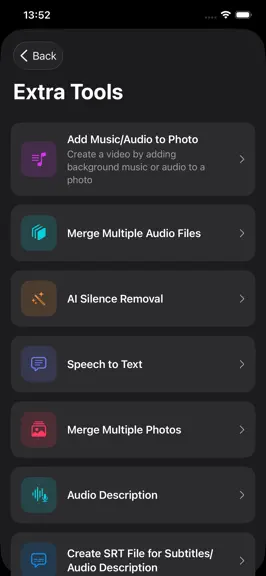
zEdit — The Fully Accessible Video and Audio Editor Built for Blind Users zEdit is the world's first fully accessible video and audio editing app, designed from the ground up for blind and low-vision users. Most media editing tools rely on visual, drag-and-drop interfaces — making them nearly impossible to use with a screen reader. zEdit solves this at its core: every screen, every button, and ev…
Trends & analysis
Chart rank trend
US · overallWhy it's surfacing
Scout 25Ratings & velocity
★ -0.07 in windowRating distribution
100% positive · 13 ratingsGeographic reach
best rank · 0 storefrontsRevenue & downloads trend
ARPU $0Update history
4 updates tracked- v4.013d ago
Bug fixes.
- v3.71mo ago
VERSION 3.7 WHAT'S NEW • Image overlay on video. An image selected from the photo library or Files is displayed over a defined time range or for the whole video. Aspect ratio is preserved and portrait images are letterboxed; the image is never rotated or stretched. Compatible with saved projects and undo. • Automatic work protection. The editing session is written to a recovery record in the background. If the app closes unexpectedly, resuming the session is offered at the next launch. Recovered work is also listed under My Projects, where its size can be reviewed and the record opened or deleted. A single record is kept, overwritten in place, and cleared automatically after one week. • Expanded insert flow. Content can be taken from the photo library or from Files, and photos can now be inserted alongside video and audio. Display duration is set for photos. • Audio filter samples are now generated from the source media. A ten-second section from a random position is played with the selected filter. Shorter media is used in full. • Filter processing starts on add. In earlier versions processing did not begin until the menu was dismissed. • The AI section in Settings has been reorganised. Providers are consolidated into single cards with connection status shown directly; authentication, model and verification appear under separate headings. Descriptions have been simplified. FIXES • Fixed a crash when inserting silence with low sample rate audio sources. Output settings are now derived within a valid range for the source, and an compatible configuration is applied automatically when settings are rejected. • Fixed the hook title not appearing in the video, leaving a black area in its place. • Fixed subtitles rendering their background band without the text. • Fixed a timing fault that displayed subtitles and the watermark over a random section instead of the selected range. • Audio filters have been retuned to preserve speech intelligibility. Filter character is retained while spoken content remains distinguishable. • Fixed sample playback continuing after the page was closed. • Removed the inconsistent title and duplicate description from the Add Content menu. • The minutes field is now shown in all time pickers. With the milliseconds setting enabled, time values are presented to hundredth-second precision on screen and through the screen reader. • Fixed incorrect rendering of the photo duration text in seven languages. • Reduced the likelihood of the app being terminated during long operations. The screen no longer locks automatically while processing, and per-frame memory use during export has been reduced.
- v3.61mo ago
VERSION 3.6 WHAT IS NEW • Export quality is now yours to choose in Settings. Compatibility plays on any device, Balanced is the default, and Highest keeps your recording's codec for a visibly better image at the same file size. • You now choose how the picture sits when resizing. After picking a ratio, Fit keeps the whole image, while Fill removes the black bars completely — turning a landscape video into a portrait one crops a little from the sides. FIXES • The "operation could not be completed" error when opening a video from the photo library is fixed. Importing now works in three stages, and every stage verifies that the file really opens. • Videos shot with the back camera of some iPhone models no longer fail to open. The file is now saved with the extension its container actually calls for. • Exported videos no longer show up as slow motion in the gallery. Only frame rates above 60 are brought down to 60; videos shot at 30 or 60 are left untouched, and duration and speed are preserved exactly. • The Add Audio page in the editor no longer opens blank. • Image quality on export is noticeably better. High frame rate videos are no longer encoded at half the bit rate, the visual effects step no longer drops audio to a single channel, and the audio sample rate now matches the source. • Watermark, subtitles and hook title are burned in a single pass. One encode instead of three: better quality and a noticeably faster export.
- v3.32mo ago
VERSION 3.3 FIXES • Fixed the app quitting unexpectedly on long videos. Processed frames accumulated in memory until the system terminated the app. Memory now stays flat regardless of video length. The same protection was applied to slideshows, photo-to-video, audio processing and all analysis steps. • Fixed speed changes failing after the first attempt, and added an automatic retry if an export is rejected. • Fixed exported videos having width and height swapped on recordings that carry rotation information. • Ducking the video's sound during audio description now works reliably; "mute completely" and zero percent had no effect on some videos. • Precise position control with the rotor now works. NEW • With hundredths shown, "forward/back one hundredth" buttons appear under the time pickers for one-tap fine tuning. • Volume levels in audio description adjust in five-percent steps, with VoiceOver too. • Loop Forever: added audio repeats until your media ends. • Auto-ducking: music is gently lowered during speech. • Enhance Voice: one-tap noise reduction. • More Options: export the selected part as a separate file or turn it into a new project.
zEdit — FAQ
How many downloads does zEdit get?
zEdit sees an estimated 100–500 downloads per month on the App Store, per AppCurrents modeling.
Is zEdit free?
zEdit is free to download on the App Store, with no in-app purchases detected.
What is zEdit's rating?
zEdit holds a 4.63-star average from 19 ratings on the App Store.
When was zEdit released?
zEdit launched on the App Store on 19.05.2026. Its latest version shipped 19.09.2026.


