
YourPods: Podcast Player
YourPods: Podcast Player generates an estimated $100–$2k/month in revenue from 80–400 downloads/month on the App Store, according to AppCurrents estimates (updated 2026-10-02).
| Est. revenue / month | $100–$2k |
|---|---|
| Est. downloads / month | 80–400 |
| Estimate confidence | medium |
| Pricing | Paid $4.99 |
| Rating | 5.00 ★ (2 ratings) |
| Category | News |
| Best chart rank | #22 News Paid |
| Released | 16.01.2026 |
| App last updated | 22.08.2026 |
| Platform | iOS |
Modeled monthly estimate · rating velocity · medium confidence


About
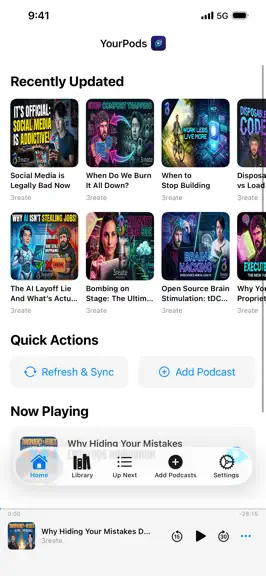
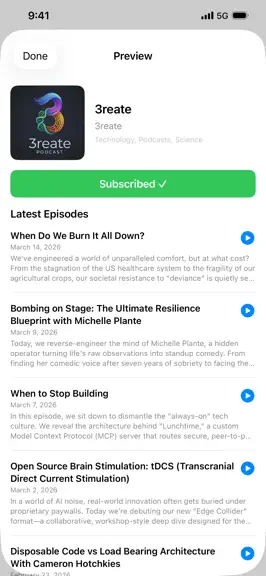
YourPods delivers a smooth and secure podcast experience across all your devices—even your vehicle. Native playback on iPhone, iPad, Apple Watch, and Apple CarPlay. No ads. No tracking. Ever. We believe your listening habits belong to you, which is why we give you total control over your data. Listen using a secure, local-only account to keep your library lightning-fast and 100% private right on y…
Trends & analysis
Chart rank trend
US · categoryWhy it's surfacing
Scout 24Ratings & velocity
★ 0 in windowRating distribution
60% positive · 5 ratingsGeographic reach
best rank · 1 storefrontRevenue & downloads trend
ARPU $3Update history
3 updates tracked- v26.81mo ago
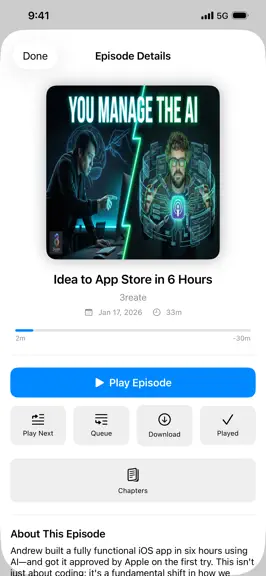
YourPods now speaks your language. German, Spanish, French, Italian and Dutch. The app follows whatever language your device is set to, and you can change it any time in Settings. Every screen is translated — including everything VoiceOver reads aloud and everything Siri says back to you. Dates, durations, speeds and percentages follow your own locale's formatting. The translations are AI-made, and the app says so. The first time YourPods appears in a language new to you, a sheet explains that we use AI to translate from English, that some wording might be a bit off, and how to report anything that reads wrong. The same explanation lives permanently in Settings. NEW - Chapter artwork, and chapters read straight out of the audio file — including files other players show no chapters for - Notes: annotate episodes while you listen, and export to Markdown, Obsidian or Nextcloud - A full Shortcuts catalogue for automations and Siri - Apple Watch: a real player, with the system Now Playing page, speed control, sleep timer and custom skip intervals - Library episode lens: browse every subscription as one flat, filterable episode list - Home Screen playback widget, and AirPlay and Bluetooth output picking from the mini player - When two devices disagree about where you are in an episode, YourPods asks — and you can make your answer the default from the sheet itself - Hide and unhide episodes from anywhere, hide by duration, and hide old episodes when you subscribe - Group your podcasts, and give a group priority in Up Next - Export My Data - Liquid Glass design on iOS 26, with four styles to choose from - Transcript search, episode search, and Nextcloud Login Flow v2 sign-in with 2FA and SSO - YourPods Pro is now available as an in-app subscription. It stays optional — every player feature is included in the app you already bought FIXED - Played state, position and Up Next now agree across your devices: an episode you started on the web picks up on your phone, un-marking one as played sticks, and one you finished on the web stops lingering in the mini player - An episode you paused part-way through is no longer marked played by a background sync, and skipping no longer marks the episode you skipped - Tapping a different episode no longer deletes the one you were listening to from Up Next - "Sync Now" now syncs everything — it was only ever syncing two of the seven things - Feeds update reliably on sync, pull-to-refresh and background refresh - The Apple Watch app's core loops work: library browsing, background refresh, mark as played, and the complication - Home Screen widget buttons control playback instead of opening the app, and the widget shows artwork again - Playback no longer stops silently on auto-advance, and the lock screen, Dynamic Island and CarPlay artwork change with it - Notes reach the web, and deleting one propagates - Fixed the crashes and background kills behind lost sync — corrupt database recovery, suspension kills and watchdog timeouts - Fixed the app quitting when you tapped Restore Purchases or Subscribe FASTER - Much less radio and battery use on Apple Watch during playback - RSS refresh skips unchanged feeds, and independent sync steps run in parallel YourPods now requires iOS 18. Thank you to everyone who wrote in. Get help or request features: https://asc.is/support/
- v2.0.43mo ago
P3 — Privacy Preserving Playback New opt-in privacy feature that strips tracking redirects and dynamic ad insertion from podcast URLs before playback. Your device connects directly to the audio host — no trackers are ever contacted. Blocks 20 tracking services across 32 domains. Enable globally in Settings or per-podcast from Listening Profile. A green shield icon appears on Now Playing when P3 is active. Episode Notifications and Badges Get notified when new episodes are discovered during background refresh. Control notifications per-podcast from each show's Listening Profile. If iOS missed a background refresh, you'll still be notified when you open the app. App icon badge shows your total unplayed episode count. 100% local — nothing is sent to any push server. Hidden Episodes Hide episodes to declutter your feed without marking them as listened. Use "Hide Older Episodes" on a podcast page to batch-hide an entire back catalog in one tap. Hidden episodes are filtered from your feed and excluded from unplayed counts. Hidden state syncs across all your devices. Clear Queue New "Clear Queue" option in the Up Next menu. Choose "Clear Up Next" to remove upcoming episodes while keeping the current one, or "Clear Everything" to stop playback and wipe the queue. Respects your queue removal preferences. Episode Activity YourPods Sync users can now see a chronological list of played episodes below the listening stat cards — episode title, podcast name, progress, timestamp, and device. Sort by Recent or By Podcast. watchOS: Recently Updated The Apple Watch home screen now shows the 10 most recent unplayed episodes with artwork, podcast name, and relative timestamps. Cached locally for offline access. Cross-Device Sync Your currently-playing episode now syncs between devices in real time. Pull-to-refresh performs a full sync — subscriptions, queue, positions, and settings alongside your RSS feeds. Background refresh now syncs everything automatically. Per-podcast Listening Profile settings (speed, skip intro/outro, AutoPilot, privacy mode) sync across all your devices. Reliability Fixed episodes replaying instantly instead of from the beginning. Fixed stale episodes inflating episode counts after feed providers rotate content. Fixed background refresh and notifications only working when plugged in. Fixed the app being killed by iOS after 3+ hours of continuous playback due to excessive disk writes. Fixed watchOS app freezing and refusing to relaunch. Resolved multiple crash-causing data races in the audio engine. Feed refresh is now up to 6x faster for large libraries. Disk I/O reduced by approximately 95% during long listening sessions. Over 40 additional stability and sync fixes across iOS, macOS, watchOS, and CarPlay.
- v2.0.35mo ago
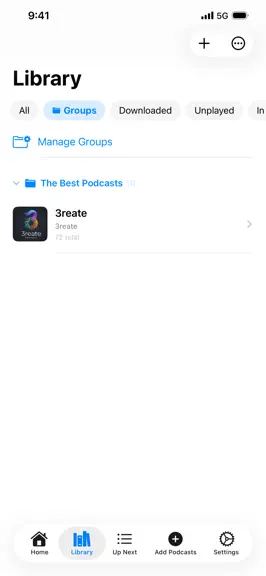
Welcome to YourPods 2.0.3! This major update introduces powerful new ways to organize your library, completely overhauls VoiceOver accessibility, and supercharges your Apple Watch experience. Organization & Discovery Podcast Groups: Tame your growing library. Organize your subscriptions into named folders (like "Tech" or "Comedy"), seamlessly bulk-move shows, and browse your groups right from your car dashboard in CarPlay. Enriched OPML Export: When you export your subscriptions, your custom Podcast Groups and personalized Listening Profiles are now perfectly preserved. Smarter Chapters: We've expanded our smart extraction engine to recognize even more timestamp formats from show notes, automatically generating chapters for you to navigate. Refined Terminology: We've updated our feature names to be clearer and more memorable: say hello to AutoPilot (auto-queueing), DriftOff Mode (sleep timers), Vault Mode (local-only listening), and Listening Profiles (per-podcast settings). Unleash Your Apple Watch True Background Audio: Play episodes directly from your Apple Watch and navigate the interface freely without your audio stopping. When an episode ends, your watch will automatically advance to the next track on your wrist. Watch-Specific Data Saver: You can now toggle Wi-Fi-only downloads specifically for your Apple Watch, independent of your iPhone, to help preserve your watch's battery. Accessibility & Interface VoiceOver Excellence: We’ve brought comprehensive VoiceOver support to the entire app. Navigate episodes instantly using custom rotor actions, scrub through audio with adjustable seek bars, and hear dynamic, descriptive labels on all playback controls. Redesigned Home Card: The Now Playing card on your Home screen has been beautifully redesigned to feature larger artwork and clearer chapter displays. Streamlined Onboarding: A brand-new welcome flow puts Vault Mode and gPodder Sync front and center, making it easier than ever for new users to get started. Connectivity & Sync Data Plan Protection: Take total control of your data with the new Download Network setting. Choose exactly when AutoPilot is allowed to download new episodes: Wi-Fi Only, Cellular Only, or both. Intelligent Offline Feedback: Never guess your connection status. Beautiful new offline banners and one-tap retry buttons appear seamlessly when you lose your signal or a stream drops. Vault to Sync Upgrade: Started local but ready for the cloud? You can now easily upgrade your local Vault Mode library to a gPodder sync server without losing a single subscription. Lightning Fast Sync: Feed refreshing is now up to 6x faster, complete with a real-time progress display for massive libraries. Polish & Performance Added a preflight integrity check to gracefully recover from SQLite database corruption. Fixed an issue that could cause a gray screen when opening episode details. Fixed an issue where duplicate episodes could appear in your Up Next queue. Resolved crashes related to large-library syncing and watchOS launches. Removed legacy Flutter migration code to keep the app lightweight and purely native. Thank you to our amazing TestFlight community for helping shape this release! If you love YourPods, please consider leaving us a review.
YourPods: Podcast Player — FAQ
How much money does YourPods: Podcast Player make?
According to AppCurrents estimates, YourPods: Podcast Player generates approximately $100–$2k per month (medium confidence), modeled from its the App Store chart performance, rating velocity, and monetization signals.
How many downloads does YourPods: Podcast Player get?
YourPods: Podcast Player sees an estimated 80–400 downloads per month on the App Store, per AppCurrents modeling.
Is YourPods: Podcast Player free?
YourPods: Podcast Player is a paid app priced at $4.99 on the App Store.
What is YourPods: Podcast Player's rating?
YourPods: Podcast Player holds a 5.00-star average from 2 ratings on the App Store. It currently ranks #22 on the News paid chart.
When was YourPods: Podcast Player released?
YourPods: Podcast Player launched on the App Store on 16.01.2026. Its latest version shipped 22.08.2026.


