
VN: Photo & Video Editor
VN: Photo & Video Editor generates an estimated $900k–$4.8M/month in revenue from 320k–1.3M downloads/month on the App Store, according to AppCurrents estimates (updated 2026-09-08).
| Est. revenue / month | $900k–$4.8M |
|---|---|
| Est. downloads / month | 320k–1.3M |
| Estimate confidence | low |
| Pricing | Free + IAP |
| Rating | 4.77 ★ (314,905 ratings) |
| Category | Photo & Video |
| Best chart rank | #64 Photo & Video Free |
| Released | 22.04.2018 |
| App last updated | 31.08.2026 |
| Platform | iOS |
Modeled monthly estimate · linked Android install floor · low confidence
About
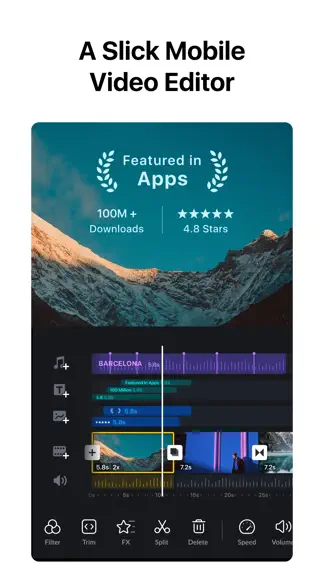
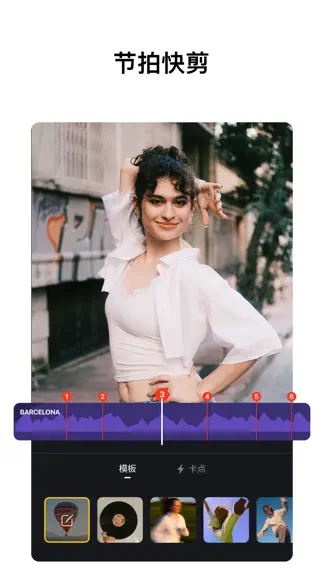
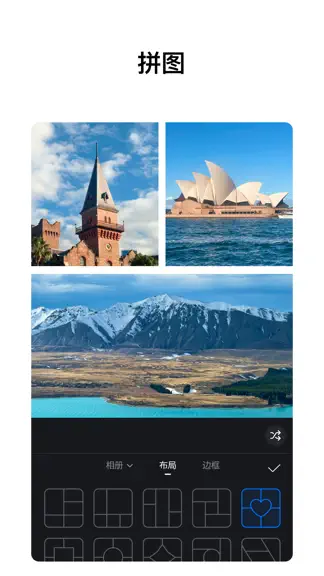
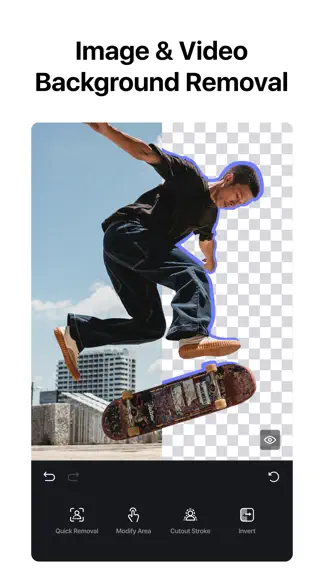
VN: Professional Video and Photo Editing—Free with No Watermark. Edit like a pro with an intuitive multi-track timeline, beat-synced templates, and powerful creative tools. Whether you're a beginner or a professional, VN helps you create high-quality videos and photos with ease. [Smart Tools] • Auto Captions. Automatically generate subtitles from audio—supports multiple languages, subtitle templa…
Trends & analysis
Chart rank trend
US · categoryWhy it's surfacing
Scout 15Ratings & velocity
★ 0 in windowRating distribution
94% positive · 306k ratingsGeographic reach
best rank · 11 storefrontsRevenue & downloads trend
ARPU $3In-app purchases
6 tiersUpdate history
10 updates tracked- v2.19.07d ago
• Filler Word Removal - After generating captions, filler words can now be detected and removed to make talking-head videos easier to edit. • Caption Templates - Added caption templates with more style options. • Collage - Improved image export quality and added HD export. • Photo Edit - Added support for editing and exporting HDR images. • Fixed an issue where the before/after comparison preview did not correctly remove Adjust effects from the original image. • Fixed an issue where selecting "Match Template Size" incorrectly applied "Keep Original Size" when creating a template. • Improved the overall experience and fixed other known issues. If you have any questions, please contact us via the following methods. Instagram: @vnvideoeditor Youtube丨Telegram: @vnvideoeditorapp Email: [email protected] Official website: https://vlognow.me/
- v2.18.126d ago
This update brings more pro editing tools and experience improvements: • Video editing: Added video stabilization, 9 mask shapes, and keyframe adjustments with custom curves; you can hide audio and text tracks. • Photo editing: Edit multiple photos at the same time. • Tools: Extract images from videos, plus a smoother Story creation workflow. • Fixed low-resolution collage exports, incorrect export duration with speed-changed templates, and issues replacing videos from external storage. • Improved video editing performance and other bug fixes. If you have any questions, please contact us via the following methods. Instagram: @vnvideoeditor Youtube丨Telegram: @vnvideoeditorapp Email: [email protected] Official website: https://vlognow.me/
- v2.18.028d ago
This update brings more pro editing tools and experience improvements: • Video editing: Added video stabilization, 9 mask shapes, and keyframe adjustments with custom curves; you can hide audio and text tracks. • Photo editing: Edit multiple photos at the same time. • Tools: Extract images from videos, plus a smoother Story creation workflow. • Fixed low-resolution collage exports, incorrect export duration with speed-changed templates, and issues replacing videos from external storage. • Improved video editing performance and other bug fixes. If you have any questions, please contact us via the following methods. Instagram: @vnvideoeditor Youtube丨Telegram: @vnvideoeditorapp Email: [email protected] Official website: https://vlognow.me/
- v2.17.01mo ago
• Collage — Stitch multiple photos into one image with a variety of preset layouts. • AutoCut — Turn your footage into a finished edit automatically with BeatsClip templates synced to the beat. • Timeline zoom — Zoom the timeline up to 30x for frame-accurate trimming and precise edits. • Added a Sub-Track Extension toggle — When enabled manually, Sub-Tracks can extend beyond the Main Track length. • Fixed an issue where Cross Transition might not take effect. If you have any questions, please contact us via the following methods. Instagram: @vnvideoeditor Youtube丨Telegram: @vnvideoeditorapp Email: [email protected] Official website: https://vlognow.me/
- v2.16.12mo ago
Workflow • Improved the Tools → BeatsClips workflow for a smoother, more intuitive experience Editor • Timeline ruler now shows FPS markers for easier frame-accurate editing • Audio waveforms are clearer and easier to read • Picture-in-Picture (PiP) track: import multiple assets at once • Other tracks can now be longer than the main track for more flexible layouts • iPad landscape: expanded track area with more vertical editing space Bug Fixes • Fixed an issue where applying volume changes to all clips on a denoised segment also incorrectly applied denoise to other clips If you have any questions, please contact us via the following methods. Instagram: @vnvideoeditor Youtube丨Telegram: @vnvideoeditorapp Email: [email protected] Official website: https://vlognow.me/
VN: Photo & Video Editor — FAQ
How much money does VN: Photo & Video Editor make?
According to AppCurrents estimates, VN: Photo & Video Editor generates approximately $900k–$4.8M per month (low confidence), modeled from its the App Store chart performance, rating velocity, and monetization signals.
How many downloads does VN: Photo & Video Editor get?
VN: Photo & Video Editor sees an estimated 320k–1.3M downloads per month on the App Store, per AppCurrents modeling.
Is VN: Photo & Video Editor free?
VN: Photo & Video Editor is free to download on the App Store, monetizing through in-app purchases.
What is VN: Photo & Video Editor's rating?
VN: Photo & Video Editor holds a 4.77-star average from 314,905 ratings on the App Store. It currently ranks #64 on the Photo & Video free chart.
When was VN: Photo & Video Editor released?
VN: Photo & Video Editor launched on the App Store on 22.04.2018. Its latest version shipped 31.08.2026.


