
VDIT - Video Caption Editor
VDIT - Video Caption Editor generates an estimated $4k–$22k/month in revenue from 1k–6k downloads/month on the App Store, according to AppCurrents estimates (updated 2026-10-03).
| Est. revenue / month | $4k–$22k |
|---|---|
| Est. downloads / month | 1k–6k |
| Estimate confidence | medium |
| Pricing | Free + IAP |
| Rating | 4.79 ★ (9,831 ratings) |
| Category | Photo & Video |
| Released | 09.03.2020 |
| App last updated | 15.09.2026 |
| Platform | iOS |
Modeled monthly estimate · rating velocity · medium confidence


About
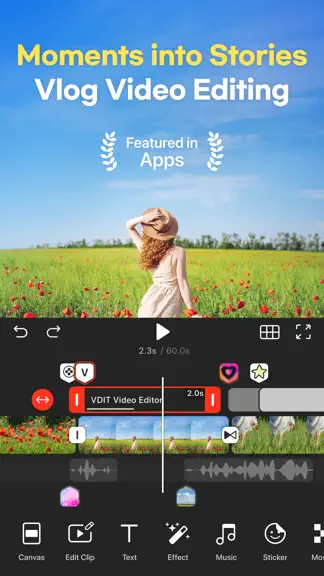
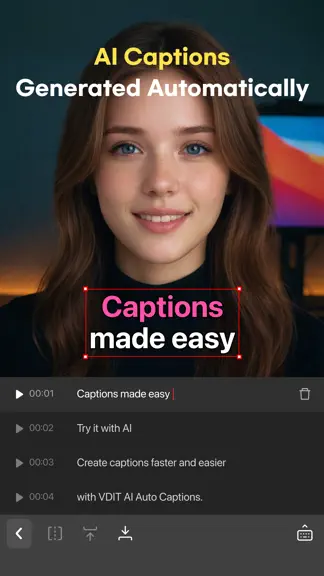
Pick your videos. VDIT does the editing. Create Reels, Shorts, vlogs and more, even if you're new to editing. Start with free basic tools. Use templates or AI Auto Cut to shape your video, then fine-tune the captions and music. From Face Blur to split-screen layouts, edit on iPhone and iPad with VDIT. Edit faster with AI - Auto Cut selects and edits highlights to match your chosen video length a…
Trends & analysis
Chart rank trend
US · overallWhy it's surfacing
Scout 11Ratings & velocity
★ 0 in windowRating distribution
95% positive · 10k ratingsGeographic reach
best rank · 0 storefrontsRevenue & downloads trend
ARPU $3In-app purchases
7 tiersUpdate history
10 updates tracked- v4.3.017d ago
- Improved AI Auto Edit: The powerful on-device LLM in iOS 27 enables more precise automatic editing. - Siri and Shortcuts: On iOS 27, use Siri in English or the Shortcuts app to quickly open key editing tools, or use the Continue Editing action to resume work on an existing project. - Beat Points: VDIT automatically detects beats in background music and displays Beat Points on the timeline, so you can sync clips and elements to the rhythm. - Video Stabilization: Reduce camera shake in your footage for smoother, more stable videos. - Added 18 New Background Music Tracks We’re always improving VDIT to deliver a better editing experience and reliable performance. If you have feedback or run into any issues, contact us anytime through the app.
- v4.2.21mo ago
- AI Auto Edit: let AI edit your clips based on your chosen video length and editing pace. Your selected music is then trimmed or looped to fit the finished video. - Save Clips Individually: export selected clips from your project as individual videos with your edits applied. - Edit Text Styles for Selected Text: apply bold, italic, underline, and strikethrough formatting to selected text. - Audio Boost Up to 500%: increase your audio volume up to 500%. - Template Search: find the templates you need faster. - Bug fixes and performance improvements. We’re always improving VDIT to deliver a better editing experience and reliable performance. If you have feedback or run into any issues, contact us anytime through the app.
- v4.2.11mo ago
- AI Auto Edit: let AI edit your clips based on your chosen video length and editing pace. Your selected music is then trimmed or looped to fit the finished video. - Save Clips Individually: export selected clips from your project as individual videos with your edits applied. - Edit Text Styles for Selected Text: apply bold, italic, underline, and strikethrough formatting to selected text. - Audio Boost Up to 500%: increase your audio volume up to 500%. - Template Search: find the templates you need faster. - Bug fixes and performance improvements. We’re always improving VDIT to deliver a better editing experience and reliable performance. If you have feedback or run into any issues, contact us anytime through the app.
- v4.2.01mo ago
- AI Auto Edit: let AI edit your clips based on your chosen video length and editing pace. Your selected music is then trimmed or looped to fit the finished video. - Save Clips Individually: export selected clips from your project as individual videos with your edits applied. - Edit Text Styles for Selected Text: apply bold, italic, underline, and strikethrough formatting to selected text. - Audio Boost Up to 500%: increase your audio volume up to 500%. - Template Search: find the templates you need faster. We’re always improving VDIT to deliver a better editing experience and reliable performance. If you have feedback or run into any issues, contact us anytime through the app.
- v4.1.42mo ago
- 6 New Background Music Tracks: add fresh music for cheerful, travel, and romantic videos. - Bug fixes and performance improvements VDIT is continuously improving to provide a better editing experience and stable service. If you have any feedback or issues, please contact us anytime via [VDIT Help > Contact Us].
VDIT - Video Caption Editor — FAQ
How much money does VDIT - Video Caption Editor make?
According to AppCurrents estimates, VDIT - Video Caption Editor generates approximately $4k–$22k per month (medium confidence), modeled from its the App Store chart performance, rating velocity, and monetization signals.
How many downloads does VDIT - Video Caption Editor get?
VDIT - Video Caption Editor sees an estimated 1k–6k downloads per month on the App Store, per AppCurrents modeling.
Is VDIT - Video Caption Editor free?
VDIT - Video Caption Editor is free to download on the App Store, monetizing through in-app purchases.
What is VDIT - Video Caption Editor's rating?
VDIT - Video Caption Editor holds a 4.79-star average from 9,831 ratings on the App Store.
When was VDIT - Video Caption Editor released?
VDIT - Video Caption Editor launched on the App Store on 09.03.2020. Its latest version shipped 15.09.2026.


