
Toon Photo Editor: Clip2Comic
Toon Photo Editor: Clip2Comic generates an estimated $5k–$22k/month in revenue from 22k–89k downloads/month on the App Store, according to AppCurrents estimates (updated 2026-06-10).
| Est. revenue / month | $5k–$22k |
|---|---|
| Est. downloads / month | 22k–89k |
| Estimate confidence | medium |
| Pricing | Free + IAP |
| Rating | 4.79 ★ (41,378 ratings) |
| Category | Photo & Video |
| Released | 31.07.2014 |
| App last updated | 08.06.2026 |
| Platform | iOS |
Modeled monthly estimate · medium confidence

About
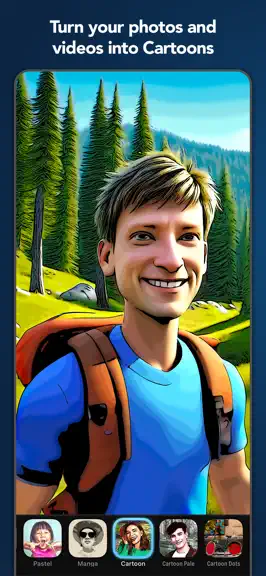
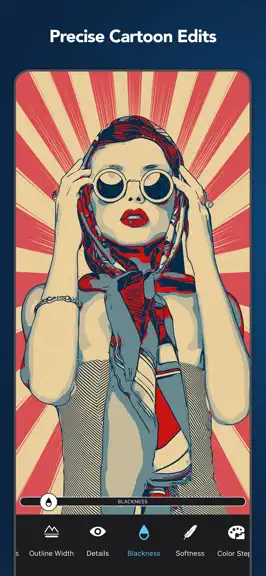
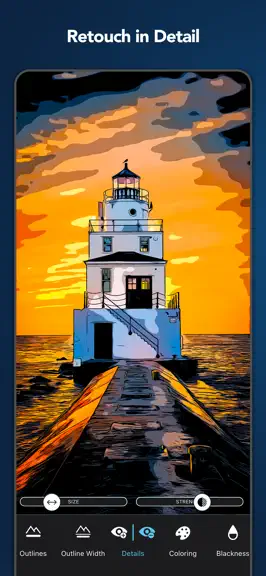
Turn your photos and videos into cartoons, comics, and caricatures — fun, high-quality art that makes everyone smile. Clip2Comic transforms your images into playful cartoon and comic creations — right on your iPhone, iPad, or Mac. Turn family photos into comic book art, transform travel snapshots and cityscapes into illustrated scenes, or create coloring pages for kids. From portraits to landscap…
Trends & analysis
Chart rank trend
US · overallWhy it's surfacing
Scout 12Reviews & velocity
★ 0 in windowRating distribution
95% positive · 41k ratingsGeographic reach
best rank · 0 storefrontsRevenue & downloads trend
ARPU $0In-app purchases
6 tiersUpdate history
2 updates tracked- v8.0.32d ago
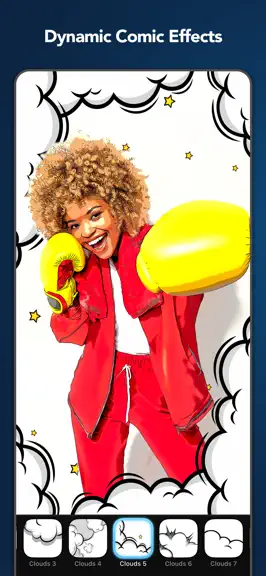
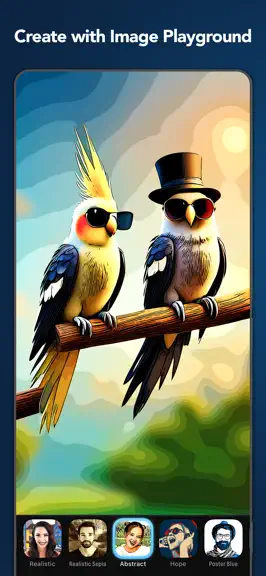
Introducing Projects This update introduces the new Projects feature. You can now save your edits as projects, allowing you to return and continue your creative work at any time. To enhance usability, we have redesigned the start and finish screens for improved project management and clarity. Projects are automatically synchronized across your devices via iCloud, ensuring seamless access wherever you work. Resume Your Last Editing Session With this update, you can now pick up right where you left off. Our app remembers your unfinished edits, so even if you close it, you can return and continue your work seamlessly. This is the first step toward our upcoming Projects feature. OS 26 and UI improvements We’ve updated the app to run smoothly on the latest operating systems. You’ll notice better performance and improved stability. We also introduce a new fresh look with Liquid Glass. Several screens now feature the new Liquid Glass UI, giving your artwork more space and a cleaner editing experience. Improved Zoom & Canvas Placement We’ve redesigned the zoom view, so your canvas is easier to position — no more sliders getting in the way of your edits! Comic Panels Elevate your artwork with professionally curated digital panel styles, perfect for showcasing your creations in a virtual gallery, capturing attention on social media, or adding the final touch to your masterpiece. Explore a handpicked collection designed for perfect comic panel aesthetics. More Precision and Control We've refined all sliders for better control and understandability. You can now see exact values and reset them easily—just double-tap the slider or tap the default value. The signature tool has also been improved, allowing you to move, rotate, and scale your signature freely with touch gestures. Dynamic Comic Effects Give your edits extra flair with new decorations! Add authentic comic speed lines or playful cartoon clouds, then customize their style to match your vision. Custom Signatures You can now add your own logo, watermark, or signature to your artwork. Simply load your own signature from Files or Photos. Unleash Your Creativity! Discover our exciting new tools designed to give you enhanced creative control over your Color filters. Plus, you now have the power to retouch every tool, old and new, for even more precision and personalization. Streamline Your Edits! We’ve organized your favorite photo adjustment tools —like contrast and saturation— into a single, easy-to-access menu for a smoother editing experience. Plus, every photo adjustment tool is now fully retouchable, giving you ultimate control over your edits. UX Improvements We've made significant improvements across all platforms to enhance your experience. The user interface is now more intuitive, with features like hover support for iPad and improved Retouch Tools with a clear visual indicator of the retouch area. macOS Support Our app is now a native macOS app, offering enhanced performance and features. We've expanded device compatibility to include Intel Macs, ensuring a wider range of users can enjoy the app. To streamline your workflow, we've optimized the user experience with keyboard shortcuts, intuitive navigation, and a sleek, native macOS design. Plus, seamless Finder and file-system integration makes loading and saving images a breeze. Image Playground** Produce fun, original images in seconds with Image Playground directly on your device. Create entirely new images based on descriptions, with suggested concepts and styles such as illustration and animation. Use our app to turn your creations into high-quality art effortlessly. The latest version contains bug fixes and performance improvements. If you have any questions or feedback for us, please feel free to send us an email at [email protected]. Our team is on hand 24 hours a day, so we’ll get right on it. ** Image playground is available on devices that support Apple Intelligence, only.
- v8.0.229d ago
Introducing Projects This update introduces the new Projects feature. You can now save your edits as projects, allowing you to return and continue your creative work at any time. To enhance usability, we have redesigned the start and finish screens for improved project management and clarity. Projects are automatically synchronized across your devices via iCloud, ensuring seamless access wherever you work. Resume Your Last Editing Session With this update, you can now pick up right where you left off. Our app remembers your unfinished edits, so even if you close it, you can return and continue your work seamlessly. This is the first step toward our upcoming Projects feature. OS 26 and UI improvements We’ve updated the app to run smoothly on the latest operating systems. You’ll notice better performance and improved stability. We also introduce a new fresh look with Liquid Glass. Several screens now feature the new Liquid Glass UI, giving your artwork more space and a cleaner editing experience. Improved Zoom & Canvas Placement We’ve redesigned the zoom view, so your canvas is easier to position — no more sliders getting in the way of your edits! Comic Panels Elevate your artwork with professionally curated digital panel styles, perfect for showcasing your creations in a virtual gallery, capturing attention on social media, or adding the final touch to your masterpiece. Explore a handpicked collection designed for perfect comic panel aesthetics. More Precision and Control We've refined all sliders for better control and understandability. You can now see exact values and reset them easily—just double-tap the slider or tap the default value. The signature tool has also been improved, allowing you to move, rotate, and scale your signature freely with touch gestures. Dynamic Comic Effects Give your edits extra flair with new decorations! Add authentic comic speed lines or playful cartoon clouds, then customize their style to match your vision. Custom Signatures You can now add your own logo, watermark, or signature to your artwork. Simply load your own signature from Files or Photos. Unleash Your Creativity! Discover our exciting new tools designed to give you enhanced creative control over your Color filters. Plus, you now have the power to retouch every tool, old and new, for even more precision and personalization. Streamline Your Edits! We’ve organized your favorite photo adjustment tools —like contrast and saturation— into a single, easy-to-access menu for a smoother editing experience. Plus, every photo adjustment tool is now fully retouchable, giving you ultimate control over your edits. UX Improvements We've made significant improvements across all platforms to enhance your experience. The user interface is now more intuitive, with features like hover support for iPad and improved Retouch Tools with a clear visual indicator of the retouch area. macOS Support Our app is now a native macOS app, offering enhanced performance and features. We've expanded device compatibility to include Intel Macs, ensuring a wider range of users can enjoy the app. To streamline your workflow, we've optimized the user experience with keyboard shortcuts, intuitive navigation, and a sleek, native macOS design. Plus, seamless Finder and file-system integration makes loading and saving images a breeze. Image Playground** Produce fun, original images in seconds with Image Playground directly on your device. Create entirely new images based on descriptions, with suggested concepts and styles such as illustration and animation. Use our app to turn your creations into high-quality art effortlessly. The latest version contains bug fixes and performance improvements. If you have any questions or feedback for us, please feel free to send us an email at [email protected]. Our team is on hand 24 hours a day, so we’ll get right on it. ** Image playground is available on devices that support Apple Intelligence, only.
Toon Photo Editor: Clip2Comic — FAQ
How much money does Toon Photo Editor: Clip2Comic make?
According to AppCurrents estimates, Toon Photo Editor: Clip2Comic generates approximately $5k–$22k per month (medium confidence), modeled from its the App Store chart performance, rating velocity, and monetization signals.
How many downloads does Toon Photo Editor: Clip2Comic get?
Toon Photo Editor: Clip2Comic sees an estimated 22k–89k downloads per month on the App Store, per AppCurrents modeling.
Is Toon Photo Editor: Clip2Comic free?
Toon Photo Editor: Clip2Comic is free to download on the App Store, monetizing through in-app purchases.
What is Toon Photo Editor: Clip2Comic's rating?
Toon Photo Editor: Clip2Comic holds a 4.79-star average from 41,378 ratings on the App Store.
When was Toon Photo Editor: Clip2Comic released?
Toon Photo Editor: Clip2Comic launched on the App Store on 31.07.2014. Its latest version shipped 08.06.2026.
Apps like Toon Photo Editor: Clip2Comic
See all alternatives → YouTubePhoto & Video · $33M–$140M/mo
 SnapchatPhoto & Video · $29M–$120M/mo
 CapCut: Photo & Video EditorPhoto & Video · $24M–$99M/mo
 Canva: AI Video & Photo EditorPhoto & Video · $23M–$94M/mo
 Facetune: Photo & Video EditorPhoto & Video · $21M–$87M/mo
 FaceApp: Perfect Face EditorPhoto & Video · $20M–$83M/mo