
Myro:Home Pro for Leviton/HAI
Myro:Home Pro for Leviton/HAI generates an estimated $30–$200/month in revenue from 10–50 downloads/month on the App Store, according to AppCurrents estimates (updated 2026-08-02).
| Est. revenue / month | $30–$200 |
|---|---|
| Est. downloads / month | 10–50 |
| Estimate confidence | low |
| Pricing | Free + IAP |
| Rating | 3.00 ★ (2 ratings) |
| Category | Lifestyle |
| Released | 12.03.2026 |
| App last updated | 09.07.2026 |
| Platform | iOS |
Modeled monthly estimate · rating velocity · low confidence

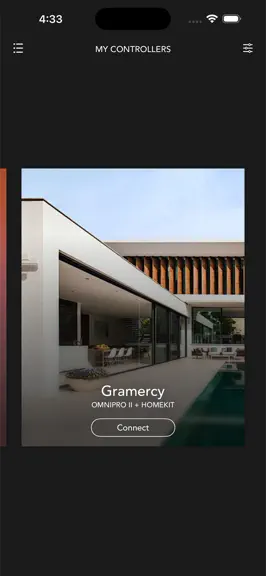
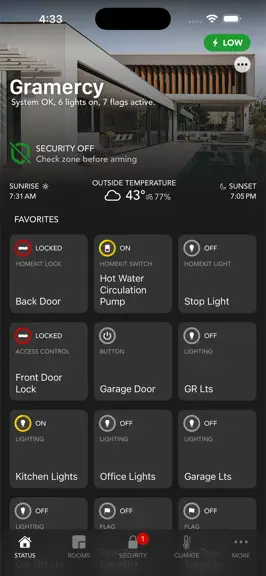
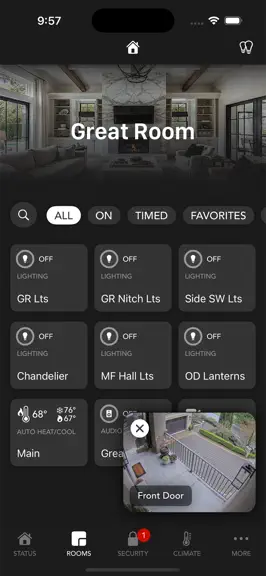
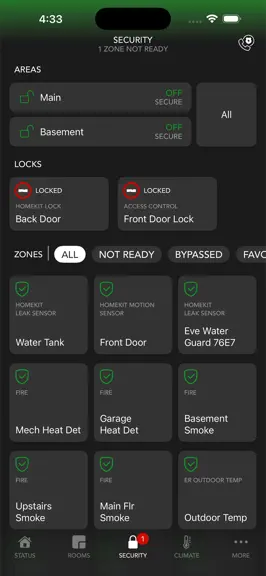
About
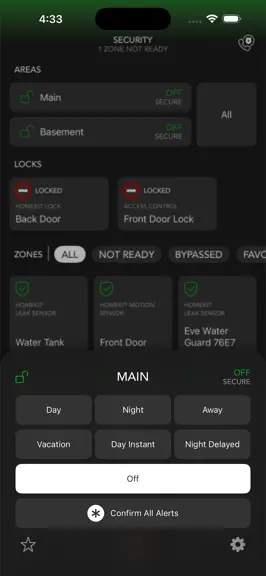
The most powerful way to control your smart home. Myro:Home Pro, the next generation of Myro:Home, brings HAI and Leviton automation together with Apple HomeKit — so every device in your home lives in one place. For more than a decade, Myro:Home has been trusted by the HAI and Leviton community to keep their Omni and Lumina home automation systems running and looking beautifully. Now it’s going…
Trends & analysis
Chart rank trend
US · overallWhy it's surfacing
Scout 23Ratings & velocity
★ 0 in windowRating distribution
50% positive · 2 ratingsGeographic reach
best rank · 0 storefrontsRevenue & downloads trend
ARPU $4In-app purchases
4 tiersUpdate history
2 updates tracked- v1.1926d ago
Tiles now respond the instant you tap. This update focuses on making the app feel faster and more honest — controls flip immediately, loading indicators stay truthful, and audio and HomeKit get some overdue fixes. Latest Features: • Instant Tile Response — Tapping a light, blind, output, or flag now flips the tile immediately instead of waiting for the controller's reply. The ring spinner keeps going as a subtle "confirming…" indicator until the controller echoes back. • Automatic Revert — If the controller never confirms a command (weak signal, panel busy or offline), the tile snaps back to its previous state after a few seconds — so what you see always matches what your home is actually doing. Locks and scenes still wait for real confirmation before changing. • Truthful Refresh Shimmer — The loading shimmer shown when the app returns from the background no longer disappears before fresh status has actually arrived. It now stays up while the app is still reconnecting, so a tile that stops shimmering really is up to date. • Audio Control All, Fixed — The All On / All Off / All Mute / All Unmute buttons on the Audio tab now actually work. Mute and unmute are also smarter about system-specific commands (Russound, HAI, Nuvo, Xantech, Speaker Craft), and every commanded zone shows a spinner until the controller confirms. • Fewer False HomeKit Warnings — HomeKit tiles no longer flash the yellow "not responding" triangle while the app is still connecting to your accessories at launch. The warning now only appears if an accessory stays unreachable — brief Wi-Fi blips won't trigger it either. • Snappier Everywhere — Because these changes live in the control layer, CarPlay, the detail sheet, and the All Lights / All Blinds screens all pick up the instant response too. • Bug fixes and stability improvements throughout the app.
- v1.182mo ago
Latest Features: • Fixed a crash some users hit when opening a HomeKit accessory's detail sheet (and the same pattern in a few other detail views). • Watch Audio Next / Previous — Added next-track and previous-track buttons to the Apple Watch audio control screen, right below the existing play/pause/stop transport row. • Smarter Watch Refresh — When you open the Watch app, the iPhone now actively wakes the controller connection and re-fetches status before sending favorites over — no more stale tile states on wake. • Auto-Recovering Connection Alerts — If a "Could Not Connect" alert was up when you backgrounded the app, opening the app again now silently dismisses it and reconnects in the background instead of forcing you to tap OK. • CarPlay Reliability — Big cleanup of CarPlay error handling: "Connection Error" Retry now actually reconnects to your last controller (with a Reconnecting screen and a 15s timeout), the bogus "Device Error" alert that blocked normal taps on lights/security/thermostats is gone, the App Not Ready and Timer Options sheets are recoverable instead of dead-ends, and stuck-tile states auto-clear after a short while. • Cleaner Home Tab — Newly added HomeKit rooms no longer jump into Favorites or Recents on the iPhone Home tab.. • Bug fixes and stability improvements throughout the app.
Myro:Home Pro for Leviton/HAI — FAQ
How much money does Myro:Home Pro for Leviton/HAI make?
According to AppCurrents estimates, Myro:Home Pro for Leviton/HAI generates approximately $30–$200 per month (low confidence), modeled from its the App Store chart performance, rating velocity, and monetization signals.
How many downloads does Myro:Home Pro for Leviton/HAI get?
Myro:Home Pro for Leviton/HAI sees an estimated 10–50 downloads per month on the App Store, per AppCurrents modeling.
Is Myro:Home Pro for Leviton/HAI free?
Myro:Home Pro for Leviton/HAI is free to download on the App Store, monetizing through in-app purchases.
What is Myro:Home Pro for Leviton/HAI's rating?
Myro:Home Pro for Leviton/HAI holds a 3.00-star average from 2 ratings on the App Store.
When was Myro:Home Pro for Leviton/HAI released?
Myro:Home Pro for Leviton/HAI launched on the App Store on 12.03.2026. Its latest version shipped 09.07.2026.


