
MuteCast
MuteCast generates an estimated $6k–$110k/month in revenue from 5k–19k downloads/month on the App Store, according to AppCurrents estimates (updated 2026-10-02).
| Est. revenue / month | $6k–$110k |
|---|---|
| Est. downloads / month | 5k–19k |
| Estimate confidence | medium |
| Pricing | Paid $3.99 |
| Rating | 0.00 ★ (0 ratings) |
| Category | News |
| Best chart rank | #6 News Paid |
| Released | 12.05.2026 |
| App last updated | 23.09.2026 |
| Platform | iOS |
Modeled monthly estimate · rating velocity · medium confidence




About
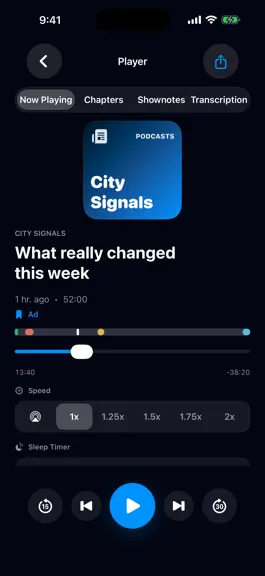
ADS OUT. PODCASTS ON. Listen for the conversations, stories and ideas. MuteCast combines a podcast player with transparent on-device segment detection and Auto-Skip. AUTO-SKIP—YOU DECIDE Detect likely ads, self-promos, donation appeals, intros and outros on your device. Choose which types may be skipped for each podcast; other types play normally. Detection draws on available transcripts, chapter…
Trends & analysis
Chart rank trend
US · categoryWhy it's surfacing
Scout 35Ratings & velocity
★ 0 in windowGeographic reach
best rank · 1 storefrontRevenue & downloads trend
ARPU $3Update history
9 updates tracked- v1.9.18d ago
1.9.1: Auto-Skip confirms a successful jump before reporting it, with retry and recovery when needed. Short ads and self-promotions detected with very high confidence can be skipped sooner while analysis continues; your settings still apply. Add multiple episodes to the queue with the new visible plus button. New Cut Wave app icon. 1.9: Stability and performance improvements. Music playback is initialized only when needed, reducing unnecessary system requests at app startup and during podcast playback. Long audio-analysis sections are processed in smaller steps. Large music libraries are sorted more efficiently, and background audio analysis controls CPU usage to reduce load. Compatibility adjustments for the latest Apple SDKs. 1.8.7: More precise ad detection: improved comparison of local and publisher transcripts, including mixed passages, and better timing of automatic skips. Sponsor hints in show notes and linked sponsor lists now inform analysis together with spoken promotional content; a brand mention alone is not enough. Intros and outros are restricted to plausible positions near the episode’s beginning and end, with tighter length limits. Reanalysis refines automatic markers while preserving manual corrections. When you return to the app, pending feed updates, eligible downloads, transcription and analysis are resumed more reliably, respecting your network and download settings. Transcripts remain visible while new sections arrive. Navigation and list preparation on Mac are more responsive. Download-result messages now appear in the active settings screen. 1.8.6: Downloaded is now part of My Lists: episodes show artwork and their order can be changed and saved. When enabled, Silence Reduction shortens pauses without altering voices, with global and per-podcast controls; Time Saved reports the result separately. The new Skip History explains automatic skips, returns to the original position, and applies label corrections to future episodes. Search every transcript in the Transcript Library, jump to a match, and share quotes. Notifications for new episodes, completed downloads, and analyses can be controlled per podcast. Eligible episodes from the last seven days are automatically queued after a feed refresh as soon as your network rules allow. Music opens from the last saved state and adds a full-screen player, accurate seeking, queue, previous/next, shuffle, and repeat; CarPlay adds music browsing and transport controls. Player bars no longer cover actions, large lists respond faster, and Add Feed is now directly visible in Podcasts. 1.8: Major reliability and detection-precision update. Ads, self-promotion, donation appeals, intros, and outros are detected more accurately with stricter confirmation and better segment boundaries. The queue now explains initial analysis, audio matching, and progress more clearly, while interrupted work resumes more reliably. Downloaded and analyzed episodes remain unchanged when feeds update. Repeated downloads and duplicate analysis have been fixed. Playback, iCloud sync, stability, and performance are improved. New on Apple Watch: the MuteCast complication opens the app from your watch face and shows playback progress plus detected segments in color. Changes to podcast subscriptions now appear more reliably in the library. Search checks local spelling variants first and falls back to international directories when needed. 1.7: More reliable refreshing, downloading, and preparation. 1.6: Analysis is easier to understand and the queue is easier to control. 1.5: Improved detection of ads and self-promotion. 1.4: Larger platform update with music library support, better Watch and CarPlay support, revised screenshots, and broader localization. 1.3: Better analysis and sharing features. 1.2: Stability and platform update for iOS and macOS. 1.1: Improved local transcription, more stable downloads, and smoother playback. 1.0: Initial version.
- v1.8.717d ago
1.8.7: More precise ad detection: improved comparison of local and publisher transcripts, including mixed passages, and better timing of automatic skips. Sponsor hints in show notes and linked sponsor lists now inform analysis together with spoken promotional content; a brand mention alone is not enough. Intros and outros are restricted to plausible positions near the episode’s beginning and end, with tighter length limits. Reanalysis refines automatic markers while preserving manual corrections. When you return to the app, pending feed updates, eligible downloads, transcription and analysis are resumed more reliably, respecting your network and download settings. Transcripts remain visible while new sections arrive. Navigation and list preparation on Mac are more responsive. Download-result messages now appear in the active settings screen. 1.8.6: Downloaded is now part of My Lists: episodes show artwork and their order can be changed and saved. When enabled, Silence Reduction shortens pauses without altering voices, with global and per-podcast controls; Time Saved reports the result separately. The new Skip History explains automatic skips, returns to the original position, and applies label corrections to future episodes. Search every transcript in the Transcript Library, jump to a match, and share quotes. Notifications for new episodes, completed downloads, and analyses can be controlled per podcast. Eligible episodes from the last seven days are automatically queued after a feed refresh as soon as your network rules allow. Music opens from the last saved state and adds a full-screen player, accurate seeking, queue, previous/next, shuffle, and repeat; CarPlay adds music browsing and transport controls. Player bars no longer cover actions, large lists respond faster, and Add Feed is now directly visible in Podcasts. 1.8: Major reliability and detection-precision update. Ads, self-promotion, donation appeals, intros, and outros are detected more accurately with stricter confirmation and better segment boundaries. The queue now explains initial analysis, audio matching, and progress more clearly, while interrupted work resumes more reliably. Downloaded and analyzed episodes remain unchanged when feeds update. Repeated downloads and duplicate analysis have been fixed. Playback, iCloud sync, stability, and performance are improved. New on Apple Watch: the MuteCast complication opens the app from your watch face and shows playback progress plus detected segments in color. Changes to podcast subscriptions now appear more reliably in the library. Search checks local spelling variants first and falls back to international directories when needed. Feeds refresh over Wi‑Fi even when mobile feed data is off. Background transitions and saving changes are more reliable. Meet the clearer Listening & Learning cockpit on iPhone and iPad. Task-based help links to the PDF manual in your language. New: red and yellow controls in the player let you mark the current transcript block as an ad or self-promo on Apple Watch, iPhone, iPad, and Mac. Skip another 30 seconds within 10 seconds and MuteCast extends the same block, saving the full passage as a reusable pattern. iMessage: Now Playing · Recently Played · Episode Position / Episode Start · Chapters & Bookmarks · TRANSCRIPT · PODCAST RECOMMENDATION. 1.7: More reliable refreshing, downloading, and preparation. 1.6: Analysis is easier to understand and the queue is easier to control. 1.5: Improved detection of ads and self-promotion. 1.4: Larger platform update with music library support, better Watch and CarPlay support, revised screenshots, and broader localization. 1.3: Better analysis and sharing features. 1.2: Stability and platform update for iOS and macOS. 1.1: Improved local transcription, more stable downloads, and smoother playback. 1.0: Initial version.
- v1.8.51mo ago
1.8.5: Changes to podcast subscriptions now appear more reliably in the library. Search checks local spelling variants first and falls back to international directories when needed. Feeds refresh over Wi‑Fi even when mobile feed data is off. Background transitions and saving changes are more reliable. 1.8: Major reliability and detection-precision update. Ads, self-promotion, donation appeals, intros, and outros are detected more accurately with stricter confirmation and better segment boundaries. The queue now explains initial analysis, audio matching, and progress more clearly, while interrupted work resumes more reliably. Downloaded and analyzed episodes remain unchanged when feeds update. Repeated downloads and duplicate analysis have been fixed. Playback, iCloud sync, stability, and performance are improved. New on Apple Watch: the MuteCast complication opens the app from your watch face and shows playback progress plus detected segments in color. 1.7: More reliable refreshing, downloading, and preparation. 1.6: Analysis is easier to understand and the queue is easier to control. 1.5: Improved detection of ads and self-promotion. 1.4: Larger platform update with music library support, better Watch and CarPlay support, revised screenshots, and broader localization. 1.3: Better analysis and sharing features. 1.2: Stability and platform update for iOS and macOS. 1.1: Improved local transcription, more stable downloads, and smoother playback. 1.0: Initial version.
- v1.8.41mo ago
1.8.4: Meet the clearer Listening & Learning cockpit on iPhone and iPad. A guided start shows how to add a podcast, mark an ad or self-promotion, and let MuteCast learn for later episodes. Each podcast now has a compact learning card with detection and preparation status, enabled Auto-Skip types, known patterns, and the recommended next step. Manual marks confirm the type and skipped duration. After an automatic skip, “Why?” explains the decision and lets you undo it as a local correction. Task-based help links to the PDF manual in your language. Accessibility and reliability are improved. This also includes the 1.8.3 search and feed fixes: RSS links with a trailing period and alternate spellings are recognized, stale directory results are avoided, and interrupted work resumes without duplicate queue runs. 1.8.3: Search, app launch, and analysis are more reliable. Pasted RSS links are recognized even with an accidental trailing period, and alternate spellings are handled better. Interrupted transcription and analysis resume without duplicate queue runs. Background transitions and playback-position saving are more stable. iMessage: Now Playing · Recently Played · Episode Position / Episode Start · Chapters & Bookmarks · TRANSCRIPT · PODCAST RECOMMENDATION. 1.8.2: Stability and performance update. Feed refresh and analysis now use fewer resources and resume more cleanly after interruptions. Playback positions sync more reliably; if episode artwork is unavailable, the podcast cover is shown. This fallback also applies in the player, Mini Player, CarPlay, and system playback controls. New: red and yellow controls in the player let you mark the current transcript block as an ad or self-promo on Apple Watch, iPhone, iPad, and Mac. Skip another 30 seconds within 10 seconds and MuteCast extends the same block, saving the full passage as a reusable pattern. In CarPlay, the official More button opens Ad, Self-promo, and Auto-Skip information options. 1.8.1: Smoother playback and more reliable sync. CarPlay resumes after navigation prompts; transcription, analysis, and playback-position sync recover more reliably after interruptions. 1.8: Major reliability and detection-precision update. Ads, self-promotion, donation appeals, intros, and outros are detected more accurately with stricter confirmation and better segment boundaries. The queue now explains initial analysis, audio matching, and progress more clearly, while interrupted work resumes more reliably. Downloaded and analyzed episodes remain unchanged when feeds update. Repeated downloads and duplicate analysis have been fixed. Playback, iCloud sync, stability, and performance are improved. New on Apple Watch: the MuteCast complication opens the app from your watch face and shows playback progress plus detected segments in color. 1.7.3: Stability and detection update. 1.7.1: iOS maintenance update. 1.7: More reliable refreshing, downloading, and preparation. 1.6: Analysis is easier to understand and the queue is easier to control. 1.5: Improved detection of ads and self-promotion. 1.4: Larger platform update with music library support, better Watch and CarPlay support, revised screenshots, and broader localization. 1.3: Better analysis and sharing features. 1.2: Stability and platform update for iOS and macOS. 1.1: Improved local transcription, more stable downloads, and smoother playback. 1.0: Initial version.
- v1.8.11mo ago
1.0: Initial version. 1.1: Improved local transcription, more stable downloads, and smoother playback. The live transcript view is faster, the queue is more robust, and CarPlay plus the app interface have been further stabilized. 1.2: Stability and platform update for iOS and macOS. Improvements to background work, download behavior, the library, corrections, and performance. 1.3: Better analysis and sharing features. Feed refreshes run in a more controlled way, detected segments are handled more reliably, and episodes are easier to share from the app. 1.4: Larger platform update with music library support, better Watch and CarPlay support, revised screenshots, and broader localization. Also includes more improvements to analysis, artwork, synchronization, and presentation. 1.5: Improved detection of ads and self-promotion. MuteCast uses stronger text patterns, audio signals, context blocks, and Handoff information so known ad blocks can be detected and skipped more reliably. 1.6: Analysis is easier to understand and the queue is easier to control. Segments are sorted by type and confidence, details show more transcript context, Help explains the percentage values, and transcription and analysis now run as separate queues. Help now also explains why visible segments do not always auto-skip. 1.7: More reliable refreshing, downloading, and preparation. New episodes are automatically queued for transcription and analysis after download, queues recover more robustly after app or background interruptions, and duplicate jobs are avoided. Episodes you deleted manually are not downloaded again without your action. Ad detection uses more context from transcripts, show notes, known patterns, and podcast-provided transcripts. CarPlay, Auto-Skip announcements, chapter or five-minute jumps, and the Store screenshots have also been improved. 1.7.1: iOS maintenance update. Known text patterns, self-promotion, and other trusted segments are considered more reliably for Auto-Skip, even when an episode needs to be re-analysed later. Queue states, display states, and Store text have also been cleaned up. 1.7.3: Stability and detection update. Auto-Skip now rejects isolated short transcript matches without confirmed advertising context and follows long host-read sponsor messages until editorial content resumes, for up to five minutes. Background tasks and queues recover more safely after interruptions, and playback no longer loops around a skip. 1.8: Major reliability and detection-precision update. Ads, self-promotion, donation appeals, intros, and outros are detected more accurately with stricter confirmation and better segment boundaries. The queue now explains initial analysis, audio matching, and progress more clearly, while interrupted work resumes more reliably. Downloaded and analyzed episodes remain unchanged when feeds update. Repeated downloads and duplicate analysis have been fixed. Playback, iCloud sync, stability, and performance are improved. New on Apple Watch: the MuteCast complication opens the app from your watch face and shows playback progress plus detected segments in color. 1.8.1: Smoother playback and more reliable sync. CarPlay resumes after navigation prompts; transcription, analysis, and playback-position sync recover more reliably after interruptions.
MuteCast — FAQ
How much money does MuteCast make?
According to AppCurrents estimates, MuteCast generates approximately $6k–$110k per month (medium confidence), modeled from its the App Store chart performance, rating velocity, and monetization signals.
How many downloads does MuteCast get?
MuteCast sees an estimated 5k–19k downloads per month on the App Store, per AppCurrents modeling.
Is MuteCast free?
MuteCast is a paid app priced at $3.99 on the App Store.
When was MuteCast released?
MuteCast launched on the App Store on 12.05.2026. Its latest version shipped 23.09.2026.


