
iCatcher! Podcast App
iCatcher! Podcast App generates an estimated $4k–$71k/month in revenue from 3k–11k downloads/month on the App Store, according to AppCurrents estimates (updated 2026-10-02).
| Est. revenue / month | $4k–$71k |
|---|---|
| Est. downloads / month | 3k–11k |
| Estimate confidence | medium |
| Pricing | Paid $4.99 |
| Rating | 4.70 ★ (1,880 ratings) |
| Category | News |
| Best chart rank | #18 News Paid |
| Released | 15.03.2011 |
| App last updated | 23.09.2026 |
| Platform | iOS |
Modeled monthly estimate · rating velocity · medium confidence


About
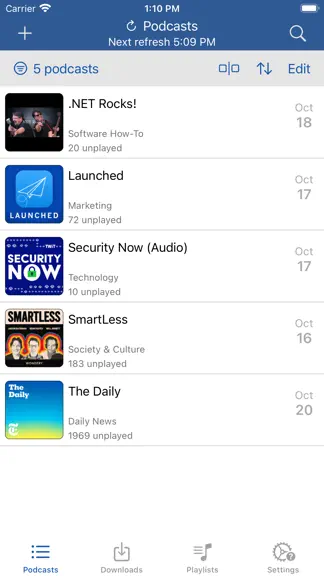
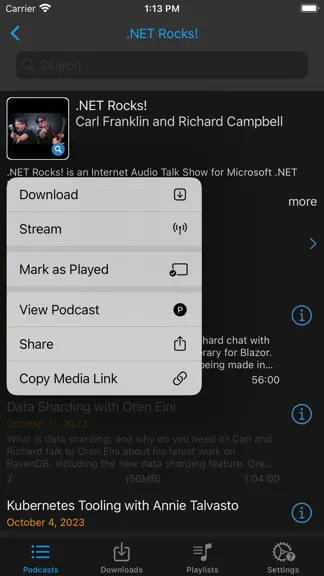
Download, listen, watch, and relish your favorite podcasts. FEATURES - Subscribe to your preferred podcasts within the app and manage them conveniently. - Download episodes over WiFi or Cellular (available on devices with cellular capabilities). - Support for password-protected feeds. - Background refresh and download in the background. - Sync subscriptions, episode playback positions, and playli…
Trends & analysis
Chart rank trend
US · categoryWhy it's surfacing
Scout 18Ratings & velocity
★ -0.02 in windowRating distribution
93% positive · 2k ratingsGeographic reach
best rank · 1 storefrontRevenue & downloads trend
ARPU $3In-app purchases
4 tiersUpdate history
12+ updates tracked- v15.1.18d ago
If you find iCatcher useful, please consider tipping in the help and settings tab, or share the app with your friends! Thanks! What’s New + Updates to better support the latest OS. + Adjusting the coloring of progress indicator to assist with identifying new/unplayed items. See episode status in help topics. + Now Playing screen (Experimental) adding ability to translate sections of a transcript as well as export as text file Bug fixes - fix for some slowness starting episodes. - various transcription improvements. - fix for deleting multiple downloads within a podcast and it would also delete the episode. - fix for next/previous episode navigation via headphones. - fix for certain crash scenarios. 15.0 - What’s new +Sleep timer enhancement. Settings tab, playback, Sleep Timer. New Alert on Sleep to present an app alert when the sleep timer expires. New Sleep Timer Action - Episode Ends that allows for specifying what happens when you use episode ends. Should stop (default) or pause. If pause, then it will also rewind by the rewind amount specified in sleep timer settings. +Added a sidebar option on iPad. +iOS 26+, Added the ability to generate [transcripts](transcripts.html). This uses Apple's built-in on-device transcription support. The episode file must be downloaded first, and transcription uses the language specified by the podcast. +Added a dedicated Search tab for finding new podcasts. +The Podcasts tab now has additional layout options, including multiple tile sizes and the traditional list view. +Updated Playlist Settings. iOS 26+, has the ability to set a playlist color and view the list of playlists in grid view. +The new podcast search gives more prominence to artwork. Tapping an episode now shows more detail, including episode artwork when available. +Added a new podcast default option under Settings, Podcast Defaults for after streaming. One option is Do Nothing, which leaves the streaming flag enabled. +Added Bonus and Trailer media types under Settings, Podcast Defaults, Allowed Media Types, so episodes marked as bonus content or trailers can be excluded from automatically becoming playable. +Added additional playback speed defaults within a podcast's settings. +Updated help viewer. For iOS 26+ users, added translate button to convert to your language of choice. +New onboarding view. Meant for fresh installs, but you can check it out by tapping that link. +Removed Siri shortcuts items under settings tab. Those are all available now as shortcuts actions. +New experimental feature to use a game controller to control certain aspects of the application. View the Settings tab, What’s New to view past updates. Follow me on x @joeisanerd and Mastodon [email protected]
- v15.119d ago
If you find iCatcher useful, please consider tipping in the help and settings tab, or share the app with your friends! Thanks! What’s New + On new now playing transcript view added context menu (press and hold) on a row to allow for copying the text. Bug fixes -fix for time codes in show notes on the new now playing (experimental, improved now playing view). -fix for rare crash. 15.0 - What’s new +Sleep timer enhancement. Settings tab, playback, Sleep Timer. New Alert on Sleep to present an app alert when the sleep timer expires. New Sleep Timer Action - Episode Ends that allows for specifying what happens when you use episode ends. Should stop (default) or pause. If pause, then it will also rewind by the rewind amount specified in sleep timer settings. +Added a sidebar option on iPad. +iOS 26+, Added the ability to generate [transcripts](transcripts.html). This uses Apple's built-in on-device transcription support. The episode file must be downloaded first, and transcription uses the language specified by the podcast. +Added a dedicated Search tab for finding new podcasts. +The Podcasts tab now has additional layout options, including multiple tile sizes and the traditional list view. +Updated Playlist Settings. iOS 26+, has the ability to set a playlist color and view the list of playlists in grid view. +The new podcast search gives more prominence to artwork. Tapping an episode now shows more detail, including episode artwork when available. +Added a new podcast default option under Settings, Podcast Defaults for after streaming. One option is Do Nothing, which leaves the streaming flag enabled. +Added Bonus and Trailer media types under Settings, Podcast Defaults, Allowed Media Types, so episodes marked as bonus content or trailers can be excluded from automatically becoming playable. +Added additional playback speed defaults within a podcast's settings. +Updated help viewer. For iOS 26+ users, added translate button to convert to your language of choice. +New onboarding view. Meant for fresh installs, but you can check it out by tapping that link. +Removed Siri shortcuts items under settings tab. Those are all available now as shortcuts actions. +New experimental feature to use a game controller to control certain aspects of the application. View the Settings tab, What’s New to view past updates. Follow me on x @joeisanerd and Mastodon [email protected]
- v15.0.1022d ago
If you find iCatcher useful, please consider tipping in the help and settings tab, or share the app with your friends! Thanks! What’s New + Apple watch now playing view added support for the hand gesture to toggle playback. + Added subscription export (OPML) while in the Recovery area. Bug fixes -fix for iCloud sync crash -fix for sync and podcast refresh that could cause some slow UI -fix for partially played episodes that are not ready to play not showing the progress -fix for dark mode issue when dark mode is turned on at the system level, but disabled in the app 15.0 - What’s new +Sleep timer enhancement. Settings tab, playback, Sleep Timer. New Alert on Sleep to present an app alert when the sleep timer expires. New Sleep Timer Action - Episode Ends that allows for specifying what happens when you use episode ends. Should stop (default) or pause. If pause, then it will also rewind by the rewind amount specified in sleep timer settings. +Added a sidebar option on iPad. +iOS 26+, Added the ability to generate [transcripts](transcripts.html). This uses Apple's built-in on-device transcription support. The episode file must be downloaded first, and transcription uses the language specified by the podcast. +Added a dedicated Search tab for finding new podcasts. +The Podcasts tab now has additional layout options, including multiple tile sizes and the traditional list view. +Updated Playlist Settings. iOS 26+, has the ability to set a playlist color and view the list of playlists in grid view. +The new podcast search gives more prominence to artwork. Tapping an episode now shows more detail, including episode artwork when available. +Added a new podcast default option under Settings, Podcast Defaults for after streaming. One option is Do Nothing, which leaves the streaming flag enabled. +Added Bonus and Trailer media types under Settings, Podcast Defaults, Allowed Media Types, so episodes marked as bonus content or trailers can be excluded from automatically becoming playable. +Added additional playback speed defaults within a podcast's settings. +Updated help viewer. For iOS 26+ users, added translate button to convert to your language of choice. +New onboarding view. Meant for fresh installs, but you can check it out by tapping that link. +Removed Siri shortcuts items under settings tab. Those are all available now as shortcuts actions. +New experimental feature to use a game controller to control certain aspects of the application. View the Settings tab, What’s New to view past updates. Follow me on x @joeisanerd and Mastodon [email protected]
- v15.0.926d ago
If you find iCatcher useful, please consider tipping in the help and settings tab, or share the app with your friends! Thanks! What’s New +Sleep timer enhancement. Settings tab, playback, Sleep Timer. New Alert on Sleep to present an app alert when the sleep timer expires. New Sleep Timer Action - Episode Ends that allows for specifying what happens when you use episode ends. Should stop (default) or pause. If pause, then it will also rewind by the rewind amount specified in sleep timer settings. Bug fixes -fix for crash on the mac. -fix for the screen not dimming based on the auto lock setting. 15.0 - What’s new +Added a sidebar option on iPad. +iOS 26+, Added the ability to generate [transcripts](transcripts.html). This uses Apple's built-in on-device transcription support. The episode file must be downloaded first, and transcription uses the language specified by the podcast. +Added a dedicated Search tab for finding new podcasts. +The Podcasts tab now has additional layout options, including multiple tile sizes and the traditional list view. +Updated Playlist Settings. iOS 26+, has the ability to set a playlist color and view the list of playlists in grid view. +The new podcast search gives more prominence to artwork. Tapping an episode now shows more detail, including episode artwork when available. +Added a new podcast default option under Settings, Podcast Defaults for after streaming. One option is Do Nothing, which leaves the streaming flag enabled. +Added Bonus and Trailer media types under Settings, Podcast Defaults, Allowed Media Types, so episodes marked as bonus content or trailers can be excluded from automatically becoming playable. +Added additional playback speed defaults within a podcast's settings. +Updated help viewer. For iOS 26+ users, added translate button to convert to your language of choice. +New onboarding view. Meant for fresh installs, but you can check it out by tapping that link. +Removed Siri shortcuts items under settings tab. Those are all available now as shortcuts actions. +New experimental feature to use a game controller to control certain aspects of the application. View the Settings tab, What’s New to view past updates. Follow me on x @joeisanerd and Mastodon [email protected]
- v15.0.828d ago
If you find iCatcher useful, please consider tipping in the help and settings tab, or share the app with your friends! Thanks! Bug Fixes - fix for mark as played within a podcast when selecting edit, select episode and mark as played when the episode is currently playing. - fix for Auto-Play on now playing setting not working. - fix for Tapping episode from builtin playlist pops back to playlists list. - fix for missing delete options for voice over action on episodes within a podcast. - fix for playlist settings not saving. - fix for now playing screen causing app to freeze. - fix for rare crashes. 15.0.5 - 15.0.7 Updatess What’s new - Playlists list view allows for selecting multiple playlists to delete - Podcasts tab badge setting now lets you see unplayed count as another badge. Values over 50 show as 50+ - iOS 18 visual updates. - Updated Now Playing View under experimental. It is labeled Improved Now Playing View and replaces the previous experimental version. - New shortcut action to refresh a single podcast or multiple podcasts - Within a podcast you can now select multiple episodes and then choose to share Bug Fixes - Fix for import subscription crash - fix for importing a playlist that was exported. - fix for local playback on the watch causing crash. - fix for cleanup temp data action. - fix for app settings visual display. - Fix for the dark theme colors. Downloaded items had the same info icon color as streaming making it difficult to distinguish - Fix for the Navigate to Shortcut Now Playing action - Other fixes for identified crashes 15.0 - What’s new +Added a sidebar option on iPad. +iOS 26+, Added the ability to generate [transcripts](transcripts.html). This uses Apple's built-in on-device transcription support. The episode file must be downloaded first, and transcription uses the language specified by the podcast. +Added a dedicated Search tab for finding new podcasts. +The Podcasts tab now has additional layout options, including multiple tile sizes and the traditional list view. +Updated Playlist Settings. iOS 26+, has the ability to set a playlist color and view the list of playlists in grid view. +The new podcast search gives more prominence to artwork. Tapping an episode now shows more detail, including episode artwork when available. +Added a new podcast default option under Settings, Podcast Defaults for after streaming. One option is Do Nothing, which leaves the streaming flag enabled. +Added Bonus and Trailer media types under Settings, Podcast Defaults, Allowed Media Types, so episodes marked as bonus content or trailers can be excluded from automatically becoming playable. +Added additional playback speed defaults within a podcast's settings. +Updated help viewer. For iOS 26+ users, added translate button to convert to your language of choice. +New onboarding view. Meant for fresh installs, but you can check it out by tapping that link. +Removed Siri shortcuts items under settings tab. Those are all available now as shortcuts actions. +New experimental feature to use a game controller to control certain aspects of the application. View the Settings tab, What’s New to view past updates. Follow me on x @joeisanerd and Mastodon [email protected]
iCatcher! Podcast App — FAQ
How much money does iCatcher! Podcast App make?
According to AppCurrents estimates, iCatcher! Podcast App generates approximately $4k–$71k per month (medium confidence), modeled from its the App Store chart performance, rating velocity, and monetization signals.
How many downloads does iCatcher! Podcast App get?
iCatcher! Podcast App sees an estimated 3k–11k downloads per month on the App Store, per AppCurrents modeling.
Is iCatcher! Podcast App free?
iCatcher! Podcast App is a paid app priced at $4.99 on the App Store.
What is iCatcher! Podcast App's rating?
iCatcher! Podcast App holds a 4.70-star average from 1,880 ratings on the App Store. It currently ranks #18 on the News paid chart.
When was iCatcher! Podcast App released?
iCatcher! Podcast App launched on the App Store on 15.03.2011. Its latest version shipped 23.09.2026.


