
TslaMirror
TslaMirror generates an estimated $5–$30/month in revenue from 10–60 downloads/month on the App Store, according to AppCurrents estimates (updated 2026-08-02).
| Est. revenue / month | $5–$30 |
|---|---|
| Est. downloads / month | 10–60 |
| Estimate confidence | low |
| Pricing | Free + IAP |
| Rating | 3.75 ★ (24 ratings) |
| Category | Utilities |
| Released | 11.12.2020 |
| App last updated | 19.07.2026 |
| Platform | iOS |
Modeled monthly estimate · rating velocity · low confidence
About
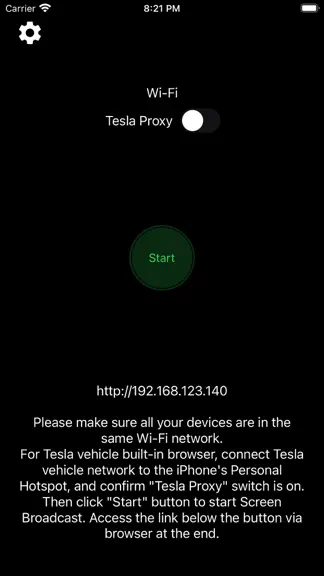
One-week free trial. TslaMirror is an app designed to mirror your iPhone apps to your Tesla’s built-in browser. - Supported apps include Waze, Google Maps, Apple Maps, YouTube, TikTok, Plex, and more. - DRM-protected apps, including but not limited to Netflix, Apple TV, YouTube TV, Amazon Prime Video, and Hulu, are not supported. Some DRM-protected apps may block video mirroring, resulting in a…
Trends & analysis
Chart rank trend
US · overallWhy it's surfacing
Scout 7Ratings & velocity
★ +0.05 in windowRating distribution
65% positive · 23 ratingsGeographic reach
best rank · 0 storefrontsRevenue & downloads trend
ARPU $0In-app purchases
2 tiersUpdate history
4 updates tracked- v9.6516d ago
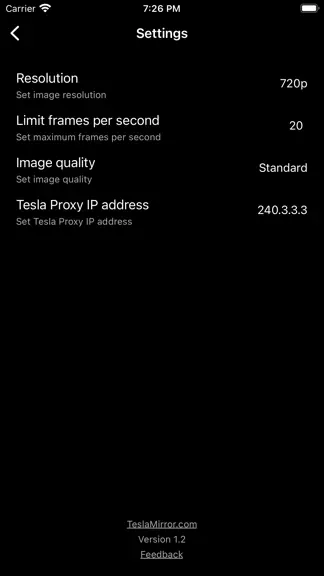
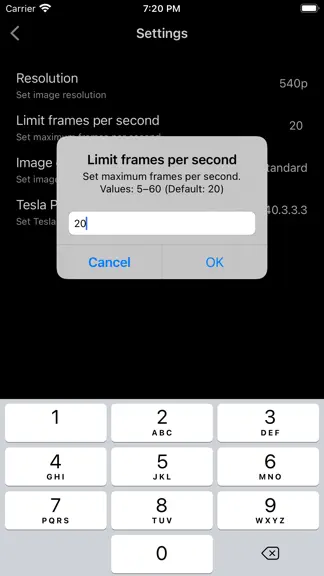
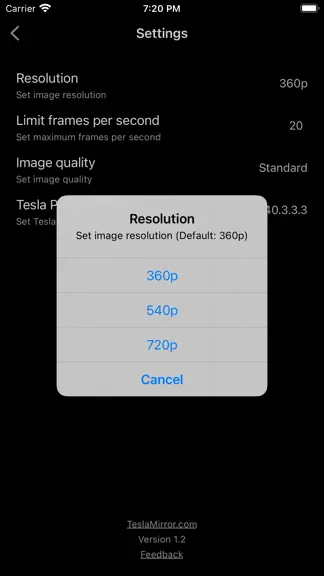
9.65: - Added Software and Hardware decoder selection for H.264 and H.265. Use the controls in the upper-right corner of the Tesla browser streaming page; touch the screen to show them if hidden. - Hardware decoding is generally recommended for smoother playback and better efficiency. If the browser does not support it or the video does not display correctly, try Software decoding. - If Software decoding is not smooth, try lowering the resolution and frame rate in the TslaMirror app settings. 9.64: - Performance improvements. - For Tesla in-car system software version 2025.38.11 and later, H.265 mirroring is now recommended for both MCU2 and MCU3. 9.25: - Added H.265 mirroring mode for improved video quality. - H.265 playback is supported on all MCU3 vehicles, and on MCU2 vehicles running Tesla software 2025.38.11 or later. - To switch modes, tap the Settings button in the top-right corner → “Mirroring mode”. - H.264 remains the default. On MCU3 (and supported MCU2 vehicles), H.265 is recommended. - On MCU3, H.265 enables smooth playback at 1080p@60 fps. - Resolution and frame-rate settings for the H.265/H.264 modes depend on your vehicle’s performance. For older Tesla models, use lower settings; for newer models, increase them gradually to suit your needs. 8.07: Siri Shortcuts support: Start Mirroring, Stop Mirroring, Start Proxy, Stop Proxy. 7.00: After careful investigation, it appears that the recent Tesla 2025.8.4 software update may have inadvertently impacted support for H.264 video streaming. - The updated H.264 mode is now compatible with Tesla’s 2025.8.4 software. - Due to limitations introduced in Tesla 2025.8.4, video playback performance in the new H.264 mode may be somewhat reduced compared with previous versions. - To achieve optimal streaming performance, consider lowering your “Resolution” and “Frames per second” settings. You can adjust these by tapping the Settings button in the top-left corner of the app. - To ensure the Tesla browser uses the latest version of a webpage, clear the vehicle’s browser data (as you would on a computer or phone) via Controls > Service > Clear Browser Data. Thank you for your understanding and patience. 6.00: - Starting with version 6.00, the audio transmission method has been completely updated and is no longer compatible with version 4.00. Tesla software versions 2024.45.32.1 and later no longer support the old method. - The new audio transmission method is comparable to Bluetooth audio and supports lossless audio. - Lossless audio specs: 44.1 kHz, stereo, 16-bit (CD quality). This is typically much better than Bluetooth or low-bitrate streaming audio. - These specs reflect the highest recording quality supported by iPhone. For best results, use music apps configured for lossless or higher-quality audio. - Lossless audio transmission is available only in H.264 mode, which includes a “Lossless Audio” option enabled by default that controls audio transmission to the browser. - Audio transmission depends on DRM restrictions set by third-party apps. If a third-party app allows screen recording and its audio is DRM-free, it can be transmitted normally. - To play audio in the browser, initial manual interaction is required (tap the audio button in the top-left corner). The button hides automatically after 30 seconds and reappears when the screen is touched. - During prolonged audio playback, latency may gradually increase. Tap the audio button in the top-left corner to restart audio and minimize latency. - For optimal transmission performance, we recommend using a 5G or 4G cellular signal along with a 5 GHz iPhone Wi-Fi hotspot (cellular signal and Wi-Fi frequency are separate parameters).
- v9.6426d ago
9.64: - Performance improvements. - For Tesla in-car system software version 2025.38.11 and later, H.265 mirroring is now recommended for both MCU2 and MCU3. 9.25: - Added H.265 mirroring mode for improved video quality. - H.265 playback is supported on all MCU3 vehicles, and on MCU2 vehicles running Tesla software 2025.38.11 or later. - To switch modes, tap the Settings button in the top-right corner → “Mirroring mode”. - H.264 remains the default. On MCU3 (and supported MCU2 vehicles), H.265 is recommended. - On MCU3, H.265 enables smooth playback at 1080p@60 fps. - Resolution and frame-rate settings for the H.265/H.264 modes depend on your vehicle’s performance. For older Tesla models, use lower settings; for newer models, increase them gradually to suit your needs. 8.07: Siri Shortcuts support: Start Mirroring, Stop Mirroring, Start Proxy, Stop Proxy. 8.06: - Enhanced H.264 performance on MCU3 (AMD Ryzen). MCU3 now supports up to 1080p@60fps. - MCU3: 720p@60fps is recommended, as 1080p requires higher network bandwidth. - MCU2 (Intel Atom): 540p@30fps is recommended. 7.06: - MCU1 (NVIDIA Tegra 3): Due to hardware limitations, this app is not recommended for use on MCU1 devices. We appreciate your understanding. 7.00: After careful investigation, it appears that the recent Tesla 2025.8.4 software update may have inadvertently impacted support for H.264 video streaming. - The updated H.264 mode is now compatible with Tesla’s 2025.8.4 software. - Due to limitations introduced in Tesla 2025.8.4, video playback performance in the new H.264 mode may be somewhat reduced compared with previous versions. - To achieve optimal streaming performance, consider lowering your “Resolution” and “Frames per second” settings. You can adjust these by tapping the Settings button in the top-left corner of the app. - To ensure the Tesla browser uses the latest version of a webpage, clear the vehicle’s browser data (as you would on a computer or phone) via Controls > Service > Clear Browser Data. Thank you for your understanding and patience. 6.00: - Starting with version 6.00, the audio transmission method has been completely updated and is no longer compatible with version 4.00. Tesla software versions 2024.45.32.1 and later no longer support the old method. - The new audio transmission method is comparable to Bluetooth audio and supports lossless audio. - Lossless audio specs: 44.1 kHz, stereo, 16-bit (CD quality). This is typically much better than Bluetooth or low-bitrate streaming audio. - These specs reflect the highest recording quality supported by iPhone. For best results, use music apps configured for lossless or higher-quality audio. - Lossless audio transmission is available only in H.264 mode, which includes a “Lossless Audio” option enabled by default that controls audio transmission to the browser. - Audio transmission depends on DRM restrictions set by third-party apps. If a third-party app allows screen recording and its audio is DRM-free, it can be transmitted normally. - To play audio in the browser, initial manual interaction is required (tap the audio button in the top-left corner). The button hides automatically after 30 seconds and reappears when the screen is touched. - During prolonged audio playback, latency may gradually increase. Tap the audio button in the top-left corner to restart audio and minimize latency. - For optimal transmission performance, we recommend using a 5G or 4G cellular signal along with a 5 GHz iPhone Wi-Fi hotspot (cellular signal and Wi-Fi frequency are separate parameters). 3.00: - Added support for the new H.264 mode.
- v9.631mo ago
9.63: - Performance improvements. - For Tesla in-car system software version 2025.38.11 and later, H.265 mirroring is now recommended for both MCU2 and MCU3. 9.25: - Added H.265 mirroring mode for improved video quality. - H.265 playback is supported on all MCU3 vehicles, and on MCU2 vehicles running Tesla software 2025.38.11 or later. - To switch modes, tap the Settings button in the top-right corner → “Mirroring mode”. - H.264 remains the default. On MCU3 (and supported MCU2 vehicles), H.265 is recommended. - On MCU3, H.265 enables smooth playback at 1080p@60 fps. - Resolution and frame-rate settings for the H.265/H.264 modes depend on your vehicle’s performance. For older Tesla models, use lower settings; for newer models, increase them gradually to suit your needs. 8.07: Siri Shortcuts support: Start Mirroring, Stop Mirroring, Start Proxy, Stop Proxy. 8.06: - Enhanced H.264 performance on MCU3 (AMD Ryzen). MCU3 now supports up to 1080p@60fps. - MCU3: 720p@60fps is recommended, as 1080p requires higher network bandwidth. - MCU2 (Intel Atom): 540p@30fps is recommended. 7.06: - MCU1 (NVIDIA Tegra 3): Due to hardware limitations, this app is not recommended for use on MCU1 devices. We appreciate your understanding. 7.00: After careful investigation, it appears that the recent Tesla 2025.8.4 software update may have inadvertently impacted support for H.264 video streaming. - The updated H.264 mode is now compatible with Tesla’s 2025.8.4 software. - Due to limitations introduced in Tesla 2025.8.4, video playback performance in the new H.264 mode may be somewhat reduced compared with previous versions. - To achieve optimal streaming performance, consider lowering your “Resolution” and “Frames per second” settings. You can adjust these by tapping the Settings button in the top-left corner of the app. - To ensure the Tesla browser uses the latest version of a webpage, clear the vehicle’s browser data (as you would on a computer or phone) via Controls > Service > Clear Browser Data. Thank you for your understanding and patience. 6.00: - Starting with version 6.00, the audio transmission method has been completely updated and is no longer compatible with version 4.00. Tesla software versions 2024.45.32.1 and later no longer support the old method. - The new audio transmission method is comparable to Bluetooth audio and supports lossless audio. - Lossless audio specs: 44.1 kHz, stereo, 16-bit (CD quality). This is typically much better than Bluetooth or low-bitrate streaming audio. - These specs reflect the highest recording quality supported by iPhone. For best results, use music apps configured for lossless or higher-quality audio. - Lossless audio transmission is available only in H.264 mode, which includes a “Lossless Audio” option enabled by default that controls audio transmission to the browser. - Audio transmission depends on DRM restrictions set by third-party apps. If a third-party app allows screen recording and its audio is DRM-free, it can be transmitted normally. - To play audio in the browser, initial manual interaction is required (tap the audio button in the top-left corner). The button hides automatically after 30 seconds and reappears when the screen is touched. - During prolonged audio playback, latency may gradually increase. Tap the audio button in the top-left corner to restart audio and minimize latency. - For optimal transmission performance, we recommend using a 5G or 4G cellular signal along with a 5 GHz iPhone Wi-Fi hotspot (cellular signal and Wi-Fi frequency are separate parameters). 3.00: - Added support for the new H.264 mode.
- v9.622mo ago
9.62: - Performance improvements. - For Tesla in-car system software version 2025.38.11 and later, H.265 mirroring is now recommended for both MCU2 and MCU3. 9.25: - Added H.265 mirroring mode for improved video quality. - H.265 playback is supported on all MCU3 vehicles, and on MCU2 vehicles running Tesla software 2025.38.11 or later. - To switch modes, tap the Settings button in the top-right corner → “Mirroring mode”. - H.264 remains the default. On MCU3 (and supported MCU2 vehicles), H.265 is recommended. - On MCU3, H.265 enables smooth playback at 1080p@60 fps. - Resolution and frame-rate settings for the H.265/H.264 modes depend on your vehicle’s performance. For older Tesla models, use lower settings; for newer models, increase them gradually to suit your needs. 8.07: Siri Shortcuts support: Start Mirroring, Stop Mirroring, Start Proxy, Stop Proxy. 8.06: - Enhanced H.264 performance on MCU3 (AMD Ryzen). MCU3 now supports up to 1080p@60fps. - MCU3: 720p@60fps is recommended, as 1080p requires higher network bandwidth. - MCU2 (Intel Atom): 540p@30fps is recommended. 7.06: - MCU1 (NVIDIA Tegra 3): Due to hardware limitations, this app is not recommended for use on MCU1 devices. We appreciate your understanding. 7.00: After careful investigation, it appears that the recent Tesla 2025.8.4 software update may have inadvertently impacted support for H.264 video streaming. - The updated H.264 mode is now compatible with Tesla’s 2025.8.4 software. - Due to limitations introduced in Tesla 2025.8.4, video playback performance in the new H.264 mode may be somewhat reduced compared with previous versions. - To achieve optimal streaming performance, consider lowering your “Resolution” and “Frames per second” settings. You can adjust these by tapping the Settings button in the top-left corner of the app. - To ensure the Tesla browser uses the latest version of a webpage, clear the vehicle’s browser data (as you would on a computer or phone) via Controls > Service > Clear Browser Data. Thank you for your understanding and patience. 6.00: - Starting with version 6.00, the audio transmission method has been completely updated and is no longer compatible with version 4.00. Tesla software versions 2024.45.32.1 and later no longer support the old method. - The new audio transmission method is comparable to Bluetooth audio and supports lossless audio. - Lossless audio specs: 44.1 kHz, stereo, 16-bit (CD quality). This is typically much better than Bluetooth or low-bitrate streaming audio. - These specs reflect the highest recording quality supported by iPhone. For best results, use music apps configured for lossless or higher-quality audio. - Lossless audio transmission is available only in H.264 mode, which includes a “Lossless Audio” option enabled by default that controls audio transmission to the browser. - Audio transmission depends on DRM restrictions set by third-party apps. If a third-party app allows screen recording and its audio is DRM-free, it can be transmitted normally. - To play audio in the browser, initial manual interaction is required (tap the audio button in the top-left corner). The button hides automatically after 30 seconds and reappears when the screen is touched. - During prolonged audio playback, latency may gradually increase. Tap the audio button in the top-left corner to restart audio and minimize latency. - For optimal transmission performance, we recommend using a 5G or 4G cellular signal along with a 5 GHz iPhone Wi-Fi hotspot (cellular signal and Wi-Fi frequency are separate parameters). 3.00: - Added support for the new H.264 mode.
TslaMirror — FAQ
How much money does TslaMirror make?
According to AppCurrents estimates, TslaMirror generates approximately $5–$30 per month (low confidence), modeled from its the App Store chart performance, rating velocity, and monetization signals.
How many downloads does TslaMirror get?
TslaMirror sees an estimated 10–60 downloads per month on the App Store, per AppCurrents modeling.
Is TslaMirror free?
TslaMirror is free to download on the App Store, monetizing through in-app purchases.
What is TslaMirror's rating?
TslaMirror holds a 3.75-star average from 24 ratings on the App Store.
When was TslaMirror released?
TslaMirror launched on the App Store on 11.12.2020. Its latest version shipped 19.07.2026.


