
StarLight - PC Streaming
StarLight - PC Streaming generates an estimated $100–$2k/month in revenue from 100–500 downloads/month on the App Store, according to AppCurrents estimates (updated 2026-08-02).
| Est. revenue / month | $100–$2k |
|---|---|
| Est. downloads / month | 100–500 |
| Estimate confidence | medium |
| Pricing | Paid $2.99 |
| Rating | 5.00 ★ (15 ratings) |
| Category | Utilities |
| Released | 14.04.2026 |
| App last updated | 01.08.2026 |
| Platform | iOS |
Modeled monthly estimate · rating velocity · medium confidence


About
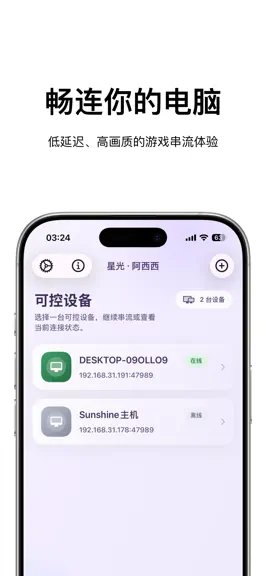
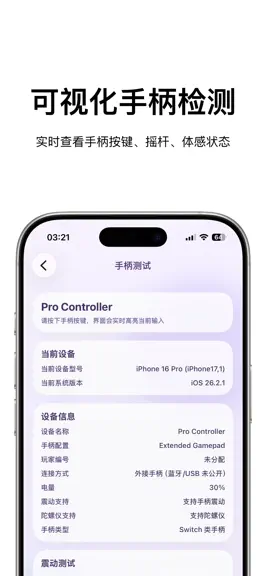
StarLight is a remote PC access and streaming utility designed for iPhone and iPad. It provides low-latency video streaming, Apple Pencil input, virtual controls, controller testing, and flexible display options. Whether you want to control your desktop, access installed apps and games, or stream content between your own devices, StarLight provides a convenient and customizable experience. Core…
Trends & analysis
Chart rank trend
US · overallWhy it's surfacing
Scout 32Ratings & velocity
★ 0 in windowRating distribution
100% positive · 15 ratingsGeographic reach
best rank · 2 storefrontsRevenue & downloads trend
ARPU $2Update history
6 updates tracked- v1.1.03d ago
- Improved 2D-to-3D stability to reduce depth flicker and visual jitter. - Added automatic comfort adjustment for fast scene changes and delayed depth updates. - Refined depth levels for a more natural and comfortable viewing experience. - Added a scrollable Full Performance panel with bitrate, latency, FPS, session duration, and controller details.
- v1.0.93d ago
What’s New - Added real-time frame interpolation on compatible devices running iOS 26 or later, supporting 30-to-60 FPS and 60-to-120 FPS output. - Added External Display Mode, allowing you to select the built-in screen, AR glasses, a monitor, or a TV from the game menu. - Added real-time 2D-to-3D conversion with support for 3840 × 1080 and 3840 × 1200 full-width side-by-side formats and three depth levels. - Added support for 1920 × 1200 streaming resolution. - Fixed an issue where Trackpad and Multi-Touch modes were unavailable when virtual buttons or the virtual gamepad were enabled. - Improved virtual joystick travel and visual feedback for better control. - Improved external display compatibility and streaming stability. Note: External display selection and 2D-to-3D conversion require iOS 17, the Metal renderer, and a compatible external display device.
- v1.0.812d ago
What’s New: - Added connection support, allowing you to briefly switch apps and continue your streaming session when you return. - Added an optional virtual mouse, available from the in-session menu, with pointer movement, left/right/middle clicks, and vertical/horizontal scrolling. - Added gamepad and keyboard/mouse modes. - Improved landscape and portrait support, edge interactions, and overall streaming stability.
- v1.0.716d ago
• Refreshed Settings and Help with improved light/dark appearance and swipe-back navigation. • Added Apple Pencil modes and improved touch, multi-touch, and virtual joystick controls. • improved landscape/portrait resolution options and stream loading progress. • Redesigned host adding, pairing, and removal flows, with additional usability fixes.
- v1.0.619d ago
This update focuses on Apple Pencil, touch input, and resolution settings: • Improved Apple Pencil hover and contact detection, pointing accuracy, and responsiveness. • Apple Pencil now remains available when touch input is disabled and in View Only mode. In View Only mode, finger gestures continue to control local pan and zoom. • Improved Apple Pencil compatibility across different streaming hosts. • Refined mouse and touch mode transitions to reduce UI flickering, stuck buttons, and unintended input passthrough. • Added Landscape and Portrait Full Screen and Safe Area resolution options, with actual pixel dimensions displayed. • Fixed inconsistent resolution width and height ordering after device orientation changes. • Additional stability and usability improvements.
StarLight - PC Streaming — FAQ
How much money does StarLight - PC Streaming make?
According to AppCurrents estimates, StarLight - PC Streaming generates approximately $100–$2k per month (medium confidence), modeled from its the App Store chart performance, rating velocity, and monetization signals.
How many downloads does StarLight - PC Streaming get?
StarLight - PC Streaming sees an estimated 100–500 downloads per month on the App Store, per AppCurrents modeling.
Is StarLight - PC Streaming free?
StarLight - PC Streaming is a paid app priced at $2.99 on the App Store.
What is StarLight - PC Streaming's rating?
StarLight - PC Streaming holds a 5.00-star average from 15 ratings on the App Store.
When was StarLight - PC Streaming released?
StarLight - PC Streaming launched on the App Store on 14.04.2026. Its latest version shipped 01.08.2026.


