
Snap Markup - Annotation Tool
Snap Markup - Annotation Tool generates an estimated $1k–$22k/month in revenue from 2k–8k downloads/month on the App Store, according to AppCurrents estimates (updated 2026-08-02).
| Est. revenue / month | $1k–$22k |
|---|---|
| Est. downloads / month | 2k–8k |
| Estimate confidence | medium |
| Pricing | Paid $1.99 |
| Rating | 4.63 ★ (3,527 ratings) |
| Category | Utilities |
| Best chart rank | #86 Utilities Paid |
| Released | 09.09.2015 |
| App last updated | 13.06.2026 |
| Platform | iOS |
Modeled monthly estimate · rating velocity · medium confidence


About
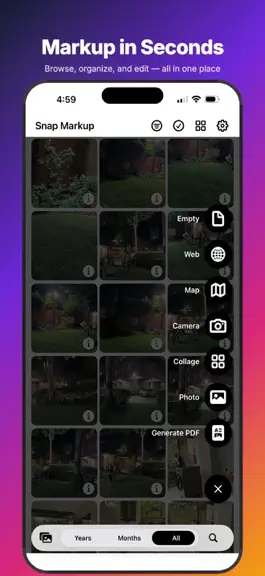
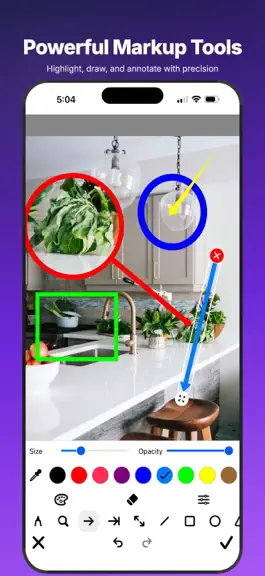
Snap Markup — Photo Markup & Editor Turn any photo into a polished, annotated image in seconds. Mark up screenshots, documents, receipts, real estate, and snapshots with on-device AI, pro editing tools, and effortless sharing — all in one app. ALL-IN-ONE MARKUP Crop, rotate, draw, add text, stickers, and overlays from one toolbar. Reorder tools in Settings so your favourites are always one tap aw…
Trends & analysis
Chart rank trend
US · categoryWhy it's surfacing
Scout 17Ratings & velocity
★ 0 in windowRating distribution
91% positive · 4k ratingsGeographic reach
best rank · 11 storefrontsRevenue & downloads trend
ARPU $1Update history
3 updates tracked- v4.21mo ago
This release is all about creating and sharing more — with powerful new tools and a faster, cleaner Snap Markup. New creative tools • GIF Maker — turn your photos into animated GIFs with transitions (fade, slide, push, zoom, rotate, blur & more), 14 filters, custom background colors, boomerang, and a live preview as you build • Photo Splitter — slice any photo into a grid for Instagram carousels and giant grids, with quick presets or custom rows & columns (1–6) • Batch Resize — resize many photos at once and save to Photos, share, or export as files More powerful export • HEIC export, DPI control & custom resolution — choose the exact format, print DPI, and width × height for your images • Format-preserving sharing — what you pick is what you get: HEIC stays HEIC, no surprise JPEGs when you share or save Better text & markup • Smarter text editing — see your chosen font, color, and background right in the editor as you type, and pick up any existing text to keep styling it • Fixed text color & styling — colors now apply instantly and reliably • Improved keyboard support — typing in Chinese, Japanese & Korean (Zhuyin/Pinyin) no longer drops the first character Polish • A refreshed, black-and-white themed interface across the new tools and a cleaner Create menu • Many UI and alignment refinements throughout
- v4.12mo ago
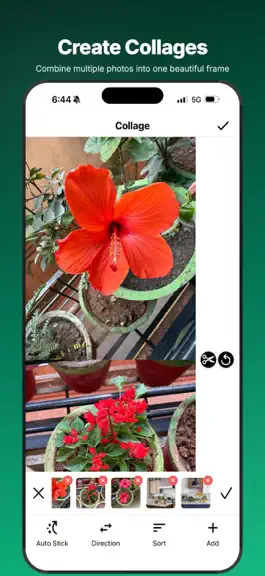
This release packs in some of our biggest features yet powered by on device AI for your help. New tools & a faster Snap Markup • Extract Text (OCR) — pull text out of any photo, then copy, share, or add it back onto the image • Scan Code — read QR codes and barcodes straight from your photos • Signature, Watermark, Redaction & Frame — sign documents, brand your images, hide private info, and add clean borders • Photo Stitch & Collage — combine multiple photos with fresh layouts • Document Scanner & Searchable PDF — scan multi-page docs and export PDFs you can search • Smarter search — find photos by date, album, screenshots, selfies, favourite and more • Faster than ever — quicker photo grid loading and snappier PDF selection • Redesigned onboarding and a new Create menu • Now translated across 75+ languages Thanks for using Photo Markup! Have feedback or an idea? We'd love to hear from you.
- v4.02mo ago
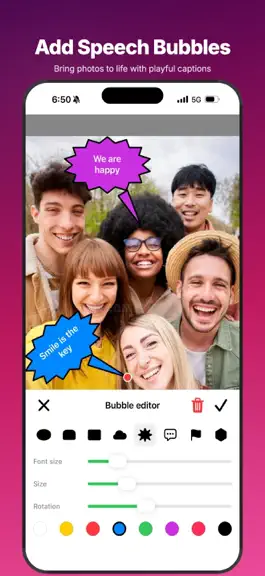
This release packs in some of our biggest features yet powered by on device AI for your help. ADJUST AND AUTO ENHANCE Fine tune brightness, contrast, saturation, and exposure with live sliders. Or tap Auto Enhance for a one tap polish. FILTERS A curated set of cinematic looks. Live preview as you swipe. BACKGROUND BLUR AND COLOUR On device AI separates the subject from the background blur it for a depth of field portrait look or replace it with any colour. Perfect for product photos and clean portraits. DATE AND LOCATION STAMP Bake the photo capture date and location into any corner reads EXIF metadata, reverse geocodes GPS to a City Country label, and falls back to your current location when the photo has no GPS. Ideal for receipts, real estate, and inspection photos. NUMBERED STEPS Walk viewers through a tutorial or bug report with circle, pin, or square step badges. Pick a colour, place each one in order, and they auto number for you. ROTATE AND FLIP Rotate 90 or 180, flip horizontal or vertical, all with a smooth live preview. SMART AUTO CROP On device document and face detection for a perfect one tap crop on import. MEASUREMENT Mark distances, lengths, and dimensions directly on any photo with a calibrated ruler overlay. SPEECH BUBBLES Drop comic-style callouts onto your photos with 10 bubble styles plus size and rotation controls. SHARE AS PDF Generate a PDF from any edited image with custom name, image quality, portrait or landscape orientation, and optional AES password protection. 76 LANGUAGES Every new feature is fully localised including the new intro screens. PRIVACY FIRST All AI processing runs on device. Your photos never leave your iPhone or iPad.
Snap Markup - Annotation Tool — FAQ
How much money does Snap Markup - Annotation Tool make?
According to AppCurrents estimates, Snap Markup - Annotation Tool generates approximately $1k–$22k per month (medium confidence), modeled from its the App Store chart performance, rating velocity, and monetization signals.
How many downloads does Snap Markup - Annotation Tool get?
Snap Markup - Annotation Tool sees an estimated 2k–8k downloads per month on the App Store, per AppCurrents modeling.
Is Snap Markup - Annotation Tool free?
Snap Markup - Annotation Tool is a paid app priced at $1.99 on the App Store.
What is Snap Markup - Annotation Tool's rating?
Snap Markup - Annotation Tool holds a 4.63-star average from 3,527 ratings on the App Store. It currently ranks #86 on the Utilities paid chart.
When was Snap Markup - Annotation Tool released?
Snap Markup - Annotation Tool launched on the App Store on 09.09.2015. Its latest version shipped 13.06.2026.


