R4 Companion
R4 Companion generates an estimated $1k–$18k/month in revenue from 300–1k downloads/month on the App Store, according to AppCurrents estimates (updated 2026-10-02).
| Est. revenue / month | $1k–$18k |
|---|---|
| Est. downloads / month | 300–1k |
| Estimate confidence | medium |
| Pricing | Paid $9.99 |
| Rating | 4.76 ★ (631 ratings) |
| Category | Utilities |
| Best chart rank | #81 Utilities Paid |
| Released | 30.08.2023 |
| App last updated | 16.09.2026 |
| Platform | iOS |
Modeled monthly estimate · rating velocity · medium confidence
About
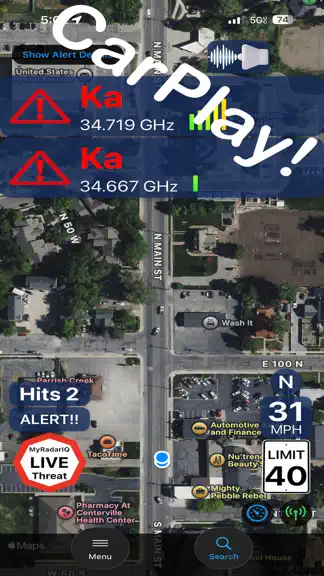
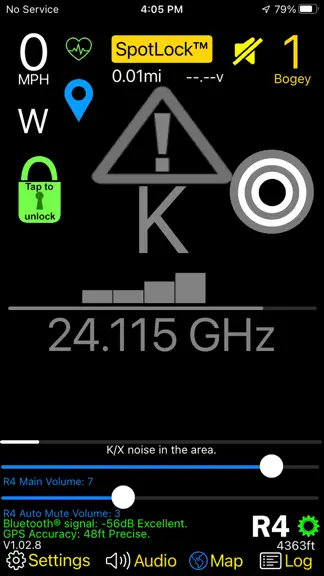
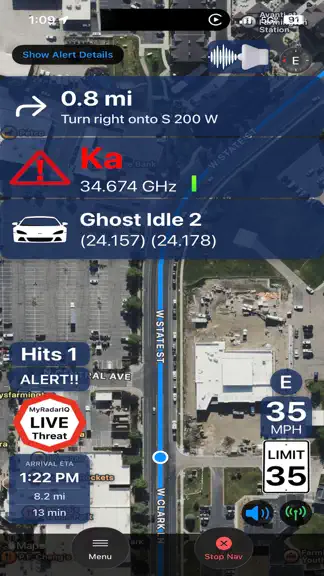
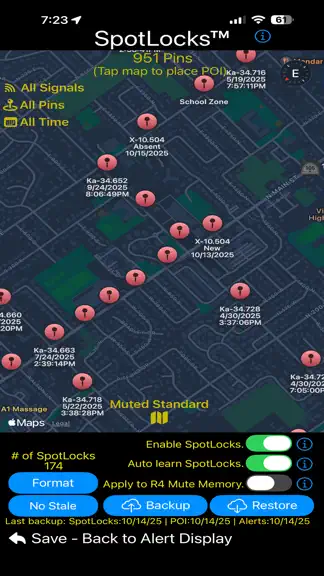
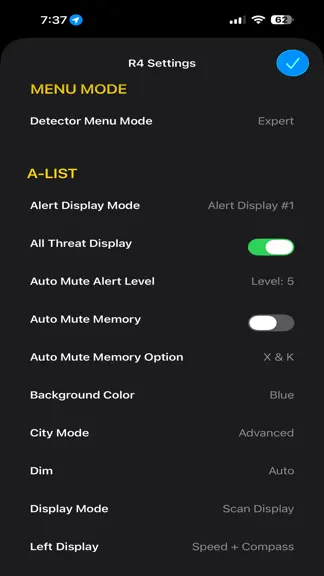
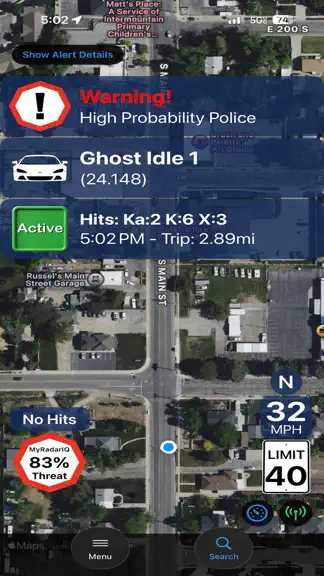
CarPlay Support! NOTE: R4 Companion™ requires a Uniden R4 or R4w radar detector with US Version 142 (R4) or 127 (R4w) firmware to function correctly. R4 Companion will NOT function correctly without at least this version of firmware. R4 Companion™ is a feature rich app, designed to give you the most out of your R4, while enhancing your driving experience along the way. Featuring intelligent alert…
Trends & analysis
Chart rank trend
US · categoryWhy it's surfacing
Scout 16Ratings & velocity
★ 0 in windowRating distribution
95% positive · 558 ratingsGeographic reach
best rank · 1 storefrontRevenue & downloads trend
ARPU $7In-app purchases
4 tiersUpdate history
7 updates tracked- v1.25.415d ago
Now works with CarPlay! "Feels like a new detector!", -e This is what people are saying after using R4 Companion™ - See what all the fuss is about, try it for yourself! New for version 1.25: • Settings screen added under CarPlay nav search button. • All new audio engine handles navigation, speech & detector tones seamlessly with options for output style, voice, speech rate, etc. • Option for altitude and car voltage on 'Active' banner. • Options for 'Nav Mute' Speaker Tap -> “Unmute” On tap, or after 5, 10, 15, 30 mins. • Option to include Alerts & Tones for nav mute tap. • Option to include all Detector audio for nav mute tap (kill switch). • CarPlay fixes for light & dark map display modes. • SpotLock engine version 2.0.09012026 - latest historical data. • Advanced false assist engine version 3.0.09012026 - latest 6+ years of historical data. Other recent big updates: • Added a 3D Perspective map view for navigation. • Added CarPlay background-alert controls: • Reduced-frequency alerts • Passive Muted alerts • My Radar IQ alerts • Stay Alert reminders • Added an option to end active navigation 15 seconds after the detector disconnects. • Improved the Navigation Audio voice-selection screen. • CarPlay background alerts • Live Activities for CarPlay, iPhone, Apple Watch. • Full navigation functionality. • Alert banner "SignalScope" shows signal strength over time of the current priority alert. • Alert screen (portrait & landscape views). *Option to view classic or new alert screen with a tap of a button. • Alert screen banners showing detailed alert, false assist, POI, MyRadarIQ, over speed warnings and other detailed detector status information. • Alternate Route selection with highway, & toll avoidance. • Navigation screen shows arrival time, distance & trip time remaining. • 'Show traffic' option while navigating. • 'Recent trip' quick selection. • Nearby points of interest selection. • Quickly switch back from navigation screen to classic alert details screen. • “Free Drive” (map / no map) alert screen when not in navigation mode. • Free Drive without map display option (battery saver). • Posted speed limit displayed on main alert screen (US, CA, AU, NZ). • Customizable low speed muting based on PSL. • Instantly see your changes when modifying detector settings. • Flashes screen when an alert occurs. If you liked R4 Companion before this release, you are going to LOVE it after! Spread the word, it is only going to get better. If you have an idea / suggestion you would like included in a future update, please visit https://crackedpixel.com/contact-us to let us know. Thanks! • MyRadarIQ™ - Threat assessment intelligent system for the radar companion series of apps. A new meter, visible at the top of the main alert screen, will show a graphical representation of the probability of a police presence (Ka or Laser) in the direction of your travel. Using your personal alert data, whenever a high probability exists for an encounter ahead, you will know about it well in advance of facing the actual threat. The meter will go from yellow (low threat), to orange (medium threat), to red (high threat) and flash on and off and a voice announcement will occur. The meter will also flash red when a Ka or Laser alert is actively being received to help draw attention to the alert. Probabilities are calculated down to the actual day of the week you are traveling, increasing the accuracy on any given day. • Pair it and forget about it! It just works. *New* - Robust Bluetooth connection engine works seamlessly in the background to manage all your R4 devices. ***TIP: Setting the main volume for the detector to 0 on the main alert screen and enabling the detector alert tones, will eliminate the brief audio "blips" you would normally hear when a mute command is first sent to the detector. Only potential threats will then trigger audio through your speaker or audio system providing an extremely quiet ride.
- v1.24.21mo ago
Now works with CarPlay! "Feels like a new detector!", -e This is what people are saying after using R4 Companion™ - See what all the fuss is about, try it for yourself! New for version 1.24: • Added a 3D Perspective map view for navigation. • Added CarPlay background-alert controls: • Reduced-frequency alerts • Passive Muted alerts • My Radar IQ alerts • Stay Alert reminders • Added an option to end active navigation 30 seconds after the detector disconnects. • Improved the Navigation Audio voice-selection screen. • Miscellaneous bug fixes and performance improvements. Other recent big updates: • CarPlay background alerts • Live Activities for CarPlay, iPhone, Apple Watch. • Full navigation functionality. • Alert banner "SignalScope" shows signal strength over time of the current priority alert. • Alert screen (portrait & landscape views). *Option to view classic or new alert screen with a tap of a button. • Alert screen banners showing detailed alert, false assist, POI, MyRadarIQ, over speed warnings and other detailed detector status information. • Navigation map zoom level customization. • Set detector mode from new alert screen. • Alternate Route selection with highway, and toll avoidance. • Navigation screen shows arrival time, distance & trip time remaining. • 'Show traffic' option while navigating. • 'Recent trip' quick selection. • Nearby points of interest selection. • Quick Nav selection from classic alert screen. • Quickly switch back from navigation screen to classic alert details screen. • “Free Drive” (map / no map) alert screen when not in navigation mode. • Free Drive without map display option (battery saver). • Posted speed limit displayed on main alert screen (US, CA, AU, NZ). • Customizable low speed muting based on PSL. • Updated main screen graphics and layout. • Updated MyRadarIQ meter and functionality. • Updated "ghost muted" graphics. • Updated graphics for alerts, silenced alerts, POI. • SpotLock engine version 03012026 - latest historical data. • Advanced false assist engine version 03012026 - latest 5+ years of historical data. If you liked R4 Companion before this release, you are going to LOVE it after! Spread the word, it is only going to get better. If you have an idea / suggestion you would like included in a future update, please visit https://crackedpixel.com/contact-us to let us know. Thanks! • MyRadarIQ™ - Threat assessment intelligent system for the radar companion series of apps. A new meter, visible at the top of the main alert screen, will show a graphical representation of the probability of a police presence (Ka or Laser) in the direction of your travel. Using your personal alert data, whenever a high probability exists for an encounter ahead, you will know about it well in advance of facing the actual threat. The meter will go from yellow (low threat), to orange (medium threat), to red (high threat) and flash on and off and a voice announcement will occur. The meter will also flash red when a Ka or Laser alert is actively being received to help draw attention to the alert. Probabilities are calculated down to the actual day of the week you are traveling, increasing the accuracy on any given day. • Instantly see your changes when modifying detector settings. • Flashes screen when an alert occurs. • Pair it and forget about it! It just works. *New* - Robust Bluetooth connection engine works seamlessly in the background to manage all your R4 devices. ***TIP: Setting the main volume for the detector to 0 on the main alert screen and enabling the detector alert tones, will eliminate the brief audio "blips" you would normally hear when a mute command is first sent to the detector. Only potential threats will then trigger audio through your speaker or audio system providing an extremely quiet ride.
- v1.23.32mo ago
Now works with CarPlay! "Feels like a new detector!", -e This is what people are saying after using R4 Companion™ - See what all the fuss is about, try it for yourself! New for version 1.23: • CarPlay support - Fullscreen/Dashboard • CarPlay background alerts • Live Activities for CarPlay, iPhone, Apple Watch. Other recent big updates: • Full navigation functionality. • Alert banner "SignalScope" shows signal strength over time of the current priority alert. • Alert screen (portrait & landscape views). *Option to view classic or new alert screen with a tap of a button. • Alert screen banners showing detailed alert, false assist, POI, MyRadarIQ, over speed warnings and other detailed detector status information. • Navigation map zoom level customization. • Set detector mode from new alert screen. • Alternate Route selection with highway, and toll avoidance. • Navigation screen shows arrival time, distance & trip time remaining. • 'Show traffic' option while navigating. • 'Recent trip' quick selection. • Nearby points of interest selection. • Quick Nav selection from classic alert screen. • Quickly switch back from navigation screen to classic alert details screen. • “Free Drive” (map / no map) alert screen when not in navigation mode. • Free Drive without map display option (battery saver). • Posted speed limit displayed on main alert screen (US, CA, AU, NZ). • Customizable low speed muting based on PSL. • Updated main screen graphics and layout. • Updated MyRadarIQ meter and functionality. • Updated "ghost muted" graphics. • Updated graphics for alerts, silenced alerts, POI. • SpotLock engine version 03012026 - latest historical data. • Advanced false assist engine version 03012026 - latest 5+ years of historical data. If you liked R4 Companion before this release, you are going to LOVE it after! Spread the word, it is only going to get better. If you have an idea / suggestion you would like included in a future update, please visit https://crackedpixel.com/contact-us to let us know. Thanks! • MyRadarIQ™ - Threat assessment intelligent system for the radar companion series of apps. A new meter, visible at the top of the main alert screen, will show a graphical representation of the probability of a police presence (Ka or Laser) in the direction of your travel. Using your personal alert data, whenever a high probability exists for an encounter ahead, you will know about it well in advance of facing the actual threat. The meter will go from yellow (low threat), to orange (medium threat), to red (high threat) and flash on and off and a voice announcement will occur. The meter will also flash red when a Ka or Laser alert is actively being received to help draw attention to the alert. Probabilities are calculated down to the actual day of the week you are traveling, increasing the accuracy on any given day. • Instantly see your changes when modifying detector settings. • Flashes screen when an alert occurs. • Pair it and forget about it! It just works. *New* - Robust Bluetooth connection engine works seamlessly in the background to manage all your R4 devices. • Better support for background connections when switching between different R4 detectors. If you are running multiple R4s across multiple vehicles, this update is for you! • Added the option to have the radar detector's alert tones play through the app. • The app will read your detector's settings for each signal type's alert tone (1-12) and use the associated alert tone within the app for alerts. ***TIP: Setting the main volume for the detector to 0 on the main alert screen and enabling the detector alert tones, will eliminate the brief audio "blips" you would normally hear when a mute command is first sent to the detector. Only potential threats will then trigger audio through your speaker or audio system providing an extremely quiet ride.
- v1.22.22mo ago
CarPlay!! Huge Release - Now works with CarPlay! "Feels like a new detector!", -e This is what people are saying after using R4 Companion™ - See what all the fuss is about, try it for yourself! V1.22 - Misc bug fixes and optimizations. Other recent big updates: • Full navigation functionality. • Alert banner "SignalScope" shows signal strength over time of the current priority alert. • Alert screen (portrait & landscape views). *Option to view classic or new alert screen with a tap of a button. • Alert screen banners showing detailed alert, false assist, POI, MyRadarIQ, over speed warnings and other detailed detector status information. • Navigation map zoom level customization. • Set detector mode from new alert screen. • Alternate Route selection with highway, and toll avoidance. • Navigation screen shows arrival time, distance & trip time remaining. • 'Show traffic' option while navigating. • 'Recent trip' quick selection. • Nearby points of interest selection. • Quick Nav selection from classic alert screen. • Quickly switch back from navigation screen to classic alert details screen. • “Free Drive” (map / no map) alert screen when not in navigation mode. • Free Drive without map display option (battery saver). • Posted speed limit displayed on main alert screen (US, CA, AU, NZ). • Customizable low speed muting based on PSL. • Updated main screen graphics and layout. • Updated MyRadarIQ meter and functionality. • Updated "ghost muted" graphics. • Updated graphics for alerts, silenced alerts, POI. • SpotLock engine version 03012026 - latest historical data. • Advanced false assist engine version 03012026 - latest 5+ years of historical data. • Misc. bug fixes and optimizations If you liked R4 Companion before this release, you are going to LOVE it after! Spread the word, it is only going to get better. If you have an idea / suggestion you would like included in a future update, please visit https://crackedpixel.com/contact-us to let us know. Thanks! • MyRadarIQ™ - Threat assessment intelligent system for the radar companion series of apps. A new meter, visible at the top of the main alert screen, will show a graphical representation of the probability of a police presence (Ka or Laser) in the direction of your travel. Using your personal alert data, whenever a high probability exists for an encounter ahead, you will know about it well in advance of facing the actual threat. The meter will go from yellow (low threat), to orange (medium threat), to red (high threat) and flash on and off and a voice announcement will occur. The meter will also flash red when a Ka or Laser alert is actively being received to help draw attention to the alert. Probabilities are calculated down to the actual day of the week you are traveling, increasing the accuracy on any given day. • Instantly see your changes when modifying detector settings. • New accessibility option flashes the screen when an alert occurs. • Pair it and forget about it! It just works. *New* - Robust Bluetooth connection engine works seamlessly in the background to manage all your R4 devices. • Better support for background connections when switching between different R4 detectors. If you are running multiple R4s across multiple vehicles, this update is for you! • Seamless background connections between different R4 detectors, no need to bring R4 Companion to the foreground to connect. • Added the option to have the radar detector's alert tones play through the app. • The app will read your detector's settings for each signal type's alert tone (1-12) and use the associated alert tone within the app for alerts. ***TIP: Setting the main volume for the detector to 0 on the main alert screen and enabling the detector alert tones, will eliminate the brief audio "blips" you would normally hear when a mute command is first sent to the detector. Only potential threats will then trigger audio through your speaker or audio system providing an extremely quiet ride.
- v1.21.103mo ago
CarPlay!! Huge Release - Now works with CarPlay! "Feels like a new detector!", -e This is what people are saying after using R4 Companion™ - See what all the fuss is about, try it for yourself! New for version 1.21: • Full navigation functionality. • New alert banner "SignalScope" shows signal strength over time of the current priority alert. • New alert screen (portrait & landscape views). *Option to view classic or new alert screen with a tap of a button. • New alert screen banners showing detailed alert, false assist, POI, MyRadarIQ, over speed warnings and other detailed detector status information. • Map zoom level customization for navigation map. • Set detector mode from new alert screen. • Alternate Route selection with highway, and toll avoidance. • Navigation screen shows arrival time, distance & trip time remaining. • 'Show traffic' option while navigating. • 'Recent trip' quick selection. • Nearby points of interest selection. • Quick Nav selection from classic alert screen. • Quickly switch back from navigation screen to classic alert details screen. • “Free Drive” (map / no map) alert screen when not in navigation mode. • Free Drive without map display option (battery saver). • Posted speed limit displayed on main alert screen (US, CA, AU, NZ). • Customizable low speed muting based on PSL. • Updated main screen graphics and layout. • Updated MyRadarIQ meter and functionality. • Updated "ghost muted" graphics. • Updated graphics for alerts, silenced alerts, POI. • SpotLock engine version 03012026 - latest historical data. • Advanced false assist engine version 03012026 - latest 5+ years of historical data. • Misc. bug fixes and optimizations If you liked R4 Companion before this release, you are going to LOVE it after! Spread the word, it is only going to get better. If you have an idea / suggestion you would like included in a future update, please visit https://crackedpixel.com/contact-us to let us know. Thanks! Other recent big updates: • MyRadarIQ™ - Threat assessment intelligent system for the radar companion series of apps. A new meter, visible at the top of the main alert screen, will show a graphical representation of the probability of a police presence (Ka or Laser) in the direction of your travel. Using your personal alert data, whenever a high probability exists for an encounter ahead, you will know about it well in advance of facing the actual threat. The meter will go from yellow (low threat), to orange (medium threat), to red (high threat) and flash on and off and a voice announcement will occur. The meter will also flash red when a Ka or Laser alert is actively being received to help draw attention to the alert. Probabilities are calculated down to the actual day of the week you are traveling, increasing the accuracy on any given day. • Instantly see your changes when modifying detector settings. • New accessibility option flashes the screen when an alert occurs. • Pair it and forget about it! It just works. *New* - Robust Bluetooth connection engine works seamlessly in the background to manage all your R4 devices. • Better support for background connections when switching between different R4 detectors. If you are running multiple R4s across multiple vehicles, this update is for you! • Seamless background connections between different R4 detectors, no need to bring R4 Companion to the foreground to connect. • Added the option to have the radar detector's alert tones play through the app. • The app will read your detector's settings for each signal type's alert tone (1-12) and use the associated alert tone within the app for alerts. ***TIP: Setting the main volume for the detector to 0 on the main alert screen and enabling the detector alert tones, will eliminate the brief audio "blips" you would normally hear when a mute command is first sent to the detector. Only potential threats will then trigger audio through your speaker or audio system providing an extremely quiet ride.
R4 Companion — FAQ
How much money does R4 Companion make?
According to AppCurrents estimates, R4 Companion generates approximately $1k–$18k per month (medium confidence), modeled from its the App Store chart performance, rating velocity, and monetization signals.
How many downloads does R4 Companion get?
R4 Companion sees an estimated 300–1k downloads per month on the App Store, per AppCurrents modeling.
Is R4 Companion free?
R4 Companion is a paid app priced at $9.99 on the App Store.
What is R4 Companion's rating?
R4 Companion holds a 4.76-star average from 631 ratings on the App Store. It currently ranks #81 on the Utilities paid chart.
When was R4 Companion released?
R4 Companion launched on the App Store on 30.08.2023. Its latest version shipped 16.09.2026.


