
OPN Admin generates an estimated $40–$300/month in revenue from 90–400 downloads/month on the App Store, according to AppCurrents estimates (updated 2026-08-02).
| Est. revenue / month | $40–$300 |
|---|---|
| Est. downloads / month | 90–400 |
| Estimate confidence | low |
| Pricing | Free + IAP |
| Rating | 5.00 ★ (5 ratings) |
| Category | Utilities |
| Released | 11.05.2026 |
| App last updated | 02.08.2026 |
| Platform | iOS |
Modeled monthly estimate · rating velocity · low confidence
About
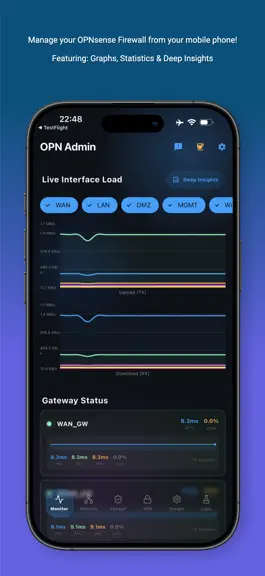
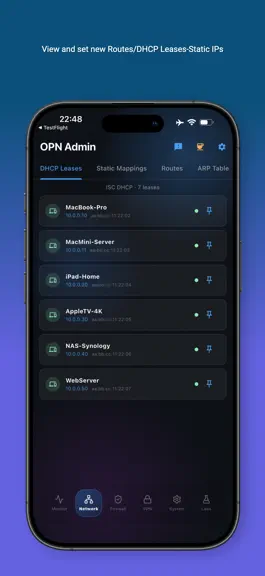
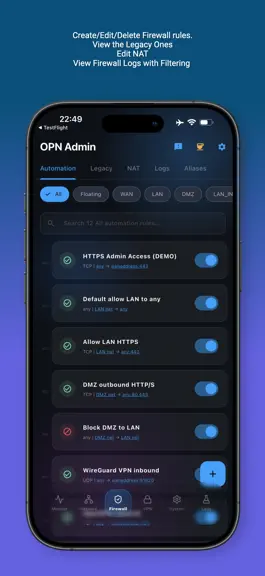
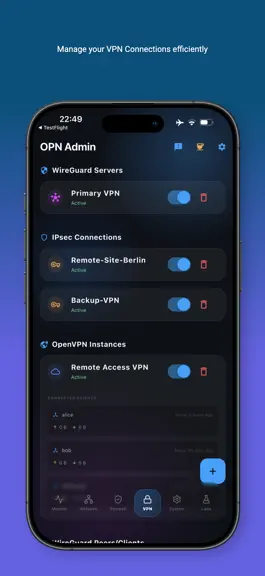
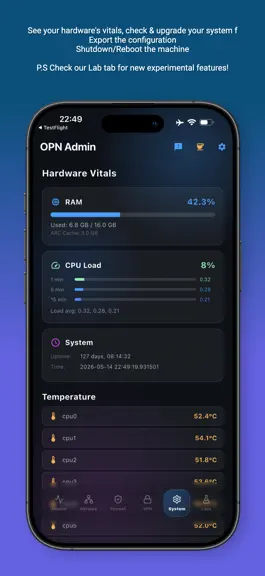
The most advanced OPN admin client ever built. Experience full control over your firewall with a stunning Liquid Glass interface and real-time insights. Pro-Grade Features Everything you need to manage your network securely and efficiently. Real-time Dashboard Live traffic graphs, system health, and resource monitoring at a glance. Firewall Management Create, edit, and toggle rules. Manage NAT…
Trends & analysis
Chart rank trend
US · overallWhy it's surfacing
Scout 33Ratings & velocity
★ 0 in windowRating distribution
100% positive · 4 ratingsGeographic reach
best rank · 0 storefrontsRevenue & downloads trend
ARPU $0In-app purchases
4 tiersUpdate history
4 updates tracked- v1.0.352d ago
Small bump version for: Bug fix: Disk Health sits properly on the Overview now - (had weird margins/paddings) Bug fix: Filter chips read correctly in both themes
- v1.0.2719d ago
• HAProxy fixed and editable — the tab was calling API endpoints the plugin doesn't provide, so it always claimed the plugin wasn't installed. It now loads your real frontends, backends, and servers — and you can edit them (binds, mode, balancing algorithm, server membership, address/port/weight). • OpenVPN instances can now be edited in place, and the add form no longer silently ignores your protocol, device type, and port choices. • Unbound Query Forwarding — add, edit, and toggle domain forwards and DNS-over-TLS upstreams from the DNS tab. • CrowdSec fixed — alert and ban lists were querying the wrong endpoints and always came up empty; lifting a ban now works too. • ZeroTier reworked — join networks by ID, leave or forget them, with live status and assigned addresses. • Dashboard cards can go half-width — pair two side by side via Customize. • Light theme polish — several accents were unreadable on white; now theme-aware.
- v1.0.2129d ago
DHCP leases fixed on Kea networks — the Leases screen could keep showing "ISC DHCP" and old lease data after a firewall migrated to Kea, because the legacy ISC lease endpoint stays reachable and kept answering with stale data. The app now checks which DHCP service is actually running and shows its real leases. Kill active connections by IP — drop all firewall states from a device directly from its DHCP lease, no need to hunt it down in the States screen. Customizable dashboard — reorder or hide any section on the main dashboard to match how you actually use it. New at-a-glance cards for system health (uptime, CPU, RAM), DHCP lease count, active firewall states, VPN tunnel status, certificate expiry warnings, and pending firmware updates — each one tap away from its full detail screen, and each only shows up when it's actually relevant (no clutter from features you don't use). More at-a-glance cards — CARP/HA status, security alerts (CrowdSec/IDS), HAProxy health, and firewall rule/alias counts, each appearing only when relevant to your setup. The VPN Tunnels card now shows per-tunnel online/offline counts instead of just a peer count. Dashboard polish — the Customize/Deep Insights controls now sit inline with whichever card is on top instead of taking their own row, reordering sections is smoother (no more long-press delay, bigger drag handles, a clear lift animation), and the floating nav bar is slimmer and no longer lets the last card peek out from underneath it. Refreshed dark theme — a deeper, more blackish-blue palette for a more premium feel at night. Firmware status fixes — the Firmware card no longer reports "update available" when a firmware mirror check simply fails to reach the mirror, and the Firmware section on the System tab no longer mislabels itself "OPN Admin" instead of OPNsense. Stability fixes — resolved a crash that could hit first-time users if a settings toggle couldn't immediately save, a rare crash on cold start caused by an internal data-refresh race, and a crash that could interrupt an in-progress firmware update if the app was backgrounded while the firewall rebooted.
- v1.0.181mo ago
Fixed a dashboard crash Light-theme polish — resolved the remaining tap-highlight glitches
OPN Admin — FAQ
How much money does OPN Admin make?
According to AppCurrents estimates, OPN Admin generates approximately $40–$300 per month (low confidence), modeled from its the App Store chart performance, rating velocity, and monetization signals.
How many downloads does OPN Admin get?
OPN Admin sees an estimated 90–400 downloads per month on the App Store, per AppCurrents modeling.
Is OPN Admin free?
OPN Admin is free to download on the App Store, monetizing through in-app purchases.
What is OPN Admin's rating?
OPN Admin holds a 5.00-star average from 5 ratings on the App Store.
When was OPN Admin released?
OPN Admin launched on the App Store on 11.05.2026. Its latest version shipped 02.08.2026.


