
OpLine
OpLine generates an estimated $400–$7k/month in revenue from 100–600 downloads/month on the App Store, according to AppCurrents estimates (updated 2026-10-02).
| Est. revenue / month | $400–$7k |
|---|---|
| Est. downloads / month | 100–600 |
| Estimate confidence | medium |
| Pricing | Paid $9.99 |
| Rating | 5.00 ★ (3 ratings) |
| Category | Social Networking |
| Best chart rank | #36 Social Networking Paid |
| Released | 08.06.2026 |
| App last updated | 24.09.2026 |
| Platform | iOS |
Modeled monthly estimate · rating velocity · medium confidence

About
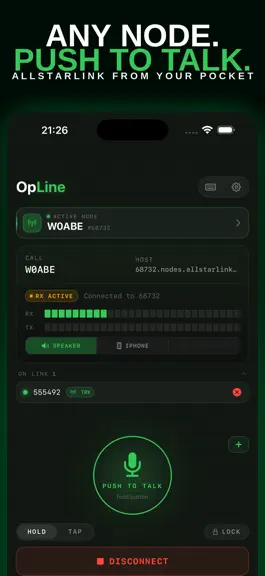
OpLine - AllStarLink in Your Pocket Connect to AllStarLink nodes anywhere your iPhone has signal. OpLine is a fast, native iOS client for licensed amateur radio operators who want a clean, reliable way to get on the network without fiddling with desktop tools or generic SIP clients. KEY FEATURES Push to Talk Hold-to-talk or tap-to-toggle. Lock the mic when you need both hands free. Designed to…
Trends & analysis
Chart rank trend
US · categoryWhy it's surfacing
Scout 32Ratings & velocity
★ 0 in windowGeographic reach
best rank · 1 storefrontRevenue & downloads trend
ARPU $7Update history
5 updates tracked- v1.48d ago
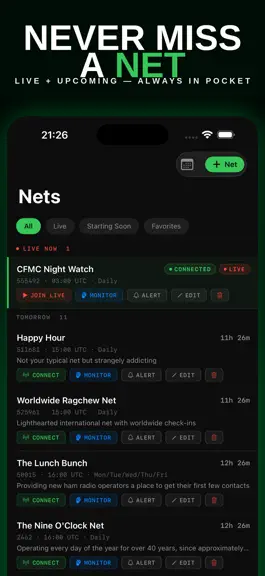
OpLine 1.4 is about finding the activity on the network, and getting on it hands free. COMMUNITY Join other operators on the OpLine Discord: https://discord.gg/AbysJgqaM. The link is also in Settings. KEYED NODES A new Keyed tab shows which nodes are transmitting on the network right now, busiest first, with the callsign, location and how many nodes are connected. Tap one to jump straight in, save it to Favorites, or see where it is. Every row says how recently that node was heard, and the list tells you how fresh the data is. NET ALERTS Open a net and pick a reminder: Start, 5, 15 or 30 minutes. A bell then marks that net everywhere it appears, and a new Alerts filter lists every net you are watching in one place. BLUETOOTH PTT HANDSETS Use an Inrico-style Bluetooth mic's button to transmit, press to talk, even with your phone locked in your pocket. Turn it on in Settings. PICK YOUR MICROPHONE Choose which mic transmits in Settings → Audio: built-in, AirPods, or a Bluetooth handset. The Bluetooth route button now names the device it is using. SEE WHAT IS LINKED TO A NODE On any node you are connected to, tap the topology icon to see the stations connected to it. VOICEOVER The Talk button switches to tap-to-toggle automatically when VoiceOver is on, and OpLine can speak what you cannot see: receiving, transmitting, connected, linked, timeouts. Optional audio cues for everyone. Both in Settings → Accessibility. ALSO IN THIS RELEASE Network data now reaches the app through OpLine's own service instead of every phone polling AllStarLink directly. Same data on screen, far lighter on the network we all share. Smoother received audio, with fewer dropouts and less latency creep on long QSOs. Transmit gain tuned to sit better on the air, and gain changes now apply live mid-call. Fixed: the Connect button on a net's screen no longer hides under the tab bar, plus assorted layout and reliability cleanups. 73~
- v1.315d ago
OpLine 1.3 brings AllStar to your Home Screen, Lock Screen, and Siri. COMMUNITY Join other operators on the OpLine Discord: https://discord.gg/AbysJgqaM WIDGETS Touch and hold your Home or Lock Screen, tap the plus, and search "OpLine" to add: - Quick Connect Nodes — pick up to three nodes and tap one to connect. - Quick Connect — one tap to connect to your active node. - Upcoming Nets — the next AllStar nets at a glance; tap to open your nets. - Favorite Nets — choose the nets you care about; tap to open them. Touch and hold a widget and tap Edit Widget to choose its nodes or nets. LOCK SCREEN LIVE ACTIVITY Connect to a node and OpLine appears on your Lock Screen. Tap Talk to key up, tap Lock for hands-free transmit (the Talk button turns amber), and tap Disconnect to hang up. Disconnect takes two taps on purpose: the first arms an "End?" confirmation and the second hangs up, so a stray tap can't drop your call. Turn the Live Activity on or off in Settings. SIRI Say "Siri, connect to OpLine" to connect to your active node. NODE LIST On a fresh install, node search works immediately and the full list finishes loading in the background. RECENTLY CONNECTED Your recent nodes now appear in Favorites, ready to re-dial with one tap. APPLE SILICON MACS OpLine is on the Mac App Store for Apple silicon Macs. The space bar keys push-to-talk. VOICEOVER The new widgets and Lock Screen controls are fully labeled for VoiceOver. FIXES - Push-to-talk now keys nodes configured for phone-control mode. OpLine sends the radio key and unkey signals, so nodes that only key on that signal now work. Standard nodes are unaffected. - Cleaner audio and more reliable connections from the first syllable. OpLine now acknowledges every frame from the node, eliminating retransmissions that could roughen the start of received audio. - EchoLink links (3xxxxxx nodes) and other non-IAX2 links now appear in your linked-nodes list with direction and an unlink control. 73
- v1.217d ago
This update is all about transmit reliability, driven by feedback from operators using OpLine on the air. • Push-to-talk now keys nodes set to phone-control mode in their dialplan. Before, these nodes received your audio but wouldn't key the transmitter. • More reliable connections and a cleaner start to received audio. • EchoLink links — and other non-IAX2 links like USRP — now show up in your linked-nodes list, with an unlink control. • New OpLine Discord channel - see OpLine.app for info. Thank you to everyone sending reports and on-air audio checks. Keep them coming. 73!
- v1.13mo ago
New • Spacebar push-to-talk for hardware keyboards on iPad and Mac - hold the spacebar to transmit, release to listen. • Choose how net schedules are displayed: your local time zone or UTC, in Settings. Fixed • Net times now show and save on the correct day for time zones far from UTC. A 4 PM Hawaii net, for example, no longer lands on the wrong day. • You can adjust a net's duration in the editor again.
- v1.03mo ago
OpLine — FAQ
How much money does OpLine make?
According to AppCurrents estimates, OpLine generates approximately $400–$7k per month (medium confidence), modeled from its the App Store chart performance, rating velocity, and monetization signals.
How many downloads does OpLine get?
OpLine sees an estimated 100–600 downloads per month on the App Store, per AppCurrents modeling.
Is OpLine free?
OpLine is a paid app priced at $9.99 on the App Store.
What is OpLine's rating?
OpLine holds a 5.00-star average from 3 ratings on the App Store. It currently ranks #36 on the Social Networking paid chart.
When was OpLine released?
OpLine launched on the App Store on 08.06.2026. Its latest version shipped 24.09.2026.


