MenuTimer menu bar tiny timer
MenuTimer menu bar tiny timer generates an estimated $0/month in revenue from 0 downloads/month on the App Store, according to AppCurrents estimates (updated 2026-06-19).
| Est. revenue / month | $0 |
|---|---|
| Est. downloads / month | 0 |
| Estimate confidence | low |
| Pricing | Free + IAP |
| Rating | 0.00 ★ (0 ratings) |
| Category | Productivity |
| Released | 30.11.2023 |
| App last updated | 13.12.2025 |
| Platform | iOS |
Modeled monthly estimate · rating velocity · low confidence
About
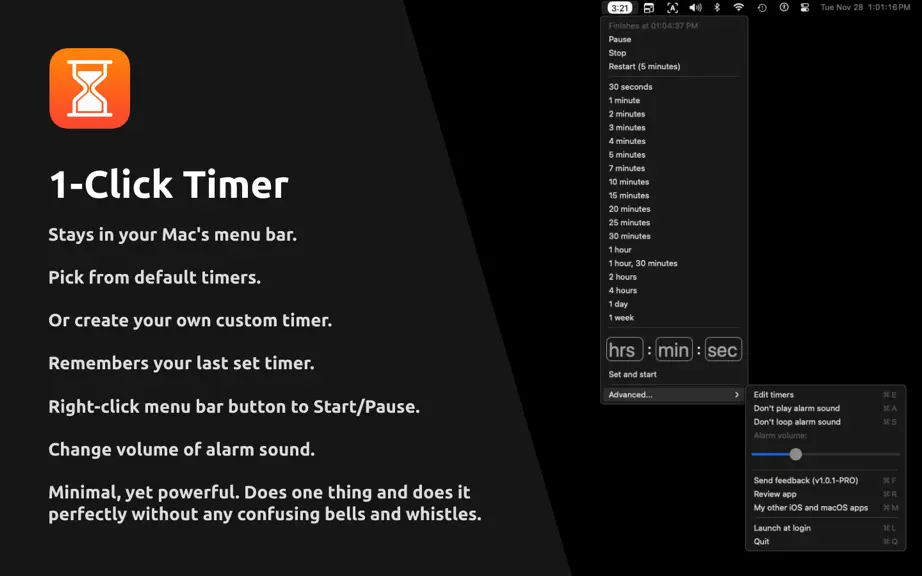
MenuTimer is a 1-Click Timer. It's minimal, yet powerful. It does one thing and does it perfectly without any confusing bells and whistles. It stays in your Mac's menu bar and shows you the remaining time there. No extra clutter. You can pick from a variety of default timers. Or you can create your own custom timer. It remembers your custom timers and you can edit them. It remembers your last s…
Trends & analysis
Chart rank trend
US · overallWhy it's surfacing
Scout 4Ratings & velocity
Geographic reach
best rank · 0 storefrontsRevenue & downloads trend
monthly estimateIn-app purchases
1 tiersUpdate history
1 update tracked- v276mo ago
- Added support for starting timers via a URL. The app supports the URL scheme "menutimer". For example, a new timer for 180 seconds can be started by calling the URL: menutimer://start?seconds=180 Following url schemes are also supported to pause, resume, stop, and restart the timer: menutimer://start?seconds=180 menutimer://pause menutimer://stop menutimer://restart menutimer://resume You can create keyboard shortcut to start timer using such URLs: Create a new Apple Shortcut and add an Open URL action. Go to Info tab. Turn on “Use as Quick Action”. Set the "receive input" from Quick Action to No and "If there's no input" to Continue. Make sure following are ON: Use as Quick Action, Finder, and Services Menu. At the bottom: turn on “Add Keyboard Shortcut”. Then press the keys you want (e.g. ⌃⌘T). Make sure this keyboard shortcut doesn't conflict with another app. - Fixed a bug where the Buy button for in app purchase wasn't showing. If this issue still exists, please email me at [email protected] Small indie developers like me benefit from your support. There are NO subscriptions, ads, trackers, analytics or other nonsense in my app. This allows me to provide the best user-experience to my users. If you are finding my app useful, please support me by purchasing the one-time only in-app purchase. You can also leave me a positive rating on the app store as that helps get the word out to others. Send feedback or feature requests at: [email protected]
MenuTimer menu bar tiny timer — FAQ
How many downloads does MenuTimer menu bar tiny timer get?
MenuTimer menu bar tiny timer sees an estimated 0 downloads per month on the App Store, per AppCurrents modeling.
Is MenuTimer menu bar tiny timer free?
MenuTimer menu bar tiny timer is free to download on the App Store, monetizing through in-app purchases.
When was MenuTimer menu bar tiny timer released?
MenuTimer menu bar tiny timer launched on the App Store on 30.11.2023. Its latest version shipped 13.12.2025.


