IONIQ 5 Companion
IONIQ 5 Companion generates an estimated $4k–$72k/month in revenue from 900–4k downloads/month on the App Store, according to AppCurrents estimates (updated 2026-08-02).
| Est. revenue / month | $4k–$72k |
|---|---|
| Est. downloads / month | 900–4k |
| Estimate confidence | medium |
| Pricing | Paid $12.99 |
| Rating | 4.75 ★ (48 ratings) |
| Category | Utilities |
| Best chart rank | #36 Utilities Paid |
| Released | 30.04.2026 |
| App last updated | 09.07.2026 |
| Platform | iOS |
Modeled monthly estimate · rating velocity · medium confidence
About
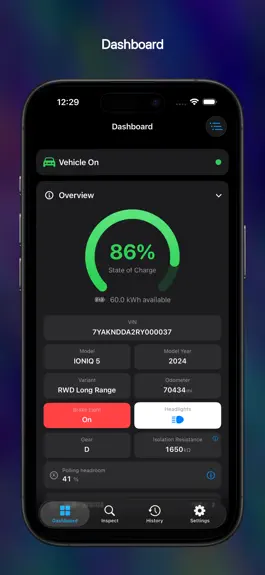
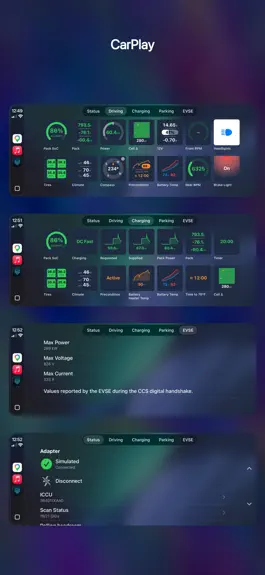
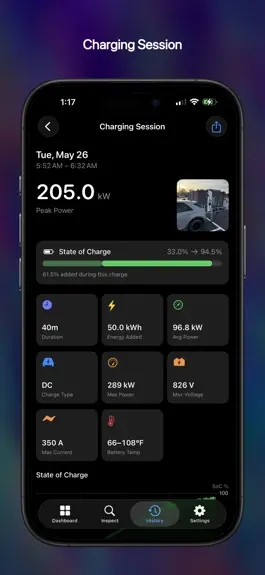
IONIQ 5 Companion is an independent OBD-II diagnostic tool for the Hyundai IONIQ 5 and other E-GMP vehicles, with full support for the IONIQ 5, IONIQ 5 N, IONIQ 6, IONIQ 9. The Kia EV6 and EV9 are also fully supported. The app requires the separate purchase of an ELM327-compatible BLE OBD-II adapter in order to read ECU data from your car. CARPLAY - Two rows of live chips on the Driving tab…
Trends & analysis
Chart rank trend
US · overallWhy it's surfacing
Scout 33Ratings & velocity
★ -0.25 in windowRating distribution
95% positive · 43 ratingsGeographic reach
best rank · 11 storefrontsRevenue & downloads trend
ARPU $9Update history
3 updates tracked- v2.226d ago
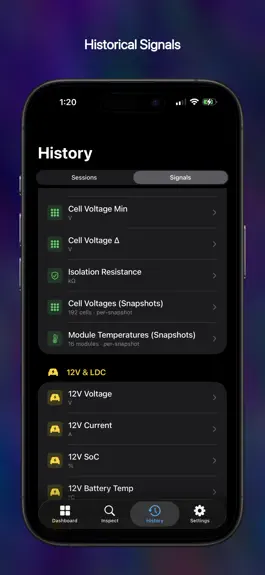
Version 2.2 — a whole new look with Themes, deeper diagnostics, smarter tire-pressure warnings, faster time to dashboard, and new climate signals A new look - The entire app is redesigned with translucent Liquid Glass panels over a soft aurora backdrop — Dashboard, History, Inspect, Settings, and every diagnostic tool - NEW: Themes picker — choose a palette that recolors the whole app, each with its own Light and Dark variants, or turn the aurora off entirely Inspect & diagnostics - NEW: Enhanced DTC Scan sweeps the entire diagnostic bus, names every module that responds, and reads each one's fault codes — reaching body, chassis, and airbag modules a standard OBD-II scan never sees - NEW: ICCU Information tool reads your charging controller's part numbers, software version, build date, and serial number - NEW: Connection Report — an in-depth view of the app-to-vehicle link: adapter details, polling stats, per-module coverage, and an events timeline - Export results to CSV from DTC scans, the Connection Report, and any History session Tires - Warning colors now derive from your vehicle's door-placard pressures, with separate front and rear targets — fully customizable in the new Settings → Tires - NEW: Temperature compensation, so hot tires after a drive no longer trip a false warning - Pressures update 4x more often, and a sleeping sensor shows its last-known reading instead of a blank value Climate - The four vent and floor outlet temperatures now appear on the Dashboard, in CarPlay, and in History charts - NEW: Driver Position setting mirrors vent layouts for right-hand-drive vehicles CarPlay - Climate and Tires chips are now tappable — color-coded vent temperatures, and pressure/temperature pages that remember your choice - NEW: SoC Range Colors — set your own red/orange/green thresholds for the state-of-charge gauge, in CarPlay and on the Dashboard - The solid-red Brake Light style is back, and the Precondition chip is renamed "Battery Warmer" Faster and steadier - Time to dashboard cut by almost half — your first values appear within about a second of polling start - "Vehicle On" detection reworked: sessions end promptly after shutoff, and adapter hiccups no longer end a session mid-drive - Faster polling on OBDLink adapters, and smoother multi-frame handling on vehicles with very fast ECUs Charging - NEW: AC Draw panel and chart show wall-side voltage, current, and power while AC charging — the gap to pack power is your charger's conversion loss - Fixed a phantom "DC Fast" session at AC plug-in; the 12V battery now shows charge/discharge direction by color Vehicle coverage & languages - Korea-built IONIQ 9 now identified correctly; Standard Range packs no longer show two phantom 0° modules; cell-voltage grids show every cell on the Kia EV9 - Dozens of translation fixes across all nine languages, including proper battery terminology in seven of them
- v2.11mo ago
Version 2.1 — broader vehicle coverage, two new languages, a new Power panel, and a faster connection to your car Vehicle coverage - NEW: Full support for the Kia EV9 in all three variants — Standard Range RWD, Long Range RWD, and Long Range AWD - Better recognition across the lineup: Korea-built EV6 and EV9, the EV6 Standard Range RWD, the 2024 IONIQ 5 N, and the Kia EV6 GT (2022–2024 and 2025+) are now read from the VIN and load the right profile - IONIQ 5 Standard Range now reads the full battery pack — Cell Voltages and Battery Configuration show all 144 cells, not just 96 Languages - NEW: Korean and Turkish added. The app is now fully translated in nine languages - Fixed dozens of labels that used to only show English no matter your language Faster and steadier - Improved the Time to Dashboard by over 30% -- see your vehicle status faster than ever before - State of Charge no longer flashes a red 0% while the battery is still being read at startup - More reliable "Vehicle On" detection, steadier Bluetooth reconnection when the adapter briefly drops, and stronger protection against background interruptions to History recording - Several crash fixes from the crash dashboard, and misc. other small bug fixes Dashboard - NEW: Power panel with a live output-power dial that fills to your car's peak power capability, in your chosen unit (kW, HP, or PS) - NEW: live scan-health gauge: see what fraction of recent polls each signal is answering - NEW: Wh/km efficiency unit, alongside mi/kWh, km/kWh, kWh/100km, and Wh/mi CarPlay - The Power chip's dial now scales to your car's live peak-power capability, with a PEAK readout in your chosen unit - NEW: Headlight Indicator setting (Off, Icons, or Text) History & charging - The Signals charts get a big multi-touch overhaul — smarter Prior/Next that skips empty stretches, "sticky" pinch-to-zoom, and a deliberate press-and-hold crosshair - AC charging sessions now chart AC Input Current and Voltage; charts mark captured points with dots and draw gaps as "unknown" regions - NEW: Gear chart (P/R/N/D) added to driving sessions - A one-time cleanup quietly removes old, spurious 0% Lifetime Efficiency readings from your history Settings - Settings is reorganized into iOS-style categories — Units, Display, CarPlay, Notifications, History, Diagnostics, Advanced Tools, and About — each on its own screen Adapter setup - Adapters that are already connected to your iPhone now appear when scanning and can be selected, after accepting a warning about using more than one OBD-II app at a time - Automatic detection of Bluetooth state, with easy buttons to turn on Bluetooth, or to grant the app's Bluetooth permission - NEW: CarPlay "Set Up Your Adapter" screen to guide new users when onboarding for the first time
- v2.02mo ago
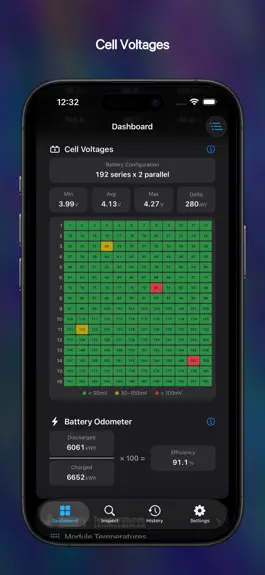
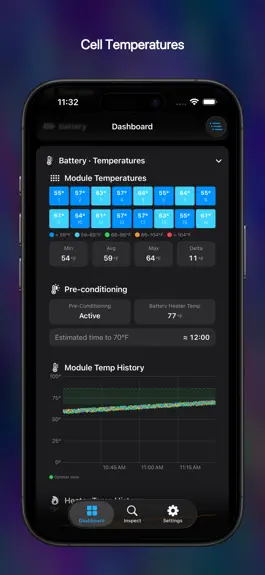
Version 2.0 — a full driving and charging History that syncs across your devices, deeper charging insight, and broader vehicle coverage. History & iCloud - New History tab records every driving and charging session, with live-updating State-of-Charge charts plus distance, energy, peak power, and battery-temperature ranges. - 50+ signals recorded over time — battery voltages and temperatures, motor RPM, isolation resistance, charging power, tire pressures, climate, and more — each with a multi-touch chart you can pinch, pan, and scrub. - Per-cell voltage and per-module temperature snapshots captured throughout the drive. - Optional iCloud sync keeps your entire history in step across iPhone, iPad, and Mac. - Attach a photo to any session and share a clean, branded report card with a single tap. Charging insight - Charging session detail now plots Charging Power, Pack Voltage, battery min/max temperature, and ambient temperature — with bands marking AC charging, DC charging, and preconditioning. - DC fast charging: a new EVSE Current chart plots what the car requested against what the charger actually delivered, plus an EV Supply Equipment card showing the station's maximum power, voltage, and current from the CCS handshake. CarPlay - New Power chip: a bidirectional gauge showing power draw and regeneration on one dial. - New Compass chip with a heading-up rose, and the option to show it in place of the odometer on the Driving tab. - DC fast charging shows three live readings side by side: power Requested, power Supplied at the inlet, and power reaching the Pack. - AC Draw chip shows live volts, amps, and kW while AC charging. - Cell Voltage Δ chip: a mini heatmap of every cell, color-coded by how far it sits from the pack average. - Experimental split-screen layout for the IONIQ 5 head unit. - New setting to jump straight to the Driving tab when your adapter connects. Dashboard - New Regeneration gauge showing how much regen the battery can currently accept and how much is flowing right now. - New Gear indicator (P, R, N, D). - New Isolation Resistance chip — battery-to-chassis electrical isolation, with an explainer on what the number means. - New Cell Voltages info panel explaining the heatmap, the color bands, and what's worth watching. - New Polling Headroom indicator showing how much spare capacity your adapter has for more signals. Connection & adapters - Take manual control: connect and disconnect on demand, and turn Auto-Connect on or off — making it easy to share one OBD-II adapter between apps. Settings - New Keep Screen Awake control: choose whether the app keeps the screen alive while it's in the foreground. - Choose your Power units: kW, HP, or PS. - Choose your Efficiency units: mi/kWh, km/kWh, kWh/100km, or Wh/mi. Vehicle coverage - Full support for the Kia EV6, IONIQ 6, and IONIQ 9. Languages - Italian is now available, bringing the app to seven languages.
IONIQ 5 Companion — FAQ
How much money does IONIQ 5 Companion make?
According to AppCurrents estimates, IONIQ 5 Companion generates approximately $4k–$72k per month (medium confidence), modeled from its the App Store chart performance, rating velocity, and monetization signals.
How many downloads does IONIQ 5 Companion get?
IONIQ 5 Companion sees an estimated 900–4k downloads per month on the App Store, per AppCurrents modeling.
Is IONIQ 5 Companion free?
IONIQ 5 Companion is a paid app priced at $12.99 on the App Store.
What is IONIQ 5 Companion's rating?
IONIQ 5 Companion holds a 4.75-star average from 48 ratings on the App Store. It currently ranks #36 on the Utilities paid chart.
When was IONIQ 5 Companion released?
IONIQ 5 Companion launched on the App Store on 30.04.2026. Its latest version shipped 09.07.2026.


