iConnectHue for Philips Hue
iConnectHue for Philips Hue generates an estimated $500–$9k/month in revenue from 400–2k downloads/month on the App Store, according to AppCurrents estimates (updated 2026-10-02).
| Est. revenue / month | $500–$9k |
|---|---|
| Est. downloads / month | 400–2k |
| Estimate confidence | medium |
| Pricing | Paid $3.99 |
| Rating | 4.16 ★ (763 ratings) |
| Category | Utilities |
| Best chart rank | #98 Utilities Paid |
| Released | 29.04.2013 |
| App last updated | 24.09.2026 |
| Platform | iOS |
Modeled monthly estimate · rating velocity · medium confidence


About
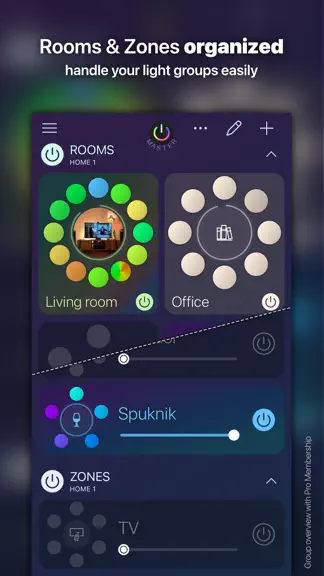
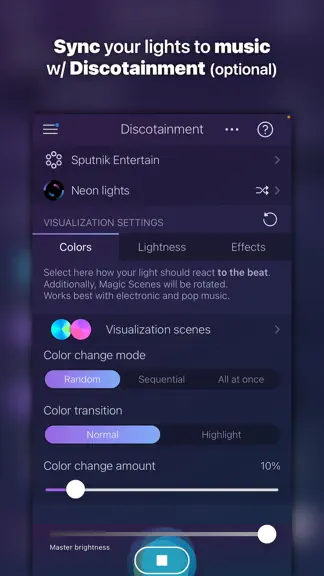
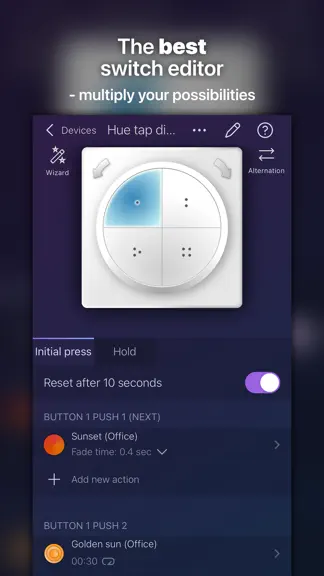
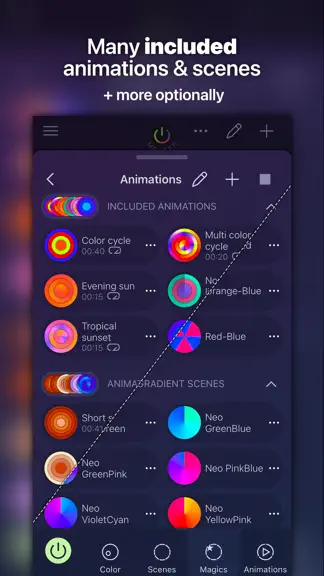
Discover a whole new world of lighting with iConnectHue, the ultimate Philips Hue app! Transform your lighting experience with our smart timers, customizable switches & widgets intuitive sleep timers, allowing you to adapt your Hue lights effortlessly for every occasion. Whether you yearn for a soothing ambiance or a lively party atmosphere with Discotainment (optional), iConnectHue has you cover…
Trends & analysis
Chart rank trend
US · categoryWhy it's surfacing
Scout 17Ratings & velocity
★ +0.01 in windowRating distribution
77% positive · 750 ratingsGeographic reach
best rank · 1 storefrontRevenue & downloads trend
ARPU $3In-app purchases
10 tiersUpdate history
11 updates tracked- v5.18.08d ago
New in iConnectHue 5.18 - Support for Sync Box 4k and Play Screen Sync - iConnectHue now supports these new Sync devices, including the use of Presets with them, so you can store your favourite settings for quick later recall. In addition to this, you can now toggle the background lighting mode in their settings, to keep a minimum brightness for dark scenes on your TV in the respective device's settings. Please note that our Sync support is still in Beta. We are now confident that it should work for everybody, but are still polishing details. (Available with Pro Membership) - Halloween Animations available - Our yearly Halloween treat is back for everybody - and we've added two new ones: "Ghostly" and "Thriller". 12 spooky Animations are available now until mid of November. Enjoy! Hint: If you have Nanoleaf panels, connect them - you can run these Animations on them as well! (Pro) (Available until mid Nov, full year for Memberships) - Other bright ideas - * We've updated several aspects of the Watch app - if it doesn't show up, try to add it again from your phone's Watch app; * If the Watch complication doesn't appear, edit your Watch face and select it again * Please keep your watchOS up to date: We only support current and previous versions, so have at least watchOS 26 soon to be able to keep using the Watch app * Several detail improvements to make your life easier Heads up: If widgets or shortcuts act up, try restarting your device - it’s an iOS thing, not an us thing! - We’d love your feedback! - Enjoying the update? We worked hard to bring this to you — and your support keeps the lights on (literally)! •• Give us five stars in the App Store! Even if you've rated before, a fresh review helps! •• If you run into any issues, don’t hesitate, contact us from within the app under "Help & More"->Contact. You will surely get support! Need a quick check for a question? We also have an elaborate FAQ: https://iconnecthue.com/f-a-q/ Thanks for leaving the lights on!
- v5.17.315d ago
New in iConnectHue 5.17.3 * Solved an issue where dialogs did not appear * Adaptions for iOS 27 * Updated Watch App for iOS 27 - if it's not properly updated by watchOS, try to reinstall it via the iPhone's Watch app * Updated Watch complications - if you use them, and the field is empty, you'll need to re-select them by editing the watch face * Still using watchOS 11? Please update to 26 soon, as we will stop supporting 11 soon! * For more help & questions about the Watch App, contact us from the app under "Help & More"->Contact; Thanks! 5.17 ** iConnectHue: Nanoleaf and Hue in one app! ** iConnectHue joins both worlds and lets you control your Nanoleaf lights in one app - no separate hardware required! It supports not only Nanoleaf Shapes, but also Aurora, Canvas, Elements and Lines. Thanks to ChromaSense, colors are calibrated between them and match as closely as possible across all devices - including your iPhone and iPad. Here's what you can do: * Control them via the Dashboard * Set colors and gradients * Start and control Animations * Play with Magic Scenes * Discover & set up in devices Currently supported Nanoleaf devices: Aurora, Canvas, Shapes, Elements & Lines. No Bridge or other additional hardware is required. What this is: * A Tech Preview - well tested, but only with a small audience * Control when at home - no remote access available What this is not: * Not a Nanoleaf-only app - you still need to connect your Hues * Not all possible features available yet, e.g. no device scenes nor Discotainment * No control via Hue hardware, like switches * No final form - may change the way it works, may even be removed, based on what comes out Current plans are to improve Nanoleaf support over time, based on outcomes and your feedback. (Available with Pro Membership) ** Other bright ideas ** * We have improved Pro's daylight mode (daylight based on your time and location), it should be now more true to the day's light (not considering clouds or pollution) * Direct light timer access from a light's menu (...) in the light list * You can now search for scenes in the scene list * Several detail improvements to make your life easier Heads up: If widgets or shortcuts act up, try restarting your device - it’s an iOS thing, not an us thing! - We’d love your feedback! - Enjoying the update? We worked hard to bring this to you — and your support keeps the lights on (literally)! •• Give us five stars in the App Store! Even if you've rated before, a fresh review helps! •• If you run into any issues, don’t hesitate, contact us from within the app under "Help & More"->Contact. You will surely get support! Need a quick check for a question? We also have an elaborate FAQ: https://iconnecthue.com/f-a-q/ Thanks for leaving the lights on!
- v5.17.217d ago
New in iConnectHue 5.17.2 * Adaptions for iOS 27 * Updated Watch App for iOS 27 - if it's not properly updated by watchOS, try to reinstall it via the iPhone's Watch app * Updated Watch complications - if you use them, and the field is empty, you'll need to re-select them by editing the watch face * For more help & questions about the Watch App, contact us from the app under "Help & More"->Contact; Thanks! 5.17 ** iConnectHue: Nanoleaf and Hue in one app! ** iConnectHue joins both worlds and lets you control your Nanoleaf lights in one app - no separate hardware required! It supports not only Nanoleaf Shapes, but also Aurora, Canvas, Elements and Lines. Thanks to ChromaSense, colors are calibrated between them and match as closely as possible across all devices - including your iPhone and iPad. Here's what you can do: * Control them via the Dashboard * Set colors and gradients * Start and control Animations * Play with Magic Scenes * Discover & set up in devices Currently supported Nanoleaf devices: Aurora, Canvas, Shapes, Elements & Lines. No Bridge or other additional hardware is required. What this is: * A Tech Preview - well tested, but only with a small audience * Control when at home - no remote access available What this is not: * Not a Nanoleaf-only app - you still need to connect your Hues * Not all possible features available yet, e.g. no device scenes nor Discotainment * No control via Hue hardware, like switches * No final form - may change the way it works, may even be removed, based on what comes out Current plans are to improve Nanoleaf support over time, based on outcomes and your feedback. (Available with Pro Membership) ** Other bright ideas ** * We have improved Pro's daylight mode (daylight based on your time and location), it should be now more true to the day's light (not considering clouds or pollution) * Direct light timer access from a light's menu (...) in the light list * You can now search for scenes in the scene list * Several detail improvements to make your life easier Heads up: If widgets or shortcuts act up, try restarting your device - it’s an iOS thing, not an us thing! - We’d love your feedback! - Enjoying the update? We worked hard to bring this to you — and your support keeps the lights on (literally)! •• Give us five stars in the App Store! Even if you've rated before, a fresh review helps! •• If you run into any issues, don’t hesitate, contact us from within the app under "Help & More"->Contact. You will surely get support! Need a quick check for a question? We also have an elaborate FAQ: https://iconnecthue.com/f-a-q/ Thanks for leaving the lights on!
- v5.17.11mo ago
New in iConnectHue 5.17 ** iConnectHue: Nanoleaf and Hue in one app! ** iConnectHue joins both worlds and lets you control your Nanoleaf lights in one app - no separate hardware required! It supports not only Nanoleaf Shapes, but also Aurora, Canvas, Elements and Lines. Thanks to ChromaSense, colors are calibrated between them and match as closely as possible across all devices - including your iPhone and iPad. Here's what you can do: * Control them via the Dashboard * Set colors and gradients * Start and control Animations * Play with Magic Scenes * Discover & set up in devices Currently supported Nanoleaf devices: Aurora, Canvas, Shapes, Elements & Lines. No Bridge or other additional hardware is required. What this is: * A Tech Preview - well tested, but only with a small audience * Control when at home - no remote access available What this is not: * Not a Nanoleaf-only app - you still need to connect your Hues * Not all possible features available yet, e.g. no device scenes nor Discotainment * No control via Hue hardware, like switches * No final form - may change the way it works, may even be removed, based on what comes out Current plans are to improve Nanoleaf support over time, based on outcomes and your feedback. (Available with Pro Membership) ** Other bright ideas ** * We have improved Pro's daylight mode (daylight based on your time and location), it should be now more true to the day's light (not considering clouds or pollution) * Direct light timer access from a light's menu (...) in the light list * You can now search for scenes in the scene list * Several detail improvements to make your life easier Heads up: If widgets or shortcuts act up, try restarting your device - it’s an iOS thing, not an us thing! - We’d love your feedback! - Enjoying the update? We worked hard to bring this to you — and your support keeps the lights on (literally)! •• Give us five stars in the App Store! Even if you've rated before, a fresh review helps! •• If you run into any issues, don’t hesitate, contact us from within the app under "Help & More"->Contact. You will surely get support! Need a quick check for a question? We also have an elaborate FAQ: https://iconnecthue.com/f-a-q/ Thanks for leaving the lights on!
- v5.17.01mo ago
New in iConnectHue 5.17 ** iConnectHue: Nanoleaf and Hue in one app! ** iConnectHue joins both worlds and lets you control your Nanoleaf lights in one app - no separate hardware required! It supports not only Nanoleaf Shapes, but also Aurora, Canvas, Elements and Lines. Thanks to ChromaSense, colors are calibrated between them and match as closely as possible across all devices - including your iPhone and iPad. Here's what you can do: * Control them via the Dashboard * Set colors and gradients * Start and control Animations * Play with Magic Scenes * Discover & set up in devices Currently supported Nanoleaf devices: Aurora, Canvas, Shapes, Elements & Lines. No Bridge or other additional hardware is required. What this is: * A Tech Preview - well tested, but only with a small audience * Control when at home - no remote access available What this is not: * Not a Nanoleaf-only app - you still need to connect your Hues * Not all possible features available yet, e.g. no device scenes nor Discotainment * No control via Hue hardware, like switches * No final form - may change the way it works, may even be removed, based on what comes out Current plans are to improve Nanoleaf support over time, based on outcomes and your feedback. (Available with Pro Membership) ** Other bright ideas ** * We have improved Pro's daylight mode (daylight based on your time and location), it should be now more true to the day's light (not considering clouds or pollution) * Direct light timer access from a light's menu (...) in the light list * You can now search for scenes in the scene list * Several detail improvements to make your life easier Heads up: If widgets or shortcuts act up, try restarting your device - it’s an iOS thing, not an us thing! - We’d love your feedback! - Enjoying the update? We worked hard to bring this to you — and your support keeps the lights on (literally)! •• Give us five stars in the App Store! Even if you've rated before, a fresh review helps! •• If you run into any issues, don’t hesitate, contact us from within the app under "Help & More"->Contact. You will surely get support! Need a quick check for a question? We also have an elaborate FAQ: https://iconnecthue.com/f-a-q/ Thanks for leaving the lights on!
iConnectHue for Philips Hue — FAQ
How much money does iConnectHue for Philips Hue make?
According to AppCurrents estimates, iConnectHue for Philips Hue generates approximately $500–$9k per month (medium confidence), modeled from its the App Store chart performance, rating velocity, and monetization signals.
How many downloads does iConnectHue for Philips Hue get?
iConnectHue for Philips Hue sees an estimated 400–2k downloads per month on the App Store, per AppCurrents modeling.
Is iConnectHue for Philips Hue free?
iConnectHue for Philips Hue is a paid app priced at $3.99 on the App Store.
What is iConnectHue for Philips Hue's rating?
iConnectHue for Philips Hue holds a 4.16-star average from 763 ratings on the App Store. It currently ranks #98 on the Utilities paid chart.
When was iConnectHue for Philips Hue released?
iConnectHue for Philips Hue launched on the App Store on 29.04.2013. Its latest version shipped 24.09.2026.


