
iCab Mobile (Web Browser)
iCab Mobile (Web Browser) generates an estimated $600–$11k/month in revenue from 600–3k downloads/month on the App Store, according to AppCurrents estimates (updated 2026-10-02).
| Est. revenue / month | $600–$11k |
|---|---|
| Est. downloads / month | 600–3k |
| Estimate confidence | medium |
| Pricing | Paid $2.99 |
| Rating | 3.95 ★ (467 ratings) |
| Category | Utilities |
| Best chart rank | #86 Utilities Paid |
| Released | 21.04.2009 |
| App last updated | 14.07.2026 |
| Platform | iOS |
Modeled monthly estimate · rating velocity · medium confidence


About
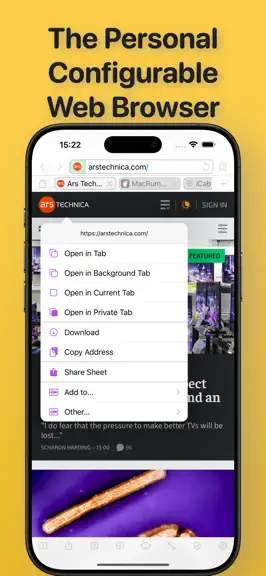
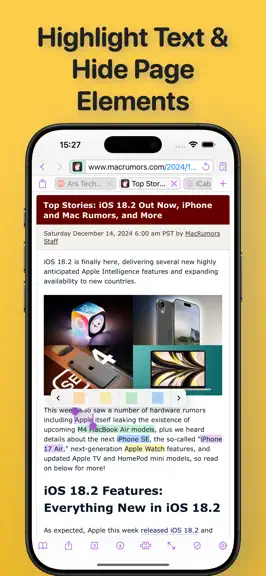
iCab Mobile is a web browser for iOS. iCab Mobile is customizable in almost all areas and can thus be made into your very own personal browser. PRIVACY: In private mode, no private data is saved permanently. Special private tabs increase privacy even further, with only a small loss of comfort. PROFILES/USER ACCOUNTS: Any number of profiles/user accounts can be created, with each profile having i…
Trends & analysis
Chart rank trend
US · categoryWhy it's surfacing
Scout 17Ratings & velocity
★ +0.01 in windowRating distribution
71% positive · 461 ratingsGeographic reach
best rank · 1 storefrontRevenue & downloads trend
ARPU $2In-app purchases
10 tiersUpdate history
3 updates tracked- v11.3.12mo ago
Solves a new issue that could prevent that links which are supposed to open in a new tab could not be forced to open in the current tab instead.
- v11.32mo ago
- "Kagi" is now another source for suggestions in the address field - There is a new option in the "User Interfaces" settings that allows you to switch tabs not only by swiping left or right on the web pages themselves, but also by using swipe gestures on the browser toolbars. Especially when web pages contain horizontally scrollable areas, swiping on the page can make switching tabs a bit more difficult; in such cases, swiping on the toolbars can help. - There is now a new option for "Preferred Language" in the "Websites" settings. Some websites take this into account and then automatically display their content in that language (if available). Previously, the system language was always passed to the website as the "preferred" language; now you can also select a different language. For JavaScript, this option can be configured individually, since some "captchas" use this information for "bot detection" and then block access if the preferred language does not match the system language. - Bookmarks can now also be copied to the Quickstarter (if they aren't already there). This option is available via a bookmark's "Edit" view and its context menu. - Bookmarks and downloads now also allow multiple selections in "Edit" mode by swiping across the selection buttons on the right (empty circle/checkmark) - Bookmarks accessible via folders in the Favorites bar (iPad) can now also be edited from here. - The search function in the settings now automatically applies the search term to the subcategories that are open during the search, so you don't have to start the search there manually - On the iPad, windows in windowed mode now have improved window titles to make it easier to tell them apart - On iOS 26 and later, when switching between Normal and "Private" Mode, slightly more data from Normal Mode can now be restored upon returning to it (previously only cookies; now local storage as well) - If you had manually deleted private data in the privacy settings, the displayed values would automatically update after the deletion has finished; however, since the deletion process could sometimes take a short while, you might have gotten the impression that the deletion hadn't worked. Now, there's an indicator shown while the deletion is still ongoing if the process takes longer than expected. - Bugfix: Fixes an issue in the Quickstarter related to URLs that contain unescaped quotation marks (e.g., in bookmarklets). - Bugfix: Fixes a rare crash that occurs when loading the icons for the default Quickstarter bookmarks - Bugfix: Selecting an iCab bookmark in iOS's Siri Search now opens not only iCab but also the bookmarked website - Bugfix: If web pages are to be loaded with additional information (via modified or additional HTTP headers in the server request, such as "Do Not Track," "Do Not Sell," "HTTP Referrer," preferred language, etc.) and the page is supposed to open in a new window via the original link, it did incorrectly open in the same tab.
- v11.2.105mo ago
- iOS 26.4 has a bug which prevents that certain cookies can't be deleted individually anymore (only very few cookies are affected by this bug). However deleting everything (all cookies, web storages etc) at once will get rid of these cookies as well. Therefore there is now a new option available in the "privacy" settings: when tapping the "clear now" button for the option to clear history, Tabs history, Cookies etc. at the same time, you can now decide whether to delete everything without evaluating any filters (cookie filters) or if filters should be still be evaluated. The former option will delete everthing web sites have stored in the browser (and this includes all cookies, including those which would otherwise not be deletable because of the iOS bug), the latter will delete only those cookies which are not declared to be kept (via cookie filters), however until Apple fixes the iOS bug, the cookies mentioned above can't be deleted this way (due to the iOS bug) - Fixes an issue when importing bookmarks.
iCab Mobile (Web Browser) — FAQ
How much money does iCab Mobile (Web Browser) make?
According to AppCurrents estimates, iCab Mobile (Web Browser) generates approximately $600–$11k per month (medium confidence), modeled from its the App Store chart performance, rating velocity, and monetization signals.
How many downloads does iCab Mobile (Web Browser) get?
iCab Mobile (Web Browser) sees an estimated 600–3k downloads per month on the App Store, per AppCurrents modeling.
Is iCab Mobile (Web Browser) free?
iCab Mobile (Web Browser) is a paid app priced at $2.99 on the App Store.
What is iCab Mobile (Web Browser)'s rating?
iCab Mobile (Web Browser) holds a 3.95-star average from 467 ratings on the App Store. It currently ranks #86 on the Utilities paid chart.
When was iCab Mobile (Web Browser) released?
iCab Mobile (Web Browser) launched on the App Store on 21.04.2009. Its latest version shipped 14.07.2026.


