
Frame Crop – Art Mode
Frame Crop – Art Mode generates an estimated $2k–$37k/month in revenue from 800–3k downloads/month on the App Store, according to AppCurrents estimates (updated 2026-10-02).
| Est. revenue / month | $2k–$37k |
|---|---|
| Est. downloads / month | 800–3k |
| Estimate confidence | medium |
| Pricing | Paid $7.99 |
| Rating | 4.66 ★ (498 ratings) |
| Category | Utilities |
| Best chart rank | #41 Utilities Paid |
| Released | 22.06.2023 |
| App last updated | 30.09.2026 |
| Platform | iOS |
Modeled monthly estimate · rating velocity · medium confidence



About
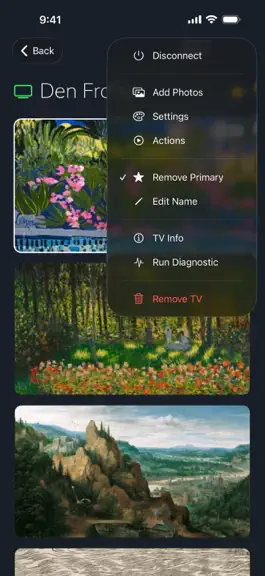
Browse and download artwork, paintings, and photos for your Samsung Frame TV or Hisense CanvasTV from Frame Crop's integrated libraries including Smithsonian, Wikimedia Commons, and Unsplash. Effortlessly crop and display your photos to fit the borderless display of your Samsung Frame TV or Hisense CanvasTV. Showcase your favorite memories, beautiful landscapes from your travels, or professional a…
Trends & analysis
Chart rank trend
US · categoryWhy it's surfacing
Scout 17Ratings & velocity
★ 0 in windowRating distribution
91% positive · 477 ratingsGeographic reach
best rank · 1 storefrontRevenue & downloads trend
ARPU $6Update history
10 updates tracked- v12.0.462d ago
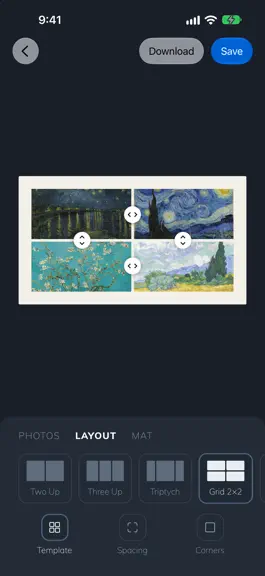
NEW: Collages Put several pieces of art on your Frame at once. Choose photos from any collection or your own library, pick a layout, and adjust each crop, the spacing, and the mat. Download it or send it to your TV, and save it to your collections to edit later. Also in this update • Smoother scrolling through large collections • Better layouts on iPad • Fixes for signing in, downloads, and TV actions
- v12.0.456d ago
NEW: Collages Put several pieces of art on your Frame at once. Choose photos from any collection or your own library, pick a layout, and adjust each crop, the spacing, and the mat. Download it or send it to your TV, and save it to your collections to edit later. Also in this update • Smoother scrolling through large collections • Better layouts on iPad • Fixes for signing in, downloads, and TV actions
- v12.0.4421d ago
- Discover Community Collections—browse artwork curated by other Frame owners, save your favorites, and publish your own collections to share. - Find your next favorite collection by searching for subjects, moods, and colors. - This update also includes layout improvements and bug fixes.
- v12.0.4323d ago
- Discover Community Collections—browse artwork curated by other Frame owners, save your favorites, and publish your own collections to share. - Find your next favorite collection by searching for subjects, moods, and colors. - This update also includes layout improvements and bug fixes.
- v12.0.422mo ago
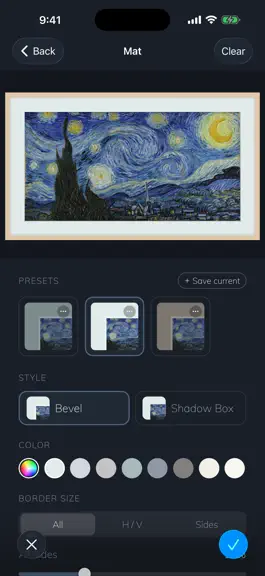
Give your artwork a polished, gallery-ready look with customizable mats. Choose your colors and styles, adjust the proportions, and save your favorites for later. We’ve also made the editing experience smoother and fixed several issues.
Frame Crop – Art Mode — FAQ
How much money does Frame Crop – Art Mode make?
According to AppCurrents estimates, Frame Crop – Art Mode generates approximately $2k–$37k per month (medium confidence), modeled from its the App Store chart performance, rating velocity, and monetization signals.
How many downloads does Frame Crop – Art Mode get?
Frame Crop – Art Mode sees an estimated 800–3k downloads per month on the App Store, per AppCurrents modeling.
Is Frame Crop – Art Mode free?
Frame Crop – Art Mode is a paid app priced at $7.99 on the App Store.
What is Frame Crop – Art Mode's rating?
Frame Crop – Art Mode holds a 4.66-star average from 498 ratings on the App Store. It currently ranks #41 on the Utilities paid chart.
When was Frame Crop – Art Mode released?
Frame Crop – Art Mode launched on the App Store on 22.06.2023. Its latest version shipped 30.09.2026.


