
eufyMake
eufyMake generates an estimated $0/month in revenue from 300–1k downloads/month on the App Store, according to AppCurrents estimates (updated 2026-10-02).
| Est. revenue / month | $0 |
|---|---|
| Est. downloads / month | 300–1k |
| Estimate confidence | medium |
| Pricing | Free |
| Rating | 4.62 ★ (590 ratings) |
| Category | Utilities |
| Released | 24.10.2022 |
| App last updated | 01.09.2026 |
| Platform | iOS |
Modeled monthly estimate · rating velocity · medium confidence

About
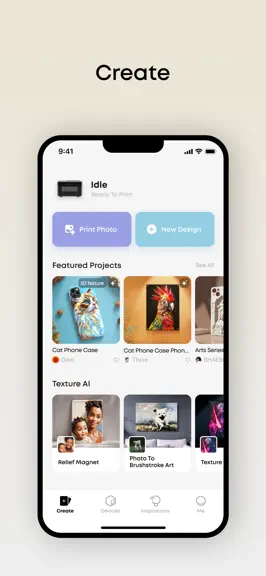
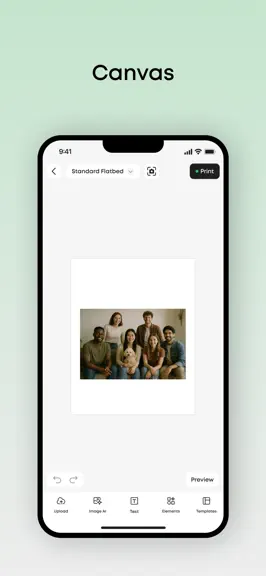
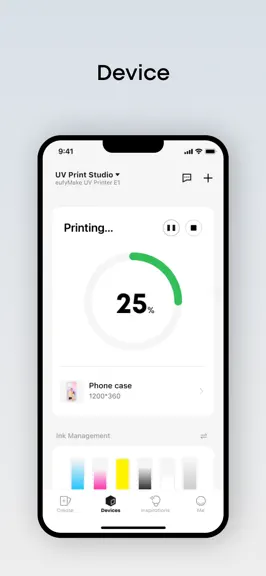
Easily Manage Your eufyMake UV Printers & 3D Printers The eufyMake app makes it simple to connect, control, and create with your eufyMake UV Printers & 3D Printers——all from your phone. More than just a printing tool, it’s a creative hub powered by AI and a vibrant community. -Seamless Printer Control: Connect your printer via Wi-Fi and manage prints directly from your phone with ease. -Creative…
Trends & analysis
Chart rank trend
US · overallWhy it's surfacing
Scout 9Ratings & velocity
★ -0.01 in windowRating distribution
91% positive · 587 ratingsGeographic reach
best rank · 0 storefrontsRevenue & downloads trend
ARPU $0Update history
5 updates tracked- v4.3.01mo ago
• Continue Printing with Expired Ink — When printing with expired ink, confirm the risk in the dialog to keep printing. Replace all ink within 14 days and your Care benefits remain unaffected; reminders continue if it's not replaced in time. • Soft White Ink Reminder Upgrade — When printing with standard white ink in scenarios where Soft White Ink is recommended, the dialog now includes a Continue Printing button so you can proceed after acknowledging the risk, with an option to snooze reminders for 3 months.
- v4.2.01mo ago
New • White Ink Settling Repair — When the system detects that white ink may have settled, it automatically triggers a repair process to restore uniform ink distribution, reducing print quality issues caused by white ink settling. • Medium Clean Level Upgrade — Medium Clean is now split into two levels. The new Enhanced level provides better repair for print line dropout issues, allowing you to choose the cleaning intensity that best fits your print head condition. Improved • Compatibility Improvements — Improved compatibility with older device models and operating systems.
- v4.1.02mo ago
New • AI Agent — Process images through natural language conversation, including style transfer, portrait generation, and artistic effects. Generate images directly in chat and import them to your canvas. Improved • White Ink Choke Improvements — White Ink Choke now adjusts automatically based on the local edge width of images or text, helping prevent fine details from becoming unclear due to excessive choking. Pure white layers and white objects automatically bypass choke to prevent white content from being eroded. For fine details like thin lines and text strokes, choke is automatically reduced to better preserve white ink. All protections apply automatically with no manual configuration needed.
- v4.0.03mo ago
New • Remote Shutdown & Moisturize — A Moisturize button has been added to the print head maintenance section on the device page, and a Shutdown button has been added in the device settings panel. Both can be used anytime when the device is not in operation. • Cleaning Cartridge Full Alerts — When the cleaning cartridge reaches its limit, a clear alert appears with options to moisturize or confirm replacement. Certain ongoing maintenance actions (Deep Clean, White Ink Switch, etc.) save a breakpoint and resume automatically after the cartridge is replaced. • Print Height Limit Raised to 13cm — The maximum printable object height has been increased from 10cm to 13cm. When using snapshot alignment and the object exceeds 60mm, a guidance dialog appears with a direct link to switch to zero-point alignment (which supports up to 130mm). • Maintenance Consumption Breakdown — An info icon (ⓘ) has been added next to the green extra-consumption numbers on the Ready to Print and print completion pages. Tapping it shows a breakdown of each maintenance action and its per-channel ink usage. • Camera Calibration — White paper detection has been added to the calibration flow, catching missing or misplaced paper early to improve calibration success rate. • Parts Expiry Reminder — When consumable parts (such as the cleaning cartridge) are approaching their expiry date, the app sends staged advance reminders to help you prepare replacements in time. • Software Update Improvements (App) — The app update flow has been improved for a smoother upgrade experience. • Software Version Rating — Starting from this version, after each update and print completion, you'll be invited at an appropriate moment to rate the current version. Improved • Device Status — When the device is in Maintenance Status (awaiting ink injection after deep clean or moisturizing), Auto Measuring and axis movement are now accessible. Printing remains blocked until ink is injected. • Maintenance Progress Indicator — Clean, Deep Clean, drain, auto deep clean, auto moisturize, and white ink cycle now show a progress bar with estimated remaining time. • ICC Profile Auto-Update Off by Default — The ICC profile auto-update option is now unchecked by default.
- v3.8.05mo ago
New • UV DTF Sticker Mode Guidance & A-Film Detection — A guidance pop-up appears the first time you switch to UV DTF Sticker mode. If height measurement exceeds 3.1mm, a warning alerts you that the A film may not be properly attached. • Initialization Preparation Page — A new pre-check step before initialization guides you through key preparation tasks, reducing initialization failures. Improved • Device Status Display — Status naming unified across App and PC. States including Initializing, Performing Maintenance, Calibrating, and more now show clear subtitles at all times. • White Ink Mid-Print Priming Notification — When cumulative white ink printing reaches 50ml, a notification explains the mid-print priming pause and confirms printing will resume automatically. • Simplified Device Settings — The "Remote Print" and "Repeat Print" switches have been removed. Both features are now always enabled by default. • Rotary Positioning Accuracy — The canvas origin has been moved to the top-left corner. Existing projects migrate automatically. • Skip Priming After Short Pause — If a print job is paused and resumed within 10 minutes (no cartridge change during pause), pre-print priming is skipped, saving ink and wait time.
eufyMake — FAQ
How many downloads does eufyMake get?
eufyMake sees an estimated 300–1k downloads per month on the App Store, per AppCurrents modeling.
Is eufyMake free?
eufyMake is free to download on the App Store, with no in-app purchases detected.
What is eufyMake's rating?
eufyMake holds a 4.62-star average from 590 ratings on the App Store.
When was eufyMake released?
eufyMake launched on the App Store on 24.10.2022. Its latest version shipped 01.09.2026.


