
Dash for Tesla
Dash for Tesla generates an estimated $5–$80/month in revenue from 10–60 downloads/month on the App Store, according to AppCurrents estimates (updated 2026-08-02).
| Est. revenue / month | $5–$80 |
|---|---|
| Est. downloads / month | 10–60 |
| Estimate confidence | medium |
| Pricing | Paid $0.99 |
| Rating | 4.67 ★ (3 ratings) |
| Category | Utilities |
| Released | 12.02.2026 |
| App last updated | 09.07.2026 |
| Platform | iOS |
Modeled monthly estimate · rating velocity · medium confidence
About
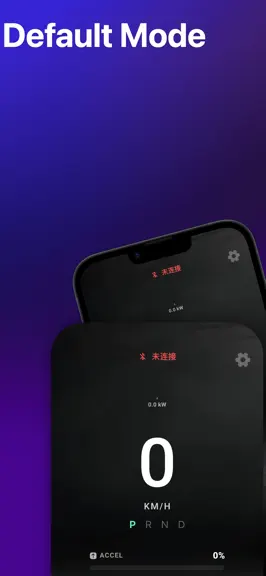
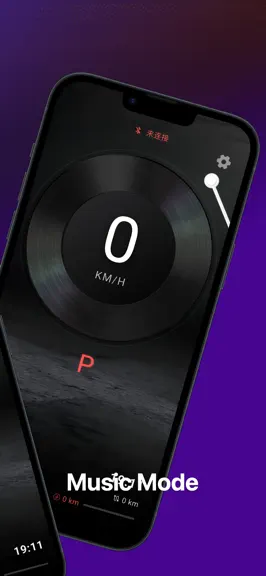
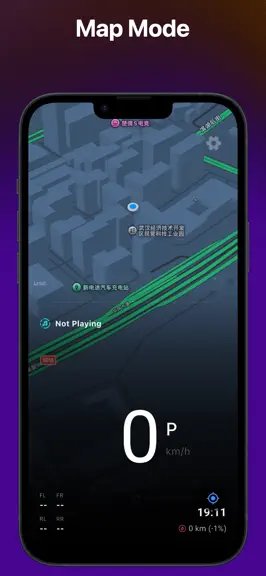
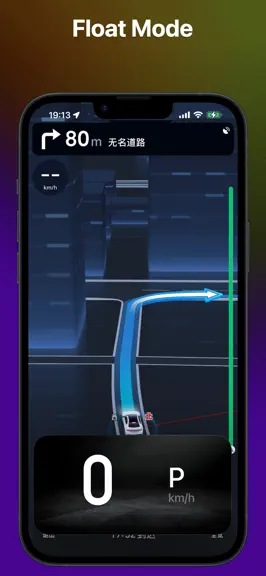
Dash for Tesla is a Bluetooth-based digital dashboard app for users who want to view essential driving information on their phone. No account login, no cloud authorization, and no additional hardware are required. With a supported Bluetooth connection, users can connect locally and view basic information such as vehicle speed and selected vehicle status. Key Features - No account login required…
Trends & analysis
Chart rank trend
US · overallWhy it's surfacing
Scout 30Ratings & velocity
★ +0.17 in windowRating distribution
100% positive · 2 ratingsGeographic reach
best rank · 6 storefrontsRevenue & downloads trend
ARPU $1Update history
4 updates tracked- v1.8.025d ago
This update introduces the new Classic Dashboard: • Supports widget combinations and quick switching • Offers multiple visual styles • Brings a richer map viewing experience • Improves stability and smoothness
- v1.7.61mo ago
【Fixes & Improvements】 Fixed several known bugs to improve application stability and compatibility. Optimized the interactive user interface for more responsive feedback and a smoother workflow. 【Performance Optimizations】 Conducted targeted performance tuning to reduce resource consumption, resulting in a lighter and faster operation. 【New Features】 Payment Model Change: The application’s payment model has been changed from a one-time purchase to a subscription, providing users with continuous feature updates and service support. New Lyric Watch Face: Added a new “Lyric Watch Face” style, supporting real-time display of the currently playing song’s lyrics on the watch face interface, allowing you to sing along easily even while driving.
- v1.7.41mo ago
【Fixes & Improvements】 Fixed the slow response issue when switching album covers; covers now display instantly upon track change. Fixed display anomalies in Minimalist Mode, ensuring complete and accurate information presentation. Optimized the display style of the speed-power curve on the default dashboard for clearer and more readable charts. Performed multiple bug fixes and functional optimizations to enhance the overall user experience. 【Performance Optimizations】 Fully optimized the underlying communication protocols, significantly improving data transmission stability and effectively reducing connection interruptions. 【New Features】 Added a new "Split-Screen Map Watch Face", allowing simultaneous display of navigation maps and core driving data on the same watch face interface for more efficient information access.
- v1.7.12mo ago
【Fixes & Improvements】 Optimized the UI of the Default, Music, Minimalist, and HUD watch faces for a more reasonable layout and visual design. Enhanced the interaction flow for setting watch face backgrounds, making customization easier. Refined the visual style of turn signal indicators for clearer and more prominent alerts. Conducted multiple detail optimizations and bug fixes to improve system stability. 【Performance Optimizations】 Added a real-time data source status display, allowing users to intuitively view the connection and signal quality of Bluetooth, vehicle modules, and GPS. 【New Features】 Multi-Source Data Fusion Driving: Added support for free combination and switching of multiple data sources (Bluetooth, vehicle modules, GPS) to adapt to a wider range of vehicle models. Professional Information Display: Added altitude, atmospheric pressure information, and a real-time speed-power dynamic curve to the default watch face. Efficient Watch Face Management: Added a “Quick Switch” entry on the watch face interface for rapid browsing and switching between watch faces. Introduced the “Watch Face Library” feature, providing centralized management and categorized browsing of watch faces. Personalized Startup Experience: Added a “Startup Show” feature, displaying personalized animations or information when the app launches. Enhanced Music Experience: The music watch face now automatically fetches and syncs the corresponding album artwork when switching music playback sources.
Dash for Tesla — FAQ
How much money does Dash for Tesla make?
According to AppCurrents estimates, Dash for Tesla generates approximately $5–$80 per month (medium confidence), modeled from its the App Store chart performance, rating velocity, and monetization signals.
How many downloads does Dash for Tesla get?
Dash for Tesla sees an estimated 10–60 downloads per month on the App Store, per AppCurrents modeling.
Is Dash for Tesla free?
Dash for Tesla is a paid app priced at $0.99 on the App Store.
What is Dash for Tesla's rating?
Dash for Tesla holds a 4.67-star average from 3 ratings on the App Store.
When was Dash for Tesla released?
Dash for Tesla launched on the App Store on 12.02.2026. Its latest version shipped 09.07.2026.


