
Countdown
Countdown generates an estimated $56k–$300k/month in revenue from 130k–540k downloads/month on the App Store, according to AppCurrents estimates (updated 2026-10-02).
| Est. revenue / month | $56k–$300k |
|---|---|
| Est. downloads / month | 130k–540k |
| Estimate confidence | medium |
| Pricing | Free + IAP |
| Rating | 4.81 ★ (187,206 ratings) |
| Category | Utilities |
| Best chart rank | #54 Utilities Free |
| Released | 11.09.2018 |
| App last updated | 29.09.2026 |
| Platform | iOS |
Modeled monthly estimate · rating velocity · medium confidence
About
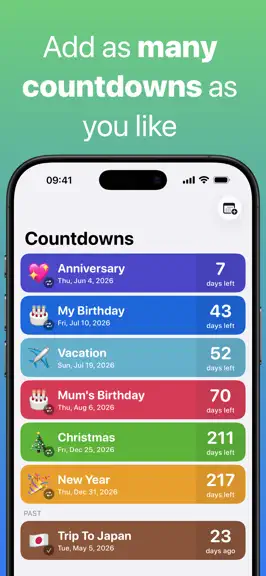
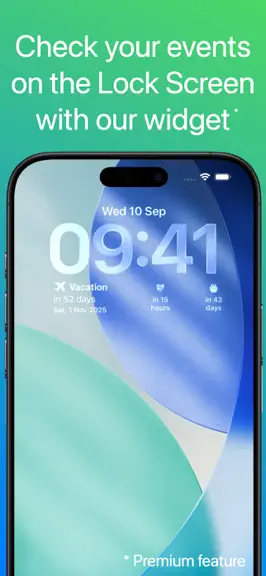
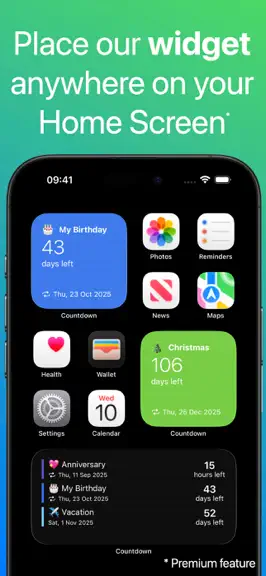
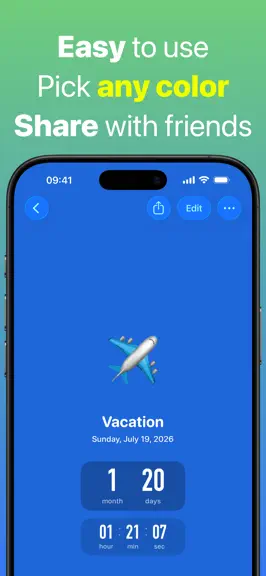
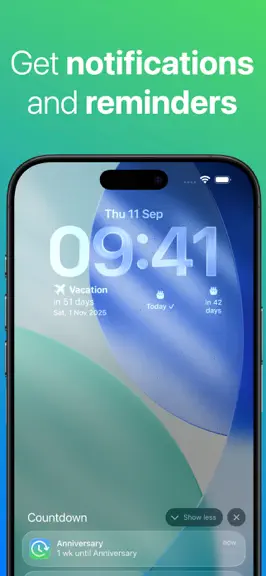
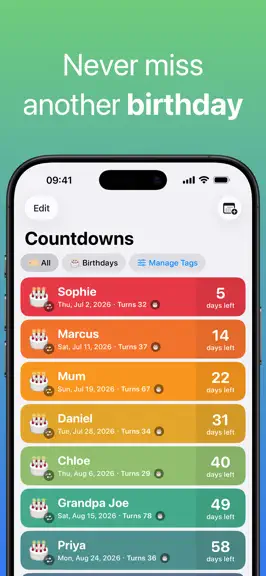
Countdown is a free, super easy to use countdown timer and reminder for the important events & dates in your life. Features: • Check your events on the Lock Screen with our widget (Premium feature) • Glance at your events on your Apple Watch • Glance at your events using our widget in StandBy (Premium feature) • Place our Widget anywhere on your Home Screen to view your most important events (Pre…
Trends & analysis
Chart rank trend
US · categoryWhy it's surfacing
Scout 21Ratings & velocity
★ 0 in windowRating distribution
96% positive · 177k ratingsGeographic reach
best rank · 1 storefrontRevenue & downloads trend
ARPU $0In-app purchases
2 tiersUpdate history
12+ updates tracked- v7.3.51d ago
• Extra Large Widget (iOS 27, Premium): The countdown list widget now comes in a new extra large size. See more of your events at a glance. • iPad & iPhone Duo: Several improvements for a better experience on large screens. Do more with Siri and Shortcuts: • Create countdowns by voice. Say “Hey Siri, create a new Countdown.” Follow the prompts to set a title, date, and either an all-day event or a specific time. • Find out what’s next. Ask “What's next in Countdown?” to hear what’s coming up and how much time is left. • Open a countdown directly. Say “Open [event name] in Countdown” — for example, “Open Birthday in Countdown.” • Keep your countdowns handy. Ask Siri how long until an event, or say “Show my countdowns in Countdown” to open your full list. • Build your own routines. Add countdown actions to custom shortcuts and automations. We’ve also improved language support, countdown recognition, and reliability for a smoother Siri experience. Have feedback or a feature request? Email me at [email protected].
- v7.3.42d ago
• Extra Large Widget (iOS 27, Premium): The countdown list widget now comes in a new extra large size. See more of your events at a glance. • iPad & iPhone Duo: Several improvements for a better experience on large screens. Do more with Siri and Shortcuts: • Create countdowns by voice. Say “Hey Siri, create a new Countdown.” Follow the prompts to set a title, date, and either an all-day event or a specific time. • Find out what’s next. Ask “What's next in Countdown?” to hear what’s coming up and how much time is left. • Open a countdown directly. Say “Open [event name] in Countdown” — for example, “Open Birthday in Countdown.” • Keep your countdowns handy. Ask Siri how long until an event, or say “Show my countdowns in Countdown” to open your full list. • Build your own routines. Add countdown actions to custom shortcuts and automations. We’ve also improved language support, countdown recognition, and reliability for a smoother Siri experience. Have feedback or a feature request? Email me at [email protected].
- v7.3.310d ago
• Extra Large Widget (iOS 27, Premium): The countdown list widget now comes in a new extra large size. See more of your events at a glance. • iPad & iPhone Duo: Several improvements for a better experience on large screens. Do more with Siri and Shortcuts: • Create countdowns by voice. Say “Hey Siri, create a new Countdown.” Follow the prompts to set a title, date, and either an all-day event or a specific time. • Find out what’s next. Ask “What's next in Countdown?” to hear what’s coming up and how much time is left. • Open a countdown directly. Say “Open [event name] in Countdown” — for example, “Open Birthday in Countdown.” • Keep your countdowns handy. Ask Siri how long until an event, or say “Show my countdowns in Countdown” to open your full list. • Build your own routines. Add countdown actions to custom shortcuts and automations. We’ve also improved language support, countdown recognition, and reliability for a smoother Siri experience. Have feedback or a feature request? Email me at [email protected].
- v7.3.211d ago
• Extra Large Widget (iOS 27, Premium): The countdown list widget now comes in a new extra large size. See more of your events at a glance. • iPad & iPhone Duo: Several improvements for a better experience on large screens. Do more with Siri and Shortcuts: • Create countdowns by voice. Say “Hey Siri, create a new Countdown.” Follow the prompts to set a title, date, and either an all-day event or a specific time. • Find out what’s next. Ask “What's next in Countdown?” to hear what’s coming up and how much time is left. • Open a countdown directly. Say “Open [event name] in Countdown” — for example, “Open Birthday in Countdown.” • Keep your countdowns handy. Ask Siri how long until an event, or say “Show my countdowns in Countdown” to open your full list. • Build your own routines. Add countdown actions to custom shortcuts and automations. We’ve also improved language support, countdown recognition, and reliability for a smoother Siri experience. Have feedback or a feature request? Email me at [email protected].
- v7.3.116d ago
Do more with Siri and Shortcuts: • Create countdowns by voice. Say “Hey Siri, create a new Countdown.” Follow the prompts to set a title, date, and either an all-day event or a specific time. • Find out what’s next. Ask “What's next in Countdown?” to hear what’s coming up and how much time is left. • Open a countdown directly. Say “Open [event name] in Countdown” — for example, “Open Birthday in Countdown.” • Keep your countdowns handy. Ask Siri how long until an event, or say “Show my countdowns in Countdown” to open your full list. • Build your own routines. Add countdown actions to custom shortcuts and automations. We’ve also improved language support, countdown recognition, and reliability for a smoother Siri experience. Have feedback or a feature request? Email me at [email protected].
Countdown — FAQ
How much money does Countdown make?
According to AppCurrents estimates, Countdown generates approximately $56k–$300k per month (medium confidence), modeled from its the App Store chart performance, rating velocity, and monetization signals.
How many downloads does Countdown get?
Countdown sees an estimated 130k–540k downloads per month on the App Store, per AppCurrents modeling.
Is Countdown free?
Countdown is free to download on the App Store, monetizing through in-app purchases.
What is Countdown's rating?
Countdown holds a 4.81-star average from 187,206 ratings on the App Store. It currently ranks #54 on the Utilities free chart.
When was Countdown released?
Countdown launched on the App Store on 11.09.2018. Its latest version shipped 29.09.2026.


