
ComicFlow - CBR & CBZ to PDF
ComicFlow - CBR & CBZ to PDF generates an estimated $30–$200/month in revenue from 10–60 downloads/month on the App Store, according to AppCurrents estimates (updated 2026-06-18).
| Est. revenue / month | $30–$200 |
|---|---|
| Est. downloads / month | 10–60 |
| Estimate confidence | medium |
| Pricing | Paid $2.99 |
| Rating | 4.67 ★ (3 ratings) |
| Category | Utilities |
| Released | 05.01.2026 |
| App last updated | 15.06.2026 |
| Platform | iOS |
Modeled monthly estimate · rating velocity · medium confidence


About
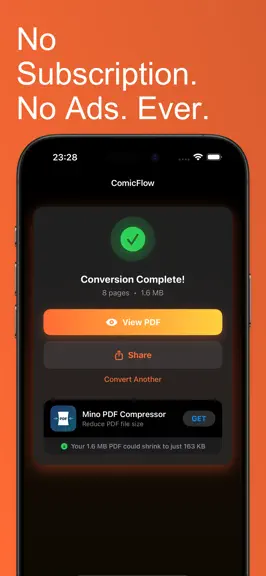
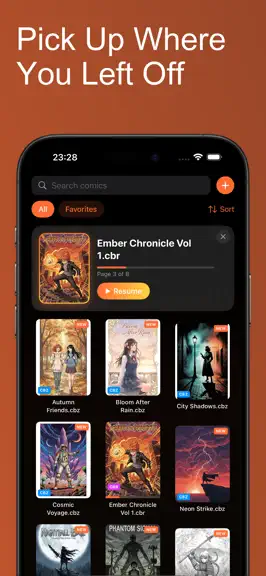
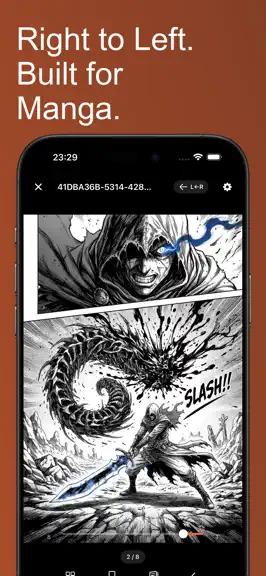
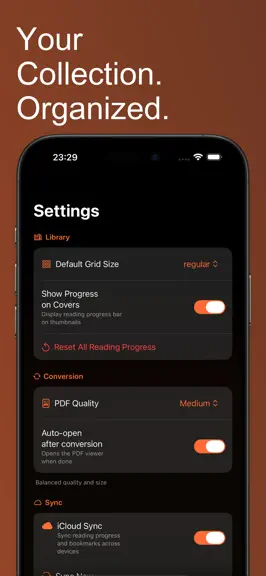
ComicFlow converts CBR and CBZ comic archives to PDF, reads them directly, and organizes your collection — 100% offline and private. No ads, no account, no subscription. CONVERT CBR/CBZ TO PDF Convert comic book archives to PDF with one tap. ComicFlow extracts every page from your CBR, CBZ, RAR, and ZIP files and builds a clean, correctly ordered PDF in seconds. - Three quality settings: Low for…
Trends & analysis
Chart rank trend
US · overallWhy it's surfacing
Scout 30Ratings & velocity
★ 0 in windowRating distribution
100% positive · 3 ratingsGeographic reach
best rank · 4 storefrontsRevenue & downloads trend
ARPU $2Update history
2 updates tracked- v3.03d ago
ComicFlow 3.0 NEW & FREE: CBZ EXPORT • Convert any comic to CBZ — opens natively on Kobo, Boox, PocketBook, KOReader, and most comic reader apps • No re-encoding, no quality loss INTRODUCING COMICFLOW PRO An optional one-time purchase. No subscription — the base app stays fully featured. • Face ID-locked collections — keep private comics behind Face ID, Touch ID, or your passcode • Reader presets — save your manga, western, and webtoon setups, switch in one tap • EPUB export for e-readers, with device profiles for Kobo, Boox, reMarkable, and PocketBook • E-ink image optimization: auto-crop, contrast, sharpening, manga double-page splitting, webtoon splitting A note on Kindle: Kindles don't read sideloaded EPUBs. The app explains the free Calibre route honestly instead of overpromising. ALSO IN THIS UPDATE • New app icon • PDF quality setting now lives in the Convert screen, where you actually need it Thanks for the feedback — keep it coming.
- v2.71mo ago
ComicFlow 2.7 NEW: DOUBLE-PAGE LAYOUT FOR PDFs • Read PDFs as side-by-side spreads, just like CBR and CBZ • Pick Single, Double, or Auto in Reader Settings — Auto switches to a spread automatically when you rotate to landscape • Cover page stays solo so the rest of the book pairs the way it was meant to • Works with right-to-left for manga PDFs Thanks for the feedback — keep it coming.
ComicFlow - CBR & CBZ to PDF — FAQ
How much money does ComicFlow - CBR & CBZ to PDF make?
According to AppCurrents estimates, ComicFlow - CBR & CBZ to PDF generates approximately $30–$200 per month (medium confidence), modeled from its the App Store chart performance, rating velocity, and monetization signals.
How many downloads does ComicFlow - CBR & CBZ to PDF get?
ComicFlow - CBR & CBZ to PDF sees an estimated 10–60 downloads per month on the App Store, per AppCurrents modeling.
Is ComicFlow - CBR & CBZ to PDF free?
ComicFlow - CBR & CBZ to PDF is a paid app priced at $2.99 on the App Store.
What is ComicFlow - CBR & CBZ to PDF's rating?
ComicFlow - CBR & CBZ to PDF holds a 4.67-star average from 3 ratings on the App Store.
When was ComicFlow - CBR & CBZ to PDF released?
ComicFlow - CBR & CBZ to PDF launched on the App Store on 05.01.2026. Its latest version shipped 15.06.2026.


