CNC Utility Pro
CNC Utility Pro generates an estimated $3–$50/month in revenue from 8–30 downloads/month on the App Store, according to AppCurrents estimates (updated 2026-08-02).
| Est. revenue / month | $3–$50 |
|---|---|
| Est. downloads / month | 8–30 |
| Estimate confidence | medium |
| Pricing | Paid $0.99 |
| Rating | 5.00 ★ (1 ratings) |
| Category | Utilities |
| Released | 20.04.2026 |
| App last updated | 24.06.2026 |
| Platform | iOS |
Modeled monthly estimate · rating velocity · medium confidence
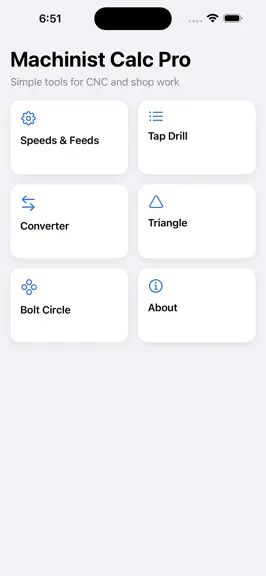
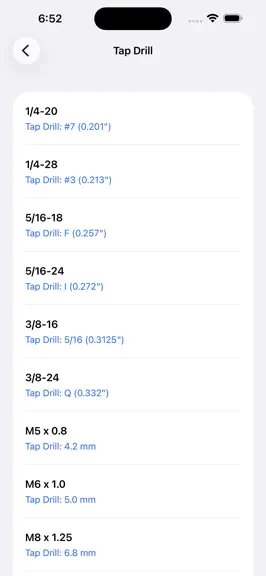

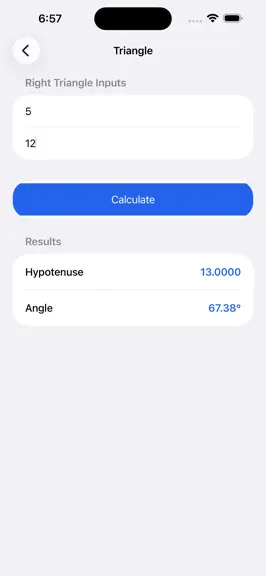
About
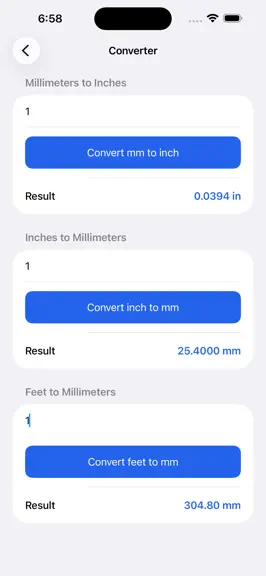
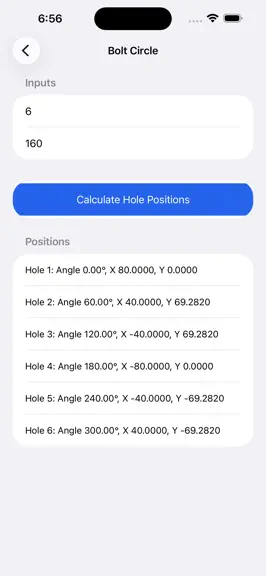
CNC Utility Pro is a fast and reliable machining companion built for real shop work. It brings essential CNC calculations into one simple and easy to use app so you can focus on precision and productivity instead of searching through charts or doing manual math. This app is designed for machinists, CNC operators, toolmakers, engineering students, and anyone working with machines who needs quick a…
Trends & analysis
Chart rank trend
US · overallWhy it's surfacing
Scout 30Ratings & velocity
★ +5 in windowGeographic reach
best rank · 1 storefrontRevenue & downloads trend
ARPU $1Update history
2 updates tracked- v1.2.11mo ago
v1.0 — Original CNC Utility Pro (3 files) Live Machining Simulator Basic Speeds & Feeds Tap Drill Chart Micrometer/Vernier Quiz v2.0 — Rebuilt as single ContentView.swift (8 tabs) Speeds & Feeds — material picker (8 materials), carbide/HSS toggle, auto-suggested SFM & chip load, RPM, feed rate (in/min + mm/min), MRR, HP estimate, formula reference Tap Drill — full UNC/UNF (#0-80 → 1"-14") + full Metric ISO (M1 → M30), 75%/50% thread drill, decimal inch, searchable, tap-for-detail card Converter — 12 categories, 100+ units (Length, Area, Volume, Mass, Speed, Temp, Torque, Pressure, Force, Power, Angle, Flow), wheel picker, swap button, all-at-once conversion table Triangle Solver — SSS, SAS, ASA, right triangle, all sides/angles/area/trig values, auto triangle type detection Bolt Hole Circle — canvas preview with numbered holes, XY coordinate table, auto G-code output G Codes — 50+ codes, plain-English descriptions, example per code, group filter, search M Codes — 35+ codes, full descriptions, examples, group filter, search Control Panels — HAAS NGC, OKUMA OSP, Hardinge with color-coded buttons, press animation, tap-to-explain every button v3.0 — Shop Math tab added (4 carpenter calculators) Board Feet & Lumber Cost — simple + advanced, 8 species with real pricing, 5 grades with multipliers, saw kerf loss, cut list builder, weight estimate Stair Stringer — risers/treads/angle/stringer length, IRC code compliance checks, fraction readout (e.g. 7 9/16"), step-by-step layout guide Roof & Rafter — live pitch diagram canvas, common rafter length, pitch factor, plumb/level cut angles, ridge deduction, rafter count, lumber + roofing material cost, pitch reference table Concrete — 5 shapes (slab, footing, column, sonotube, steps), bag size selector, truck vs bag cost, mix design guide, weight estimate v4.0 — Construction tab added (8 calculators) Drywall & Framing — gross/net wall + ceiling area, door/window deductions, sheet size selector, stud count, plate footage, combined material cost Paint & Coating — 6 surface types with real coverage rates, 5 paint types with price multipliers, primer estimate, ceiling toggle Flooring — hardwood, LVP, tile (with grout joint), laminate, carpet (auto sq yd), installation + underlayment cost Roofing Materials — 4 shingle types with lifespan, pitch factor, squares, bundles, 4 underlayment types, ridge cap, drip edge Excavation & Grading — rectangle/circle/trench, 4 soil types with real swell factors, loose CY, truck loads, haul cost Insulation — batts/blown/spray foam/rigid board, R-value target selector (R-13 → R-60), depth needed per type, R/inch reference Steel Beam & Load — 20 W-beam sections (W4×13 → W36×135), UDL/point loads, moment/shear/deflection, L/360 and capacity code checks Electrical — wire gauge selector with full NEC ampacity table, load/circuit calculator, voltage drop with 3% NEC check, conduit fill with 40% NEC check
- v23mo ago
This update brings one of the most powerful improvements yet, focused on making CNC Utility Pro faster, smarter, and even more practical for real machinists on the shop floor. Built from real-world experience and continuous feedback, this version enhances both functionality and usability while keeping the app simple, reliable, and efficient. The biggest addition in this update is the all-new G-Code and M-Code Reference. Instead of searching manuals or relying on memory, machinists now have quick access to essential CNC codes directly inside the app. The reference is designed with clarity in mind, providing simple explanations and real examples so you can understand and apply codes instantly. A built-in search feature allows you to find any code within seconds, helping reduce downtime and improve workflow efficiency. We have also refined the overall user experience to make navigation smoother and more intuitive. The interface has been optimized to ensure that every tool is easy to access with minimal effort. Whether you are calculating speeds and feeds or checking drill sizes, the experience now feels faster and more responsive. Performance improvements have been made across the entire app. Calculations now load quicker, transitions are smoother, and the app runs more efficiently even during heavy use. These enhancements ensure that CNC Utility Pro remains reliable when you need it the most, especially in time-critical machining environments. The core tools that machinists rely on every day have been further polished. Speed and feed calculations, unit conversions, bolt hole circle calculations, Pythagorean triangle solving, and tap drill sizing have all been fine-tuned for better accuracy and ease of use. The goal is simple: give you precise results quickly without unnecessary complexity. This update also focuses on maintaining a clean and minimal design. CNC Utility Pro continues to follow a “keep it simple” approach, removing clutter and distractions so you can focus on what truly matters—your work. Every feature is carefully designed to provide value without overwhelming the user. Behind this update is a commitment to continuous improvement. As a machinist with years of hands-on experience, I understand the real challenges faced in the field. CNC Utility Pro is built not just as an app, but as a practical tool to improve efficiency, reduce errors, and make everyday machining tasks easier. Thank you for your continued support. More powerful features and improvements are on the way as we continue to evolve CNC Utility Pro into the ultimate companion for machinists worldwide.
CNC Utility Pro — FAQ
How much money does CNC Utility Pro make?
According to AppCurrents estimates, CNC Utility Pro generates approximately $3–$50 per month (medium confidence), modeled from its the App Store chart performance, rating velocity, and monetization signals.
How many downloads does CNC Utility Pro get?
CNC Utility Pro sees an estimated 8–30 downloads per month on the App Store, per AppCurrents modeling.
Is CNC Utility Pro free?
CNC Utility Pro is a paid app priced at $0.99 on the App Store.
What is CNC Utility Pro's rating?
CNC Utility Pro holds a 5.00-star average from 1 ratings on the App Store.
When was CNC Utility Pro released?
CNC Utility Pro launched on the App Store on 20.04.2026. Its latest version shipped 24.06.2026.


