CNC CONTROL PANEL
CNC CONTROL PANEL generates an estimated $0/month in revenue from 0 downloads/month on the App Store, according to AppCurrents estimates (updated 2026-08-02).
| Est. revenue / month | $0 |
|---|---|
| Est. downloads / month | 0 |
| Estimate confidence | low |
| Pricing | Paid $4.99 |
| Rating | 0.00 ★ (0 ratings) |
| Category | Utilities |
| Released | 26.05.2026 |
| App last updated | 29.07.2026 |
| Platform | iOS |
Modeled monthly estimate · rating velocity · low confidence




About
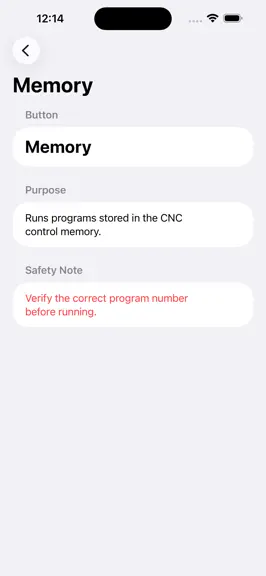
CNC Panel Atlas. CNC Control Panel Simulator & CNC Learning System CNC Panel Atlas is a powerful CNC learning and operator reference application designed for machinists, CNC operators, students, manufacturing professionals, engineers, hobbyists, and anyone interested in CNC machining technology. Built with simplicity and industrial usability in mind, CNC Panel Atlas helps users understand CNC mach…
Trends & analysis
Chart rank trend
US · overallWhy it's surfacing
Scout 36Ratings & velocity
★ 0 in windowGeographic reach
best rank · 0 storefrontsRevenue & downloads trend
monthly estimateUpdate history
3 updates tracked- v6.06d ago
AI CNC Copilot — ProCNCBrain rebuilt from 7 hardcoded if-checks to 150+ entries covering every tap drill (UNC, UNF, Metric, NPT, BSP, ACME in inches and mm), every G/M-code, all 16 materials, all alarms, all controllers, and every app feature with navigation paths. The Copilot UI is now a proper chat with history, 18 quick-prompt cards, typing indicator, timestamps, and a trash button. Voice Assistant — Same 150+ entry brain as the Copilot for offline answers. System prompt updated to tell Claude the full app data structure so online answers are specific and contextual. Camera Measurement — FOV-based dimension math using actual iPhone camera geometry (75° field of view). Shows a range across three distance estimates (30/50/80cm) rather than one guess. Detects circular objects and estimates diameter from contour bounding box. Full reference table: US quarter, penny, dime, credit card, A4, Letter. MachiningToolUniverse — Complete rebuild: 200+ tools across 12 categories, every tool with a real industry-standard SceneKit 3D model (full C-frame micrometer with thimble/barrel/ratchet/ruby tip, full Kurt-style vise with T-slots/serrations/workpiece/handle, 3-jaw chuck with scroll/key holes, vernier caliper with depth blade/thumb wheel, dial indicator with red needle/bezel/ruby, CMM probe with stylus and qualification sphere, etc.). Memory-safe — one SCNView per sheet, destroyed on dismiss.
- v3.01mo ago
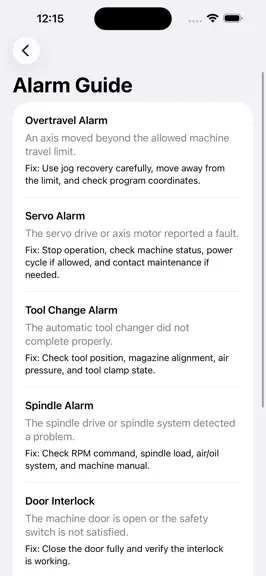
CNC Setup Wizard — pre-run checklist covering program, material, workholding, offsets, tools, safety G/M Code Library — searchable G-code and M-code reference, tap any code for full detail, star to Favorites Control Panel Library — Fanuc, Haas, Siemens, Mazak interactive panels — tap any button to learn what it does CNC Alarm Guide — common alarm codes with causes and fixes Operator Lessons — structured lessons on machine operation Safety Checklist — pre-run safety verification Calculators & Tools 7. Speeds & Feeds Calculator — pick material + tool diameter → RPM and feed rate 8. Offset Calculator — nominal vs measured vs current offset → exact correction value to type in 9. Tap & Thread Chart — 28 sizes (inch UNC/UNF + metric), searchable, with drill size and safety notes Reference & Learning 10. Quick Reference Card — one-screen cheat sheet of essential G/M codes, work offsets, safe startup sequence 11. Tool Holder Visual Library — Canvas-drawn diagrams of 17 tool holders across lathe turret and mill spindle, with revolving animated turret showing each tool type distinctly 12. Tooling Library — End mill, drill, tap, boring bar with geometry tips, speeds/feeds, common mistakes, pro tips 13. Advanced G-Code Builder — 30 parametric block types, inline editor, live validation warnings, dark terminal preview, clipboard export 14. Operator Quiz — 10 multiple-choice questions with live feedback and score 15. Favorites — star any G or M code, persists across app launches Simulation 16. G-Code Part Simulator — paste any G-code → renders tool path live on screen in lathe or mill mode, play/pause/scrub, speed control, tool returns home after completion 17. G71 Roughing Cycle Simulator — sliders for stock/finish diameter, DOC, RPM, feed → watch passes peel the part in real time, auto-generates G71 block 18. G83 Peck Drill Simulator — animated peck drill with per-peck color-coded material removal, chip cloud on retract, coolant jets, auto-generates G83 block 19. 5-Axis Toolpath Visualizer — paste 5-axis G-code with A/B axes → full SceneKit 3D scene, turbine wheel geometry, cyan toolpath overlay, pinch/rotate, animate with slider, custom stock size input (L × W × T)
- v1.02mo ago
CNC CONTROL PANEL — FAQ
How many downloads does CNC CONTROL PANEL get?
CNC CONTROL PANEL sees an estimated 0 downloads per month on the App Store, per AppCurrents modeling.
Is CNC CONTROL PANEL free?
CNC CONTROL PANEL is a paid app priced at $4.99 on the App Store.
When was CNC CONTROL PANEL released?
CNC CONTROL PANEL launched on the App Store on 26.05.2026. Its latest version shipped 29.07.2026.


