Clink: Custom Keyboards
Clink: Custom Keyboards generates an estimated $100–$2k/month in revenue from 100–500 downloads/month on the App Store, according to AppCurrents estimates (updated 2026-08-02).
| Est. revenue / month | $100–$2k |
|---|---|
| Est. downloads / month | 100–500 |
| Estimate confidence | medium |
| Pricing | Paid $2.99 |
| Rating | 3.63 ★ (8 ratings) |
| Category | Utilities |
| Best chart rank | #10 Utilities Paid |
| Released | 10.06.2026 |
| App last updated | 13.07.2026 |
| Platform | iOS |
Modeled monthly estimate · rating velocity · medium confidence
About
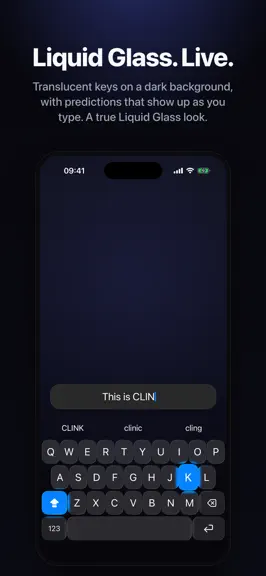
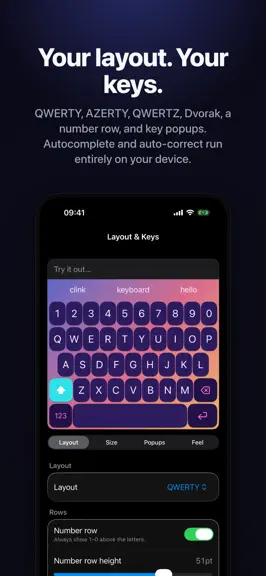
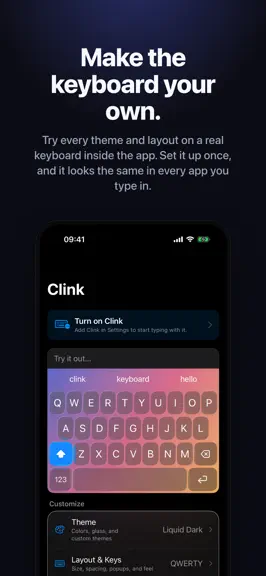
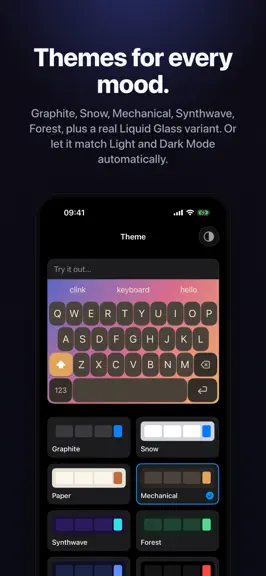
A keyboard that's finally yours. Clink replaces the system keyboard with one you actually control: the look, the feel, the sound, the layout, and the extras. One-time purchase. No subscription. Everything runs on your device. LIQUID GLASS The only third-party keyboard with a true Liquid Glass look. Keys are translucent and alive. Predictions appear as you type, and each key ripples under your fi…
Trends & analysis
Chart rank trend
US · overallWhy it's surfacing
Scout 40Ratings & velocity
★ +3.63 in windowGeographic reach
best rank · 10 storefrontsRevenue & downloads trend
ARPU $2Update history
4 updates tracked- v1.322d ago
Clink 1.3 is a massive update. Here’s what’s new: • Neural autocorrect is now available in Arabic, Bulgarian, Croatian, English, French, German, Hungarian, Italian, Malay, Portuguese, Russian and Spanish. It understands the sentence around what you’re typing, catches more real-word mistakes and is much less likely to “fix” names, slang or words you actually meant. • AI Tools lets you proofread, rewrite, shorten, translate, change tone or draft a reply without leaving the keyboard. You can create your own actions, edit the built-in prompts and see exactly what changed with underlines, an inline diff or a change list. It uses Apple Intelligence on supported devices. • Custom Actions and Custom Panels are now available to everyone. Build your own text actions and complete keyboard panels in Python, test them in the built-in editor and share them as files. Everything runs locally on your device. • Custom keys are much more powerful. Keys can have separate tap, shift, hold and swipe actions, sit on the number row, stay beside the space bar across layouts or open any built-in or custom panel. You can also import, export, duplicate and share complete layouts. • Korean now has full dubeolsik Hangul input. Vietnamese supports Telex, VNI and VIQR. Croatian, Arabic, Bulgarian and Hungarian have received proper layouts, dictionaries and input improvements. Adding a language now picks a suitable layout automatically. • Themes got a huge upgrade. There are loads of new themes, raised 3D keycaps, brushed metal finishes, key outlines, improved custom typefaces and more key press, entrance, letter and delete animations. • Backgrounds can now move and react while you type. Choose from Aurora, Rain, Embers, Starfield, Snow, Confetti, Fireworks, Lava and more, then adjust the colours, speed, density and reaction strength. They pause automatically when your phone needs to save power or memory. • Clink Pets have arrived. Pick from 17 little keyboard friends that watch you type, react to words and deletes, fall asleep when you stop and wake up when you return. • The clipboard now supports named groups and smart filters for links, email addresses, phone numbers and images. • The new haptic feel pad lets you adjust sharpness and strength together, with a live preview as you drag. • The whole Clink app has been rebuilt with native iOS navigation, controls, sheets, frosted cards and swipeable settings pages. There’s a lot under the hood too. Autocorrect and prediction now stay off the touch path, repeated work has been removed and haptics land as soon as you press a key. Fast typing should feel smoother, suggestions should be steadier and corrections should be both quicker and less aggressive. We’ve also fixed number pads opening incorrectly in empty fields, invisible suggestion text on transparent keyboards, overlapping emoji, disappearing recent emoji, theme preview issues, audio and haptic problems, and a long list of smaller keyboard bugs.
- v1.21mo ago
Clink 1.2 is the biggest update yet. Split keyboard. Open a gap down the middle so the keys pull to the edges and your thumbs reach less. Tune the gap, set where each row breaks, and let the edge letter and space bar drift to whichever thumb is free. Better swipe typing. Swipe now reads contractions like don't and you're, keeps the runner-up words one tap away when it guesses wrong, and learns the words you use. Dress the trail in seven looks: Neon, Rainbow, Sparkle, Comet, Fire, Ocean, and Solid. Smarter corrections. Clink learns the fixes you make over and over, catches real-word slips like tat into that, splits run-on words like alot into a lot, and ranks suggestions by what fits the word before them. Number and phone pads. Number, decimal, and phone fields now get a proper digit pad instead of the letter keyboard, themed to match. Languages. Type in several languages at once or switch one at a time with a swipe up on Return. The app itself now speaks ten languages. Profiles. Save whole setups and switch between them, export a single profile to share, and choose whether an imported config replaces your settings or becomes a new profile. First-run intro. A quick welcome that walks you through setup. Replay it any time from the home screen. New app icon! Plus swipe between settings tabs, a symbol long-press preset, host field traits honored like the system keyboard, per-row glass rendering for less heat, and more.
- v1.11mo ago
This update is a full UI refresh — every corner of the app has been polished. Themes & Appearance New default themes: Liquid Light and Liquid Dark out of the box "Theme app with keyboard" toggle — keep the settings UI clean and neutral, or let your keyboard theme take over All UI elements (emoji tabs, delete button, search bar, skin tone picker, swipe buttons, history cards, note cards) now respect your chosen corner radius Cursor The cursor settings page now shows a live animated preview of each movement style Switching modes replays the animation immediately Home Your scroll position on the home screen is now remembered when you navigate away and back Manage Extensions is now accessible directly from the home grid and sidebar Notepad & Clipboard History entries and notes have a subtle hairline border for better visual separation Minor label and layout cleanups in the Notepad settings Performance Default feel preset is now Native — snappier springs, firmer damping, no linger
- v1.01mo ago
Clink: Custom Keyboards — FAQ
How much money does Clink: Custom Keyboards make?
According to AppCurrents estimates, Clink: Custom Keyboards generates approximately $100–$2k per month (medium confidence), modeled from its the App Store chart performance, rating velocity, and monetization signals.
How many downloads does Clink: Custom Keyboards get?
Clink: Custom Keyboards sees an estimated 100–500 downloads per month on the App Store, per AppCurrents modeling.
Is Clink: Custom Keyboards free?
Clink: Custom Keyboards is a paid app priced at $2.99 on the App Store.
What is Clink: Custom Keyboards's rating?
Clink: Custom Keyboards holds a 3.63-star average from 8 ratings on the App Store. It currently ranks #10 on the Utilities paid chart.
When was Clink: Custom Keyboards released?
Clink: Custom Keyboards launched on the App Store on 10.06.2026. Its latest version shipped 13.07.2026.


