
xTune - Lyrion Remote & Player
xTune - Lyrion Remote & Player generates an estimated $30–$600/month in revenue from 10–50 downloads/month on the App Store, according to AppCurrents estimates (updated 2026-08-02).
| Est. revenue / month | $30–$600 |
|---|---|
| Est. downloads / month | 10–50 |
| Estimate confidence | medium |
| Pricing | Paid $8.99 |
| Rating | 5.00 ★ (6 ratings) |
| Category | Music |
| Released | 06.06.2025 |
| App last updated | 23.07.2026 |
| Platform | iOS |
Modeled monthly estimate · rating velocity · medium confidence
About
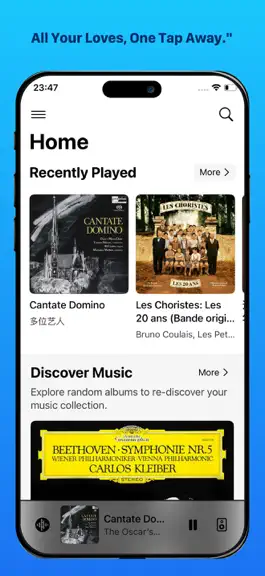
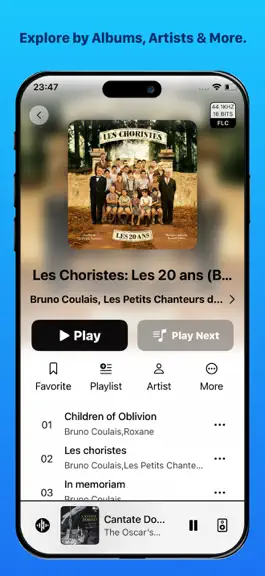
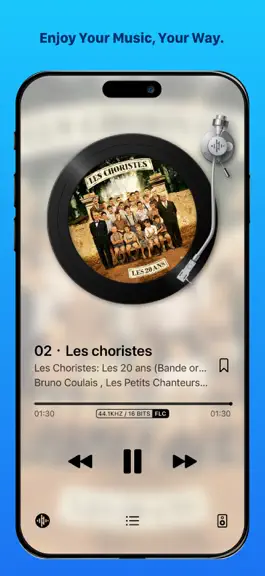
xTune is a remote app for LMS (Lyrion Music Server/Logitech Media Server) with a built-in player. Compatible with all LMS-based systems including Daphile and piCorePlayer. Key Features: - Flexible Browsing: Navigate your music by Album, Artist, Genre, Year, Work, or Folder. - Streaming Services: Supports Spotify, Qobuz, Tidal, Podcasts, and BBC Sounds. - Playback & Discovery: Includes fav…
Trends & analysis
Chart rank trend
US · overallWhy it's surfacing
Scout 17Ratings & velocity
★ 0 in windowRating distribution
100% positive · 6 ratingsGeographic reach
best rank · 6 storefrontsRevenue & downloads trend
ARPU $6In-app purchases
1 tiersUpdate history
3 updates tracked- v3.7.113d ago
# New Features ## Dynamic Island & Lock Screen - Dynamic Island live activity now supported on iPhone (built-in player only). Displays album art, title, artist, playback progress, and controls when switching to the desktop or other apps - Lock Screen live activity: shows current playback info and random album recommendations ## Full-Screen VU Meter & Spectrum - VU meter and spectrum are built-in player exclusive features, presented in landscape mode on iPhone - iPad users can tap the VU meter or spectrum button at the bottom-left of the full-screen player to switch views - iPhone users can tap an empty area on the full-screen player to reveal VU meter and spectrum switcher at the top - When in VU meter or spectrum view, tap an empty area to reveal song info, playback controls, and view switcher - Customizable default full-screen view (Player / VU Meter / Spectrum / Last Used) - 5 new VU meter styles: Power, McIntosh, Nagra (round), Retro, and Teac - Quickly switch between VU meter styles using the left/right arrows on the overlay ## All-New Cassette Tape Interface - Brand new cassette tape playback theme with meticulously rendered reel rotation, tape winding animation, and mechanical cassette shell details - Two tape appearances available: metal large-reel and standard cassette - Tape reels visually reflect playback progress in real time - VU meter now features a power-off effect — needles gracefully return to zero when playback stops - Tap the cassette to quickly switch tape styles; tap the VU meter to switch VU meter styles - Dedicated cassette appearance settings (Settings → Appearance → Now Playing → Theme → Cassette): adjust tape type and VU meter independent/system mode ## iPhone Landscape Experience - iPhone full-screen player now supports landscape mode with automatic orientation switching - Album detail, artist, and other pages adapted for landscape layout - Settings and dialogs fully adapted for landscape; pop-up panels automatically switch to scroll view in landscape - Experimental landscape feature toggle added (Settings → Advanced → Experimental Features) - Force landscape lock available in SqueezeDeck mode ## Others - New retro analog clock screensaver with date and weekday display (SqueezeDeck mode) - Customizable Deck screensaver clock style (Digital / Analog) # Improvements - VU meter needle smoothing algorithm moved to the underlying engine for more fluid, natural motion - Unified piecewise interpolation for all 5 VU meter scale mappings, eliminating substantial duplicate code - Spectrum animation rendering engine rebuilt for more stable frame rates and lower power consumption - Optimized screensaver night mode detection logic - Cassette interface button spacing and sizing refined for more precise tap targets - Song title automatically switches to horizontal scroll when marquee effect is turned off, so info is never lost - iPad full-screen overlay layout optimized with larger, easier-to-tap buttons - Bottom sheet panel width unified on iPhone for a more consistent visual appearance - Spectrum and VU meter transition animations improved, eliminating residual flickering # Bug Fixes - Fixed UI freezing caused by high-frequency list refresh callbacks on iOS 16 devices - Fixed orientation being hardcoded on iOS versions below 16, causing incorrect rotation behavior - Fixed long titles being truncated on the iPad navigation bar back button - Fixed artist name displaying incorrectly after disabling the marquee effect
- v3.6.11mo ago
# New Features ## Cassette Player Interface - Brand new retro cassette player theme, available in two material styles: black metal and silver metal. - Currently only supported in iPhone portrait orientation. - VU meter added, displaying real-time left and right channel levels (only visible when using the built-in player). - **Boxset View**: Added Boxset display to the album detail page, allowing discs to be grouped and browsed via an expandable GridView. - **New Home Page Card**: Added a “Recent Updated Albums” card to the home screen, along with corresponding appearance settings. - **Enhanced Player Settings**: Added a power switch, and quick-jump links for both the built-in player and Lyrion player. # Improvements - **NowPlaying Page Redesign**: Unified the modern, vinyl, and classic themes, and adapted the interface for both iPad and iPhone. - **Deck Mode Album Gesture Optimization**: iPhone supports swiping to the previous/next album; iPad supports swiping to the previous/next two albums. - **Unified Button Style**: Changed button style from Plain to the default blue button style. - Optimized animations and scrolling performance on several screens. - Improved the readability of the progress bar in the Now Playing list. # Bug Fixes - Fixed an issue where password-protected LMS services could not be auto-discovered. - Fixed a recent regression that prevented browsing of password-protected LMS servers. - Fixed a compatibility issue with the Radio Paradise plugin. - Fixed an issue where Smart DJ would play all genres when loaded from the template dialog. - Fixed an issue where the alarm music source in the player could not be saved. - Fixed a layout issue on the Now Playing screen for iPhone Mini caused by the smaller screen size. - Fixed an issue where the iPhone mini-player bar would stick at the bottom of the settings screen. - Fixed an incorrect “Last Scan Time” displayed on the settings page after a media library scan. - Fixed an issue where screen brightness would not properly restore after exiting dark screen mode.
- v3.5.22mo ago
# New Features ## SqueezeDeck Mode - A brand-new desktop mode that keeps the screen always on, allowing xTune to work as a standalone player or remote control (external power recommended) - Automatically displays a clock and recommended albums when no music is playing - Seamlessly switches to the full-screen Now Playing interface during playback - Customizable night mode: choose to show only the clock or keep the screen completely black - Configuration available at Settings -> SqueezeDeck ## Keyboard Shortcuts - Global playback control is now available via a Bluetooth keyboard. - Supports play/pause, previous/next track, volume adjustment, and switching players. - Quickly navigate to the Home page, Now Playing page, Settings page, and trigger search from anywhere. - Enable keyboard shortcuts and view the current key bindings in Settings -> Shortcuts. - On iPad, long-press the Command key to view the full list of available shortcuts. ## Others - Added Traditional Chinese language support. - Enhanced song list filtering now supports matching by work subtitle, work title, and grouping field. # Improvements - Refactored and optimized the animations and layout of the full-screen Now Playing interface on iPad. - Optimized the logic for resuming the built-in player after a phone call ends; it now reconnects to the server before continuing playback to avoid interruptions. - Improved icon compatibility for iOS 15, prioritizing icon resources supported by older system versions. - Optimized the Snackbar notification style to better display non-system icons. - Optimized the built-in player's DSP processing logic to reduce waiting time when buffer space is low, preventing audio underruns on low-end devices. - Changed the "Enable Volume Slider" setting in Advanced Settings to be enabled by default. - No longer requests lyrics when a track is identified as a Radio Now Playing program. - Optimized MAI plugin API calls by extending the timeout to 15 seconds. - Improved rendering performance for certain views and animations. # Bug Fixes - Fixed an issue introduced in the previous version where the built-in player failed to play correctly in bit-perfect mode. - Fixed an issue where tapping "Play All" on a song list with an active search filter would incorrectly play all unfiltered songs. - Fixed a long-standing issue where the player power state could not be toggled properly. - Corrected various translation and language display errors.
xTune - Lyrion Remote & Player — FAQ
How much money does xTune - Lyrion Remote & Player make?
According to AppCurrents estimates, xTune - Lyrion Remote & Player generates approximately $30–$600 per month (medium confidence), modeled from its the App Store chart performance, rating velocity, and monetization signals.
How many downloads does xTune - Lyrion Remote & Player get?
xTune - Lyrion Remote & Player sees an estimated 10–50 downloads per month on the App Store, per AppCurrents modeling.
Is xTune - Lyrion Remote & Player free?
xTune - Lyrion Remote & Player is a paid app priced at $8.99 on the App Store.
What is xTune - Lyrion Remote & Player's rating?
xTune - Lyrion Remote & Player holds a 5.00-star average from 6 ratings on the App Store.
When was xTune - Lyrion Remote & Player released?
xTune - Lyrion Remote & Player launched on the App Store on 06.06.2025. Its latest version shipped 23.07.2026.


