WorkHours - Overtime Tracker
WorkHours - Overtime Tracker generates an estimated $0/month in revenue from 0 downloads/month on the App Store, according to AppCurrents estimates (updated 2026-08-02).
| Est. revenue / month | $0 |
|---|---|
| Est. downloads / month | 0 |
| Estimate confidence | low |
| Pricing | Paid $0.99 |
| Rating | 0.00 ★ (0 ratings) |
| Category | Productivity |
| Released | 11.03.2026 |
| App last updated | 03.08.2026 |
| Platform | iOS |
Modeled monthly estimate · rating velocity · low confidence




About
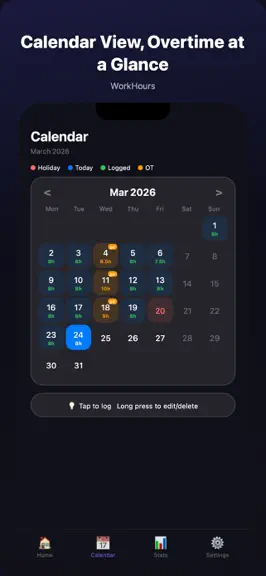
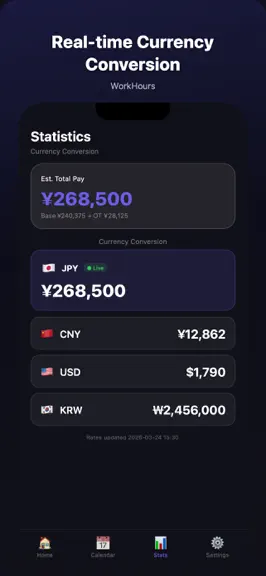
WorkHours is a simple yet powerful work-hours tracker for anyone who needs to log hours — hourly workers, salaried employees, or freelancers. [Smart Time Tracking] • Clock in/out or enter hours directly • 15-minute rounding with automatic lunch break deduction • Long-press calendar entries to edit or delete • Add notes for business trips, leave, and more [Monthly Statistics] • Visual half-circle…
Trends & analysis
Chart rank trend
US · overallWhy it's surfacing
Scout 28Ratings & velocity
★ 0 in windowGeographic reach
best rank · 2 storefrontsRevenue & downloads trend
monthly estimateUpdate history
5 updates tracked- v2.17.01d ago
[Custom Shift Templates] • Create up to 8 reusable shifts using clock times or total hours • Edit, delete, and reorder your templates • Apply a template from Calendar to log recurring shifts faster • Completed achievement translations across all 9 app languages and improved local save-error handling
- v2.16.010d ago
[Month-End Pay Forecast] • New forecast card on Home to preview this month's expected pay • Stats now shows projected hours, projected overtime pay, and target balance • Forecasts are based on your pace across elapsed workdays • Before any entries, the app uses standard monthly hours as a clean planning baseline
- v2.15.025d ago
[First Setup & Pay Preview] • New pay-preview setup flow for first launch • Quickly set region, monthly/hourly pay, standard daily hours, and overtime multiplier • Save your usual clock-in/out time and reuse it from Calendar • Preview this month's required hours, estimated pay, and +10h overtime pay before your first entry
- v2.14.01mo ago
[Stability & Compatibility] • Updated Expo 56 dependencies for better compatibility with the latest runtime • Improved animation initialization to reduce potential render warnings • Refined biometric unlock flow for smoother app launch and foreground return
- v2.13.11mo ago
[Privacy & Security] • New Face ID / Touch ID unlock to protect your salary and work data • Off by default — enable in Settings. Auto-relocks after 5 minutes of inactivity
WorkHours - Overtime Tracker — FAQ
How many downloads does WorkHours - Overtime Tracker get?
WorkHours - Overtime Tracker sees an estimated 0 downloads per month on the App Store, per AppCurrents modeling.
Is WorkHours - Overtime Tracker free?
WorkHours - Overtime Tracker is a paid app priced at $0.99 on the App Store.
When was WorkHours - Overtime Tracker released?
WorkHours - Overtime Tracker launched on the App Store on 11.03.2026. Its latest version shipped 03.08.2026.


