
Widgy Widgets: Home/Lock/Watch
Widgy Widgets: Home/Lock/Watch generates an estimated $14k–$78k/month in revenue from 35k–150k downloads/month on the App Store, according to AppCurrents estimates (updated 2026-10-02).
| Est. revenue / month | $14k–$78k |
|---|---|
| Est. downloads / month | 35k–150k |
| Estimate confidence | medium |
| Pricing | Free + IAP |
| Rating | 4.65 ★ (26,116 ratings) |
| Category | Graphics & Design |
| Best chart rank | #45 Graphics & Design Free |
| Released | 10.10.2020 |
| App last updated | 17.09.2026 |
| Platform | iOS |
Modeled monthly estimate · rating velocity · medium confidence
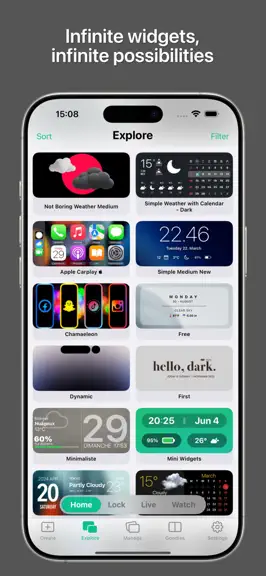
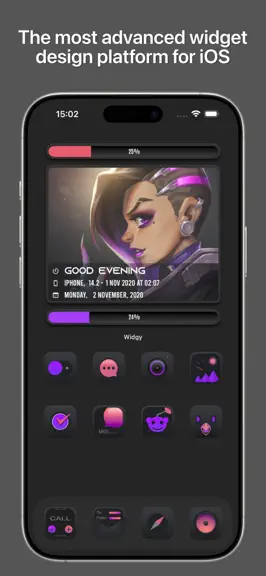
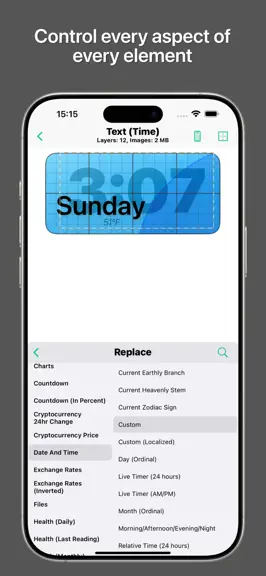
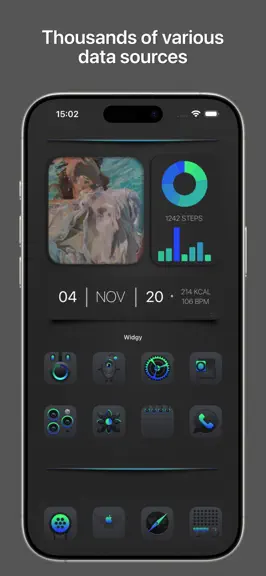
About
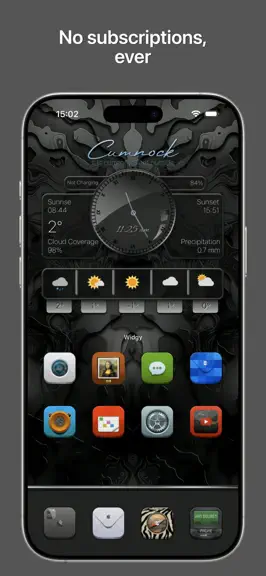
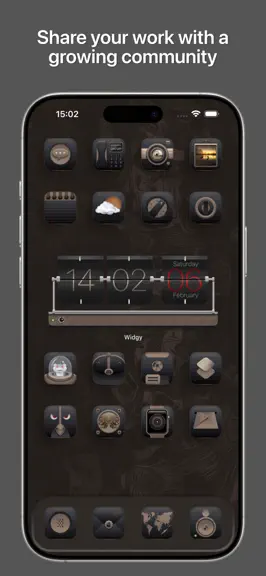
Pick a design you love, then make it yours. Widgy brings custom widgets to your Home Screen, Lock Screen and Apple Watch, built around your style and the information you care about. START WITH A COMMUNITY DESIGN Explore widgets shared by the Widgy community. Import a design, personalize it, or create your own from scratch. MAKE THE DETAILS YOURS Arrange text, photos, symbols, shapes and charts i…
Trends & analysis
Chart rank trend
US · categoryWhy it's surfacing
Scout 13Ratings & velocity
★ 0 in windowRating distribution
92% positive · 26k ratingsGeographic reach
best rank · 1 storefrontRevenue & downloads trend
ARPU $0In-app purchases
9 tiersUpdate history
3 updates tracked- v27.0.115d ago
Improvements: • iCloud Sync: Widget libraries now sync more safely, with verified transfers, preserved conflicts, safer Bin deletions, automatic retries, visible sync status, and immediate library and thumbnail refreshes. • Tap Actions: Improved touch detection for actions inside nested or transformed Groups. Hidden actions no longer override visible ones, data-driven links can resolve when tapped, and Dynamic Island, Control Center, Live Activity, and Picture in Picture actions are more reliable. • Watchy Custom Fonts: Custom fonts used by synced widgets can now be transferred to Apple Watch. Missing or invalid font files are detected before working Watch data is replaced. • Cryptocurrency Picker: The cached catalog loads immediately, refreshes daily, supports custom coins by symbol, distinguishes duplicate symbols, and preserves existing selections. • Weather Data: Open-Meteo and OpenWeather can fill missing supported values from MET Norway without replacing primary-provider data. Fog Coverage is consistently shown as a percentage. • Faster Library: Thumbnail work is deduplicated and prepared in the background, while cloud changes refresh affected widget previews automatically. Bug Fixes: • Fixed Shrink text truncation involving attributed colors or fonts, kerning, custom fonts, monospaced digits, inline images, symbols, and live timers. • Fixed stale or overwritten Health data and Pedometer values falling back to the wrong day. • Fixed Async JavaScript jobs completing twice, returning a late result, or interrupting queued work. • Fixed Smart Color and Smart Symbol boundary edits reordering rules.
- v2719d ago
Major Features: • Widget Variables: Reuse values across text, colors, visibility and more. • New Layers: Apple Charts, Linear Gauge, Mini Charts, List and Live Progress. • Live Animations: Choose from 44 visual effects. • Smart Colors & Symbols: Make colors and symbols react to data. • Custom Fonts: Find online fonts or import your own. • Weather Providers: Choose MET, Open-Meteo or OpenWeather. • Inline Widget Designs: Build inline widgets from full layer designs. • iPhone XL Widgets: Eight XL slots and newer devices. Other Features: • Editor Preview Variants: Preview sizes, themes and Button states. • Custom Shapes: Draw and reuse shapes and gauge paths. • Slot Settings: Set location, Agenda and refresh per slot. • Widget Schedules: Change widgets throughout the day. • More Health Data: Activity, workouts, mood and medication data. • Web Data for Charts: Use JSON/JavaScript and compare series. • Circle Charts: Use angle, radius or both. • Bar Charts: Grouped, stacked, range and cell layouts. • Compact Chart Labels: Adjust font, placement, rotation and length. • Gauge Controls: Text needles, tick visibility and snapping. • Ring Chart Anchor: Anchor the current value. • Calendar Options: Local/ISO weeks and rule-based symbols. • Memory Use: Less memory for images and large widgets. Improvements: • Images Inside Text: Mix images and symbols into Text layers. • Custom Date Formats: Format each source separately. • Minute-Only Live Clocks: 12/24-hour clocks without seconds. • Text Replacement: Partial, exact or Regex matching with previews. • Text Styles: Monospaced digits and custom mapping. • Font Features: Ligatures, number styles and variable axes. • Chart Data Tools: Fill gaps, forecast and round values. • Solar Automation: Trigger changes around solar events. • Combined Agenda: Calendar events and Reminders together. • Sun & Moon Data: 28 new twilight, season and moon values. • App Store Data: App icons, versions, ratings and prices. • Photo Metadata: 17 camera, exposure and image details. • User Preferences: Use language, units and currencies as data. • Device Data: Added model, processor and display details. • Maps & Distances: Live maps and distance to coordinates. • Newest Album Photo: Use the latest selected-album image. • Web Image Search: Openverse with paging and retries. • Last.fm Support: Choose Apple Music, Spotify or Last.fm. • Financial Data: New cryptocurrency and stock metrics. • Current Weather Charts: 11 new weather measurements. • Custom Web Requests: Custom authentication and richer responses. • Reusable Styles: Replace/copy fonts, colors and gradients. • Group Selected Layers: Group layers without changing order. • Widget Resizing: Keep layout or scale to fit. • Favorites & Author Search: Find, filter and sort widgets. • Bulk Deletion: Multi-delete with Bin recovery. • Quick Assignment: Assign directly from Preview. • Automatic iCloud Sync: Sync local and cloud changes. • More Tap Actions: Hundreds of app, Activity and music links. • New SF Symbols: Added 292 SF Symbols 8 entries. • New Needles: Ten built-in gauge needles. • Content Animations: Three new content transitions. • Cancel Loading: Stop active data fetches. • New Languages: Indonesian, Filipino, Turkish and Vietnamese. • Help & Settings: Clearer screens and guidance. • Watchy & Live Activities: Updated controls and presentations. Bug Fixes: • Data: Fixed Agenda/Reminders, Health/sleep, loading, RSS/JSON, JavaScript, weather and clocks. • Sync: Fixed iCloud, Watch transfers, assignments, updates, Live Activities and Shortcuts. • Media: Improved images, artwork, Spotify, astronomy, Reddit/Wallpapers, PiP and imports. • Rendering & UI: Fixed gauges, text, colors, geometry, patterns, translations, purchases and Mac battery reporting.
- v26.1.111mo ago
Transparency Fix: Resolved an issue preventing tinted widgets on iOS 18 from using transparency. Shortcut Fix: Fixed a bug that blocked new transparency images from uploading via Siri Shortcut.
Widgy Widgets: Home/Lock/Watch — FAQ
How much money does Widgy Widgets: Home/Lock/Watch make?
According to AppCurrents estimates, Widgy Widgets: Home/Lock/Watch generates approximately $14k–$78k per month (medium confidence), modeled from its the App Store chart performance, rating velocity, and monetization signals.
How many downloads does Widgy Widgets: Home/Lock/Watch get?
Widgy Widgets: Home/Lock/Watch sees an estimated 35k–150k downloads per month on the App Store, per AppCurrents modeling.
Is Widgy Widgets: Home/Lock/Watch free?
Widgy Widgets: Home/Lock/Watch is free to download on the App Store, monetizing through in-app purchases.
What is Widgy Widgets: Home/Lock/Watch's rating?
Widgy Widgets: Home/Lock/Watch holds a 4.65-star average from 26,116 ratings on the App Store. It currently ranks #45 on the Graphics & Design free chart.
When was Widgy Widgets: Home/Lock/Watch released?
Widgy Widgets: Home/Lock/Watch launched on the App Store on 10.10.2020. Its latest version shipped 17.09.2026.
Apps like Widgy Widgets: Home/Lock/Watch
See all alternatives → Reface: AI Face Swap & EditorGraphics & Design · $270k–$1.5M/mo
 AI Maker: Photo Video FiltersGraphics & Design · $250k–$1.4M/mo
 Nomad SculptGraphics & Design · $100k–$1.7M/mo
 ThemePack: Widgets & WallpaperGraphics & Design · $150k–$820k/mo
 Artmate: Drawing TogetherGraphics & Design · $150k–$800k/mo
 Artrace: AR Drawing & SketchGraphics & Design · $140k–$770k/mo