
Whisper Notes - Speech to Text
Whisper Notes - Speech to Text generates an estimated $5k–$84k/month in revenue from 2k–8k downloads/month on the App Store, according to AppCurrents estimates (updated 2026-10-02).
| Est. revenue / month | $5k–$84k |
|---|---|
| Est. downloads / month | 2k–8k |
| Estimate confidence | medium |
| Pricing | Paid $7.99 |
| Rating | 4.67 ★ (637 ratings) |
| Category | Productivity |
| Best chart rank | #12 Productivity Paid |
| Released | 04.04.2023 |
| App last updated | 18.09.2026 |
| Platform | iOS |
Modeled monthly estimate · rating velocity · medium confidence
About
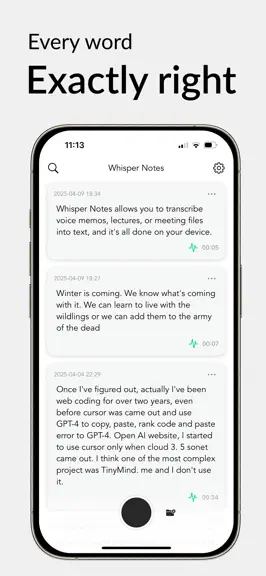
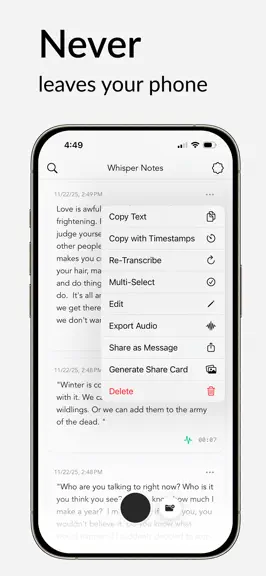
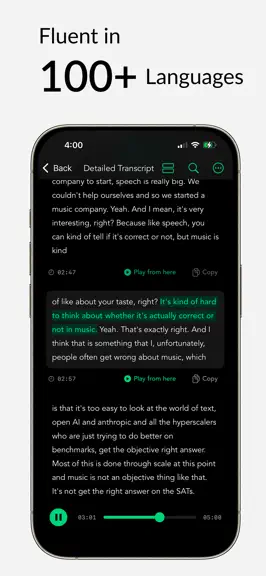
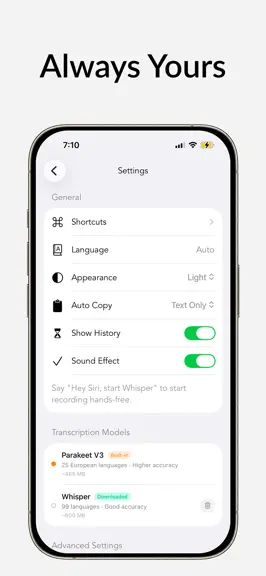
Maybe the best offline transcription app — 70,000+ journalists, researchers, and professionals seem to think so. Turn meetings, lectures, and voice memos into accurate text with speaker labels — fast, 100% offline, on your device. No subscription. One purchase, yours forever. ■ Core Features - Record voice memos and capture ideas instantly—from the Lock Screen, widgets, Action Button, or just sa…
Trends & analysis
Chart rank trend
US · categoryWhy it's surfacing
Scout 19Ratings & velocity
★ +0.05 in windowRating distribution
90% positive · 485 ratingsGeographic reach
best rank · 1 storefrontRevenue & downloads trend
ARPU $6Update history
8 updates tracked- v1.8.813d ago
New Features - Apple Speech — on iOS 26, choose Apple's speech engine alongside Parakeet, SenseVoice and Whisper. Download only the languages you need; everything stays on your device. - Recordings resume automatically after a phone call or other interruption (up to two minutes). - One Share menu for everything — text, timestamps, text + audio, TXT/SRT/VTT — the same on the note and in detail view, plus Bulk Share Text for several notes. Improvements - Faster: models are ready sooner after launch, the note appears the moment you stop recording, and saving edits no longer blocks the interface. - Very long transcripts open instantly — text first, timestamps generated in the background. - Model downloads resume where they left off, retry automatically, and say why if they fail. - Speaker detection is in every note's menu and now handles long recordings reliably. - VoiceOver: every control is labeled, results are announced, notes read as one sentence, and Reduce Motion is respected. Fixes - Force-quit while recording? The recording is in your list when you reopen the app, and transcribes automatically. - Failed transcriptions and imports show the actual reason, and an interrupted transcription keeps the text it already produced. - Whisper: quiet or distant speech is no longer dropped, and phantom phrases in silent passages are filtered out. - Silent recordings with a Bluetooth or wired headset? Turn on "Prefer Built-in Microphone" in Recording & Audio. - Stability improvements throughout, especially SenseVoice, sharing and the custom dictionary. Edits and deletions can no longer be lost or come back.
- v1.8.71mo ago
Long notes open instantly - Opening a very long transcript — an hour or more of recording — no longer freezes the app; it now opens in about a second. - Browsing a library full of long notes also uses noticeably less memory. Translate on the spot - New "Translate to…" menu: translate any note into any of 20 languages with a single tap, without changing your default language in Settings. Useful for two-way translation while traveling — and like everything else, it runs entirely on your device. Share text and audio together - New "Share Text + Audio": the transcript and its recording go out in a single share. One email instead of two. Shortcuts you can rely on - "Stop Recording and Get Transcription" now reliably stops the recording and returns your text — no more stuck shortcuts or leftover recording screens. No more silent failures - If the language you picked isn't supported by the current transcription model, the app now tells you clearly — in Settings and in Shortcuts — instead of quietly producing unusable text.
- v1.8.61mo ago
New Features - Translation — translate any note right inside the app, with the original and translation shown side by side, paragraph by paragraph. Runs 100% on your device — your notes never leave your iPhone. (Requires iOS 18.) - New Shortcuts action: "Stop Recording and Get Transcription" — end a recording and get the text in one step, perfect for automations. - Export transcripts as TXT files, with speaker labels included. - Edit an entire note directly from the transcript view. Recording & Transcription - Fixed recordings losing their first seconds when an Apple Watch or Bluetooth headset was connected. - Spoken punctuation ("comma", "period", ...) now works with every transcription model. - Fixed the Parakeet model failing to load for some users — it now repairs itself automatically. - Failed transcriptions now reliably show a Retry button, and the record button no longer gets stuck after an error. Stability & Fixes - Widgets no longer stop working after an app update. - Search filters (date, category) now work on their own, without typing a search first. - Playback highlighting no longer makes text shift while you follow along. - Copying multiple notes with timestamps now keeps them in chronological order. - Stability improvements and crash fixes throughout.
- v1.8.52mo ago
New Features - Speaker Labels — Whisper Notes now labels who said what, automatically splitting any transcript into color-coded speakers you can rename, even across short interjections and quick back-and-forth. Runs 100% on your device, and speaker labels are included in copied text and exported SRT / VTT subtitles. - Folders — organize your recordings into folders you create. Anything you record or import inside a folder is filed there automatically, with batch move and per-folder search. Design - A warmer, easier-on-the-eyes look — soft paper tones instead of stark white, and gentler text in dark mode. - More refined haptic feedback throughout, and cleaner Share and Export menus. Reliability - If storage runs low while recording, you're now warned instead of ending up with a silent, empty file.
- v1.8.42mo ago
This update focuses on speed, recording reliability, and transcription quality. Performance - Faster app launch — transcription models load about twice as fast, and your notes appear instantly even with thousands of recordings. - Long recordings with pauses transcribe much faster — silent stretches are skipped instead of processed. - Recording starts at full speed the moment you open the app. - Switching transcription models is now smooth, with no freezes. Recording reliability - More reliable recording with AirPods and Bluetooth — less audio lost when you connect or remove a headset mid-recording, and faster recovery if it stops sending audio. - Fixed rare issues with rapid stop-and-restart recording and recordings interrupted by phone calls. Transcription quality - Live transcript lines now always appear in the correct order during long transcriptions. - More accurate timestamps in recordings with long silences. Stability - Fixed the most common crash — transcribing while the app is in the background — plus several rarer reliability issues.
Whisper Notes - Speech to Text — FAQ
How much money does Whisper Notes - Speech to Text make?
According to AppCurrents estimates, Whisper Notes - Speech to Text generates approximately $5k–$84k per month (medium confidence), modeled from its the App Store chart performance, rating velocity, and monetization signals.
How many downloads does Whisper Notes - Speech to Text get?
Whisper Notes - Speech to Text sees an estimated 2k–8k downloads per month on the App Store, per AppCurrents modeling.
Is Whisper Notes - Speech to Text free?
Whisper Notes - Speech to Text is a paid app priced at $7.99 on the App Store.
What is Whisper Notes - Speech to Text's rating?
Whisper Notes - Speech to Text holds a 4.67-star average from 637 ratings on the App Store. It currently ranks #12 on the Productivity paid chart.
When was Whisper Notes - Speech to Text released?
Whisper Notes - Speech to Text launched on the App Store on 04.04.2023. Its latest version shipped 18.09.2026.


