
VectorPaint
VectorPaint generates an estimated $0–$6/month in revenue from 1–2 downloads/month on the App Store, according to AppCurrents estimates (updated 2026-08-02).
| Est. revenue / month | $0–$6 |
|---|---|
| Est. downloads / month | 1–2 |
| Estimate confidence | medium |
| Pricing | Paid $2 |
| Rating | 4.00 ★ (1 ratings) |
| Category | Graphics & Design |
| Best chart rank | #59 Graphics & Design Paid |
| Released | 17.10.2021 |
| App last updated | 19.09.2025 |
| Platform | iOS |
Modeled monthly estimate · rating velocity · medium confidence


About
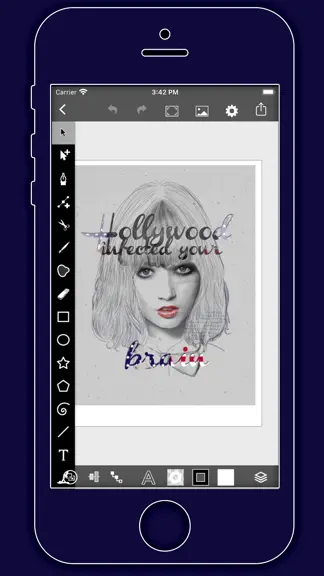
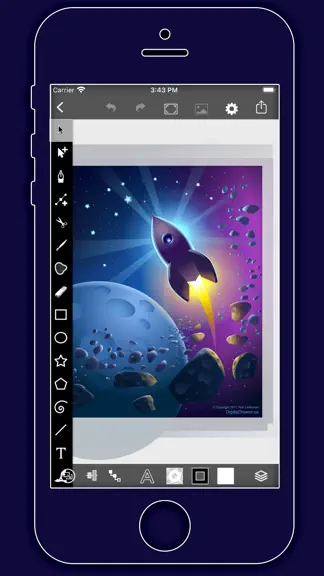
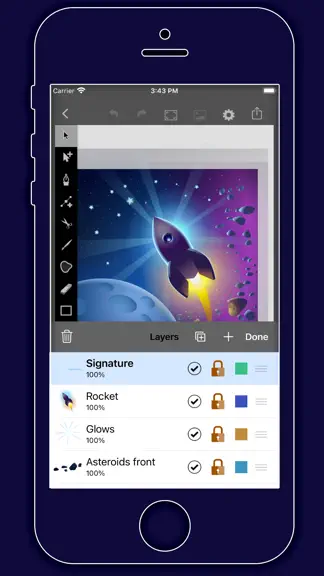
VectorPaint is a vector illustration app designed for IOS inspired by desktop class illustrator programms and powered by Metal, so Render times are up to 10x faster. [Gallery] The Gallery displays a thumbnail for each of your drawings. Tap a thumbnail to open it for viewing or editing. Tap the title below the thumbnail to enter a new title. Tap the + button in the upper right corner of the scree…
Trends & analysis
Chart rank trend
US · categoryWhy it's surfacing
Scout 12Ratings & velocity
★ +4 in windowRating distribution
100% positive · 1 ratingsGeographic reach
best rank · 2 storefrontsRevenue & downloads trend
ARPU $2Update history
1 update tracked- v1.0.510mo ago
VectorPaint Version 1.0.5 Update - Full iOS 26 Adaptation, Enhanced Creative Experience Dear VectorPaint User, We are thrilled to announce the release of the new VectorPaint version 1.0.5! The key highlight of this version is the full adaptation to the latest iOS 26 system, ensuring a seamless and smooth vector drawing experience on your iPad. Whether you are a professional illustrator or a creative enthusiast, VectorPaint continues to provide efficient creative tools with its desktop-class features and Metal-accelerated rendering technology. Core Update: Perfect iOS 26 Adaptation System Compatibility Optimization: Fully adapted to iOS 26's latest APIs and performance frameworks, ensuring stable operation and seamless integration in the iOS 26 environment. Experience faster launch times and lower power consumption on your iPad Pro, iPad Air, or any other device supporting iOS 26. Performance Boost: Leveraging iOS 26's graphics rendering optimizations, the Metal engine rendering speed is further increased by up to 10x, making drawing and editing complex vector graphics incredibly smooth. Maintain zero lag even when working with multi-layered, high-resolution illustrations. Interface & Interaction Improvements: Adapted to iOS 26's new gestures and multitasking features, supporting smarter dragging and hiding of the floating tool panel, enhancing productivity in multi-window workflows. Enhancements and Optimizations Based on Existing Features VectorPaint remains focused on professional vector drawing as its core. In this version, we have further refined the core features to make your creative process more efficient and intuitive. Here are the highlights based on the application's existing powerful toolset: Unlimited Layer Management: Continues to support an unlimited layer system. You can easily delete, copy, reorder, name, lock, hide layers, and precisely control transparency. New iOS 26-exclusive Isolate Active Layer mode allows for more focused editing in complex drawings, avoiding distractions. Professional Drawing Tools: The floating tool panel can be freely dragged or quickly dismissed. Supports cutting, copying, pasting, deleting, and modifying selections. Path tools are further optimized, including adding/removing anchor points, stroking paths, joining/combining paths, creating masks, and placing text on a path. Outline Mode helps you view and edit vector outlines more clearly. Object Arrangement & Editing: Enhanced object arrangement functions, supporting moving backward/forward, grouping/ungrouping, distributing, and aligning objects. iOS 26 gesture support makes these operations more precisely responsive. Gallery & Export: The gallery view is cleaner, supporting quick creation of new drawings, selecting, emailing exports, or deleting existing works. Export formats are compatible with iOS 26's sharing ecosystem, ensuring your work is easily transferred to other apps or devices. Custom Settings: Comprehensive optimization of grid controls (on/off, spacing, snap options), rulers, drawing units, and size settings. Supports 100% zoom view at actual pixel size or print size, combined with iOS 26's pinch gesture for infinite, lossless zooming. Masks & Advanced Features: Masking functionality for paths, compound paths, or text objects is more powerful, allowing easy clipping of drawing elements and supporting quick toggling of mask/unmask, ideal for complex illustration design. These updates are based on VectorPaint's core design philosophy – bringing a desktop-class vector drawing experience to iPad users. We have listened to user feedback to further improve the application's stability and user-friendliness, ensuring every creator can focus on inspiration rather than technical obstacles. Update now and open a new era of vector creation with iOS 26!
VectorPaint — FAQ
How much money does VectorPaint make?
According to AppCurrents estimates, VectorPaint generates approximately $0–$6 per month (medium confidence), modeled from its the App Store chart performance, rating velocity, and monetization signals.
How many downloads does VectorPaint get?
VectorPaint sees an estimated 1–2 downloads per month on the App Store, per AppCurrents modeling.
Is VectorPaint free?
VectorPaint is a paid app priced at $2 on the App Store.
What is VectorPaint's rating?
VectorPaint holds a 4.00-star average from 1 ratings on the App Store. It currently ranks #59 on the Graphics & Design paid chart.
When was VectorPaint released?
VectorPaint launched on the App Store on 17.10.2021. Its latest version shipped 19.09.2025.
Apps like VectorPaint
See all alternatives → Cricut Design SpaceGraphics & Design · $410k–$2.3M/mo
 Reface: AI Photo & Face EditorGraphics & Design · $270k–$1.5M/mo
 Nomad SculptGraphics & Design · $140k–$2.4M/mo
 Home AI - AI Interior DesignGraphics & Design · $230k–$1.3M/mo
 Artrace: AR Drawing & SketchGraphics & Design · $190k–$1.1M/mo
 ThemePack: Widgets & WallpaperGraphics & Design · $160k–$900k/mo