
UltraPod: Music Player
UltraPod: Music Player generates an estimated $200–$1k/month in revenue from 600–3k downloads/month on the App Store, according to AppCurrents estimates (updated 2026-08-02).
| Est. revenue / month | $200–$1k |
|---|---|
| Est. downloads / month | 600–3k |
| Estimate confidence | low |
| Pricing | Free + IAP |
| Rating | 4.62 ★ (26 ratings) |
| Category | Music |
| Released | 08.07.2026 |
| App last updated | 03.08.2026 |
| Platform | iOS |
Modeled monthly estimate · rating velocity · low confidence




About
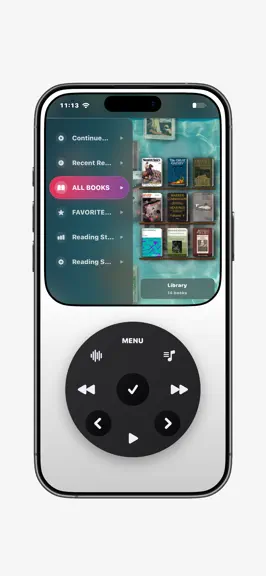
UltraPod is a music-first space for people who want their phone to feel quieter: a dedicated player, local tools, and fewer reasons to fall back into feeds. Connect Apple Music through MusicKit to browse your authorized library, playlists, albums, recent items, and catalog metadata. Manage playback and keep your queue within reach. Apple Music playback requires MusicKit authorization and may requ…
Trends & analysis
Chart rank trend
US · overallWhy it's surfacing
Scout 44Ratings & velocity
★ +4.62 in windowGeographic reach
best rank · 5 storefrontsRevenue & downloads trend
ARPU $0In-app purchases
3 tiersUpdate history
12+ updates tracked- v2.0.41d ago
Apple Music's core experience now works on iOS 15—browse your library, search the catalog, play and favorite songs, and create or append to cloud playlists. New: • iOS 15 now supports Apple Music authorization, library browsing, catalog search, playback, favorites, adding songs to your library, playlist creation, and appending tracks. Full editing of existing cloud playlists still requires iOS 16. • DIY adds a choice to show time and battery at the device top or inside UltraPod, plus an independent top shell blackout saved with templates. Improved: • A valid Apple Music cache now opens immediately. Library checks and derived indexes continue after Home appears, while changes build a complete candidate and replace it atomically without clearing playback first. • If Apple's store or media services stall during an account change, Home, Local Files, Subsonic, and locally verified access remain available. Fixed: • On-device persistent IDs no longer masquerade as MusicKit cloud-library IDs, preventing invalid Apple Music actions and incorrect playback resolution. • Restored the missing Easter egg video.
- v2.0.32d ago
Local Files and Subsonic lyrics are now complete—from embedded and plain lyrics to LRC files, Enhanced LRC, and OpenSubsonic word timing. Every result keeps its real source, and online completion runs only after consent. New: • Manage Local Files by song, album, or artist. Scanning detects additions, updates, renames, and deletions while preserving stable track identities. • Artist pages across Apple Music, Local Files, and Subsonic now separate All Songs from albums. Improved: • Subsonic works with more servers through protocol negotiation, password tokens, API keys, tolerant library sync, safer streaming/transcoding, scrobbling, and large-playlist updates. • Sorting and queues preserve playlist order and duplicate positions. Shuffle and repeat can now work together without rewriting the playlist you are viewing. • Apple Music cold starts finish local library validation, downloaded availability, and playback lookup setup before Music opens, reducing delayed large-library stalls. Fixed: • Music menus now cover all 9 app languages, restore failures show clearer guidance without exposing internal StoreKit errors, and Settings includes a direct support email action.
- v2.0.23d ago
• Track changes from Control Center and the Lock Screen are now more reliable across Apple Music and local playback. • Apple Music library changes, account sign-outs, and account switches now rebuild music data cleanly, fixing shuffle errors and missing artwork after refresh. • Screen Lock now opens to a black screen, wakes with one tap, returns to black after 10 seconds, and uses a smoother unlock transition. Wallpaper and password or pattern settings also open from the correct menus. • Music browsing is more consistent: Play All and Shuffle are available at the top of All Music; song lists can focus the current track; Local Files and Subsonic add first-letter fast jumping and direct Sleep Timer access. • Photo, video, favorites, and wallpaper grids continue loading while you drag. • Button click and Control Ring tick volumes can now be adjusted separately.
- v2.0.15d ago
• More reliable playback and track changes, including correct local fallback when MusicKit cannot play a track. • Artwork now stays stable while changing tracks, and Local Music/Subsonic artwork appears on the Lock Screen and in Control Center. • Better compatibility with older Navidrome servers. • Lower heat by pausing hidden visual updates behind dialogs and editors without stopping playback, downloads, or sync. • Smoother album browsing, direct volume control, and Control Ring seeking from the Now Playing action menu. • Fixed long-lyrics layout, misleading end-of-queue errors, oversized dialogs, and TestFlight launch redirection.
- v2.0.06d ago
UltraPod now runs on iOS 15 with Local Files and Subsonic/Navidrome—no Apple Music required. New: - Import local audio or connect one or more Subsonic/Navidrome servers. - Each music source keeps its own library, playlists, queue, and playback position. - Create, rename, edit, and sort playlists where the selected source supports it. Improved: - On iOS 15, UltraPod starts with Local Files and fully hides Apple Music controls, authorization, and guides. - iOS 16 and later keep the complete Apple Music experience. Home Screen widgets still require iOS 16. - Subsonic adds streaming, lyrics, favorites, multiple servers, and verified offline downloads. Fixed: - More reliable source switching, queues, resumed downloads, and large-library performance.
UltraPod: Music Player — FAQ
How much money does UltraPod: Music Player make?
According to AppCurrents estimates, UltraPod: Music Player generates approximately $200–$1k per month (low confidence), modeled from its the App Store chart performance, rating velocity, and monetization signals.
How many downloads does UltraPod: Music Player get?
UltraPod: Music Player sees an estimated 600–3k downloads per month on the App Store, per AppCurrents modeling.
Is UltraPod: Music Player free?
UltraPod: Music Player is free to download on the App Store, monetizing through in-app purchases.
What is UltraPod: Music Player's rating?
UltraPod: Music Player holds a 4.62-star average from 26 ratings on the App Store.
When was UltraPod: Music Player released?
UltraPod: Music Player launched on the App Store on 08.07.2026. Its latest version shipped 03.08.2026.


