
TwistedWave 365
TwistedWave 365 generates an estimated $0/month in revenue from 0 downloads/month on the App Store, according to AppCurrents estimates (updated 2026-10-03).
| Est. revenue / month | $0 |
|---|---|
| Est. downloads / month | 0 |
| Estimate confidence | low |
| Pricing | Free + IAP |
| Rating | 0.00 ★ (0 ratings) |
| Category | Music |
| Released | 25.04.2024 |
| App last updated | 19.09.2026 |
| Platform | iOS |
Modeled monthly estimate · rating velocity · low confidence

About
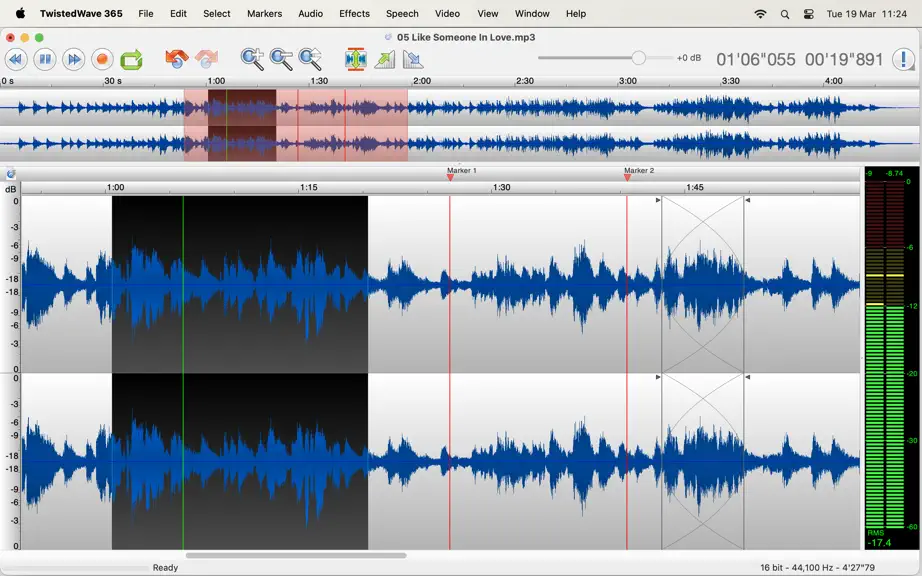
TwistedWave is a very fast and easy to use audio editor and recorder. Even when working with huge files, it will remain very fast and fluid, and will never run out of memory. UNIQUE TO TWISTEDWAVE • Very fluid, even with very large files • Unlimited undo / redo history, happens instantly RECORD AUDIO • No duration limit other than the available storage • Up to 32 bit / 192 kHz audio if your aud…
Trends & analysis
Chart rank trend
US · overallWhy it's surfacing
Scout 4Ratings & velocity
★ 0 in windowGeographic reach
best rank · 0 storefrontsRevenue & downloads trend
monthly estimateIn-app purchases
4 tiersUpdate history
6 updates tracked- v34.113d ago
Fixed: - On macOS 27, saving an MP3 file could fail with an error about the file extension.
- v33.71mo ago
Fixed: - The AUPeakLimiter effect could open with a broken layout. - The waveform would redraw at 30 Hz instead of 60 Hz on macOS 26. - Some VST 3 effects could refuse to be applied right after being previewed. - Plug-in effects could be applied bypassed, and quietly do nothing. - Trim Silences could leave some silence behind on multichannel files.
- v33.61mo ago
New: - Added an option for independent per-document volume control. - Zooming is now centered on the mouse by default. Fixed: - Applying a batch on an open file could fail when it contained AudioUnit effects. - Warn when exporting an MP2 with more than two channels. - When playing a file that has a sampling rate different than the audio interface, now use a high quality sample rate converter instead of a quick one. - The cursor would not move smoothly when playing a file with a 8 kHz sample rate. - Previewing the pitch/speed effect with ZTX was silent if working on a selected region. - Deleting markers with Backspace was broken on macOS 26.5+ - The clipped sample count in the Analyze window was wrong for DSD files.
- v33.52mo ago
Fixed: - Fix fade in / fade out shortcuts not firing on macOS 26.5+
- v33.43mo ago
New: - A new rounded square icon to match the new macOS style. - The cursor position is highlighted in red when recording. - It is possible to select a fade curve other than linear. - When trimming silences, it is possible to specify the amount of silence to preserve on either end. - When splitting by markers, format the file names with a format string. The batch split action gains the same options. - AudioUnit effects will now load out of process so that a misbehaving plugin doesn't crash TwistedWave. - It is now possible to configure the dark or light mode independently of the system settings. - Warn when the mic mode is not in standard mode. Avoid voice isolation as it does some heavy processing on the audio. Speech: - It is now possible to do real-time speech recognition with Whisper. - Added the Parakeet speech recognition models. - It is now possible to search in the text script window. - In the speech recognition, it is now possible to enable VAD, and select the language to recognize. - When selecting an English Whisper model, the multilingual version was used by mistake. Video: - Added variable frame-rate video export, allowing speed changes to be saved without dropping or duplicating frames and often avoiding re-encoding. - TwistedWave would fail saving some h264 files. - Avoids unnecessary full re-encoding when saving video files. Fixed: - Force the old toolbar style on macOS Tahoe to reduce the spacing between buttons. - Previewing AudioUnit/VST plugins with non-contiguous selection could fail. - The keyboard shortcut editor now allows editing the built-in shortcuts such as cut/copy/paste, undo/redo and select all. - TwistedWave would fail to load markers from some WAV files. - Fix no-modifier custom shortcuts on dynamic menus (e.g. Audio Units) not firing until the menu had been opened once (macOS 26.5+). - The progress bar when saving files was not very smooth - Fixed a crash trying to load sd2 files without a resource fork. - Work around a bug in macOS 26.5 where keyboard shortcuts with no modifier would stop working. - Fixed a crash when opening TwistedWave on systems older than macOS 14.
TwistedWave 365 — FAQ
How many downloads does TwistedWave 365 get?
TwistedWave 365 sees an estimated 0 downloads per month on the App Store, per AppCurrents modeling.
Is TwistedWave 365 free?
TwistedWave 365 is free to download on the App Store, monetizing through in-app purchases.
When was TwistedWave 365 released?
TwistedWave 365 launched on the App Store on 25.04.2024. Its latest version shipped 19.09.2026.


