
Things 3
Things 3 generates an estimated $17k–$290k/month in revenue from 5k–21k downloads/month on the App Store, according to AppCurrents estimates (updated 2026-10-02).
| Est. revenue / month | $17k–$290k |
|---|---|
| Est. downloads / month | 5k–21k |
| Estimate confidence | medium |
| Pricing | Paid $9.99 |
| Rating | 4.82 ★ (27,982 ratings) |
| Category | Productivity |
| Best chart rank | #4 Productivity Paid |
| Released | 18.05.2017 |
| App last updated | 22.09.2026 |
| Platform | iOS |
Modeled monthly estimate · rating velocity · medium confidence



About
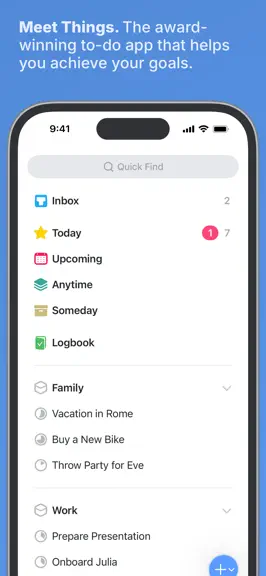
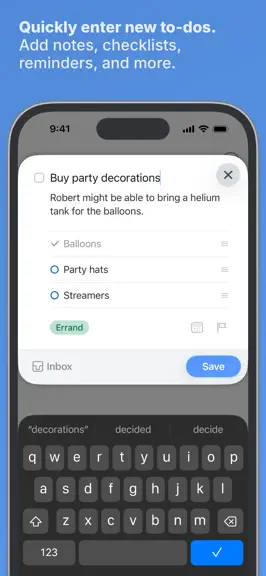
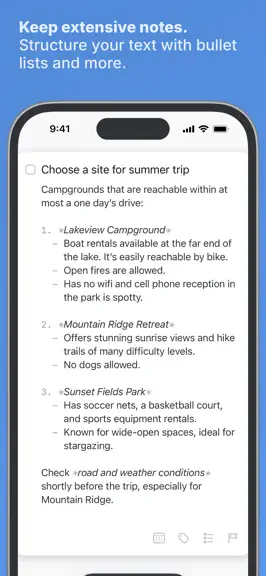
Get things done! The award-winning Things app helps you plan your day, manage your projects, and make real progress toward your goals. Best of all, it’s easy to use. Within the hour, you’ll have everything off your mind and neatly organized—from routine tasks to your biggest life goals—and you can start focusing on what matters today. “Things offers the best combination of design and functionali…
Trends & analysis
Chart rank trend
US · overallWhy it's surfacing
Scout 21Ratings & velocity
★ 0 in windowRating distribution
96% positive · 28k ratingsGeographic reach
best rank · 1 storefrontRevenue & downloads trend
ARPU $7Update history
9 updates tracked- v3.24.210d ago
• Tweaked the appearance of to-dos shown by Siri on iOS 27. • Improved performance when loading lists, using Quick Find, and selecting to-dos in Apple Shortcuts. • Improved the Russian localization for a deadline that has “1 day left”. • Fixed a bug where a newly created tag could appear in an arbitrary position in the tags dialog. • Fixed a bug where the description of a repeating project’s recurrence rule referred to a to-do instead of a project. • Fixed a bug on iOS 18 and earlier where the source list didn’t appear completely black when using the “Black” appearance. • Fixed a bug on watchOS 27 where the widget on the Siri watch face was hard to read; it now uses a dark background. • Fixed a grammatical error in the Italian localization of the Repeat dialog. • Fixed a crash that could occur when deleting a project through Apple Shortcuts. • Many other improvements under the hood. THINGS 3.24 Things is ready for iOS 27 and watchOS 27, with great new system integrations: • Full integration with the new Siri (please check if it’s available on your device). • Full integration with Spotlight, your device’s built-in search. • More snoozing options for notifications, with more suitable durations. • A new extra-tall widget to see longer lists. • Various other compatibility improvements for the new OS. See our blog for more information: www.things.app
- v3.24.117d ago
Things is ready for iOS 27 and watchOS 27, with great new system integrations: • Full integration with the new Siri (please check if it’s available on your device). • Full integration with Spotlight, your device’s built-in search. • More snoozing options for notifications, with more suitable durations. • A new extra-tall widget to see longer lists. • Various other compatibility improvements for the new OS. See our blog for more information: www.things.app
- v3.2417d ago
Things is ready for iOS 27 and watchOS 27, with great new system integrations: • Full integration with the new Siri (please check if it’s available on your device). • Full integration with Spotlight, your device’s built-in search. • More snoozing options for notifications, with more suitable durations. • A new extra-tall widget to see longer lists. • Various other compatibility improvements for the new OS. See our blog for more information: www.things.app
- v3.23.11mo ago
Repeating to-dos just got far more flexible, with two highly requested improvements: You can now complete them early, and easily reschedule them when plans change! Plus many more refinements throughout. COMPLETE REPEATING TO-DOS EARLY Sometimes you’re ahead of schedule and want to tick something off early. Now you can! A repeating to-do now shows a normal checkbox – just like any other to-do – so you can complete it as soon as it’s done. RESCHEDULE WITH EASE Repeating to-dos can now be rescheduled, which makes it easy to adapt when plans change. Simply bump it to a new date. If it repeats on a fixed schedule, Things will ask whether you want to make a one-time exception, or update the rule going forward. If it repeats after completion, it simply moves to the new date. MORE REFINEMENTS We’ve made a number of other refinements: • The repeating to-do setup dialog has received a visual refresh, and lets you more easily pick the next recurrence date. • A copy of a repeating to-do now shows a little gray repeat icon to distinguish it from regular to-dos. • If you want to start working on a repeating project early, you now can! As soon as you start editing its to-dos, Things will offer to create the next copy of the project ahead of time. • You can manually create the next copy of a repeating to-do ahead of time: expand the to-do, tap its repeat rule, then tap Create Next Copy. • You can now pause, resume, and stop multiple repeating to-dos at once. • Fixed a bug where enabling Mail to Things in Settings didn’t work. • More bug fixes and improvements – see our website for the full release notes. --- Last but not least, this update includes a big change under the hood that we’ve been working on for some time: the display and editing of to-dos – both inside lists and when you expand them – is now driven by the same code on Mac and iOS. --- Things now requires iOS 16.4 or later, and watchOS 9.1 or later. --- NEW IN 3.23.1 • Removed the parent list’s label from each row in the Repeating list. • Fixed a bug where Get Info didn’t work for project headers. • Fixed a bug where text could appear at a slightly incorrect size when using a non-default text size. • Fixed an animation glitch that could occur when dragging and dropping on the latest OS beta. • Fixed a minor issue with the Japanese localization.
- v3.231mo ago
Repeating to-dos just got far more flexible, with two highly requested improvements: You can now complete them early, and easily reschedule them when plans change! Plus many more refinements throughout. COMPLETE REPEATING TO-DOS EARLY Sometimes you’re ahead of schedule and want to tick something off early. Now you can! A repeating to-do now shows a normal checkbox – just like any other to-do – so you can complete it as soon as it’s done. RESCHEDULE WITH EASE Repeating to-dos can now be rescheduled, which makes it easy to adapt when plans change. Simply bump it to a new date. If it repeats on a fixed schedule, Things will ask whether you want to make a one-time exception, or update the rule going forward. If it repeats after completion, it simply moves to the new date. MORE REFINEMENTS We’ve made a number of other refinements to repeating to-dos: • The repeating to-do setup dialog has received a visual refresh, and lets you more easily pick the next recurrence date. • A copy of a repeating to-do now shows a little gray repeat icon to distinguish it from regular to-dos. • If you want to start working on a repeating project early, you now can! As soon as you start editing its to-dos, Things will offer to create the next copy of the project ahead of time. • You can manually create the next copy of a repeating to-do ahead of time by right-clicking it and choosing Repeat > Create Next Copy. • You can now pause, resume, and stop multiple repeating to-dos at once. • More bug fixes and improvements – see our website for the full release notes. --- Last but not least, this update includes a big change under the hood that we’ve been working on for some time: the display and editing of to-dos – both inside lists and when you expand them – is now driven by the same code on Mac and iOS. --- Things now requires iOS 16.4 or later, and watchOS 9.1 or later.
Things 3 — FAQ
How much money does Things 3 make?
According to AppCurrents estimates, Things 3 generates approximately $17k–$290k per month (medium confidence), modeled from its the App Store chart performance, rating velocity, and monetization signals.
How many downloads does Things 3 get?
Things 3 sees an estimated 5k–21k downloads per month on the App Store, per AppCurrents modeling.
Is Things 3 free?
Things 3 is a paid app priced at $9.99 on the App Store.
What is Things 3's rating?
Things 3 holds a 4.82-star average from 27,982 ratings on the App Store. It currently ranks #4 on the Productivity paid chart.
When was Things 3 released?
Things 3 launched on the App Store on 18.05.2017. Its latest version shipped 22.09.2026.


