
STEP File Viewer
STEP File Viewer generates an estimated $4–$30/month in revenue from 10–60 downloads/month on the App Store, according to AppCurrents estimates (updated 2026-08-02).
| Est. revenue / month | $4–$30 |
|---|---|
| Est. downloads / month | 10–60 |
| Estimate confidence | low |
| Pricing | Free + IAP |
| Rating | 4.00 ★ (4 ratings) |
| Category | Developer Tools |
| Best chart rank | #80 Developer Tools Grossing |
| Released | 08.12.2025 |
| App last updated | 29.07.2026 |
| Platform | iOS |
Modeled monthly estimate · rating velocity · low confidence





About
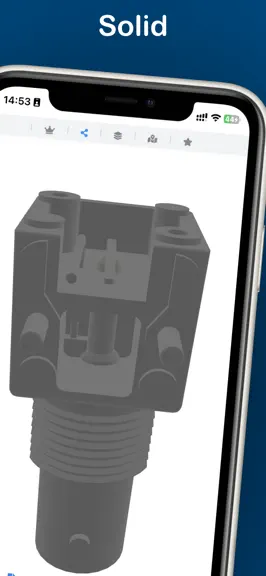
STEP File Viewer is a lightweight yet powerful tool for viewing .step and .stp files on macOS, iPad, and iPhone. Key Features • View STEP models in 3D with rotate, pan, and zoom controls using perspective projection. • Display 3D models in solid, shaded, or wireframe modes. • Load and view IGES/IGS models. • Supports assembly-level colors and exploded views (requires the model to include asse…
Trends & analysis
Chart rank trend
US · categoryWhy it's surfacing
Scout 16Ratings & velocity
★ +3 in windowRating distribution
0% positive · 1 ratingsGeographic reach
best rank · 12 storefrontsRevenue & downloads trend
ARPU $0In-app purchases
10 tiersUpdate history
5 updates tracked- v1.0.136d ago
- Improved model zoom control for smoother mouse wheel and trackpad zooming, making view adjustments more precise. - Improved the recent files list with quick filename filtering and a clearer Clear All action. - Improved STEP file compatibility, fixing some models that failed to load or showed abnormal faces and holes.
- v1.0.1224d ago
- View orientation has been optimized for the Z-up convention commonly used in industrial and mechanical CAD. - The bottom-right ViewCube has been further improved, keeping standard views, rotate, roll, and reset actions in sync with the model view.
- v1.0.1129d ago
- Added exploded-parts faceted STEP export — save each exploded part as a separate STEP file, with batch export to a single folder - Added an explosion radius slider (1×–20×) to the exploded-parts panel - Replaced the corner view helper with a new view cube — tap faces for front, top, side, and other standard views; use the surrounding buttons to rotate and roll the model
- v1.0.101mo ago
- Added per-file deletion in the recent files list, plus confirmed clear-all when the list gets longer, making import history easier to manage - Improved STEP color loading, including XCAF, instance, face-level, and subshape colors, reducing gray or mismatched colors in colored models - Improved view reset: tap the quick action icon to return directly to the default view without an extra confirmation prompt
- v1.0.92mo ago
- New hole feature auto-detection and measurement — scan all circular holes in the model with one tap, with quick diameter/radius annotation - New bounding box measurement — automatically calculate length, width, height, and volume of parts or assemblies - New assembly part recognition scan — measure part bounding box dimensions with one tap - Exploded view now supports exporting selected parts to separate files; the part list panel allows quick switching and locating of part views - Improved measurement focus camera — one tap to auto-adapt to the optimal viewing angle - Exploded view measurement rules now restrict measurements to within the same part, preventing cross-part annotation misalignment - New PMI/GD&T information browser panel (located in the sidebar's Model tab), supporting filtering by type, source, and confidence level to explore product manufacturing information
STEP File Viewer — FAQ
How much money does STEP File Viewer make?
According to AppCurrents estimates, STEP File Viewer generates approximately $4–$30 per month (low confidence), modeled from its the App Store chart performance, rating velocity, and monetization signals.
How many downloads does STEP File Viewer get?
STEP File Viewer sees an estimated 10–60 downloads per month on the App Store, per AppCurrents modeling.
Is STEP File Viewer free?
STEP File Viewer is free to download on the App Store, monetizing through in-app purchases.
What is STEP File Viewer's rating?
STEP File Viewer holds a 4.00-star average from 4 ratings on the App Store. It currently ranks #80 on the Developer Tools grossing chart.
When was STEP File Viewer released?
STEP File Viewer launched on the App Store on 08.12.2025. Its latest version shipped 29.07.2026.


