Speedometer: Driving Tracker
Speedometer: Driving Tracker generates an estimated $200–$1k/month in revenue from 800–4k downloads/month on the App Store, according to AppCurrents estimates (updated 2026-06-17).
| Est. revenue / month | $200–$1k |
|---|---|
| Est. downloads / month | 800–4k |
| Estimate confidence | medium |
| Pricing | Free + IAP |
| Rating | 4.87 ★ (116 ratings) |
| Category | Navigation |
| Best chart rank | #91 Navigation Grossing |
| Released | 05.03.2026 |
| App last updated | 07.06.2026 |
| Platform | iOS |
Modeled monthly estimate · rating velocity · medium confidence
About
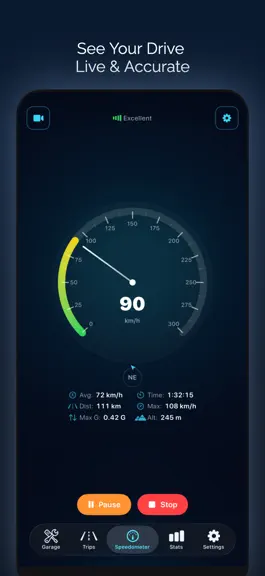
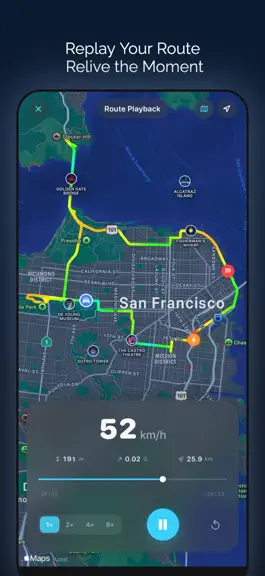
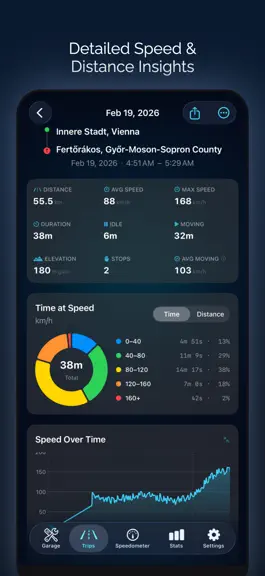
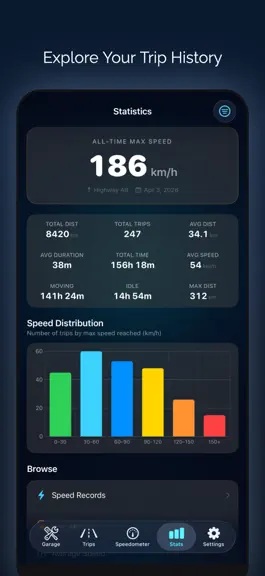
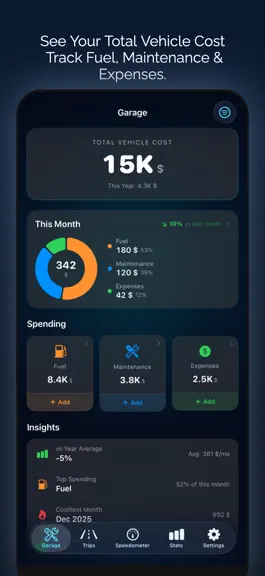
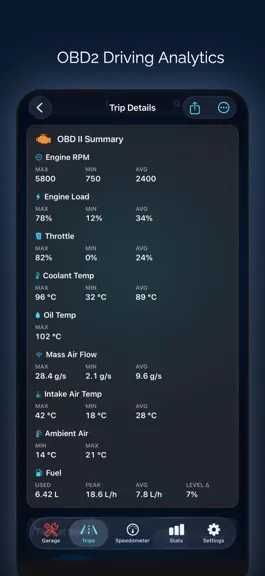
Your ultimate driving companion - a modern GPS speedometer to track speed, distance, and every trip in detail. Whether you’re driving, motorcycling, cycling, running, or boating, Speedometer delivers real-time GPS speed with beautiful digital, analog, and HUD displays, along with powerful trip analytics. TRIP RECORDING & ROUTE TRACKING • Distance, duration, and moving time • Average and maximum s…
Trends & analysis
Chart rank trend
US · categoryWhy it's surfacing
Scout 26Ratings & velocity
★ -0.01 in windowRating distribution
98% positive · 112 ratingsGeographic reach
best rank · 7 storefrontsRevenue & downloads trend
ARPU $0In-app purchases
3 tiersUpdate history
2 updates tracked- v3.9.010d ago
Smarter Vehicle Detection • Auto-match Vehicle by VIN. If your OBD2 adapter reports a VIN that matches a saved vehicle, the trip is automatically assigned to it. Forgot to switch your default before driving? It just works. • Per-source Default Vehicle. Pick a default for trips that start while CarPlay or Bluetooth is connected. Each car gets its own automation, no per-trip taps. • In-trip auto-detect banner. When the app silently retags your trip, you see why, with a one-tap revert. • Default vehicle now syncs across devices via iCloud. Set it once, it follows you. • Manual picks are always respected by every automatic detection. Hands-Free Recording • Auto-Detect Trips. Opt in to have the app start recording automatically once you start driving. Uses motion plus a speed threshold so it does not trigger from walking. • Auto-End after idle. Trips end automatically after a configurable stationary period. Trip Customization • New Gauge Stats grid. Pick which 6 stats appear on the main speedometer, in any order. Includes live OBD2 stats (RPM, coolant, oil, engine load, fuel level, battery volts). • Reorderable Trip Detail. Drag sections like Stats, Records, Speed Over Time, Elevation, Segments, Videos into your preferred order. Hide what you do not use. • Trip Filter sheet rewritten with better sorting and grouping. Live Activity Overhaul • 16 lock-screen presets including OBD-aware layouts (OBD Pulse, OBD Track, OBD Health). • Custom Preset editor. Build your own lock-screen layout with the fields you care about. Big OBD2 Update • Step-by-step setup wizard for Wi-Fi adapters (ELM327). • Expanded PID support, better recovery from adapter dropouts. • Wide-band O2 / AFR support for tuners and diagnosticians. • Live OBD2 screen redesigned for cleaner readouts. Stats and Reports • Speed Limit Violations and Max Speed Records views rebuilt. • Trip PDF export improved with more content and cleaner formatting. • Vehicle breakdown chart polished in the stats screens. Other Improvements • Sprint records work across every speed unit (km/h, mph, m/s, knots). Set up once, see top times in any display. • Better trip-to-vehicle reassignment from trip detail, bulk edit, and the unassigned-trips claim flow. • Improved performance across history, vehicle profiles, and stats. We hope you love these updates! Please take a moment to rate us if you're enjoying these new features. Your rating helps us grow and improve! Have feedback? [email protected]
- v3.8.022d ago
• Tap and drag across the Speed, Elevation, and G-Force charts to read your exact value at any moment of the trip. • Improved compatibility with Veepeak OBDCheck BLE and BLE+ adapters. • Trip commands triggered by Siri or Shortcuts automations (Start Trip, Pause, Resume, Stop) now run silently, so they don't interrupt music, navigation, or CarPlay audio. • Updated the OBD II setup guide with clearer adapter buying advice and a heads-up about MFi-locked adapters (OBDLink MX+, CX, MX WiFi, BlueDriver) that cannot exchange data with third-party iPhone apps. We hope you love these updates! Please take a moment to rate us if you're enjoying these new features. Your rating helps us grow and improve! Have feedback? [email protected]
Speedometer: Driving Tracker — FAQ
How much money does Speedometer: Driving Tracker make?
According to AppCurrents estimates, Speedometer: Driving Tracker generates approximately $200–$1k per month (medium confidence), modeled from its the App Store chart performance, rating velocity, and monetization signals.
How many downloads does Speedometer: Driving Tracker get?
Speedometer: Driving Tracker sees an estimated 800–4k downloads per month on the App Store, per AppCurrents modeling.
Is Speedometer: Driving Tracker free?
Speedometer: Driving Tracker is free to download on the App Store, monetizing through in-app purchases.
What is Speedometer: Driving Tracker's rating?
Speedometer: Driving Tracker holds a 4.87-star average from 116 ratings on the App Store. It currently ranks #91 on the Navigation grossing chart.
When was Speedometer: Driving Tracker released?
Speedometer: Driving Tracker launched on the App Store on 05.03.2026. Its latest version shipped 07.06.2026.


