
Speed Cameras Spain & Portugal
Speed Cameras Spain & Portugal generates an estimated $50–$400/month in revenue from 100–600 downloads/month on the App Store, according to AppCurrents estimates (updated 2026-08-02).
| Est. revenue / month | $50–$400 |
|---|---|
| Est. downloads / month | 100–600 |
| Estimate confidence | low |
| Pricing | Free + IAP |
| Rating | 4.48 ★ (255 ratings) |
| Category | Navigation |
| Released | 16.07.2011 |
| App last updated | 24.07.2026 |
| Platform | iOS |
Modeled monthly estimate · rating velocity · low confidence
About
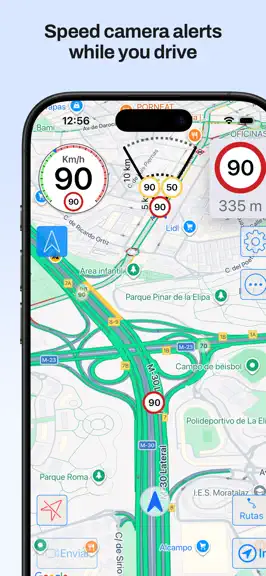
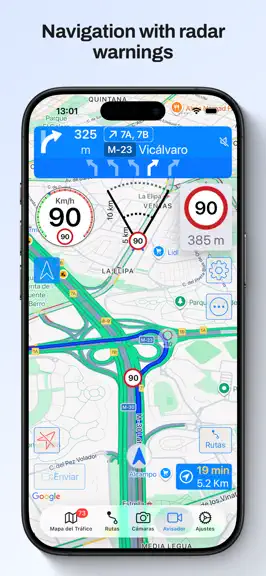
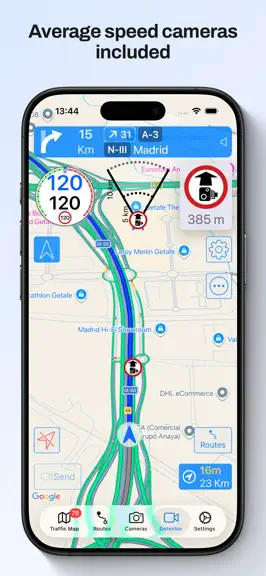
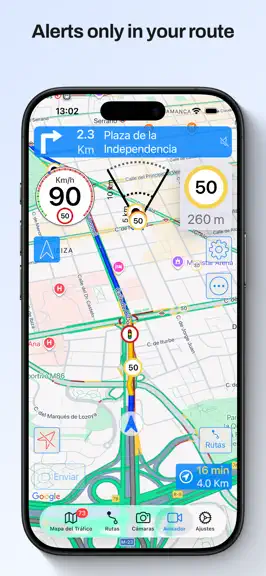
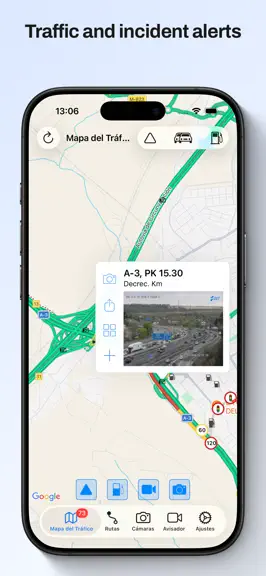
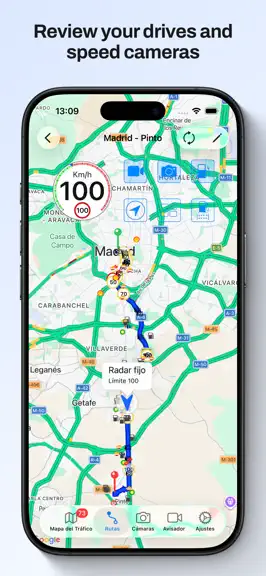
Enjoy driving with the best navigator, speed camera detector, real-time traffic information and gas prices. Forget about fines and drive with peace of mind. MAIN FEATURES - 100% legal speed camera detector - Turn by turn GPS navigation, with lane guidance, spoken instructions, speed limits, and the speed camera detector fully integrated into the navigation - Automatic route recorder. Shows the to…
Trends & analysis
Chart rank trend
US · overallWhy it's surfacing
Scout 8Ratings & velocity
★ -0.01 in windowRating distribution
86% positive · 254 ratingsGeographic reach
best rank · 0 storefrontsRevenue & downloads trend
ARPU $0In-app purchases
8 tiersUpdate history
3 updates tracked- v22.5.013d ago
- Many fixes and improvements - CarPlay options menu on iPhone, you can change the CarPlay options also from there - Route recording export option to several file formats In previous versions: - CarPlay with map in Ultra version - Support for CarPlay metadata (maneuvers, lane guidance and more information) in the instrument cluster or in the HUD in units which support these features - All CarPlay scenes available: standard, dashboard and instrument cluster with metadata - Upcoming maneuvers in CarPlay displayed, as many as your units supports - Navigation alerts in CarPlay for warnings in your way (configured by default to be shown when the app is in background in CarPlay, only in Ultra version) - Support for iOS 26 - New gestures for CarPlay in iOS 26 and in units which support gestures New shortcuts for your automations: - Navigate to a favorite location - Navigate a route from your location going through its waypoints - Navigate to an address you provide - Open the detector in background - Activate / silence the navigation voice - Activate / silence the detector voice and sounds - Open a route and show its traffic cameras or gas stations ordered by price - Open favorite gas stations ordered by price - Open the traffic map Route recorder: - When the app is started it records your path with the speed you have - You can check the speed you had when going through a speed camera or in any point - You can check the traffic cameras and gas stations with the price - Distance and duration of each route - You can configure for how many days the routes are kept, and the minimum distance and duration to save them - You can disable the recording completely - This data is kept in your device, it is not sent anywhere Route planner: - You can plan a route, with intermediate waypoints, to check the speed cameras you will find in it taking into account the direction in which you shall pass them - Speed limits of the route - You can launch the navigation from the route, the best option will be calculated taking into account the waypoints it has - You can check the traffic cameras and gas stations with their price Navigation: - Navigation integrated with speed camera warnings and traffic map. All in the same screen, no need to use several apps - Warnings of only the speed cameras with are in your route (configurable). Avoid false positives from nearby roads - Speed limits when navigating - Indication of the lanes to follow - Spoken instructions together with speed camera warnings - Navigation instructions in the Watch with indication of the lanes to follow - Notifications for the navigation instructions Others: - CarPlay with map in Ultra version - CarPlay with a list of the following warnings in pro version - You can choose the voice for the warnings and navigation according to the voices you have downloaded in your device - You can choose a different warning sound for hidden speed cameras - Shortcut to stop the detector - Shortcuts for the Watch app - Gas price: on the "Traffic Map", in "Routes" sorted by price, make your list of favorites to read their price quickly
- v22.4.41mo ago
- Many fixes and improvements - CarPlay options menu on iPhone, you can change the CarPlay options also from there - Route recording export option to several file formats In previous versions: - CarPlay with map in Ultra version - Support for CarPlay metadata (maneuvers, lane guidance and more information) in the instrument cluster or in the HUD in units which support these features - All CarPlay scenes available: standard, dashboard and instrument cluster with metadata - Upcoming maneuvers in CarPlay displayed, as many as your units supports - Navigation alerts in CarPlay for warnings in your way (configured by default to be shown when the app is in background in CarPlay, only in Ultra version) - Support for iOS 26 - New gestures for CarPlay in iOS 26 and in units which support gestures New shortcuts for your automations: - Navigate to a favorite location - Navigate a route from your location going through its waypoints - Navigate to an address you provide - Open the detector in background - Activate / silence the navigation voice - Activate / silence the detector voice and sounds - Open a route and show its traffic cameras or gas stations ordered by price - Open favorite gas stations ordered by price - Open the traffic map Route recorder: - When the app is started it records your path with the speed you have - You can check the speed you had when going through a speed camera or in any point - You can check the traffic cameras and gas stations with the price - Distance and duration of each route - You can configure for how many days the routes are kept, and the minimum distance and duration to save them - You can disable the recording completely - This data is kept in your device, it is not sent anywhere Route planner: - You can plan a route, with intermediate waypoints, to check the speed cameras you will find in it taking into account the direction in which you shall pass them - Speed limits of the route - You can launch the navigation from the route, the best option will be calculated taking into account the waypoints it has - You can check the traffic cameras and gas stations with their price Navigation: - Navigation integrated with speed camera warnings and traffic map. All in the same screen, no need to use several apps - Warnings of only the speed cameras with are in your route (configurable). Avoid false positives from nearby roads - Speed limits when navigating - Indication of the lanes to follow - Spoken instructions together with speed camera warnings - Navigation instructions in the Watch with indication of the lanes to follow - Notifications for the navigation instructions Others: - CarPlay with map in Ultra version - CarPlay with a list of the following warnings in pro version - You can choose the voice for the warnings and navigation according to the voices you have downloaded in your device - You can choose a different warning sound for hidden speed cameras - Shortcut to stop the detector - Shortcuts for the Watch app - Gas price: on the "Traffic Map", in "Routes" sorted by price, make your list of favorites to read their price quickly
- v22.4.31mo ago
- Many fixes and improvements - CarPlay options menu on iPhone, you can change the CarPlay options also from there - Route recording export option to several file formats In previous versions: - CarPlay with map in Ultra version - Support for CarPlay metadata (maneuvers, lane guidance and more information) in the instrument cluster or in the HUD in units which support these features - All CarPlay scenes available: standard, dashboard and instrument cluster with metadata - Upcoming maneuvers in CarPlay displayed, as many as your units supports - Navigation alerts in CarPlay for warnings in your way (configured by default to be shown when the app is in background in CarPlay, only in Ultra version) - Support for iOS 26 - New gestures for CarPlay in iOS 26 and in units which support gestures New shortcuts for your automations: - Navigate to a favorite location - Navigate a route from your location going through its waypoints - Navigate to an address you provide - Open the detector in background - Activate / silence the navigation voice - Activate / silence the detector voice and sounds - Open a route and show its traffic cameras or gas stations ordered by price - Open favorite gas stations ordered by price - Open the traffic map Route recorder: - When the app is started it records your path with the speed you have - You can check the speed you had when going through a speed camera or in any point - You can check the traffic cameras and gas stations with the price - Distance and duration of each route - You can configure for how many days the routes are kept, and the minimum distance and duration to save them - You can disable the recording completely - This data is kept in your device, it is not sent anywhere Route planner: - You can plan a route, with intermediate waypoints, to check the speed cameras you will find in it taking into account the direction in which you shall pass them - Speed limits of the route - You can launch the navigation from the route, the best option will be calculated taking into account the waypoints it has - You can check the traffic cameras and gas stations with their price Navigation: - Navigation integrated with speed camera warnings and traffic map. All in the same screen, no need to use several apps - Warnings of only the speed cameras with are in your route (configurable). Avoid false positives from nearby roads - Speed limits when navigating - Indication of the lanes to follow - Spoken instructions together with speed camera warnings - Navigation instructions in the Watch with indication of the lanes to follow - Notifications for the navigation instructions Others: - CarPlay with map in Ultra version - CarPlay with a list of the following warnings in pro version - You can choose the voice for the warnings and navigation according to the voices you have downloaded in your device - You can choose a different warning sound for hidden speed cameras - Shortcut to stop the detector - Shortcuts for the Watch app - Gas price: on the "Traffic Map", in "Routes" sorted by price, make your list of favorites to read their price quickly
Speed Cameras Spain & Portugal — FAQ
How much money does Speed Cameras Spain & Portugal make?
According to AppCurrents estimates, Speed Cameras Spain & Portugal generates approximately $50–$400 per month (low confidence), modeled from its the App Store chart performance, rating velocity, and monetization signals.
How many downloads does Speed Cameras Spain & Portugal get?
Speed Cameras Spain & Portugal sees an estimated 100–600 downloads per month on the App Store, per AppCurrents modeling.
Is Speed Cameras Spain & Portugal free?
Speed Cameras Spain & Portugal is free to download on the App Store, monetizing through in-app purchases.
What is Speed Cameras Spain & Portugal's rating?
Speed Cameras Spain & Portugal holds a 4.48-star average from 255 ratings on the App Store.
When was Speed Cameras Spain & Portugal released?
Speed Cameras Spain & Portugal launched on the App Store on 16.07.2011. Its latest version shipped 24.07.2026.


