
Sonoran CAD
Sonoran CAD generates an estimated $30–$600/month in revenue from 30–200 downloads/month on the App Store, according to AppCurrents estimates (updated 2026-08-02).
| Est. revenue / month | $30–$600 |
|---|---|
| Est. downloads / month | 30–200 |
| Estimate confidence | medium |
| Pricing | Paid $2.99 |
| Rating | 3.95 ★ (58 ratings) |
| Category | Games |
| Best chart rank | #100 Games · Simulation Paid |
| Released | 29.01.2020 |
| App last updated | 29.07.2026 |
| Platform | iOS |
Modeled monthly estimate · rating velocity · medium confidence


About
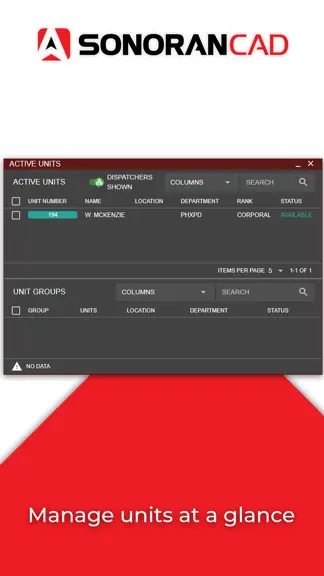
Sonoran CAD is a state of the art, cross-platform, computer automated dispatching and records management system for gaming communities. Sonoran CAD comes complete with real time connections, in-depth customization, voice commands, in-game integration, Discord WebHook notifications and more!
Trends & analysis
Chart rank trend
US · categoryWhy it's surfacing
Scout 14Ratings & velocity
★ 0 in windowRating distribution
67% positive · 58 ratingsGeographic reach
best rank · 5 storefrontsRevenue & downloads trend
ARPU $2Update history
6 updates tracked- v3.43.177d ago
Bug fixes and improvements
- v3.43.1414d ago
---New DB Sync: Save and Disabled Indicators - Improved the individual DB sync sections to show disabled markers and added an unsaved changes notice Bodycam: Recording Toggle - Improved the unit identifier bodycam tab to show a start/stop recording button with a notice about the hotkeys for web and desktop users Custom Layouts: Bodycam Viewer - Added support for the live bodycam viewer as a custom layout panel ---Changed Customization: Settings vs hotkeys - Updated the customization menu to have separate tabs for general settings vs hotkeys ---Fixed Bodycam: Recording Timeline Scrubber - Fixed an issue with the bodycam recording playback timeline scrubber skipping to the end visually Bodycam: Shadow Recording - Fixed an issue with the web and desktop version not properly including the shadow recording in some cases Trevor Theme: Dual Taskbar - Fixed an issue with the secondary taskbar when in dual mode on the Trevor theme not having proper width for tabs Dual Taskbar: Customization - Fixed an issue where the customization tab button would not work if in the secondary taskbar Lookup: Create Record on Character - Fixed an issue where creating a new record from a civilian record in the lookup tab wouldn't automatically import them to the record Call Editor: Create Call Selection - Fixed an issue where opening the call editor tab after a refresh would prevent the dropdown selections from working, until the editor was cleared Call Editor: New Line for Notes - Fixed an issue where pressing ENTER in the call notes would send the note with a new line above it. SHIFT + ENTER is now used for newlines. Call Editor: Call Description - Fixed an issue where the call description box of the call viewer could sometimes overflow the parent container.
- v3.43.1214d ago
New theme customization options
- v3.43.91mo ago
New Multiple Call Editors - Added the ability to open and edit multiple dispatch calls at once Multi-Monitor Drag-and-Drop - Added drag-and-drop support for multi-monitor layouts to drag units, dispatch calls, and emergency calls from one monitor into another monitor's call editor. Drag-and-Drop Row - Updated the drag-and-drop system for units, dispatch calls, and emergency calls to make the entire row draggable, not just the ID chips. Active Groups Display Persistent - Added a toggle to the active groups panel to hide persistent groups that have no active units in them Penal Code Preview - Added a preview tooltip to penal codes in the records panel search results Changed Sonoran CAD Logo Redirect - Improved behavior when in a community and clicking the Sonoran CAD logo in the header so that it goes back to the community menu, not the homepage. Fixed Record Agency Field IDs - Fixed an issue with custom record agency sections having the record ID still show as NEW Tablet Layout Drag-and-Drop - Fixed an issue on the tablet sized screens preventing drag-and-drop custom layouts from saving and reverting instantly Panel Expand and Collapse - Fixed an issue with the tablet sized screen not allowing double-click to expand and collapse layout panels Active Calls Unit Display - Fixed an issue with the units on an active call only displaying a maximum of two when the column was wide enough for more
- v3.43.71mo ago
Bug fixes and improvments
Sonoran CAD — FAQ
How much money does Sonoran CAD make?
According to AppCurrents estimates, Sonoran CAD generates approximately $30–$600 per month (medium confidence), modeled from its the App Store chart performance, rating velocity, and monetization signals.
How many downloads does Sonoran CAD get?
Sonoran CAD sees an estimated 30–200 downloads per month on the App Store, per AppCurrents modeling.
Is Sonoran CAD free?
Sonoran CAD is a paid app priced at $2.99 on the App Store.
What is Sonoran CAD's rating?
Sonoran CAD holds a 3.95-star average from 58 ratings on the App Store. It currently ranks #100 on the Games · Simulation paid chart.
When was Sonoran CAD released?
Sonoran CAD launched on the App Store on 29.01.2020. Its latest version shipped 29.07.2026.


