Skydive Designer
Skydive Designer generates an estimated $1–$5/month in revenue from 4–20 downloads/month on the App Store, according to AppCurrents estimates (updated 2026-10-02).
| Est. revenue / month | $1–$5 |
|---|---|
| Est. downloads / month | 4–20 |
| Estimate confidence | low |
| Pricing | Free + IAP |
| Rating | 5.00 ★ (7 ratings) |
| Category | Sports |
| Released | 10.11.2020 |
| App last updated | 17.09.2026 |
| Platform | iOS |
Modeled monthly estimate · rating velocity · low confidence

About
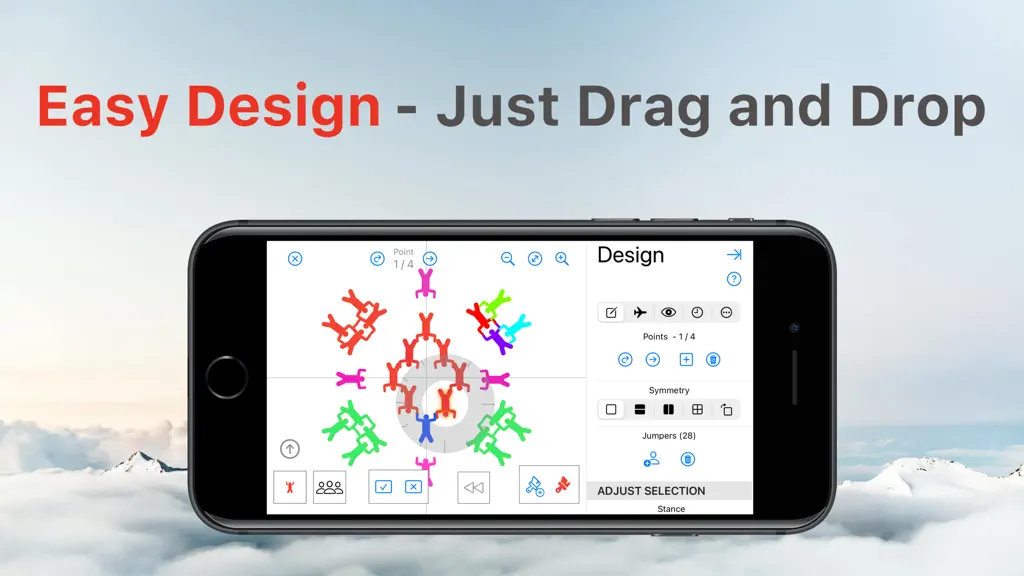
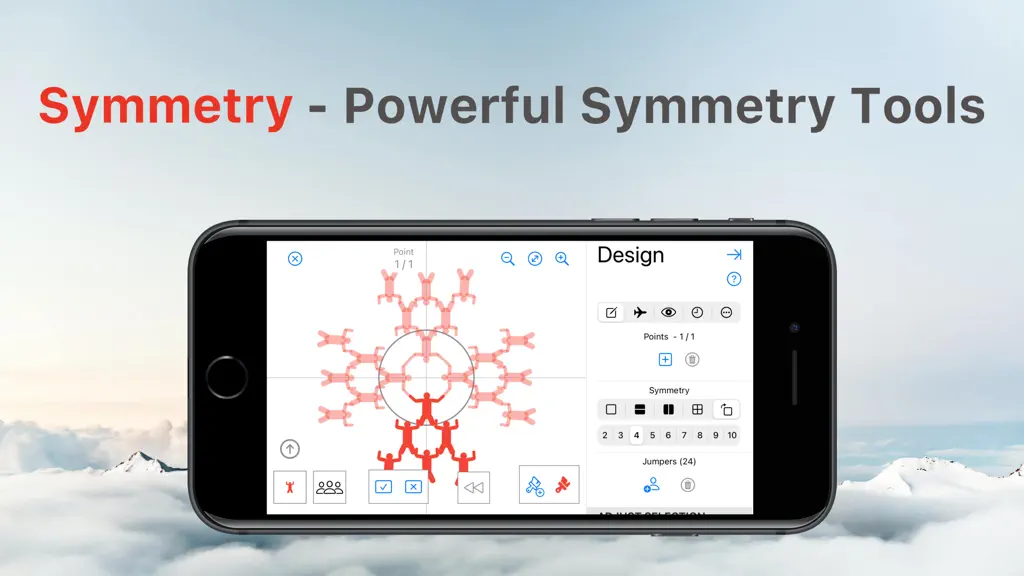
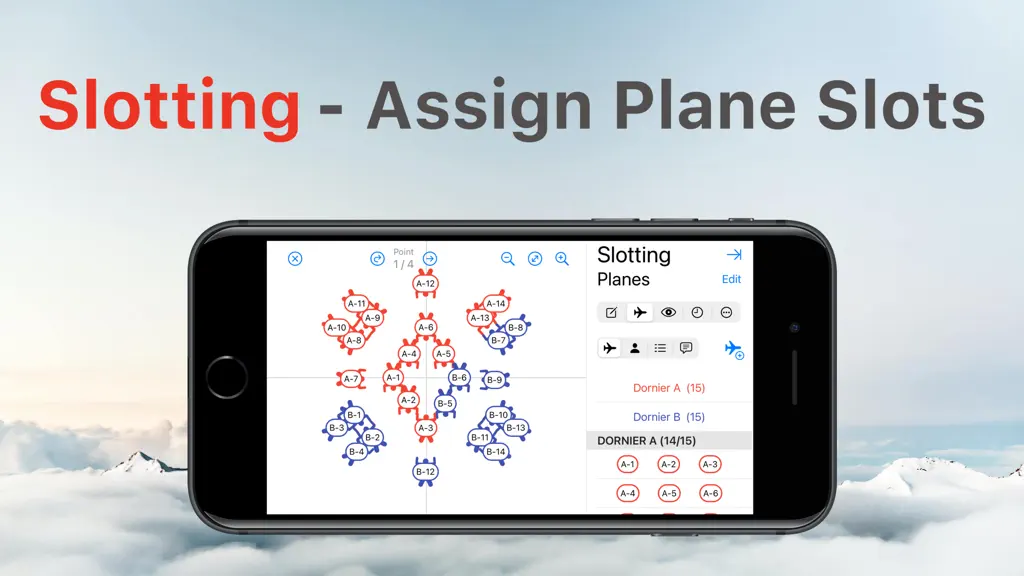
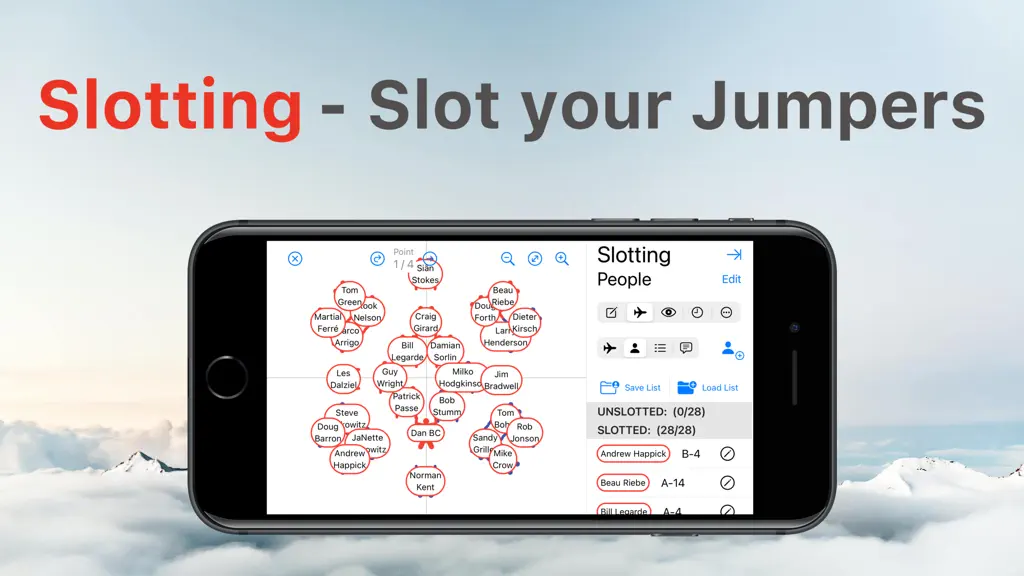
Powerful and Easy to Use - Skydive designer is the ultimate tool for load organisers. Easily drag jumpers or blocks onto your canvas. Belly, Sit, Stand, Wingsuiters and even CRW! Powerful symmetry tools can automatically manage reflected or rotated parts of your plan. Animated transitions between points help you visualise traffic. Slot Planes and People with an easy drag & drop interface. Builder…
Trends & analysis
Chart rank trend
US · overallWhy it's surfacing
Scout 6Ratings & velocity
★ 0 in windowRating distribution
100% positive · 7 ratingsGeographic reach
best rank · 0 storefrontsRevenue & downloads trend
ARPU $0In-app purchases
1 tiersUpdate history
5 updates tracked- v4.7.115d ago
Version 4.0 - New 'One Click' Publishing - New Builder and Puzzler views - New symmetry controls - And so much more... Version 4.1 - C-130 support for Patrick Passe :) Version 3.3.0 - Much easier publishing integration - Better integration with library for downloading jumps Version 3.2.0 - Scott Latinis wants an event with no floaters. So be it. - The crazy axing dance is no more Version 3.1.1 - Option to pick colours of planes - Fix for dark mode Version 3.1.0 - Option to 'Flip' jump to assist head down/up visualisation Version 3.0.1 - White Backpack option Version 2.3.1 - Fixes slotting on MacOS 12 - Scales labels when slotting for max clarity Version 2.2 - Support for Panning - Option to show grid - Much clearer labels for slotting Version 2.0 - New bottom toolbar - with point controls at the bottom right - You can select groups by drawing a line around them - Reorder points - Specify number of floaters on each plane - Slot planes without specifying the exact lineup - Slot your Camera flyers - Print your manifest - App remembers your last plane setup & repeats it by default - Editing planes & people simplified - Option to drop formations automatically facing the centre Version 2.1.1 - Fixes issue with labels not being saved properly Version 2.1.0 - Now with copy & paste! - Freefly Formations tweaked so that they touch :) Version 2.0.3 - Presentation view shows same info as design mode - No more Cowabunga :( - No more autocorrect
- v4.7.02mo ago
Version 4.0 - New 'One Click' Publishing - New Builder and Puzzler views - New symmetry controls - And so much more... Version 4.1 - C-130 support for Patrick Passe :) Version 3.3.0 - Much easier publishing integration - Better integration with library for downloading jumps Version 3.2.0 - Scott Latinis wants an event with no floaters. So be it. - The crazy axing dance is no more Version 3.1.1 - Option to pick colours of planes - Fix for dark mode Version 3.1.0 - Option to 'Flip' jump to assist head down/up visualisation Version 3.0.1 - White Backpack option Version 2.3.1 - Fixes slotting on MacOS 12 - Scales labels when slotting for max clarity Version 2.2 - Support for Panning - Option to show grid - Much clearer labels for slotting Version 2.0 - New bottom toolbar - with point controls at the bottom right - You can select groups by drawing a line around them - Reorder points - Specify number of floaters on each plane - Slot planes without specifying the exact lineup - Slot your Camera flyers - Print your manifest - App remembers your last plane setup & repeats it by default - Editing planes & people simplified - Option to drop formations automatically facing the centre Version 2.1.1 - Fixes issue with labels not being saved properly Version 2.1.0 - Now with copy & paste! - Freefly Formations tweaked so that they touch :) Version 2.0.3 - Presentation view shows same info as design mode - No more Cowabunga :( - No more autocorrect
- v4.6.02mo ago
Version 4.0 - New 'One Click' Publishing - New Builder and Puzzler views - New symmetry controls - And so much more... Version 4.1 - C-130 support for Patrick Passe :) Version 3.3.0 - Much easier publishing integration - Better integration with library for downloading jumps Version 3.2.0 - Scott Latinis wants an event with no floaters. So be it. - The crazy axing dance is no more Version 3.1.1 - Option to pick colours of planes - Fix for dark mode Version 3.1.0 - Option to 'Flip' jump to assist head down/up visualisation Version 3.0.1 - White Backpack option Version 2.3.1 - Fixes slotting on MacOS 12 - Scales labels when slotting for max clarity Version 2.2 - Support for Panning - Option to show grid - Much clearer labels for slotting Version 2.0 - New bottom toolbar - with point controls at the bottom right - You can select groups by drawing a line around them - Reorder points - Specify number of floaters on each plane - Slot planes without specifying the exact lineup - Slot your Camera flyers - Print your manifest - App remembers your last plane setup & repeats it by default - Editing planes & people simplified - Option to drop formations automatically facing the centre Version 2.1.1 - Fixes issue with labels not being saved properly Version 2.1.0 - Now with copy & paste! - Freefly Formations tweaked so that they touch :) Version 2.0.3 - Presentation view shows same info as design mode - No more Cowabunga :( - No more autocorrect
- v4.5.03mo ago
Version 4.0 - New 'One Click' Publishing - New Builder and Puzzler views - New symmetry controls - And so much more... Version 4.1 - C-130 support for Patrick Passe :) Version 3.3.0 - Much easier publishing integration - Better integration with library for downloading jumps Version 3.2.0 - Scott Latinis wants an event with no floaters. So be it. - The crazy axing dance is no more Version 3.1.1 - Option to pick colours of planes - Fix for dark mode Version 3.1.0 - Option to 'Flip' jump to assist head down/up visualisation Version 3.0.1 - White Backpack option Version 2.3.1 - Fixes slotting on MacOS 12 - Scales labels when slotting for max clarity Version 2.2 - Support for Panning - Option to show grid - Much clearer labels for slotting Version 2.0 - New bottom toolbar - with point controls at the bottom right - You can select groups by drawing a line around them - Reorder points - Specify number of floaters on each plane - Slot planes without specifying the exact lineup - Slot your Camera flyers - Print your manifest - App remembers your last plane setup & repeats it by default - Editing planes & people simplified - Option to drop formations automatically facing the centre Version 2.1.1 - Fixes issue with labels not being saved properly Version 2.1.0 - Now with copy & paste! - Freefly Formations tweaked so that they touch :) Version 2.0.3 - Presentation view shows same info as design mode - No more Cowabunga :( - No more autocorrect
- v4.4.01.3y ago
Version 4.0 - New 'One Click' Publishing - New Builder and Puzzler views - New symmetry controls - And so much more... Version 4.1 - C-130 support for Patrick Passe :) Version 3.3.0 - Much easier publishing integration - Better integration with library for downloading jumps Version 3.2.0 - Scott Latinis wants an event with no floaters. So be it. - The crazy axing dance is no more Version 3.1.1 - Option to pick colours of planes - Fix for dark mode Version 3.1.0 - Option to 'Flip' jump to assist head down/up visualisation Version 3.0.1 - White Backpack option Version 2.3.1 - Fixes slotting on MacOS 12 - Scales labels when slotting for max clarity Version 2.2 - Support for Panning - Option to show grid - Much clearer labels for slotting Version 2.0 - New bottom toolbar - with point controls at the bottom right - You can select groups by drawing a line around them - Reorder points - Specify number of floaters on each plane - Slot planes without specifying the exact lineup - Slot your Camera flyers - Print your manifest - App remembers your last plane setup & repeats it by default - Editing planes & people simplified - Option to drop formations automatically facing the centre Version 2.1.1 - Fixes issue with labels not being saved properly Version 2.1.0 - Now with copy & paste! - Freefly Formations tweaked so that they touch :) Version 2.0.3 - Presentation view shows same info as design mode - No more Cowabunga :( - No more autocorrect
Skydive Designer — FAQ
How much money does Skydive Designer make?
According to AppCurrents estimates, Skydive Designer generates approximately $1–$5 per month (low confidence), modeled from its the App Store chart performance, rating velocity, and monetization signals.
How many downloads does Skydive Designer get?
Skydive Designer sees an estimated 4–20 downloads per month on the App Store, per AppCurrents modeling.
Is Skydive Designer free?
Skydive Designer is free to download on the App Store, monetizing through in-app purchases.
What is Skydive Designer's rating?
Skydive Designer holds a 5.00-star average from 7 ratings on the App Store.
When was Skydive Designer released?
Skydive Designer launched on the App Store on 10.11.2020. Its latest version shipped 17.09.2026.


