
ShiftFlow: Track Team Hours
ShiftFlow: Track Team Hours generates an estimated $2k–$12k/month in revenue from 4k–17k downloads/month on the App Store, according to AppCurrents estimates (updated 2026-08-02).
| Est. revenue / month | $2k–$12k |
|---|---|
| Est. downloads / month | 4k–17k |
| Estimate confidence | low |
| Pricing | Free + IAP |
| Rating | 4.80 ★ (2,185 ratings) |
| Category | Business |
| Released | 31.10.2023 |
| App last updated | 28.07.2026 |
| Platform | iOS |
Modeled monthly estimate · rating velocity · low confidence



About
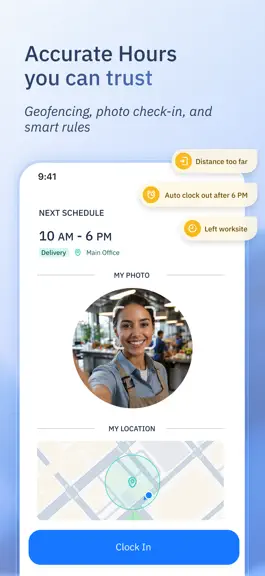
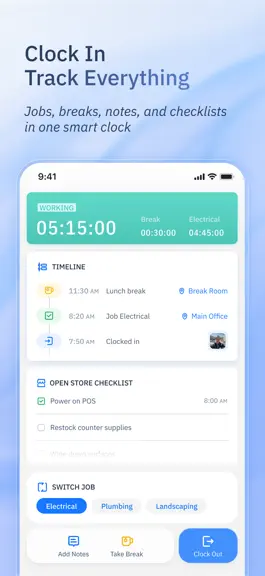
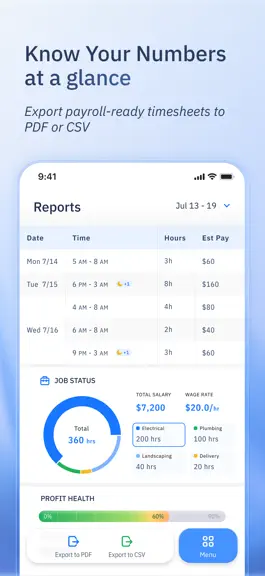
Your team deserves better than messy spreadsheets or clunky and complicated systems. ShiftFlow is a complete time and attendance solution built around how your team actually works. From real-time clock-ins and GPS verification to smart shift scheduling and one-click timesheet exports, we help you save time today — so you can build a stronger business tomorrow. Built for Real Teams, Real Workflow…
Trends & analysis
Chart rank trend
US · overallWhy it's surfacing
Scout 13Ratings & velocity
★ -0.01 in windowRating distribution
96% positive · 2k ratingsGeographic reach
best rank · 4 storefrontsRevenue & downloads trend
ARPU $1In-app purchases
10 tiersUpdate history
4 updates tracked- v19.0.08d ago
Checklists Keep Daily Work on Track: Assign daily tasks to your team and follow completion in real time. Automatic reminders help bring attention to anything still undone. Edit Shifts While They’re Running: Managers can now adjust ongoing shifts instead of waiting until they’re completed. One of your most-requested improvements is here. See Where Work Happened: Team Radar brings location trails into Clock & Shifts, giving managers a clear view of where work took place. Plan With a Team Calendar: Managers can see the whole team’s schedule in a new calendar layout, making it easier to review coverage and plan ahead.
- v18.0.019d ago
Clock In, Wherever Work Takes You: Clock in and out from remote sites, rugged terrain, and everywhere in between. No signal? Keep moving. Team Member Schedule Filter: Focus the Schedule page on the people you need. Show or hide specific team members for less clutter and faster planning. Time Off on Your Schedule: Your schedule list now shows time off alongside scheduled shifts, giving you the full picture of what’s ahead. Work and time off, all in one place.
- v17.0.01mo ago
The biggest feature drop in ShiftFlow history — the 2026 summer party is here. Grab a cold one and scroll. Team Radar, Reborn: The team map grew up. See who's on the clock live, then tap any teammate to follow their day — and clock them in, start a break, or fix their time without leaving the map. Departments & Managers: Split your team into departments and give each one a manager, focused on just their people. Delegate the work, keep the keys. Cost Codes: Sort every hour by the kind of work behind it — electrical, plumbing, drywall — so labor lines up cleanly for cost analysis later. Know exactly where the hours go. Job Code Access Control: Keep specialized job codes to the right people. Restrict a code to specific team members — fewer mis-clocks, cleaner hours. Smarter, More Organized Work Sites: Setting up locations just got easier. ShiftFlow auto-recommends sites from where your team actually clocks in — tap to save, less manual typing. Copy a Scheduled Shift: Reuse a good one instead of rebuilding it. Copy any scheduled shift into a fresh draft — every detail carried over — then just set the new date. Far fewer taps to fill the week. Search, Where It Counts: Big team? Just type. Search now filters team-member lists and the scheduler's job-code, location, and cost-code pickers — the right option is always a few letters away. Early Clock-In, Your Call: Dial the early clock-in window down to 5 minutes for tight starts — or switch it off entirely for no limit at all. Tighten up, or loosen the reins.
- v16.0.03mo ago
Kiosk-Only Clock-Ins: A new mode that sends all clock-ins through your shared kiosk — not personal phones. A single device, one simple routine — for the whole team. Custom Early Clock-In Window: Pick how early is early enough — anywhere from 15 minutes to 3 hours before shift start. Less guesswork for staff who arrive early, smoother starts for everyone.
ShiftFlow: Track Team Hours — FAQ
How much money does ShiftFlow: Track Team Hours make?
According to AppCurrents estimates, ShiftFlow: Track Team Hours generates approximately $2k–$12k per month (low confidence), modeled from its the App Store chart performance, rating velocity, and monetization signals.
How many downloads does ShiftFlow: Track Team Hours get?
ShiftFlow: Track Team Hours sees an estimated 4k–17k downloads per month on the App Store, per AppCurrents modeling.
Is ShiftFlow: Track Team Hours free?
ShiftFlow: Track Team Hours is free to download on the App Store, monetizing through in-app purchases.
What is ShiftFlow: Track Team Hours's rating?
ShiftFlow: Track Team Hours holds a 4.80-star average from 2,185 ratings on the App Store.
When was ShiftFlow: Track Team Hours released?
ShiftFlow: Track Team Hours launched on the App Store on 31.10.2023. Its latest version shipped 28.07.2026.


